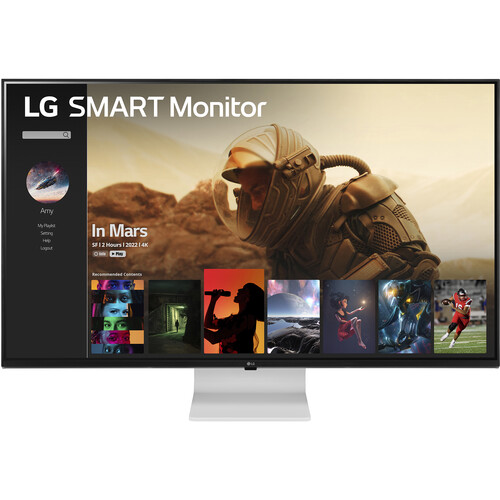
LG MyView 43SQ700S-W overview
The LG MyView 43SQ700S-W is a 42.5-inch 4K UHD IPS smart monitor built around webOS 22. It combines streaming and smart-display functions with a 3840 × 2160 panel, Wi-Fi, web browser, LG ThinQ, AirPlay 2, Screen Share, Bluetooth, two 10W speakers and USB-C with up to 65W Power Delivery. LG lists 60Hz refresh and 15ms response time, so it is suited to mixed work and entertainment rather than fast competitive gaming. LG Canada currently marks the model discontinued; current local stock and support need seller confirmation. Actual app availability, wireless behavior and charging depend on region, device, service, cable and software; verify live stock and Bangladesh serial warranty with the seller.
Exact model identity and discontinued listing
The exact model is 43SQ700S-W, also sold under the LG MyView Smart Monitor name. The technical panel measurement is 42.5 inches although the product is marketed as 43 inches. Do not confuse it with 43UN700-B, which is a monitor-first model with four HDMI inputs and PBP/PIP, or with later MyView generations whose webOS version and ports may differ. LG’s Canadian page marks 43SQ700S-W discontinued. Confirm model suffix, region, software and package label before ordering. Actual app availability, wireless behavior and charging depend on region, device, service, cable and software; verify live stock and Bangladesh serial warranty with the seller.
42.5-inch 4K UHD IPS screen
The IPS display has native 3840 × 2160 UHD resolution, 16:9 aspect ratio, 0.2451mm pixel pitch and 178-degree viewing angles. At 42.5 inches it provides a large workspace for documents, dashboards, remote work and viewing media across the room. A 4K-capable source is needed for full pixel detail. Operating-system scaling and viewing distance affect text comfort. The large panel needs a stable surface and enough desk depth; measure the space before buying. Actual app availability, wireless behavior and charging depend on region, device, service, cable and software; verify live stock and Bangladesh serial warranty with the seller.
Brightness, contrast and color coverage
LG specifies 300 cd/m² typical brightness and 210 cd/m² minimum, a typical contrast ratio of 1200:1 and DCI-P3 coverage of 80% (CIE1976). The monitor supports 1.07 billion colors. These are manufacturer model specifications rather than an individual unit measurement. The panel can serve everyday productivity and entertainment, but the listed gamut is below wide-gamut professional photo monitors. Keep ambient light under control and use managed profiles for color-sensitive work. Actual app availability, wireless behavior and charging depend on region, device, service, cable and software; verify live stock and Bangladesh serial warranty with the seller.
HDR10 and display limits
HDR10 input and HDR Effect are listed. The 300-nit typical brightness and absence of a listed VESA DisplayHDR tier mean HDR acceptance should not be interpreted as a premium local-dimming or mastering display. IPS contrast is not equivalent to OLED black levels in dark scenes. Select HDR only when the source, operating system and content are configured appropriately, and compare the result with SDR. For color grading or critical HDR delivery, choose a monitor with specifications and calibration appropriate to that production. Actual app availability, wireless behavior and charging depend on region, device, service, cable and software; verify live stock and Bangladesh serial warranty with the seller.
webOS 22 apps and smart features
webOS 22 is the operating system, with LG Content Store, a full web browser, Home Dashboard, LG Channels and voice assistant support listed. This lets the display run supported streaming and smart-home apps without requiring a computer for every task. App availability, service subscriptions, regional catalogues and software support can change. An internet connection is required for online features. Check whether a specific streaming app is offered in Bangladesh and whether the required account or subscription is available. Actual app availability, wireless behavior and charging depend on region, device, service, cable and software; verify live stock and Bangladesh serial warranty with the seller.
Wi-Fi, web browser and LG ThinQ
The smart features list includes Wi-Fi, LG ThinQ and a full web browser. Home Dashboard can expose compatible connected devices and services, while the browser supports suitable web content. These capabilities depend on network access, account setup, software updates and service availability. A browser on a monitor is not identical to a desktop browser; some websites, extensions and playback protections may not be supported. Use an attached computer when full productivity software or advanced browser capability is required. Actual app availability, wireless behavior and charging depend on region, device, service, cable and software; verify live stock and Bangladesh serial warranty with the seller.
AirPlay 2, Screen Share and Bluetooth
AirPlay 2, Screen Share and Bluetooth are listed for wireless sharing and device connections. LG notes AirPlay compatibility requires supported Apple software and the monitor and Apple device to be on the same Wi-Fi network; operating-system minimums and service details may vary by region and update. Screen sharing depends on source-device support. Bluetooth can connect compatible accessories, but not every codec, device or simultaneous-use combination is guaranteed. Confirm the wireless device pairing flow in the manual. Actual app availability, wireless behavior and charging depend on region, device, service, cable and software; verify live stock and Bangladesh serial warranty with the seller.
Magic Remote and regional bundle
LG lists Magic Remote support; the US page notes Magic Remote support, but accessory inclusion can vary by market. Confirm whether the remote is included with the Bangladesh package or sold separately. Voice assistant functions may depend on the remote, language, region and linked services. Keep the remote and monitor firmware updated using official instructions. Do not assume that promotional photos prove a particular local bundle includes the remote or its batteries. Actual app availability, wireless behavior and charging depend on region, device, service, cable and software; verify live stock and Bangladesh serial warranty with the seller.
USB-C 65W video and charging
The USB-C connection supports DisplayPort video, USB data and up to 65W Power Delivery. A compatible laptop can connect to the screen and receive charging over a single cable. The host USB-C port must support DisplayPort Alt Mode; some laptops require more power than 65W, especially under heavy load. LG notes USB-C cable is not included on the US page. Confirm the local box and use a cable rated for video and charging. USB-C does not mean Thunderbolt; Thunderbolt is not listed. Actual app availability, wireless behavior and charging depend on region, device, service, cable and software; verify live stock and Bangladesh serial warranty with the seller.
HDMI, USB and wired network ports
The smart monitor offers two HDMI inputs, three USB ports, USB-C and wired LAN (RJ-45) according to LG Canada specifications. The available port roles and version details can vary by regional spec, so check the exact unit label/manual before buying adapters. USB ports can support compatible peripherals or accessories, but their behavior depends on webOS and the selected input. Use LAN for a wired network where practical; verify the port is present on the regional configuration if network cabling matters. Actual app availability, wireless behavior and charging depend on region, device, service, cable and software; verify live stock and Bangladesh serial warranty with the seller.
Speakers and sound options
Two built-in 10W speakers provide audio for streaming, calls and casual viewing, and Bluetooth supports compatible audio devices. Speaker performance depends on placement and content; external speakers or headphones may provide better clarity, bass or room coverage. Choose the correct audio output and volume in webOS or the connected computer. Bluetooth pairing and latency vary by accessory, so wired audio may suit latency-sensitive work better. Actual app availability, wireless behavior and charging depend on region, device, service, cable and software; verify live stock and Bangladesh serial warranty with the seller.
webcam port readiness and privacy
LG Australia lists the monitor as webcam-port ready, with camera sold separately. This indicates a supported mounting/connection arrangement, not an included webcam. Confirm the compatible camera model and the local accessory separately. A compatible webcam and webOS functionality may be required for video calling; check app availability and privacy permissions. Cover or disconnect any camera when not in use, and review privacy settings before enabling voice or connected-device features. Actual app availability, wireless behavior and charging depend on region, device, service, cable and software; verify live stock and Bangladesh serial warranty with the seller.
Stand, tilt and VESA planning
LG describes a slim, flat-style stand and lists tilt as the display-position adjustment. Height and swivel adjustment are not listed in the regional specification reviewed. Check the manual for the precise tilt range and included mounting hardware. When using a third-party VESA mount, confirm the mounting pattern, display weight and mount rating on the actual regional unit; do not assume a specification from another MyView model applies. A monitor arm must support the large panel safely. Actual app availability, wireless behavior and charging depend on region, device, service, cable and software; verify live stock and Bangladesh serial warranty with the seller.
Monitor and smart display workflows
The combination of a large UHD display and webOS supports both computer work and standalone streaming. A laptop can connect over USB-C for video, data and up to 65W charging, while built-in apps provide an independent viewing mode. AirPlay 2 or Screen Share can mirror compatible devices. These are separate workflows; switching from smart TV functions to a computer input changes the active source. Check whether a preferred app, device or work feature runs natively before relying on it. Actual app availability, wireless behavior and charging depend on region, device, service, cable and software; verify live stock and Bangladesh serial warranty with the seller.
Gaming and entertainment performance
The panel is specified at 60Hz with 15ms response time. Casual games and streaming can display normally, but fast competitive play may show more blur than a high-refresh gaming monitor. LG lists Dynamic Action Sync and Black Stabilizer in regional specifications, but no 120Hz-plus mode is specified. For PC gaming, confirm the supported 4K refresh and whether the game performance fits the graphics hardware. This is a lifestyle smart monitor, not a dedicated esports display. Actual app availability, wireless behavior and charging depend on region, device, service, cable and software; verify live stock and Bangladesh serial warranty with the seller.
Compatibility and service limitations
The monitor can play supported webOS streaming services, mirror compatible phones or computers, and accept HDMI or USB-C video from external sources. Internet connectivity and subscriptions are required for many content services. DRM, app catalogue and voice assistant support can vary by country and change over time. The Canadian page marks this model discontinued, so future app or component support should be checked before choosing it for a long-term smart-home installation. Actual app availability, wireless behavior and charging depend on region, device, service, cable and software; verify live stock and Bangladesh serial warranty with the seller.
Bangladesh stock and warranty checklist
This model is not a high-refresh gaming monitor, a professional wide-gamut reference display, or a guaranteed current-stock product. LG marks it discontinued in Canada. The official materials reviewed specify 65W USB-C; high-power laptops may need their own adapter. Magic Remote and webcam may be sold separately depending on region. No Bangladesh-specific price, stock, service eligibility or warranty is established by the manufacturer pages. Actual app availability, wireless behavior and charging depend on region, device, service, cable and software; verify live stock and Bangladesh serial warranty with the seller.
Setup and troubleshooting
Before ordering in Bangladesh, verify the exact 43SQ700S-W model, condition, serial number, included remote, USB-C cable, warranty terms and return policy in writing. Confirm local LG service availability and the serial’s eligibility with the seller. Ask whether the product is sealed new, refurbished or old stock because LG lists the model as discontinued on its Canadian page. Check streaming-app and regional smart-feature availability if those are purchase requirements. Actual app availability, wireless behavior and charging depend on region, device, service, cable and software; verify live stock and Bangladesh serial warranty with the seller.
Frequently asked questions
For setup, connect Wi-Fi or LAN and complete webOS onboarding, then check for official software updates and region settings. To use a laptop, connect USB-C only if its port supports DisplayPort Alt Mode and set the external display to 3840 × 2160 at 60Hz where supported. If charging is insufficient, connect the laptop’s power adapter. If AirPlay is unavailable, verify both devices use the same Wi-Fi network, supported OS versions and current firmware. Confirm local app availability before relying on a service. Actual app availability, wireless behavior and charging depend on region, device, service, cable and software; verify live stock and Bangladesh serial warranty with the seller.