Pros
- Large 4K workspace for multi-window productivity and media.
- USB-C video, data and up to 60W laptop power on a compatible host.
- Four HDMI inputs with PBP/PIP support multi-source use.
- Built-in 2×10W speakers and a headphone output are provided.

All categories
 New condition
Monitors
LG · 43UN700-B
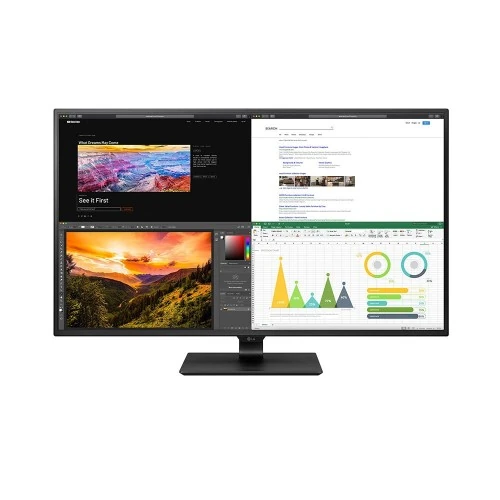
42.5-inch 4K IPS monitor with HDR10, USB-C 60W, four HDMI inputs, PBP/PIP and 2×10W speakers.
Price unavailable
Price range updating
No verified price is available yet. Store offers will appear when merchants publish them.
Compare store prices
No live offers for this variant
Offers will appear when merchants publish them.
Loading history…
Product story
The LG 43UN700-B is a 42.5-inch-class 4K UHD IPS monitor designed for a large shared desktop, office productivity and multi-source viewing. LG lists 3840 × 2160 resolution, HDR10, four HDMI inputs, DisplayPort, USB-C with up to 60W Power Delivery, built-in 10W stereo speakers, and PBP/PIP multitasking. Its 60Hz refresh rate and 8ms GtG response suit general work and media playback more than competitive gaming. LG’s US page marks this model discontinued; current stock and warranty must therefore be confirmed with the Bangladesh seller. Actual compatibility depends on the source, port version, cable, regional configuration and chosen settings; check current seller stock and Bangladesh serial warranty before purchase.
The correct model identifier is 43UN700-B. LG describes the screen as 43-inch in consumer-facing naming, while the technical display size is 42.5 inches. Do not confuse it with nearby 43-inch LG models such as 43UN700T or 43BN70U, which may use different tuning or package details. LG’s US page currently marks 43UN700-B discontinued. Regional availability can differ, but this global product specification does not prove current Bangladesh inventory or a seller’s warranty. Actual compatibility depends on the source, port version, cable, regional configuration and chosen settings; check current seller stock and Bangladesh serial warranty before purchase.
The 42.5-inch IPS panel has native UHD resolution of 3840 × 2160, 16:9 aspect ratio and 178-degree horizontal and vertical viewing angles. Four times as many pixels as Full HD create room for multiple windows and detailed spreadsheets, timelines or media. A screen this large needs adequate desk depth and comfortable viewing distance. Check that the stand and desk can safely support the monitor, and consider operating-system scaling so text and controls remain readable at the chosen distance. Actual compatibility depends on the source, port version, cable, regional configuration and chosen settings; check current seller stock and Bangladesh serial warranty before purchase.
LG lists a pixel pitch of 0.2451 × 0.2451mm. At typical desktop distances, the large 4K canvas is useful for arranging several application windows without separate monitors, although individual interface scaling varies by operating system and app. A source below 4K will be scaled to fill the panel and may look softer. Use a 4K-capable GPU and suitable cable when native-resolution detail is important. Large screen size does not automatically improve small text readability if the user sits too close. Actual compatibility depends on the source, port version, cable, regional configuration and chosen settings; check current seller stock and Bangladesh serial warranty before purchase.
Typical brightness is specified at 400 cd/m² and minimum brightness at 320 cd/m². LG lists a 1000:1 typical contrast ratio and 700:1 minimum. HDR10 input and HDR Effect are included, but LG does not list a VESA DisplayHDR certification or local dimming for this model. HDR10 compatibility means the monitor accepts HDR content; it does not guarantee the highlight intensity or black levels of a specialized HDR reference screen. IPS contrast remains limited in dark-room scenes. Actual compatibility depends on the source, port version, cable, regional configuration and chosen settings; check current seller stock and Bangladesh serial warranty before purchase.
LG specifies NTSC 72% color gamut, 1.07 billion colors and factory color calibration. These are model-level figures, not a current independent measurement of a delivered unit. They support everyday business, media and general creative viewing, but the listing does not claim wide-gamut Adobe RGB coverage. For color-critical print work, use a measured profile and a display intended for that workflow. Keep room lighting consistent and avoid using a vivid preset when color accuracy is the priority. Actual compatibility depends on the source, port version, cable, regional configuration and chosen settings; check current seller stock and Bangladesh serial warranty before purchase.
The monitor has four HDMI inputs, but LG regional specification material differentiates HDMI 1/2 (HDMI 1.4) from HDMI 3/4 (HDMI 2.0). At 3840 × 2160, HDMI 1.4 inputs are specified up to 30Hz, while HDMI 2.0 inputs support up to 60Hz. Connect a 4K 60Hz source to one of the HDMI 2.0 inputs and check the port labels. Four sockets do not imply identical bandwidth, refresh capability or feature support across all ports. Actual compatibility depends on the source, port version, cable, regional configuration and chosen settings; check current seller stock and Bangladesh serial warranty before purchase.
One DisplayPort 1.4 input is listed for up to 3840 × 2160 at 60Hz. DisplayPort is a direct option for a compatible desktop GPU and can carry the native resolution and refresh. Use a cable suitable for the signal and verify the selected input and resolution in the operating system. If 4K 60Hz is unavailable, check the source output, GPU settings, cable, monitor OSD and whether the computer is using a compatible display adapter or dock. Actual compatibility depends on the source, port version, cable, regional configuration and chosen settings; check current seller stock and Bangladesh serial warranty before purchase.
The USB-C input supports DisplayPort Alternate Mode, data transfer and up to 60W Power Delivery. A compatible laptop can send video and data while receiving power through one cable. The host USB-C port must support video output, and the cable must support DisplayPort Alt Mode and the required charging. Sixty watts may be insufficient for some high-performance laptops under load. USB-C does not mean Thunderbolt; LG does not list Thunderbolt support for this model. Actual compatibility depends on the source, port version, cable, regional configuration and chosen settings; check current seller stock and Bangladesh serial warranty before purchase.
PBP allows the monitor to show multiple source signals at once; LG lists 2PBP and 4PBP configurations. PIP places a smaller source window over the main image. These modes can help compare systems, keep a laptop and desktop visible, or monitor work alongside a video source. The displayed layout and resolution depend on the selected input combination. Check the manual for supported source pairings and controls. Multiple windows do not turn the monitor into an independent multi-computer KVM. Actual compatibility depends on the source, port version, cable, regional configuration and chosen settings; check current seller stock and Bangladesh serial warranty before purchase.
Two built-in speakers are listed at 10W each with Rich Bass branding, and a headphone output is provided. Built-in audio can reduce desk clutter for calls, briefings and general media. It is not a substitute for dedicated speakers or headphones when precise monitoring, stronger bass or room-filling volume is needed. Choose the monitor as the computer’s audio output after connecting HDMI, DisplayPort or USB-C, and check volume and mute settings in both the monitor and host. Actual compatibility depends on the source, port version, cable, regional configuration and chosen settings; check current seller stock and Bangladesh serial warranty before purchase.
LG lists OnScreen Control and Dual Controller software support. OnScreen Control can expose supported monitor settings through the computer, while Dual Controller is intended to share input devices between compatible systems on the same network. Software versions and operating-system support change over time, so check LG’s current product support page before installing. These utilities do not guarantee that every application, network setup or peripheral will behave identically, and Dual Controller is distinct from a hardware KVM switch. Actual compatibility depends on the source, port version, cable, regional configuration and chosen settings; check current seller stock and Bangladesh serial warranty before purchase.
The stand provides tilt adjustment from -5 to +10 degrees. LG lists a 200 × 200mm VESA mounting pattern for compatible wall or arm mounting. No height or swivel adjustment is listed for the standard base. Measure desk depth and width before installation, route the power and signal cables without sharp bends, and use a VESA mount rated for the display’s dimensions and weight. Large-panel mounting is safer with another person supporting the monitor during assembly. Actual compatibility depends on the source, port version, cable, regional configuration and chosen settings; check current seller stock and Bangladesh serial warranty before purchase.
The 4K 42.5-inch format can serve as a shared workspace for spreadsheets, dashboards, video timelines and multiple documents. Four HDMI inputs simplify connecting several sources, and USB-C can provide a single-cable laptop path at up to 60W. PBP/PIP makes parallel viewing possible without changing inputs. Plan the layout around the display’s size, viewing distance and port bandwidth. Source devices, scaling, docking hardware and the selected split mode all affect the final usable workspace. Actual compatibility depends on the source, port version, cable, regional configuration and chosen settings; check current seller stock and Bangladesh serial warranty before purchase.
The monitor is specified at 60Hz with an 8ms GtG response time. It can display casual games and everyday motion, but it is not designed for high-refresh competitive play. Large 4K resolution also places more load on the graphics system than QHD or Full HD. For gaming, verify the selected HDMI 2.0 or DisplayPort input and confirm the PC or console output timing. LG lists no high-refresh rate, adaptive sync or dedicated variable-refresh feature for this model page. Actual compatibility depends on the source, port version, cable, regional configuration and chosen settings; check current seller stock and Bangladesh serial warranty before purchase.
A console or media player can connect over HDMI. To target 4K at 60Hz, use HDMI 3 or 4, which are identified as HDMI 2.0 in LG’s regional specification; HDMI 1 and 2 are HDMI 1.4 and limited to 30Hz at 4K. The monitor supports HDR10 input but is not described as having a VESA HDR tier. Confirm the source’s output format, color range and refresh setting. Streaming quality and HDR behavior also depend on the content service and source device. Actual compatibility depends on the source, port version, cable, regional configuration and chosen settings; check current seller stock and Bangladesh serial warranty before purchase.
This model is not a high-refresh gaming display, not a USB-C dock with high-wattage charging, and not a color-critical wide-gamut monitor. LG does not list built-in webcam, microphone, hardware KVM or height-adjustable stand. HDR10 support does not mean local dimming or certified high-impact HDR. The US product page labels the model discontinued. Check the exact regional ports, accessories, physical condition and serviceability before buying old or imported stock. Actual compatibility depends on the source, port version, cable, regional configuration and chosen settings; check current seller stock and Bangladesh serial warranty before purchase.
For Bangladesh purchases, ask the seller whether the item is new, sealed, refurbished or old stock; verify the exact 43UN700-B label, serial number, available parts and return terms. Confirm local LG service coverage and warranty duration in writing. LG’s US support page shows US-specific warranty only, which cannot establish Bangladesh coverage. Confirm current stock and price directly with the seller because the US manufacturer page identifies the product as discontinued. Actual compatibility depends on the source, port version, cable, regional configuration and chosen settings; check current seller stock and Bangladesh serial warranty before purchase.
For initial setup, place the display on a stable surface, connect a 4K source to DisplayPort or HDMI 3/4 for 60Hz, and choose 3840 × 2160 in the source settings. For USB-C, verify DP Alt Mode and up to 60W charging support on the laptop. If 4K is limited to 30Hz, check whether the source is connected to HDMI 1/2, confirm the cable and review output settings. Select PBP/PIP through the OSD and check the supported source combinations in the owner manual. Actual compatibility depends on the source, port version, cable, regional configuration and chosen settings; check current seller stock and Bangladesh serial warranty before purchase.
What is the actual screen size? LG’s specification gives 42.5 inches, commonly marketed as 43 inches. What is the resolution? 3840 × 2160 UHD 4K. Which HDMI ports support 4K 60Hz? Regional LG specifications list HDMI 3/4 as HDMI 2.0; HDMI 1/2 are HDMI 1.4 up to 30Hz at 4K. How much USB-C power is available? Up to 60W. Does it include speakers? Yes, two 10W speakers are listed. What is the refresh rate? 60Hz. Does it have PBP/PIP? Yes, LG lists 2PBP/4PBP and PIP. Is it discontinued? LG’s US page currently labels 43UN700-B discontinued. What warranty applies in Bangladesh? Confirm serial-specific local terms with the seller. Actual compatibility depends on the source, port version, cable, regional configuration and chosen settings; check current seller stock and Bangladesh serial warranty before purchase.
Helpful answers
Product-specific answers maintained with the catalog information.
LG technical specifications list 42.5 inches; it is marketed as a 43-inch monitor.
Native 3840 × 2160 UHD 4K at up to 60Hz through compatible inputs.
Yes, LG lists up to 60W Power Delivery with USB-C DP Alt Mode and data.
LG regional specs list HDMI 3/4 as HDMI 2.0; HDMI 1/2 are HDMI 1.4 and top out at 30Hz at 4K.
Yes, two 10W speakers are specified.
LG lists PBP with 2PBP/4PBP and PIP.
The maximum refresh rate is 60Hz.
LG’s US product page currently labels 43UN700-B discontinued; regional stock can differ.
LG lists a 200 × 200mm VESA pattern; verify the mount load rating.
Confirm current local LG service coverage and serial eligibility with the seller.
Customer community
Become a merchant
Join BiponiBD, publish accurate offers and start free.