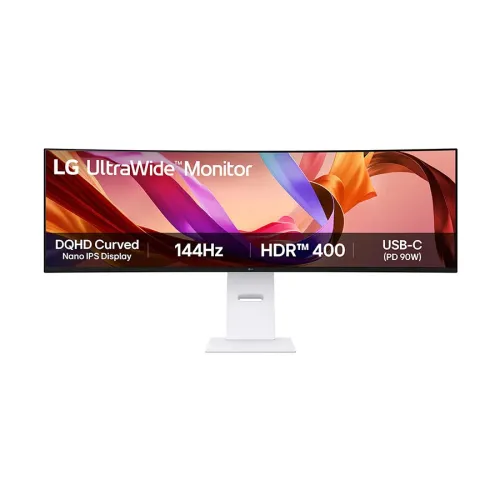
LG 49U950A-W 49-inch UltraWide curved Nano IPS monitor combines 5120 x 1440 DQHD, 144Hz, DCI-P3 98% typical, HDR400, USB-C 90W, KVM and 2 x 10W speakers in a 32:9 display.
Overview and intended use
The LG UltraWide 49U950A-W is a 49-inch curved Nano IPS monitor with Dual QHD resolution of 5120 x 1440 and a 32:9 aspect ratio. It is designed to provide the horizontal workspace of two 27-inch QHD monitors in one panel. LG lists a maximum 144Hz refresh rate, 5ms gray-to-gray response time in Faster mode, 98% typical DCI-P3 coverage, factory color calibration and VESA DisplayHDR 400. The screen also works as a desk hub, with two HDMI inputs, DisplayPort 1.4, USB-C with up to 90W power delivery, a USB hub, built-in KVM and two 10W speakers. Its 3800R curve is relatively gentle for a screen this wide. The 49U950A-W can suit multitasking, professional desk setups and games that support a 32:9 field of view.
Screen dimensions, 32:9 format and DQHD
The native resolution is 5120 x 1440 pixels, often called Dual QHD or DQHD, at a 32:9 ratio. LG identifies the diagonal as 49 inches (124.46cm), the pixel pitch as 0.234 x 0.234mm and the viewing angles as 178 degrees horizontally and vertically. The ultrawide format can show two 2560 x 1440 work areas side by side, though software window management and application support affect how useful that layout is. The screen is not 5K2K (5120 x 2160); the vertical pixel count is 1440. A compatible graphics card, cable and selected input are needed for the full 5120 x 1440 at 144Hz. The screen's width and stand take significant desk space, so measure the desk and viewing distance before ordering.
Nano IPS panel and curved viewing
LG specifies a Nano IPS LCD panel with a 3800R curvature. The gentle arc can help keep the far ends of the 32:9 screen within a consistent viewing area from a centered position. The monitor has a three-side virtually borderless design and a white exterior. The listed brightness is 400cd/m² typical and 320cd/m² minimum. Typical contrast is 1000:1 with a 700:1 minimum; these are IPS LCD figures, not OLED black levels. The anti-glare coating and IPS viewing angles support desk use across a range of room conditions. Reflections, perceived brightness and color can vary with lighting and viewing position. The screen is flat in top-to-bottom orientation and does not pivot to portrait.
Color reproduction and calibration
LG lists DCI-P3 coverage of 98% typical and 90% minimum, measured under CIE 1976, and a color depth of 16.7 million colors. The product is factory color calibrated according to LG. This can be useful for creative work and media, but it does not mean every unit will remain calibrated indefinitely or that every software pipeline will handle color correctly. For reliable output, use a color-managed application, confirm the intended color space and recalibrate if the work requires measured accuracy. The DCI-P3 percentage should be understood with its typical/minimum values and the stated measurement method. The display supports HDR10 and VESA DisplayHDR 400; this is an entry-level HDR certification compared with higher brightness tiers and does not imply full-array local dimming.
Refresh rate, response and adaptive sync
The monitor supports up to 144Hz, with a 5ms GtG response-time rating in LG's Faster overdrive mode. LG separately lists 1ms Motion Blur Reduction (MBR), which is a backlight strobing mode and not the same as the 5ms pixel transition rating. MBR may reduce perceived motion blur but can change brightness and may not work together with every other display feature. LG lists NVIDIA G-SYNC Compatible, AMD FreeSync Premium and variable refresh support. Dynamic Action Sync, Black Stabilizer, Crosshair and Game Mode features are also listed. These tools can support compatible games, but the actual frame rate and visual result depend on the computer, game, connection and selected mode. Use the monitor's timing table to confirm full-resolution 144Hz operation for the chosen input.
Video inputs, USB-C and laptop power
The exact-model specification lists two HDMI inputs, one DisplayPort 1.4 input and one USB-C connection that supports data and up to 90W Power Delivery. USB-C can carry display output, data and laptop charging over one cable when the laptop and cable support the required functions. Some gaming or workstation laptops draw more than 90W and may still need their own adapter. The monitor's USB hub includes one USB upstream port (USB 2.0) and two USB downstream ports (USB 3.0). There is also a 3-pole headphone output for sound only. LG's listed port count, rather than generic retailer descriptions, is used here. The official specification calls the HDMI inputs simply HDMI; confirm the exact HDMI version and supported signal timing for the regional SKU in the manual.
KVM, PiP/PbP and software tools
The built-in KVM can share a keyboard and mouse between two connected computers. Picture-in-Picture and Picture-by-Picture modes can display two source signals at once; the PBP specification lists two-source PBP. LG Dual Controller software can support control across computers on a shared network, while the LG Switch application offers window layouts and display controls. These functions have separate setup requirements and are not interchangeable: KVM switches USB peripherals, whereas PIP/PBP changes how input images are shown. The monitor also lists automatic brightness, Smart Energy Saving, Reader Mode, Color Weakness assistance, Super Resolution+ and Live Color Low Blue Light. Verify computer compatibility and use the LG support downloads for the correct operating system.
Speakers and daily audio
Two built-in speakers are rated at 10W each, and LG describes them as stereo speakers with Rich Bass. They can provide convenient audio for video calls, system sounds and general media without a separate speaker set. The specification lists a 3-pole headphone output for sound only; it should not be represented as a combined headset microphone port. External speakers or a headset can be used through the relevant computer or monitor output. Actual loudness and bass depend on room acoustics, source material and volume settings. The speaker rating is not a substitute for a separately measured frequency response or a claim of studio-monitor accuracy.
Stand, installation and mounting
The supplied L-shaped stand supports height, tilt and swivel adjustment. LG gives the with-stand dimensions as 1215.1 x 598.2 x 260.0mm (W x H x D) and the stand-off dimensions as 1215.1 x 365.7 x 114.2mm. Shipping dimensions are 1330 x 298 x 490mm. The net weight is 17.3kg with stand and 12.6kg without it; shipping weight is 22.0kg. LG supports 100 x 100mm VESA mounting. The tall curved panel needs a stable desk or a properly rated arm and sufficient width. Place the display centrally and leave room for cables and stand movement. Pivot rotation is not listed. Check the carton measurements and access route before delivery because the package is large.
Power and operating modes
LG lists built-in power and AC input from 100 to 240V at 50/60Hz. Sleep-mode consumption is below 0.5W and DC-off consumption below 0.3W. The exact official page does not expose a typical or maximum on-mode wattage in the same specification table, so this description does not guess one. Power use depends on brightness, refresh rate, HDR, USB devices, audio volume and screen content. Use a grounded power outlet and leave ventilation unobstructed. Keep the supplied cables clear of the stand's movement and avoid pulling the monitor by its panel when repositioning it. The box includes HDMI, DisplayPort and USB-C cables according to the LG regional page; actual accessories may vary by market and seller.
Bangladesh price and local warranty
On 6 November 2026, Star Tech and Skyland listed ৳230,000 against ৳249,550 regular price and marked the monitor In Stock. Ultra Tech also showed ৳230,000. Those are dated seller observations and may change at checkout. The existing catalog MSRP of ৳230,000 is retained. Retailers list a three-year warranty; LG Bangladesh's local warranty table lists three years for monitors 22 inches and larger, under its authorized-dealer and proof-of-purchase terms. Confirm the local warranty card, service center, panel and pixel coverage, dead-pixel thresholds, delivery installation and return policy with the seller. Current seller stock and final price are not guaranteed by this product description.
Who should consider it and trade-offs
The 49U950A-W may suit users who want one wide screen for multiple applications, long editing timelines or compatible simulation and strategy games. USB-C charging, KVM, PiP/PbP, a USB hub and 20W stereo audio make it a capable all-in-one desk display. Trade-offs include the 32:9 physical width, 1440 vertical pixels, 1000:1 typical contrast, a maximum 90W USB-C charging rate and a 144Hz ceiling. It is an IPS LCD, not OLED, and DisplayHDR 400 is not a high-zone local-dimming HDR system. At this size, a centered viewing position and adequate desk depth matter. Before buying, check whether your graphics output can drive 5120 x 1440 at the target refresh, whether the 3800R curve fits your preference and whether the local warranty is acceptable.
Key features
- 49-inch curved Nano IPS display with 5120 x 1440 DQHD resolution and 32:9 aspect ratio.
- 3800R curvature and 144Hz maximum refresh rate.
- 5ms GtG in Faster mode; separate 1ms MBR option.
- DCI-P3 98% typical / 90% minimum and factory color calibration.
- 400 nits typical, HDR10 and VESA DisplayHDR 400.
- Two HDMI inputs, DisplayPort 1.4 and USB-C with up to 90W PD.
- Built-in KVM, 2PBP, PIP and LG Dual Controller.
- Two 10W speakers with Rich Bass and a 3-pole sound-only headphone output.
- G-SYNC Compatible, FreeSync Premium and VRR listed by LG.
- Height/tilt/swivel stand and VESA 100 x 100mm mounting.
Advantages
- One 32:9 DQHD display can place two QHD work areas side by side.
- USB-C with 90W PD, KVM and USB hub can simplify a compatible laptop desk.
- 144Hz, adaptive sync and MBR support gaming and motion-focused use.
- 98% typical DCI-P3, factory calibration and HDR400 support wide-gamut media.
- Built-in 2 x 10W speakers and adjustable stand reduce extra desk equipment.
Trade-offs
- The 49-inch width requires a large desk and centered viewing position.
- USB-C charging is limited to 90W; some laptops need a separate adapter.
- IPS typical contrast is 1000:1 and HDR400 lacks high-tier local-dimming claims.
- 32:9 and 1440 vertical pixels may not suit all games or creative layouts.
- 5ms GtG and 1ms MBR are different measurements and modes; check expected motion behavior.
Frequently asked questions
1. What is the native resolution?
5120 x 1440 pixels, also called Dual QHD or DQHD, in a 32:9 aspect ratio.
2. Is the panel Nano IPS or OLED?
LG identifies the 49U950A-W as a Nano IPS LCD monitor. It is not OLED.
3. What is the curvature?
LG lists a 3800R curve.
4. What refresh rate does it support?
Up to 144Hz at the supported input timing. The source device, cable and selected port must support the mode.
5. What do the 5ms and 1ms figures mean?
LG lists 5ms GtG in Faster mode and a separate 1ms Motion Blur Reduction feature. They are not the same measurement.
6. Does the monitor support HDR?
Yes. LG lists HDR10 and VESA DisplayHDR 400, with 400 nits typical brightness.
7. Can USB-C charge a laptop?
The USB-C port supports up to 90W Power Delivery plus display and data, if the laptop and cable support it. Higher-power laptops may need their own charger.
8. Does it have a built-in KVM?
Yes. The KVM can share keyboard and mouse between connected computers when the USB signal connections are configured.
9. How many speakers are included?
Two 10W speakers with Rich Bass are listed by LG.
10. Which ports are included?
Two HDMI inputs, one DisplayPort 1.4, one USB-C, one USB upstream, two USB downstream and a 3-pole sound-only headphone output.
11. Can it be wall mounted?
Yes. LG lists a 100 x 100mm VESA mount. Ensure the chosen arm supports the 17.3kg with-stand or 12.6kg stand-off weight as applicable.
12. What is the price and warranty in Bangladesh?
Retailers showed ৳230,000 and three-year warranty listings on 6 November 2026. Confirm current price, stock, warranty card and local claim terms before checkout.
Source note: LG exact-model specification and Bangladesh retailer listings checked 6 November 2026. Regional accessory bundle, current stock and checkout price should be confirmed with the seller.