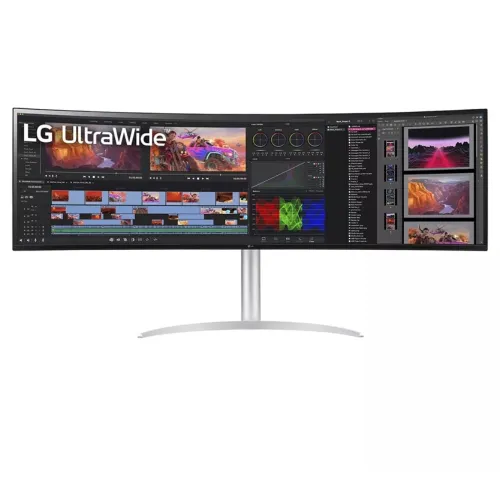
LG UltraWide 49WQ95C-W overview
The LG 49WQ95C-W is a 49-inch curved UltraWide monitor with Nano IPS, 5120 × 1440 Dual QHD resolution and a 144Hz maximum refresh rate. LG specifies a 32:9 aspect ratio, 3800R curvature, 98% typical DCI-P3, VESA DisplayHDR 400, USB-C with 90W Power Delivery, built-in KVM and two 10W speakers. It also supports FreeSync Premium Pro and G-SYNC Compatible. Specifications here follow LG’s product information.
Identify the exact model
Confirm that the monitor label and carton read 49WQ95C-W. It is a 49-inch IPS display, not a VA or OLED Odyssey-style product. Model variants can differ by regional suffix, bundled cables and warranty terms. Before purchase, check the exact unit, serial, packaging and local service conditions with the seller. This update retains the current product URL, Active status and SKU.
49-inch Nano IPS display
LG specifies a 49-inch Nano IPS panel with an active 32:9 workspace. The panel supports wide viewing angles and factory color calibration. Screen surface and room lighting still affect perceived contrast and color. Position the screen to manage reflections and allow enough distance to view the full width comfortably. The 49-inch diagonal is roughly equivalent to two 27-inch QHD displays side by side.
Dual QHD 5120 × 1440 resolution
The native resolution is 5120 × 1440, providing two QHD-width work areas in a single continuous canvas. The pixel pitch is 0.234 × 0.234mm. This layout supports multitasking and wide game views when applications support 32:9. Standard 16:9 video or console output may use side bars or a different framing. Confirm source device compatibility before expecting full-screen ultrawide output.
144Hz refresh and response time
LG lists a maximum 144Hz refresh rate and a 5ms gray-to-gray response time in the Faster setting. High refresh can make motion smoother when the source supplies supported frame rates. It does not guarantee that every game renders at 144 frames per second. Actual mode depends on GPU, cable, application, signal format and monitor settings; verify the active display mode after connecting.
Nano IPS color coverage
LG specifies 98% typical DCI-P3 coverage and lists factory color calibration. Color gamut describes the range the display can reproduce, not a guarantee that every unit remains perfectly calibrated for every application. For print, video or color-critical work, use appropriate color management and verify the delivered monitor’s calibration. Panel modes and room lighting can influence visual appearance.
VESA DisplayHDR 400 and HDR10
The monitor supports VESA DisplayHDR 400 and HDR10. LG lists typical brightness of 400 cd/m² and minimum brightness of 320 cd/m². HDR requires compatible content, source output and monitor mode. Certification and typical brightness do not guarantee identical brightness across all image areas or content. Set HDR in the operating system or console and compare the result with the source material.
3800R curve and wide screen ergonomics
The screen has a gentle 3800R curve and a 32:9 ratio. A broad curved panel helps keep the far edges within view at a suitable seating distance, while its gentle curve is less pronounced than tighter gaming curves. Desk depth, viewing distance and head movement matter with a 49-inch panel. Adjust height and tilt so the display center aligns comfortably with your seating position.
HDMI 2.1, DisplayPort 1.4 and USB-C
LG lists two HDMI 2.1 ports, one DisplayPort 1.4 and one USB-C port with DisplayPort Alt Mode and up to 90W Power Delivery. The USB-C connection can carry compatible video, data and power over one cable. Cable quality and source support determine available modes. HDMI 2.1 includes VRR on supported connections; verify the source timing and cable before gaming at maximum refresh.
USB-C 90W charging and data hub
A compatible laptop can send display output over USB-C and receive up to 90W of Power Delivery. Actual charging depends on the laptop’s requirements, cable and workload; 90W may not replace every laptop adapter. LG’s hub includes USB downstream connections and an upstream data path. Use the supplied or properly rated cable and check the manual’s port diagram for the correct USB routing.
Built-in KVM and Dual Controller
LG lists a built-in KVM switch and Dual Controller software. KVM can let two compatible computers share a keyboard and mouse through the monitor after the correct video and USB data paths are connected. Dual Controller allows supported computers on the same network to share keyboard/mouse control. These functions do not merge the computers or their applications. Configure USB routing and software as instructed.
PIP and PBP multitasking
The monitor supports Picture-in-Picture and 2PBP Picture-by-Picture. PIP overlays a smaller source view; PBP divides the panel between two inputs. These options can help monitor multiple connected devices across the large workspace. Supported source combinations and scaling depend on the selected inputs and signal modes. Choose the layout from the monitor menu and check that each device outputs a compatible resolution.
FreeSync Premium Pro and G-SYNC Compatible
LG lists AMD FreeSync Premium Pro and NVIDIA G-SYNC Compatible, along with VRR. Variable refresh synchronizes a supported GPU and display to reduce tearing and stutter. Support depends on graphics hardware, drivers, cable, selected input and game. Enable the feature on both monitor and source, then verify behavior in a supported game at a compatible resolution and refresh range.
Speakers and headphone audio
The monitor includes two 10W stereo speakers with Rich Bass and an audio/headphone connection. Built-in speakers can reduce desk wiring for everyday use; headphones or separate speakers may suit more demanding audio. Select the LG monitor as the source device’s audio output and check volume and input settings if no sound is heard. Audio support depends on the connected device and its signal configuration.
Adjustable stand and mounting
The stand supports 110mm height adjustment, -5° to +20° tilt and ±15° swivel. LG’s product page lists VESA DisplayHDR 400 and ergonomic stand features; verify the exact VESA mounting pattern in the regional user manual before buying an arm. The broad curved panel is heavy and wide, so check stand footprint, desk capacity, arm load rating, mounting hardware and cable clearance.
Eye-care and gaming functions
LG lists Flicker Safe, Reader Mode, Color Weakness, Auto Brightness, Black Stabilizer, Dynamic Action Sync, Crosshair and Smart Energy Saving. These features can adjust the image or assist supported gaming use, but they do not replace comfortable room lighting and breaks. Some modes alter color or brightness. Choose the setting that suits the content, then verify image quality in your actual workflow.
Dimensions, power and supplied accessories
The LG page lists product dimensions, net weight, power consumption and regional accessories; exact package contents vary by market. Because of its large 49-inch form, plan transport, installation clearance and safe lifting with assistance. Check the local product manual for dimensions, adapter or cable details and the correct mounting hardware. Keep packaging and the serial label for any service request.
Bangladesh price, stock and warranty
This review verifies the LG model specifications, not today’s BiponiBD price, stock, shipping condition or warranty eligibility for a particular serial. Ask the seller to confirm exact 49WQ95C-W suffix, new/sealed condition, local LG service route, warranty duration and included accessories. Confirm product warranty on the serial before payment and retain invoice and box label.
Frequently asked questions
What is the screen size? 49 inches. What resolution? 5120 × 1440 DQHD. What refresh rate? Up to 144Hz. What panel? Nano IPS. What curve? 3800R. Does it support HDR? VESA DisplayHDR 400 and HDR10. Does USB-C charge a laptop? Up to 90W with compatible devices. Does it include speakers? Yes, two 10W speakers. Does it support KVM? Yes. What local warranty applies? Confirm the supplied serial and Bangladesh terms with the seller.