Pros
- 144Hz IPS panel with 1ms GtG Faster mode for Full HD gaming.
- FreeSync Premium and G-SYNC compatibility are listed.
- 99% sRGB typical gamut and HDR10 support.
- VESA 100 × 100mm mounting and anti-glare screen.

All categories
 New condition
Monitors
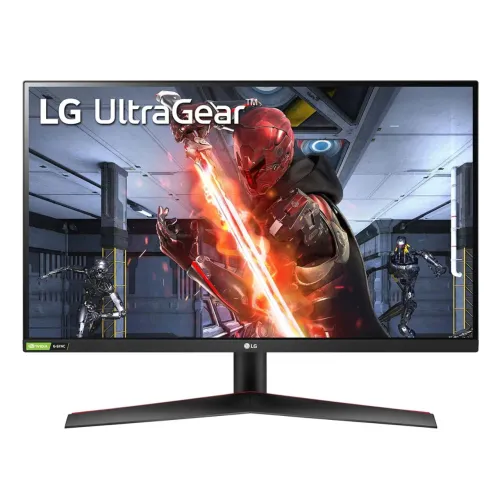
LG · UltraGear 27GN60R-B 27-inch FHD 144Hz IPS
27-inch Full HD IPS gaming monitor with 144Hz, 1ms GtG Faster mode, FreeSync Premium and G-SYNC compatibility.
Price unavailable
Price range updating
No verified price is available yet. Store offers will appear when merchants publish them.
Compare store prices
No live offers for this variant
Offers will appear when merchants publish them.
Loading history…
Product story
The LG UltraGear 27GN60R-B is a 27-inch Full HD IPS gaming monitor. LG lists 1920 × 1080 resolution, 144Hz refresh, 1ms GtG response at Faster setting, 300 cd/m² typical brightness, 1000:1 contrast and 99% sRGB. It supports HDR10, AMD FreeSync Premium and NVIDIA G-SYNC compatibility. Connections include HDMI, DisplayPort 1.4 and a headphone output. The stand supports tilt, with 100 × 100mm VESA mounting. The exact regional suffix may affect package and warranty details, so check the product label.
The panel has 1920 × 1080 Full HD resolution in a 16:9 aspect ratio. LG lists a pixel pitch of 0.3108mm and 27-inch diagonal. Full HD is less demanding to render than QHD or 4K, which can help compatible gaming PCs reach higher frame rates. On a 27-inch screen, text and fine detail are less dense than QHD. Use native resolution for clarity and adjust game UI or operating-system scaling to suit the viewing distance.
LG specifies an IPS LCD panel with 178-degree horizontal and vertical viewing angles. This supports viewing from different positions while retaining broad color visibility. The typical contrast ratio is 1000:1, and the screen surface is anti-glare. Position the display to limit reflections from windows and lights. Viewing-angle ratings do not guarantee calibrated colors or identical uniformity across every unit. Use the monitor’s picture controls to choose a comfortable mode for gaming and general work.
The maximum refresh rate is 144Hz at Full HD. A higher refresh can make movement appear smoother when the source provides enough frames. Set the display to 1920 × 1080 and choose 144Hz in the operating system or graphics control panel. Cable, GPU output and driver support affect the mode. If 144Hz is not available, check the input, cable, monitor settings and any dock or adapter. The monitor does not make a game render at 144 frames per second by itself.
LG lists 1ms gray-to-gray response at the Faster setting. The stated value depends on that overdrive mode and LG’s test conditions; actual transitions vary with pixel colors and settings. Stronger overdrive may create inverse ghosting or bright trails. Compare Faster with other response options and use the cleanest image. GtG response is not input lag and does not mean every pixel always changes in exactly one millisecond. Motion also depends on the selected refresh and game frame rate.
LG lists AMD FreeSync Premium and NVIDIA G-SYNC compatibility. These variable-refresh features can synchronize compatible displays with changing GPU frame output and help reduce tearing. Support depends on graphics card, driver, connection and operating range. Enable the feature in the monitor and graphics software, then test with the games you use. Variable refresh cannot improve GPU rendering speed. If flicker appears, test a stable frame-rate range or compare with sync disabled.
The monitor supports HDR10 content. LG’s product specifications do not list a VESA DisplayHDR certification tier for the 27GN60R-B. HDR10 signal compatibility does not guarantee local dimming or a particular certified peak brightness. The listed typical brightness is 300 cd/m², with minimum 240 cd/m² on the India specification page. HDR appearance depends on game, operating system, picture mode and room lighting. Compare with SDR content and choose the setting that preserves detail.
LG lists typical 99% sRGB color gamut (CIE 1931) and 16.7 million colors. The regional page also lists minimum 95% sRGB. Coverage describes the range of colors, not calibration accuracy. For gaming and general content, choose a natural preset. For photography, design or print work, calibrate the display and use color-managed software. A published gamut percentage alone does not certify a particular Delta E result or identical color between units.
LG lists one HDMI input, one DisplayPort 1.4 input and a 3.5mm headphone output on the India model page. Some regional specification pages show multiple HDMI inputs; verify the exact regional suffix and rear-panel layout before connecting several devices. Supported maximum timing is 1920 × 1080 at 144Hz. Use a compatible cable and connect directly to the GPU while troubleshooting. The headphone output is for audio equipment, not a microphone input.
LG’s specification for this model does not list integrated speakers. Use headphones, external speakers or a separate audio system. Sound may be routed over HDMI or DisplayPort to the headphone output if the source is configured for monitor audio. Check the operating system’s playback device and monitor volume if there is no sound. Do not assume that the monitor has speakers because other LG UltraGear models include them.
The included stand supports tilt adjustment. LG’s specifications list tilt movement, while height adjustment and swivel are not listed for this particular model page. Adjust desk and chair height to establish a comfortable screen position, then tilt to reduce glare. The base should rest on a stable surface, and cables need slack as the display moves. If a full ergonomic range is necessary, confirm the delivered regional configuration or consider a VESA arm.
LG lists 100 × 100mm VESA mounting for the 27GN60R-B. Verify the arm’s load rating, screw length and bracket fit before installation. Support the monitor while mounting and ensure its tilt and cable paths remain clear of the wall. Measure desk width and viewing distance for the 27-inch 16:9 panel. The exact stand dimensions and net weight may vary by regional SKU; check the label and local product specification for a close-fit setup.
LG specifies an external power supply and universal AC input. Energy consumption varies with brightness, refresh and picture mode. Use the adapter and power cable supplied with the exact unit, keep the adapter ventilated and connect to a grounded outlet. Disconnect power before cleaning or moving the monitor. Product energy-label values may be lower than maximum adapter capacity and are measured under defined conditions; do not confuse them with typical day-to-day power use.
LG lists Flicker Safe and reader/low-blue-light features in its product materials. These are display modes and not medical claims. Comfort also depends on ambient light, brightness, viewing distance, text size and breaks. Reader settings can change the color temperature, so switch to a neutral mode for color-sensitive work. Position the anti-glare panel away from direct reflections and use readable scaling for long sessions. The stand’s tilt helps, but does not replace good desk ergonomics.
LG includes gaming features such as Black Stabilizer, Dynamic Action Sync, crosshair and on-screen settings. They adjust how the display presents dark scenes or game interface overlays but do not change the game engine, network latency or render rate. Configure them through the monitor menu and compare with standard image settings. Excessive shadow boost or sharpening can make the image less natural. The monitor improves visualization of compatible gameplay; the PC or console remains responsible for game performance.
The 27GN60R-B combines Full HD IPS, 144Hz, 1ms GtG in Faster mode, FreeSync Premium, G-SYNC compatibility and HDR10. Full HD is easier to drive at high frame rates but has less detail than QHD on a 27-inch screen. HDR10 is listed without a VESA DisplayHDR tier; integrated speakers and height adjustment are not specified. Input counts vary across regional pages, so verify the full suffix. These practical details help match the monitor to the PC, desk and audio setup.
LG regional product pages describe regional configurations and do not verify Bangladesh warranty coverage for the offered serial. The catalog says three years; confirm serial eligibility, service location, warranty start and panel defect terms with the seller. Check that the product label reads 27GN60R-B and record the full suffix. Input count and included cables may differ between regions. Verify current price, stock, delivery, return terms and payment conditions at checkout, and retain the invoice.
Connect power and use HDMI or DisplayPort, select the correct input and set 1920 × 1080 at 144Hz. If 144Hz is unavailable, check the GPU output, cable, driver and monitor input; test without a dock or adapter. Enable FreeSync or G-SYNC-compatible variable refresh if tearing occurs. For sound, select the monitor as playback device and connect headphones to the audio output. Adjust the picture response mode if moving objects show trails or overshoot.
This LG UltraGear display can suit a gamer who wants a 27-inch IPS panel, 144Hz refresh and adaptive sync for Full HD gameplay. Check that Full HD detail at 27 inches fits your expectations and that the PC can provide high frame rates. The model is less suitable for buyers seeking QHD/4K resolution, built-in speakers, a height-adjustable stand or USB-C docking. Confirm exact regional inputs and Bangladesh serial warranty before ordering.
LG UltraGear 27GN60R-B: 27-inch IPS LCD, 1920 × 1080 Full HD, 16:9, 144Hz, 1ms GtG at Faster mode, 300 cd/m² typical brightness, 1000:1 typical contrast, 99% sRGB typical, 16.7M colors, HDR10. AMD FreeSync Premium and NVIDIA G-SYNC compatible. HDMI, DisplayPort 1.4 and 3.5mm headphone output; input count varies by region. Tilt stand; VESA 100 × 100mm. Verify exact suffix, local inputs and warranty.
Helpful answers
Product-specific answers maintained with the catalog information.
The 27GN60R-B has Full HD 1920 × 1080 resolution.
LG lists a maximum refresh rate of 144Hz.
It uses a 27-inch IPS panel with 178-degree viewing angles.
Yes. AMD FreeSync Premium is listed.
LG lists NVIDIA G-SYNC compatibility.
HDMI, DisplayPort 1.4 and headphone output are listed; exact HDMI count varies by region.
Integrated speakers are not listed for this model.
LG lists 100 × 100mm VESA mounting.
Confirm local coverage for the exact serial and suffix with the seller.
Customer community
Become a merchant
Join BiponiBD, publish accurate offers and start free.