Pros
- QHD resolution with high 180Hz native refresh.
- DisplayPort overclock provides up to 200Hz when the system supports it.
- IPS viewing angles with G-SYNC Compatible and FreeSync.
- Adjustable height, tilt and pivot stand.

All categories
 New condition
Monitors
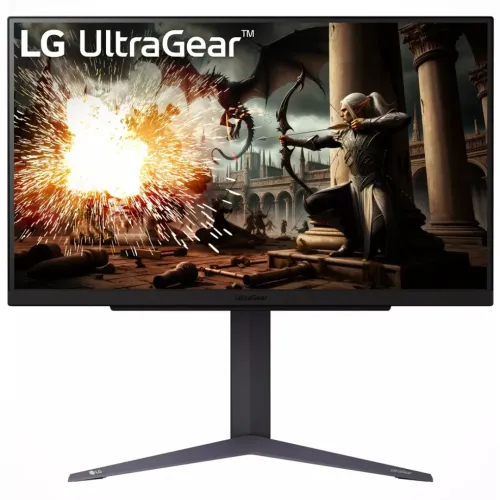
LG · UltraGear 27GS75Q-B
27-inch QHD IPS gaming monitor with 180Hz native refresh and optional 200Hz DisplayPort overclock.
Price unavailable
Price range updating
No verified price is available yet. Store offers will appear when merchants publish them.
Compare store prices
No live offers for this variant
Offers will appear when merchants publish them.
Loading history…
Product story
The LG UltraGear 27GS75Q-B is a 27-inch QHD gaming monitor using a 2560 × 1440 IPS panel. LG specifies a native 180Hz refresh rate that can be overclocked to 200Hz through DisplayPort, 1ms GtG in Faster mode, HDR10, 99% typical sRGB, NVIDIA G-SYNC Compatible and AMD FreeSync. The overclock condition matters: 200Hz is not the default native refresh. Refer to LG's model-specific product specification and manual for signal and setup details. Results depend on source device, cable, selected mode and content. Current Bangladesh price, stock, warranty and return terms are seller details and must be confirmed before ordering.
The exact model is 27GS75Q-B. LG's model-specific specification identifies native 180Hz and optional 200Hz overclocking. It says a graphics card with DisplayPort 1.4 and a DisplayPort 1.4 cable are required for the 200Hz mode. Similar UltraGear model numbers can have different panel, refresh and stand details, so check the label before relying on a spec. Refer to LG's model-specific product specification and manual for signal and setup details. Results depend on source device, cable, selected mode and content. Current Bangladesh price, stock, warranty and return terms are seller details and must be confirmed before ordering.
The 27-inch 16:9 panel has a native 2560 × 1440 QHD resolution. Compared with Full HD, QHD provides more pixels for detailed games and desktop space, while needing more GPU performance to drive high frame rates. Use the native resolution for sharp text and images. The display is flat, and its listed pixel pitch is 0.2331 × 0.2331mm. Refer to LG's model-specific product specification and manual for signal and setup details. Results depend on source device, cable, selected mode and content. Current Bangladesh price, stock, warranty and return terms are seller details and must be confirmed before ordering.
LG specifies an IPS panel with 178-degree horizontal and vertical viewing angles. IPS supports broad off-axis viewing, and LG lists 99% typical sRGB coverage. The typical contrast ratio is 1000:1, with a 700:1 minimum listed. Individual units can vary in uniformity and glow; these headline figures do not constitute a custom calibration report. Refer to LG's model-specific product specification and manual for signal and setup details. Results depend on source device, cable, selected mode and content. Current Bangladesh price, stock, warranty and return terms are seller details and must be confirmed before ordering.
LG lists the normal refresh as 180Hz and 200Hz when overclocked. Enable overclocking in the monitor menu, connect over DisplayPort 1.4 with a suitable cable, then select the mode in the operating system and verify the monitor's information screen. The GPU, driver and application must support the selected signal. Refer to LG's model-specific product specification and manual for signal and setup details. Results depend on source device, cable, selected mode and content. Current Bangladesh price, stock, warranty and return terms are seller details and must be confirmed before ordering.
LG lists 1ms GtG when Faster response-time mode is selected. GtG is a particular pixel transition measurement and is not equivalent to total input latency or a universal result for all transitions. Adjust response-time mode based on visible overshoot or ghosting. Motion clarity also depends on game frame rate, refresh, sync and display settings. Refer to LG's model-specific product specification and manual for signal and setup details. Results depend on source device, cable, selected mode and content. Current Bangladesh price, stock, warranty and return terms are seller details and must be confirmed before ordering.
The monitor supports HDR10 and LG's HDR Effect feature. LG lists typical brightness of 300 cd/m² and minimum 240 cd/m²; this is not a claim of a high peak brightness or local dimming. HDR appearance depends on content, GPU output, operating-system settings and picture mode. Do not equate HDR10 signal support with premium HDR contrast. Refer to LG's model-specific product specification and manual for signal and setup details. Results depend on source device, cable, selected mode and content. Current Bangladesh price, stock, warranty and return terms are seller details and must be confirmed before ordering.
LG lists sRGB 99% typical (CIE1931), with 95% minimum, and factory color calibration. This can suit general content and gaming, but the listing does not provide a unit-specific calibration certificate or professional wide-gamut coverage claim. Color-critical workflows should use a measured profile and confirm the selected color space. Refer to LG's model-specific product specification and manual for signal and setup details. Results depend on source device, cable, selected mode and content. Current Bangladesh price, stock, warranty and return terms are seller details and must be confirmed before ordering.
LG lists both NVIDIA G-SYNC Compatible and AMD FreeSync. Variable refresh requires a compatible GPU, driver, enabled setting and supported signal range. Check the GPU control panel and monitor OSD after connecting. Adaptive sync can reduce tearing under supported conditions but does not guarantee a fixed frame rate or eliminate the need for a capable graphics card. Refer to LG's model-specific product specification and manual for signal and setup details. Results depend on source device, cable, selected mode and content. Current Bangladesh price, stock, warranty and return terms are seller details and must be confirmed before ordering.
The supplied stand is adjustable for tilt, height and pivot. LG specifies a 110mm height range and tilt from -5° to +15°; pivot supports clockwise rotation. Adjust the display to a comfortable height and viewing position. Keep the base stable and consider desk depth, keyboard placement and portrait-mode clearance before rotating. Refer to LG's model-specific product specification and manual for signal and setup details. Results depend on source device, cable, selected mode and content. Current Bangladesh price, stock, warranty and return terms are seller details and must be confirmed before ordering.
LG lists two HDMI inputs, one DisplayPort 1.4 input and a three-pole headphone output for audio only. The page identifies DisplayPort 1.4 as the path needed for 200Hz overclocking. Check the graphics output and cable specification before setup. No built-in speakers are listed, so plan for headphones or external audio. Refer to LG's model-specific product specification and manual for signal and setup details. Results depend on source device, cable, selected mode and content. Current Bangladesh price, stock, warranty and return terms are seller details and must be confirmed before ordering.
On-screen controls include Dynamic Action Sync, Black Stabilizer, Crosshair and FPS Counter. LG notes that Crosshair is unavailable while the FPS Counter is active. OnScreen Control software can adjust monitor settings from a compatible computer. These gaming aids change display controls but do not alter the game's mechanics or guarantee better performance. Refer to LG's model-specific product specification and manual for signal and setup details. Results depend on source device, cable, selected mode and content. Current Bangladesh price, stock, warranty and return terms are seller details and must be confirmed before ordering.
For PC, connect via DisplayPort 1.4, set 2560 × 1440, choose 180Hz as the native mode or enable the monitor's overclock for up to 200Hz, then verify the active signal. Update the GPU driver and choose a game frame-rate target the PC can sustain. LG identifies a DisplayPort 1.4 graphics card and cable for 200Hz. Refer to LG's model-specific product specification and manual for signal and setup details. Results depend on source device, cable, selected mode and content. Current Bangladesh price, stock, warranty and return terms are seller details and must be confirmed before ordering.
Console refresh and resolution depend on the console generation and title. HDMI inputs are available, but the 200Hz overclock is specifically associated with DisplayPort. Many consoles will use 60Hz or 120Hz modes and may not support QHD in every configuration. Confirm the console's supported output, HDR and VRR behavior before purchase. Refer to LG's model-specific product specification and manual for signal and setup details. Results depend on source device, cable, selected mode and content. Current Bangladesh price, stock, warranty and return terms are seller details and must be confirmed before ordering.
The display supports a 100 × 100mm VESA mount. LG lists 613.5 × 577.7 × 253.7mm with stand at the raised position and 6.0kg with stand. Power input is 100–240V, with an external adapter. Verify bracket capacity and screw requirements in the product manual, provide ventilation and route cables safely. Refer to LG's model-specific product specification and manual for signal and setup details. Results depend on source device, cable, selected mode and content. Current Bangladesh price, stock, warranty and return terms are seller details and must be confirmed before ordering.
Strengths include QHD detail, fast 180Hz native refresh, optional 200Hz overclock, an IPS panel, adaptive sync and an adjustable stand. Trade-offs include the need for a strong GPU at QHD high refresh, a DisplayPort 1.4 setup for 200Hz, moderate listed brightness and no integrated speakers listed. Match the monitor to your actual game and workstation needs. Refer to LG's model-specific product specification and manual for signal and setup details. Results depend on source device, cable, selected mode and content. Current Bangladesh price, stock, warranty and return terms are seller details and must be confirmed before ordering.
The QHD canvas can support gaming, multi-window work and general media. The flat 16:9 screen is broadly compatible with video and standard desktop layouts. 99% typical sRGB and factory calibration are useful reference points, but they do not replace proofing measurements for color-critical publishing. Set scaling and brightness to suit ambient light and viewing distance. Refer to LG's model-specific product specification and manual for signal and setup details. Results depend on source device, cable, selected mode and content. Current Bangladesh price, stock, warranty and return terms are seller details and must be confirmed before ordering.
Inspect the panel, stand movement, ports, buttons, adapter and cables on delivery. Retain invoice, serial label and packaging during the return period. Use a soft microfiber cloth and avoid spraying liquid on the screen. Test native 180Hz first, then overclock only if the computer and cable support it; confirm stable image and expected signal in the OSD. Refer to LG's model-specific product specification and manual for signal and setup details. Results depend on source device, cable, selected mode and content. Current Bangladesh price, stock, warranty and return terms are seller details and must be confirmed before ordering.
For Bangladesh, confirm current price and stock, exact 27GS75Q-B model, included DisplayPort cable and adapter, return/dead-pixel policy, delivery, and the local provider and duration of serial-specific warranty. LG's international product specification does not establish local seller coverage. Keep the invoice and verify the serial and service terms with the seller before ordering. Refer to LG's model-specific product specification and manual for signal and setup details. Results depend on source device, cable, selected mode and content. Current Bangladesh price, stock, warranty and return terms are seller details and must be confirmed before ordering.
LG specifies 27-inch 2560 × 1440 IPS, 180Hz native refresh with 200Hz DisplayPort overclock, 1ms GtG in Faster mode, HDR10, sRGB 99% typical, G-SYNC Compatible and FreeSync. The 200Hz mode requires a DP 1.4 graphics card and cable. Confirm compatibility, local warranty, live offer, accessories and return terms with the Bangladesh seller. Refer to LG's model-specific product specification and manual for signal and setup details. Results depend on source device, cable, selected mode and content. Current Bangladesh price, stock, warranty and return terms are seller details and must be confirmed before ordering.
Helpful answers
Product-specific answers maintained with the catalog information.
LG specifies 180Hz native, with an optional overclock up to 200Hz.
LG specifies a DisplayPort 1.4 graphics card and DisplayPort 1.4 cable.
2560 × 1440 QHD on a 27-inch IPS panel.
LG lists NVIDIA G-SYNC Compatible and AMD FreeSync.
1ms GtG when Faster response-time mode is selected.
HDR10 and HDR Effect are listed; typical brightness is 300 cd/m².
LG does not list built-in speakers; a headphone output is provided.
Yes, the stand supports tilt, height adjustment and clockwise pivot.
Confirm the exact serial-specific local warranty provider, duration and terms with the seller.
Customer community
Become a merchant
Join BiponiBD, publish accurate offers and start free.