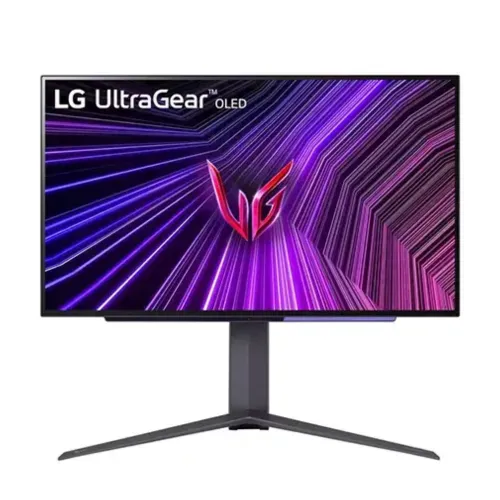
LG UltraGear 27GS95QE-B overview
LG UltraGear 27GS95QE-B is marketed as a 27-inch gaming monitor with a 26.5-inch viewable OLED panel. LG specifies 2560 × 1440 QHD resolution, 240Hz refresh, 0.03ms GTG response, 1,500,000:1 typical contrast, DisplayHDR True Black 400, NVIDIA G-SYNC Compatible and AMD FreeSync Premium Pro. The model includes an adjustable stand, HDMI 2.1 inputs, DisplayPort and USB connectivity; this review distinguishes verified facts from local offer details.
Exact model and regional suffix
Confirm 27GS95QE-B and the regional suffix on the carton, rear label and invoice. Similar LG model numbers can have different refresh rates, panel specifications, ports and bundles. Do not transfer specifications from 27GR95QE, 27GS93QE or 27GS95QX variants. The original BiponiBD product slug and SKU are preserved. Regional warranty and accessory differences need seller confirmation.
26.5-inch viewable OLED panel
LG lists a 26.5-inch viewable diagonal, even though the product is marketed as 27-inch class. The panel is OLED and flat, with a 16:9 aspect ratio. OLED pixels emit their own light, supporting deep blacks and high contrast. Room light, image mode and viewing position still affect the perceived result. Protect the screen surface and follow LG’s care guidance.
QHD 2560 × 1440 resolution
The native panel resolution is 2560 × 1440, commonly called QHD or 1440p. It offers a balance of detail and graphics demand for PC gaming. Set the source to native resolution for sharp text and pixel mapping. A graphics card must support the chosen resolution and refresh over the selected input; applications and games may use different rendering scales.
240Hz refresh rate
LG specifies refresh rates up to 240Hz and notes actual refresh can vary with computer graphics specifications and configurations. A compatible PC and game must deliver high frame rates to benefit fully. Choose 240Hz in operating-system display settings after connecting a suitable DisplayPort 1.4 or HDMI 2.1 source. A monitor’s maximum refresh does not itself create additional game frames.
0.03ms GTG response time
LG rates the panel at 0.03ms gray-to-gray response time. This describes a pixel transition claim and is not a measurement of total input lag or complete gameplay latency. Game rendering, frame pacing, controller input and signal path also matter. Use the monitor’s gaming modes with care because image-processing options can affect motion, brightness or visual character.
DisplayHDR True Black 400
LG lists VESA DisplayHDR True Black 400 and HDR10 support. True Black certification is intended for OLED displays and covers defined contrast and black-level behavior. It does not mean every image reaches the same brightness. HDR playback requires compatible content, source configuration, application support and a selected HDR mode. SDR and HDR appearance can differ substantially.
Brightness and contrast
LG lists typical brightness of 275 cd/m², minimum brightness of 250 cd/m² and typical contrast of 1,500,000:1. These are manufacturer model specifications, not measurements of the exact delivered monitor. OLED brightness can vary with the content and display conditions. Use a comfortable level for ambient light and avoid assuming peak HDR brightness from the typical SDR figure.
Color gamut and factory calibration
LG specifies typical DCI-P3 coverage of 98.5% (CIE 1976), 1.07 billion colors and factory color calibration. It also lists hardware-calibration readiness. Gamut coverage does not establish exact delivered-unit accuracy or a calibrated workflow by itself. Use color-managed software and the right picture preset. For strict creative work, request the calibration report and measure the individual panel.
Variable refresh and synchronization
LG lists VRR, NVIDIA G-SYNC Compatible and AMD FreeSync Premium Pro. Variable refresh can coordinate display updates with a compatible GPU to help reduce tearing and stutter. Support depends on source hardware, driver, selected input and refresh range. Enable the feature in the display menu and graphics settings, then verify in a game. It cannot correct low frame rates or network lag.
HDMI 2.1 and DisplayPort 1.4
The UK specification lists two HDMI 2.1 ports and one DisplayPort 1.4 input with DSC. LG states a graphics card supporting DisplayPort 1.4 or HDMI 2.1 is required for up to 240Hz. Port bandwidth, cable and source settings affect the mode. Check the exact regional manual’s signal table for resolution, bit depth, chroma and refresh combinations.
USB hub and headphone connection
LG lists one USB 3.0 upstream port and two USB 3.0 downstream ports. Connect the upstream cable to the PC for the monitor’s downstream USB ports to function as a hub. The four-pole headphone output supports audio and microphone connections according to regional specifications. This model does not list USB-C laptop charging; use its documented video inputs and a separate charger.
Stand adjustment and portrait mode
LG lists tilt, height, swivel and pivot adjustment. The stand supports height movement up to 110mm in the catalog specification, while exact range and orientation should be confirmed in the regional manual. Pivot can help with vertical documents but the display is designed primarily for landscape gaming. Adjust screen position to reduce glare and support a comfortable posture.
VESA wall or arm mounting
The manufacturer specifies a 100 × 100mm VESA pattern. Check the exact screw length and mounting procedure in the manual before attaching an arm or wall bracket. Confirm that the support is rated for the monitor’s weight and that cables can bend without strain. Keep the panel supported during installation and avoid pressure on the OLED surface.
Gaming controls and software
LG lists Dynamic Action Sync, Black Stabilizer, Crosshair, FPS Counter, Auto Input Switch, Reader Mode, Color Weakness and OnScreen Control. These settings provide options for different tasks; they do not guarantee a competitive advantage. LG Calibration Studio is available for supported workflows, and hardware calibration requires suitable equipment. Download software only for the exact model and operating system.
Audio and accessories
The LG UK specification lists two 2W speakers, while other regional data should be checked against the precise model suffix. The same source lists an optical digital audio output and a four-pole headphone connector. LG regional packages may include HDMI and DisplayPort cables, USB A-to-B cable, power adapter and documentation. Confirm the actual Bangladesh box contents before purchase.
PC and console compatibility
For PC gaming, confirm the GPU, cable and selected input support QHD at 240Hz. For consoles, HDMI 2.1 can support compatible modes, but console and game limitations mean the full 240Hz rate may not be available. Check the console’s output information and the model manual. Ensure VRR and HDR are configured on both source and monitor when supported.
OLED panel care
Long sessions showing fixed bright interface elements can contribute to uneven OLED wear. Follow LG’s screen-care recommendations and maintenance prompts, allow standby cycles to run and avoid interrupting pixel-cleaning processes. Vary static desktop content when practical. Care tools help manage the panel but do not guarantee that image retention can never occur. Confirm local warranty language for burn-in coverage.
Bangladesh stock, offer and warranty
This page does not verify live BiponiBD stock, current price, delivery condition or eligibility for a specific unit. Ask the seller to confirm the exact 27GS95QE-B suffix, new/sealed condition, local service route, warranty term and OLED panel coverage against its serial number. Keep the purchase invoice and serial label. Manufacturer support terms for another market do not automatically apply in Bangladesh.
Frequently asked questions
What resolution does this LG monitor use? 2560 × 1440 QHD. What is the refresh rate? Up to 240Hz. What is the viewable size? 26.5 inches. What HDR certification is listed? DisplayHDR True Black 400. Does it support G-SYNC? LG lists G-SYNC Compatible. What is response time? 0.03ms GTG per LG. Does it have USB-C charging? No USB-C charging is listed in the reviewed specifications. What is the VESA size? 100 × 100mm. What warranty applies in Bangladesh? Confirm the delivered serial’s local terms with the seller.