Pros
- Compact wireless design reduces cable clutter
- Ambidextrous shape suits left- or right-handed use
- USB receiver provides a straightforward connection to a compatible port

All categories
 New condition
Computer Accessories
Logitech · M170
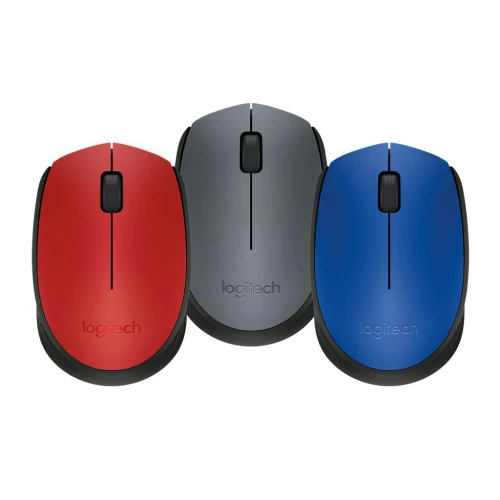
Logitech M170 compact wireless mouse with a 2.4 GHz USB receiver, optical tracking, three buttons and an ambidextrous shape.
Approximate Market Price
BDT 1,000
Informational market estimate only; this is not a current Store offer. Last checked Nov 11, 2026. Source
Compare store prices
No live offers for this variant
BDT 1,000
Approximate Market Price
Informational market estimate only; this is not a current Store offer. Last checked Nov 11, 2026. Source
Loading history…
Product story
The Logitech M170 is a compact wireless mouse for everyday navigation at a desk or on the move. Its ambidextrous shape can be used in either hand, and its optical sensor and scroll wheel support ordinary browsing, documents and other computer tasks.
The mouse connects wirelessly through a USB receiver rather than a mouse cable. Plug the receiver into a compatible USB port and follow the device instructions. Logitech describes a wireless range of up to 10 metres; actual range varies with the environment and computer setup. A suitable USB port is required, and a USB-C-only computer may need a compatible adapter.
Three buttons include the left and right buttons and the clickable scroll wheel. Optical tracking moves the pointer as the mouse moves across a suitable surface. The existing catalog lists approximately 1000 DPI; verify the exact regional specification if pointer sensitivity is important to your purchase.
The mouse is battery powered, so it does not rely on a cable for operation. Logitech advertises up to 12 months of battery life, which depends on use and conditions. Check the battery type, included accessories and replacement instructions for the exact unit with the seller. The compact form fits readily into a laptop bag; comfort depends on hand size and grip.
Logitech lists Windows, macOS, ChromeOS and Linux for its related M170/M171 product family. Check the exact operating-system version and receiver compatibility before ordering. Verify model, colour, genuine receiver, package contents, current price and local warranty terms with the merchant. The pictured colour may not represent every available variant.
Keep the receiver safe when carrying the mouse and replace the battery when needed. Wireless performance can be affected by distance and interference. This model uses a USB receiver; do not assume Bluetooth support or programmable buttons without checking the exact product documentation.
Helpful answers
Product-specific answers maintained with the catalog information.
It connects using a 2.4 GHz USB receiver. A compatible USB port is required; check adapter compatibility for a USB-C-only device.
A local retailer lists one AA battery and up to 12 months of use. Battery life varies with usage and conditions; confirm inclusion with the seller.
Logitech describes a range of up to 10 metres. Actual range depends on environmental and computing conditions.
Its ambidextrous shape is designed for use in either hand. Comfort depends on hand size and grip.
Customer community
Become a merchant
Join BiponiBD, publish accurate offers and start free.