Pros
- Three-button layout supports standard pointer and scrolling tasks
- Wired USB connection needs no mouse battery
- 1000 DPI optical tracking for general desktop control

All categories
 New condition
Computer Accessories
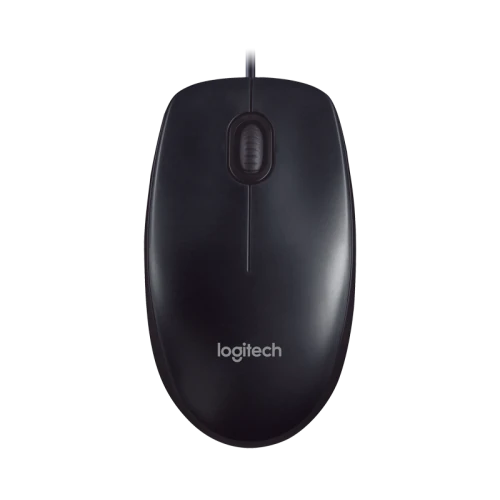
Logitech · M90 Wired USB Optical Mouse
Logitech M90 is a wired USB optical mouse with 1000 DPI, three buttons, scroll wheel and 150cm or 180cm cable per seller listing. Check dimensions and warranty.
Approximate Market Price
BDT 449
Informational market estimate only; this is not a current Store offer.
Compare store prices
No live offers for this variant
BDT 449
Approximate Market Price
Informational market estimate only; this is not a current Store offer.
Loading history…
Product story
The Logitech M90 is a wired USB optical mouse with a 1000 DPI resolution. Local retailer listings specify three buttons, 1000 DPI and USB wired connection. Cable length is listed as 150cm by some sellers and 180cm by others. It is designed for standard desktop work, browsing and everyday navigation. It does not use a wireless receiver or battery. Exact warranty, weight and OS support depend on the current model package and selected seller.
Several local M90 listings specify 1000 DPI. DPI affects cursor movement relative to physical mouse movement; pointer speed can also be adjusted in the operating system. A higher sensitivity is not automatically more accurate. Choose a setting that is comfortable for the display and work surface. Local listings identify 1000 DPI; detailed IPS, acceleration and lift-off-distance data are not published in the reviewed sources.
Retailer specifications count three keys, typically left click, right click and a wheel click. The wheel provides standard vertical scrolling. Reviewed listings do not document side buttons, a DPI selector or custom macro controls.
The official Logitech listing calls out a scroll wheel and optical tracking. These features can make navigation more convenient and help the wheel resist dust-related problems, but they do not make the mouse waterproof or maintenance-free. Avoid spills and excessive dust, and clean the wheel area gently when needed. The manufacturer does not publish a specific dust ingress rating or protection certification on the reviewed page.
The M90 connects through a wired USB interface. Star Tech and Ryans list a 150cm cable, while ExcelBD and Vibe Gaming list 180cm; confirm the length on the selected package. A wired connection avoids mouse batteries but limits movement to the cable’s reach. Route the cable with slack and keep it away from sharp edges, chair wheels and tight bends. The reviewed sources do not consistently specify cable braid, USB revision or connector plating. Confirm the host has a compatible USB port before ordering.
Vibe Gaming lists dimensions of approximately 113 × 62 × 38mm. Treat these as retailer measurements and confirm package details if precision matters. The manufacturer listing does not provide verified weight in the reviewed result. Consider the symmetric body and overall size against your hand and grip preference; try it physically if fit is important.
Logitech describes plug-and-play operation. Connect the USB plug to a compatible computer port and allow the operating system to detect the mouse. The official page lists the M90/M90S family, so verify the exact M90 variant and current operating-system support. Retailers list Windows versions, but do not assume all legacy and current OS releases have been individually tested. Console and specialized device support also depends on the host software.
With 1000 DPI and a scroll wheel, M90 can support ordinary cursor control, document scrolling and web navigation. It is a general-purpose wired mouse rather than a model with documented high polling rate, adjustable DPI profiles, programmable side buttons or gaming software. If a task requires a specific wheel driver or custom mapping, confirm that function with Logitech and the target operating system before purchase.
If the pointer does not move, reconnect the USB cable, try another host port and restart the computer if needed. If the wheel behaves unexpectedly, check application scrolling settings and clean dust carefully without spraying liquid into the device. Use a stable surface and keep the optical sensor window clear. For intermittent detection, connect directly to the computer without a hub and inspect the cable for wear.
Current warranty coverage varies by seller and offer. Ask the merchant for the warranty period, service location and whether replacement or repair applies. Retail prices and stock at other shops do not verify BiponiBD’s live offer. Confirm model M90, three-button configuration, wired USB connection and cable length on delivery. Keep the purchase invoice and packaging for a service claim.
M90 offers 1000 DPI optical tracking, three-button USB operation, a scroll wheel and retailer-listed 150cm cable. The manufacturer highlights plug-and-play setup and a dust-resistant wheel. It is wired, has no listed lighting or advanced remapping and does not document detailed sensor metrics on the reviewed page. Check seller warranty, operating-system needs and physical fit before purchase.
Logitech M90 is a wired USB optical mouse with 1000 DPI. The manufacturer lists a scroll wheel and optical tracking; retailers specify three buttons, a 150cm cable and approximate 113 × 62 × 38mm dimensions. One seller lists 85g without cable weight. Confirm current OS compatibility and seller warranty for the exact package.
Helpful answers
Product-specific answers maintained with the catalog information.
The model is Logitech M90.
Logitech and local retailers list 1000 DPI.
Retailers list three keys.
The M90 is the silent-click variant. Logitech distinguishes silent clicks by model number in its family listing.
Local retailers specify 150cm.
It uses a wired USB connection.
No; it is a wired mouse powered through its USB connection.
retailer listings give approximately 113 × 62 × 38mm; Logitech lists Not verified; retailer measurements may vary.
Logitech describes plug-and-play setup on the product listing.
Confirm current coverage and service terms with the selected seller.
Customer community
Become a merchant
Join BiponiBD, publish accurate offers and start free.