Pros
- No battery charging or wireless pairing required
- DPI switch provides a sensitivity control on the mouse
- Ambidextrous design and compact dimensions listed

All categories
 New condition
Computer Accessories
Mofii · M13S Wired 3D Optical Mouse
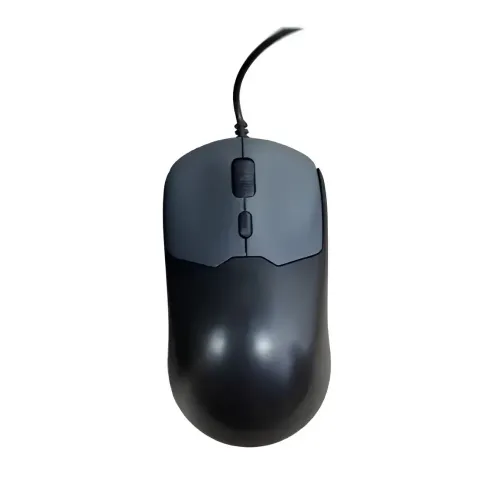
Mofii M13S is a wired 3D optical USB mouse with DPI switch and ambidextrous design. Local listings specify a 1.5m PVC cable; check exact DPI and warranty.
Approximate Market Price
BDT 375
Informational market estimate only; this is not a current Store offer.
Compare store prices
No live offers for this variant
BDT 375
Approximate Market Price
Informational market estimate only; this is not a current Store offer.
Loading history…
Product story
The Mofii M13S is a wired 3D optical mouse for computer use. Bangladesh retailer pages list a USB connection, DPI switch and ambidextrous design. One local listing gives dimensions of 62 × 99 × 40mm and a 1.5-meter PVC cable. The catalog variant is named M13S Wired Mouse; inspect the current seller’s photos and confirm the supplied color before ordering. It receives power over USB and does not need a wireless receiver or battery for ordinary operation.
Connect the mouse to an available compatible USB port on a desktop or laptop. Retailer specifications identify a USB interface and wired operation; the available product description does not require Bluetooth pairing or a battery. Most operating systems support basic mouse input, but the exact software environment can affect advanced features. If the computer has only USB-C ports, a suitable adapter may be needed and is not confirmed as included. Insert the plug gently and avoid pulling on the cable.
The M13S is described by local sellers as a 3D optical mouse. Optical tracking reads movement from the surface beneath the sensor; tracking quality depends on the surface, sensor condition and movement. The reviewed specification pages do not establish a sensor manufacturer, polling rate, acceleration behavior or measured precision. Use a clean, suitable desk surface or mouse pad. Highly reflective, transparent or uneven surfaces can impair optical tracking, so test the mouse on the intended work area.
Star Tech describes the M13S as having a DPI switch. DPI levels determine pointer sensitivity, but the reviewed sources do not give a consistent list of exact selectable values for this model. This content therefore confirms the presence of a DPI switch without inventing specific levels. Pointer speed can also be adjusted in operating-system settings. If a particular DPI step is important for work or gaming, ask the seller to verify the exact product revision and its switch levels.
Orient Computers describes the mouse as suitable for left- and right-hand use and lists a size of approximately 62 × 99 × 40mm. The shape is compact compared with many full-size mice, but comfort depends on hand size and grip style. Try the mouse if possible or compare its listed measurements with a mouse you already use. The available listings do not provide independently verified weight, shell material or palm-support measurements.
Several Bangladesh listings specify a 1.5-meter cable, and Orient Computers identifies a PVC cable. This reach is suitable for many nearby desktop or laptop setups, but the cable should not be stretched taut or pinched behind furniture. Route it with enough slack for normal movement and avoid sharp bends close to the mouse or USB plug. Check the exact supplied length with the seller if your desk layout requires a longer reach.
Retailer listings describe mouse buttons and a scroll wheel for clicking and document navigation; some catalog sources list four buttons. The reviewed specifications do not establish programmable profiles, dedicated side buttons, macros, onboard memory or software customization. Button behavior can be configured in the operating system. The scroll wheel provides basic page movement, while application-specific scrolling behavior depends on software settings and the host device.
A wired optical sensor, DPI switch and familiar pointer controls can support everyday browsing, documents, spreadsheets and study tasks. The direct USB connection means no charging routine or wireless pairing is needed. Pointer comfort depends on sensitivity settings, the desk surface and hand fit. The model’s compact dimensions may suit some workspaces, but the sources do not provide ergonomic test results or medical/comfort guarantees.
The DPI switch can change sensitivity, but the reviewed pages do not specify exact DPI steps, polling rate, programmable buttons, dedicated gaming software or onboard profiles. Do not assume the M13S provides advanced features advertised for other Mofii or gaming mouse models. It can send ordinary mouse input to games that support a standard USB pointer; actual gaming performance depends on sensor behavior, settings and the user’s requirements. Verify critical specifications with the seller.
The supplied catalog record lists Windows PC and laptop compatibility, and USB mice commonly work on supported computer operating systems. Exact support for other systems was not confirmed by the reviewed M13S pages. If the cursor does not move, try another USB port, check for host detection, test on a suitable surface and inspect the sensor opening for dust. If the DPI switch appears ineffective, check pointer settings and ask the seller whether the current revision exposes selectable steps.
The catalog data describes the color as black and gray, while retailers may show different product photos or color names. Verify the color variant and included package contents before purchase. Keep the cable away from sharp edges, liquids and sources of heat. Disconnect by holding the USB plug rather than pulling the cord. Stop using the mouse if its cable is damaged or the plug becomes loose, and contact the seller about service.
The existing catalog record contains a one-year warranty, but the product search results did not independently verify the current warranty for the selected BiponiBD offer. Confirm warranty duration, provider, service location, return window and claim requirements with the merchant and retain the invoice. Prices and stock displayed by other retailers are not a live quote for this offer. On receipt, check the M13S model, USB plug, cable, DPI switch and package condition.
Mofii M13S provides wired USB operation, 3D optical tracking and a DPI switch in a compact ambidextrous design. Local listings specify a 1.5-meter PVC cable and 62 × 99 × 40mm dimensions. The exact DPI levels, some button details, weight and current seller warranty are not consistently documented in the reviewed sources. Confirm color and cable length for the specific stock, and choose another model if advanced gaming controls or a guaranteed sensitivity range are required.
Mofii M13S is a wired USB 3D optical mouse with a DPI switch. A Bangladesh retailer lists ambidextrous use, a 1.5m PVC cable and dimensions of 62 × 99 × 40mm. Exact DPI levels are not published consistently in the reviewed sources. The catalog records black/gray color and a one-year warranty, but confirm both with the selected seller.
Helpful answers
Product-specific answers maintained with the catalog information.
The mouse model is Mofii M13S.
It is a wired USB mouse.
Retailers describe it as a 3D optical mouse.
Star Tech lists a DPI switch, but exact sensitivity steps were not consistently published.
Orient Computers lists left- and right-hand use.
Local listings specify 1.5 meters; confirm the length of the selected stock.
A local retailer lists approximately 62 × 99 × 40mm.
No battery is listed; the mouse uses its wired USB connection.
The catalog record lists Windows PC and laptop; check support for other systems with the seller.
The catalog has a previous one-year record, but current seller terms need confirmation.
Customer community
Become a merchant
Join BiponiBD, publish accurate offers and start free.