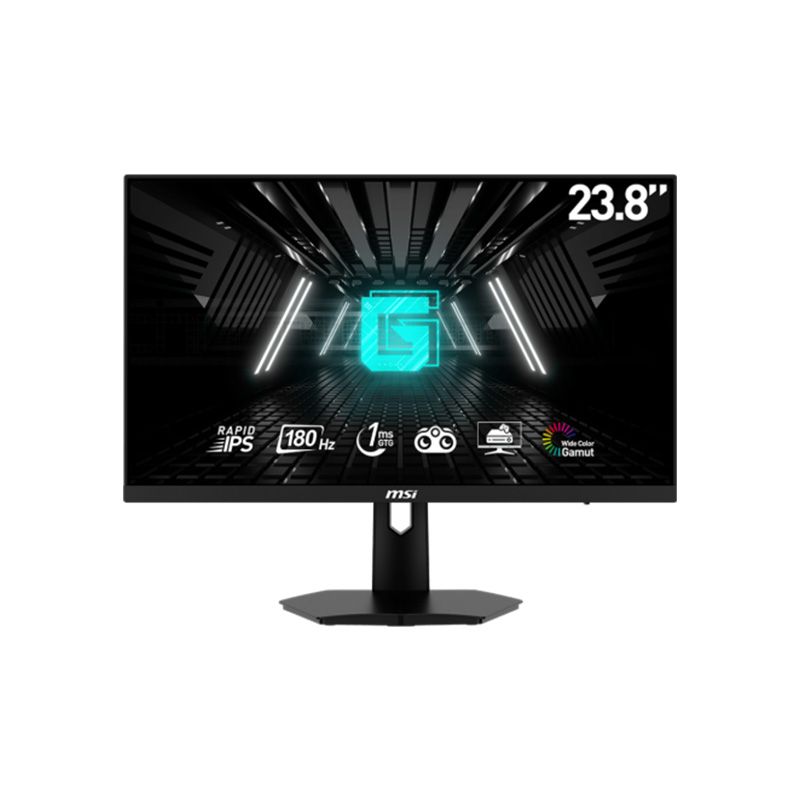
MSI G244F E2 23.8-inch Full HD Rapid IPS gaming monitor
The MSI G244F E2 is a flat 23.8-inch Rapid IPS monitor with Full HD 1920 × 1080 resolution, 180Hz refresh and 1ms GTG response listed by MSI. It has one DisplayPort 1.2a, two HDMI 2.0b inputs, a headphone output, Adaptive-Sync, 300-nit typical brightness and a 75 × 75mm VESA mount. The stand tilts but has no listed height adjustment; the monitor does not list built-in speakers.
Rapid IPS Full HD overview
The MSI G244F E2 is a flat 23.8-inch Rapid IPS gaming monitor with 1920 × 1080 resolution and 16:9 aspect ratio. The technical specification describes an active viewing area of 527.04 × 296.46mm and 0.2745mm pixel pitch. Full HD at this size is a familiar choice for competitive games and daily use. The model is not a curved display, and it should not be confused with G244F, G244PF E2 or other similarly named MSI models.
IPS technology supports broad listed viewing angles of 178 degrees horizontally and vertically. The anti-glare surface helps reduce some reflections, but placement and room lighting still affect visibility. The display provides 16.7 million colours with 8-bit colour depth. If you work on detailed designs or large spreadsheets, weigh the screen’s Full HD resolution against QHD alternatives before choosing.
180Hz refresh over HDMI and DisplayPort
MSI rates the G244F E2 at 180Hz and specifies 1920 × 1080 at up to 180Hz on both HDMI 2.0b and DisplayPort 1.2a. This lets a compatible PC use the maximum refresh on either digital input. The source device, cable, driver and system settings must also support the mode. Connect directly to the graphics card first if an adapter or dock limits available options.
A 180Hz panel can refresh more often than a 60Hz display, which may make supported game motion and pointer movement look smoother. It does not make a game generate more frames. The CPU, graphics card, game engine and quality settings control frame rate and frame pacing. Check the operating-system advanced display menu and the game’s own refresh setting after setup.
Response modes and motion clarity
MSI lists 1ms GTG, 1ms MPRT and 6ms Tr + Tf response specifications. GTG measures a transition between grey levels; MPRT describes motion-picture response; Tr + Tf is another transition timing. They are different methods and should not be compared as if they represented one identical test. No single number guarantees that every pixel transition completes in that time under all settings.
The on-screen display includes response and motion-related controls. Adjust them gradually and test in the content you use. An aggressive overdrive or motion-blur reduction setting can cause visible artifacts or alter brightness. A stable frame rate, correct 180Hz input mode and sensible response setting work together to produce clear motion; the best balance depends on the game and the viewer.
Adaptive-Sync and gaming controls
MSI specifies Adaptive-Sync. With a compatible graphics card and driver, variable refresh can synchronize monitor updates with rendered frames to reduce tearing within the supported range. Enable the feature in the monitor’s OSD and source graphics settings as needed. Availability can depend on input, driver and settings; the listing alone does not guarantee identical operation for every PC or console.
The MSI manual describes gaming functions such as Game Mode presets, Night Vision and MPRT controls. These provide monitor-side adjustments, not extra computer performance. Some OSD controls may be unavailable when particular signals or modes are active. Review the manual’s notes and reset to a neutral picture if a preset makes colours or shadows look unnatural.
Brightness, contrast and colour
MSI specifies 300 nits typical brightness and 1000:1 contrast. Dynamic contrast is listed separately at 100,000,000:1; it should not be compared directly with static contrast. The stated colour gamut is 91% Adobe RGB, 88% DCI-P3 and 118% sRGB according to CIE1976. These are gamut area measurements and do not prove accurate calibration, uniformity or consistency between units.
For colour-critical work, use a suitable calibrated display and measurement workflow. For general games, media and office use, select a comfortable picture mode and adjust brightness to room conditions. The anti-glare screen helps with reflections but cannot eliminate strong direct light. Compare the colour preset you prefer with the actual source content rather than relying on one headline gamut percentage.
Ports, audio and connected devices
The rear panel has one DisplayPort 1.2a, two HDMI 2.0b inputs and one headphone output. MSI states that both HDMI ports and DisplayPort support 1920 × 1080 up to 180Hz. A desktop PC and another HDMI source can remain connected while you switch the active input through the monitor menu. Check the labels on the actual unit and use certified cables suitable for the selected resolution and refresh.
MSI lists an earphone output but does not list built-in speakers. Connect headphones to the monitor output or use speakers connected directly to the computer or console. If audio does not reach the monitor jack over HDMI or DisplayPort, select the monitor as the source operating system’s audio output and check the application volume. The monitor does not function as a USB hub.
Tilt stand, VESA and physical placement
The included stand tilts from -5° to +20°. MSI does not list height, swivel or pivot adjustment for G244F E2. VESA mounting is 75 × 75mm, with M4 × 10mm screw guidance in the manual. Check that a monitor arm supports the VESA pattern and weight; many common arms use 100 × 100mm, so verify compatibility before purchase.
The model is approximately 541.9 × 231.9 × 424.3mm with stand and 541.9 × 59.7 × 322.3mm without. Net weight is about 4.2kg with stand and 2.7kg without; gross packaging weight is 5.6kg. Leave space for the external adapter and cables. Since the stand does not rise, a compatible arm or riser may help position the screen at eye level.
PC, laptop and console setup
For high-refresh PC gaming, connect HDMI or DisplayPort directly to the graphics card and select Full HD at 180Hz in the operating system. Confirm the mode in the game and keep drivers current. If 180Hz is missing, test another supported cable and bypass docks or converters. When the image becomes unstable, revert to a supported lower rate and check the manual before changing other settings.
A laptop or console can use HDMI if its output supports the desired mode. The source device and game determine available resolution and refresh combinations; the monitor cannot force a console to render at 180 frames per second. Adaptive-Sync behaviour also depends on source compatibility. Verify the graphics output and application settings rather than assuming every HDMI source uses the maximum mode.
Power, care and troubleshooting
The monitor uses an external 12V, 3A power adapter. MSI lists 100–240V, 50/60Hz AC input to the adapter. Use the supplied power equipment or an authorized exact replacement. Keep ventilation areas clear and avoid liquids, heat and direct sunlight. The user guide says package contents can vary by country; verify the local carton for the adapter, power cord, documentation, stand and any optional HDMI cable.
Turn the monitor off before cleaning and follow MSI’s instructions; use a soft cloth and do not spray liquid onto the panel. If the screen has no signal, confirm the selected input and cable connection. If 180Hz is not offered, check the GPU output, driver, cable and operating-system setting. Persistent flicker or artifacts should be documented and reported to the seller during the return period.
Bangladesh offer, price and warranty
TechLand’s product page showed a ৳22,900 promotional price, ৳28,990 regular price and in-stock status when reviewed. Retailer prices and inventory can change; confirm final cash/card price, delivery cost, stock location and dispatch time before ordering. The retailer page also displayed a three-year warranty claim and one review. Those are seller statements and do not constitute a BiponiBD offer or independently verified serial coverage.
MSI’s manual states package contents may vary by country, and the regional warranty provider can differ. Ask the seller who handles Bangladesh service, how the serial is registered, what dead-pixel threshold applies and whether repair or replacement is offered. Obtain written warranty terms and an invoice showing model and serial. Keep the box and accessories until the return window closes.
Who should consider this monitor
The G244F E2 suits someone seeking a 23.8-inch Full HD Rapid IPS screen with up to 180Hz on both HDMI and DisplayPort, Adaptive-Sync and a headphone output. It can fit competitive PC gaming and general desktop use when Full HD resolution and a tilt-only stand meet the user’s needs. Two HDMI inputs are useful for leaving multiple devices connected.
Consider a QHD model if text detail and workspace are higher priorities, or another monitor if height-adjustable ergonomics, built-in speakers or USB hub features are essential. Check whether your arm supports 75 × 75mm VESA. Compare measured motion performance, local warranty and current stock alongside headline refresh numbers when choosing between similar models.
Frequently asked questions
What are the size and resolution?
MSI specifies a 23.8-inch flat Rapid IPS panel with Full HD 1920 × 1080 resolution and 16:9 aspect ratio.
Can it run at 180Hz over HDMI?
Yes. MSI specifies 1920 × 1080 at up to 180Hz on HDMI 2.0b and DisplayPort 1.2a. Use a suitable cable and compatible source.
What does 1ms response time mean?
MSI lists 1ms GTG and 1ms MPRT, as well as 6ms Tr + Tf. These are different response methods and are not a universal guarantee for every pixel transition.
Which ports are included?
One DisplayPort 1.2a, two HDMI 2.0b and one headphone output. Each video input supports Full HD up to 180Hz according to MSI.
Does it have speakers?
MSI lists a headphone output but does not specify built-in speakers. Plan to connect headphones or speakers to your computer or another audio source.
Does Adaptive-Sync work with my graphics card?
MSI lists Adaptive-Sync. Compatibility depends on the GPU, driver, cable and selected display mode; configure it in the source graphics settings.
What is the VESA mount size?
MSI specifies 75 × 75mm VESA mounting and M4 × 10mm screws in the user guide. Check your arm supports this pattern and the monitor weight.
Does the stand adjust in height?
No height adjustment is listed for G244F E2. The included stand tilts from -5° to +20°.
What are the colour gamut figures?
MSI lists Adobe RGB 91%, DCI-P3 88% and sRGB 118% under CIE1976. Gamut area does not establish calibration accuracy or panel uniformity.
What is its current Bangladesh price and warranty?
TechLand listed ৳22,900 promotional and ৳28,990 regular with in-stock status when reviewed. Confirm current price, stock and serial-specific MSI warranty; this is not a BiponiBD offer.