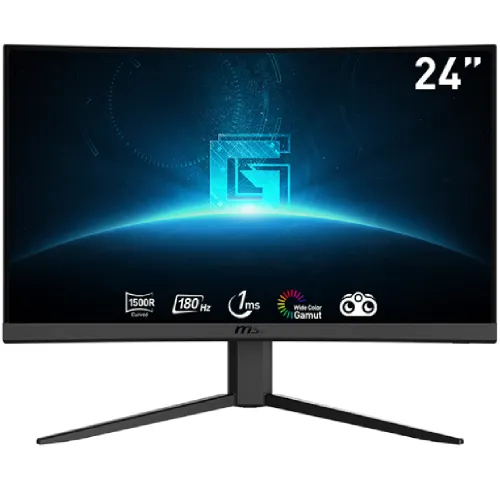
MSI G24C4 E2 23.6-inch 180Hz curved gaming monitor
The MSI G24C4 E2 is a 23.6-inch Full HD curved gaming monitor with a VA panel, 1500R curvature and a maximum 180Hz refresh rate. MSI specifies 1ms MPRT, 250 cd/m² brightness, 3000:1 typical contrast, Adaptive Sync and a wide colour gamut. Both HDMI 2.0b and DisplayPort 1.2a support 1920 × 1080 up to 180Hz. The monitor has two HDMI inputs, one DisplayPort input and one earphone output. MSI does not list built-in speakers. This description follows the exact MSI specification and user manual.
1500R curved VA display and Full HD image
The panel is 23.6 inches diagonally with 1920 × 1080 resolution and a 16:9 aspect ratio. MSI identifies a VA panel with 1500R curvature, a 521.395 × 293.284mm active display area and 0.27156mm pixel pitch. The anti-glare surface can help reduce reflections in indoor settings. Viewing angles are listed at 178 degrees horizontally and vertically. A curved screen brings the outer edges toward the viewer and may feel immersive when seated directly in front of it.
Full HD at this size can suit gaming and everyday desktop use. QHD displays provide more pixels and workspace, so compare alternatives if you spend long sessions reading small text, editing detailed images or keeping multiple windows open. VA panels can offer stronger native contrast than typical IPS panels, though dark pixel transitions may vary. Curvature is a matter of preference and can be less suitable for users who need geometrically flat visual references.
180Hz over HDMI 2.0b and DisplayPort 1.2a
MSI specifies a maximum refresh rate of 180Hz with a 48–180Hz vertical frequency range. Two HDMI 2.0b ports support Full HD at up to 180Hz, and the DisplayPort 1.2a input also supports Full HD up to 180Hz. Connect a compatible graphics output and cable, select 1920 × 1080 and choose 180Hz in the computer's operating-system display settings. Both video interfaces can be used for high refresh; the system source and cable still need to support the signal.
If 180Hz is not available, check the active input, graphics output, cable rating, driver, selected resolution and any dock or converter. Remove intermediaries while troubleshooting. A 180Hz display updates more often than a 60Hz display, but the game must render enough frames to use those updates. Actual smoothness depends on the GPU, game settings, frame pacing, input latency and monitor response behaviour.
1ms MPRT and 4ms GtG are different measures
MSI lists 1ms MPRT on the model specification. The product user manual also lists 4ms GtG for this model. MPRT and grey-to-grey response are different measurement methods and must not be treated as interchangeable. An MPRT mode can reduce perceived motion persistence under its operating conditions, but it does not mean every pixel transition completes in 1ms. Response varies with transition pair, overdrive setting and test conditions.
Motion clarity also depends on frame rate, refresh rate, dark-level transitions, content and any blur-reduction mode. VA panels may show darker transition trails in some scenes. Test the monitor with the games and settings you use; do not choose solely by a response-time headline. If you notice flicker or reduced brightness with a motion mode, compare normal operation and select the more comfortable image.
Adaptive Sync and variable refresh
MSI lists Adaptive Sync. Variable refresh can coordinate compatible graphics output with the monitor's refresh timing to help reduce tearing when frame rates fluctuate within the supported range. The activated range is listed as 48–180Hz. Actual operation depends on graphics hardware, driver, cable, selected input and display settings. Enable adaptive sync in the monitor menu and graphics control software, then test with the games you play.
Adaptive Sync cannot increase the computer's frame rate or guarantee tear-free output outside its supported conditions. Check the compatibility of your exact GPU and connection. If you see flicker, blanking or unstable behaviour, test another cable or input and review driver settings. A VRR feature name alone does not ensure identical compatibility across different graphics vendors.
Brightness, contrast and colour gamut
MSI specifies 250 cd/m² brightness and 3000:1 typical contrast, with a 100,000,000:1 dynamic contrast figure. Static and dynamic contrast are different measurements and are not directly comparable. A 250-nit screen can be appropriate for normal indoor lighting but may be harder to see in bright rooms or direct sunlight. Position the display to avoid strong reflections and adjust brightness to suit the space.
Colour gamut is listed as 88% Adobe RGB, 89% DCI-P3 and 112% sRGB under the CIE1976 standard. The display supports 16.7 million colours. These gamut figures do not prove calibration accuracy or uniformity and should not be presented as a colour-accuracy certification. If your work depends on exact colour, request a test report or calibrate the unit with a colorimeter. For general gaming and video, use the colour mode that appears natural to you.
HDMI, DisplayPort and headphone audio
Available connections are two HDMI 2.0b inputs, one DisplayPort 1.2a input and one earphone output. MSI specifies 1920 × 1080 up to 180Hz on HDMI and DisplayPort. Multiple HDMI devices can remain attached while you switch the active input. Confirm the cable standard, GPU port and refresh setting if a connected PC does not offer 180Hz.
MSI's specification lists an earphone output but no built-in speakers. Connect headphones or powered speakers to the output or directly to the computer or console. Select the correct audio device in the source settings. A video connection by itself does not produce sound from the monitor because speakers are not part of the listed configuration. Check the box for included cables and adapter before discarding the packaging.
Stand, VESA mount and security
The stand tilts from -5° to +20°. Height adjustment, swivel and pivot are not listed. A 100 × 100mm VESA pattern supports compatible arms or brackets. Check the bracket rating, screw length and clearance around the rear ports before mounting. The monitor includes a Kensington lock slot for a compatible security cable.
MSI lists dimensions at 537 × 225 × 429mm with stand and 537 × 68 × 326mm without stand. Net weight is approximately 3.5kg; the monitor head without stand is 2.8kg and gross package weight is 5.2kg. Measure the desk and mounting arm before setup. Support the screen during installation and avoid applying pressure to the display panel.
Power adapter and package contents
The monitor uses an external 20V, 2.25A power adapter and accepts 100–240V AC input. Use the adapter provided with the unit and check its label before replacing it. The connector fitting alone does not guarantee an electrically compatible adapter. Route the power cord so it does not pull when the screen is tilted or moved.
MSI product material lists an HDMI cable, power cord and quick guide, but regional bundles can differ. Ask the Bangladesh seller which video cable, adapter, stand components, screws and warranty documents are included. Inspect the serial label, screen, base and accessories when delivered. Keep the invoice, carton and warranty card for service claims.
Who should consider the MSI G24C4 E2?
This monitor may suit gamers looking for a 23.6-inch curved VA screen, Full HD resolution, 180Hz refresh and Adaptive Sync. Dual HDMI ports plus DisplayPort help connect a PC and console, and the 1500R curve can create an immersive view from a centered seating position. It can also handle everyday browsing, video and general computer tasks.
Consider a flat IPS monitor if you need consistent geometry for design or spreadsheets, a QHD model if extra detail matters, integrated speakers if you need built-in audio, or a height-adjustable stand for ergonomic changes. The 1ms MPRT headline is not a universal 1ms GtG guarantee; compare real response behaviour if motion performance is central to your decision.
Bangladesh price, stock and warranty
Bangladesh retailer pages checked for this review showed asking prices around ৳22,300–৳22,900. Stock and listed terms vary and may change. These are third-party observations, not a BiponiBD offer. Confirm the current price, exact G24C4 E2 model, delivery fee, return policy and package contents before ordering.
Some local sellers advertise a three-year warranty, but service provider and serial eligibility depend on the regional unit and seller. Ask who handles warranty service in Bangladesh, whether the serial is covered, what dead-pixel policy applies and how repair or replacement is handled. Get the terms in writing and retain the invoice, warranty card and serial evidence.
Frequently asked questions
What is the panel size and resolution?
MSI specifies a 23.6-inch VA panel with 1920 × 1080 Full HD resolution, 16:9 aspect ratio and 1500R curvature.
Does it support 180Hz over both HDMI and DisplayPort?
Yes. MSI lists two HDMI 2.0b ports and one DisplayPort 1.2a, with Full HD up to 180Hz on HDMI and DP. Use a compatible graphics output and cable, then select 180Hz in display settings.
What does 1ms MPRT mean?
MSI lists a 1ms MPRT mode. MPRT is different from GtG response time; the user manual lists 4ms GtG. MPRT does not mean every pixel transition is 1ms and may have mode-specific effects.
Does this monitor have built-in speakers?
No. MSI lists one earphone output but no speakers. Connect headphones or external speakers to the source device or monitor audio output.
What are the contrast and colour specifications?
MSI lists 3000:1 typical contrast and 250 cd/m² brightness. Colour gamut is 88% Adobe RGB, 89% DCI-P3 and 112% sRGB under CIE1976; gamut figures do not establish calibration accuracy.
Does it support FreeSync or Adaptive Sync?
MSI lists Adaptive Sync. Variable-refresh compatibility depends on the graphics card, driver, connection and monitor settings. Check the exact GPU and input configuration.
How curved is the screen?
The VA panel has 1500R curvature. The curve wraps the display toward the viewer and may feel immersive at a typical desktop viewing distance; preference varies by user and task.
Can I mount it on a monitor arm?
MSI specifies a 100 × 100mm VESA pattern. Check screw size and the arm load rating. The supplied stand tilts from -5° to +20° but has no listed height or swivel adjustment.
What adapter and ports are included?
The monitor uses an external 20V, 2.25A adapter and has two HDMI 2.0b ports, one DisplayPort 1.2a and an earphone output. Confirm the regional package contents with the seller.
What is the price and warranty in Bangladesh?
Bangladesh seller listings checked showed approximately ৳22,300–৳22,900 and some advertise a three-year warranty. These are third-party observations, not a BiponiBD offer. Confirm current stock, serial eligibility, service provider and written warranty terms.
Key note: MSI specifies 23.6-inch 1500R VA, 180Hz over HDMI/DP, 1ms MPRT, 3000:1 typical contrast, no built-in speakers and a 100 × 100mm VESA mount.