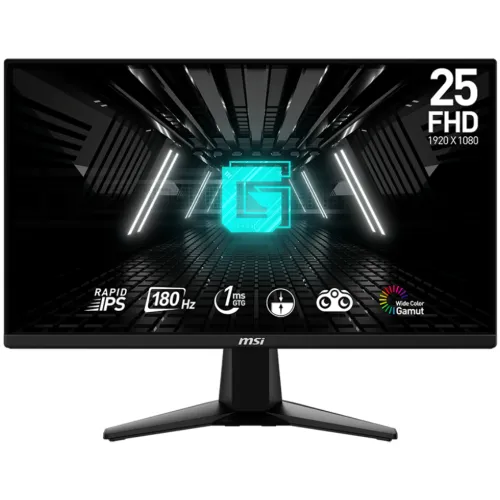
The MSI G255F is a 24.5-inch Full HD Rapid IPS monitor with 180Hz, Adaptive-Sync, 1ms GTG and 1ms MPRT specifications. MSI lists two HDMI 2.0b inputs, DisplayPort 1.2a, headphone-out, 300-nit brightness and a tilt-only stand. HDR support and built-in speakers are not listed. Read the full specifications and Bangladesh buying notes below.
Overview and intended use
The MSI G255F is a 24.5-inch Full HD Rapid IPS monitor with a 180Hz maximum refresh rate, 1ms GTG and 1ms MPRT specifications, and Adaptive-Sync. It is aimed at desktop gaming and everyday use where motion clarity and high refresh matter. MSI lists two HDMI 2.0b inputs, one DisplayPort 1.2a input, headphone-out, a 100 × 100mm VESA pattern and a tilt stand. The screen is anti-glare and has a flat 16:9 format.
This is a 1920 × 1080 SDR monitor; MSI lists HDR support as N/A. Its 24.5-inch size keeps a competitive gaming workspace compact, while FHD is generally less demanding to render than QHD. The stand adjusts by tilt only, so buyers who need height or pivot should plan for a VESA arm. Product response figures and refresh capabilities depend on selected mode, source hardware and connection.
Panel, image size and resolution
MSI specifies a 24.5-inch (62.2cm) Rapid IPS panel with 1920 × 1080 resolution, 16:9 aspect ratio and a flat screen. The active viewing area measures 543.744 × 302.616mm. MSI’s detailed specification lists 0.2832mm horizontal and 0.2802mm vertical pixel pitch. The anti-glare surface helps reduce reflections from ordinary room lighting, although strong direct light can still affect visibility.
Full HD at 24.5 inches is a common gaming format that keeps the pixel load lower than QHD. That can make it easier for a computer to deliver high frame rates, but sharpness and small-text detail depend on viewing distance and eyesight. If your work involves fine text or design at close range, compare a higher-resolution panel. Scaling can change text size but cannot add physical screen pixels.
180Hz refresh and Adaptive-Sync
MSI lists a maximum 180Hz refresh rate and an Adaptive-Sync activated range of 48–180Hz. A higher refresh can make supported motion appear smoother than 60Hz when the graphics card produces enough frames. Adaptive-Sync can coordinate display refresh with a compatible source to reduce tearing within its supported range. MSI’s datasheet names AMD FreeSync; the exact experience depends on the graphics card, driver, input, cable and game frame rate.
Connect directly to a capable graphics output where possible, set Full HD and select 180Hz in advanced display settings. MSI lists HDMI 2.0b and DisplayPort 1.2a inputs, and says both support 1920 × 1080 up to 180Hz. Verify the active signal rather than assuming a cable or connector automatically provides the maximum mode. If variable refresh causes flicker or instability in a particular game, check the driver, OSD settings and compatibility guidance.
GTG and MPRT response specifications
MSI lists both 1ms GTG and 1ms MPRT response values. GTG describes a transition between grey levels, whereas MPRT is a motion-picture response measurement. They are different approaches, so the identical number does not mean the display has a one-millisecond response in every scenario. Neither value measures end-to-end input delay from controller or mouse to visible output.
Motion clarity also depends on overdrive setting, refresh rate, frame pacing and the game’s rendering. Use the monitor OSD and MSI guide to select a response setting that looks clean; stronger overdrive can cause visible overshoot on some transitions. No independent response or input-lag test is claimed here. For competitive play, compare measured motion performance and consider whether your PC can sustain high frame rates in the games you use.
Brightness, contrast and color
MSI lists 300 nits SDR brightness and a 1000:1 static contrast ratio. It also publishes a 100,000,000:1 dynamic contrast ratio, which is a dynamic marketing measure and should not be compared with the static figure as if they describe the same panel condition. Viewing angles are 178° horizontally and vertically. Color output is listed as 16.7 million colors with 8-bit depth.
MSI publishes color-space area and overlap values using CIE1976 and CIE1931 conventions. For example, sRGB CIE1976 is 99% area and 93% overlap; DCI-P3 CIE1976 is 78%/78%. Area percentages can exceed 100% because they compare gamut size, not simply coverage. They do not demonstrate factory calibration, unit uniformity or low delta-E. For color-critical work, use independent measurements and calibration.
Sync, gaming features and HDR expectations
MSI lists Adaptive-Sync/AMD FreeSync, Night Vision and Less Blue Light. The monitor also has an anti-glare surface. Adaptive-Sync can help reduce tearing when supported by the computer, but its effective behavior depends on the GPU, driver and frame-rate range. The G255F is specified as an SDR display: MSI’s datasheet says HDR support is N/A. Do not treat an HDR mode in a generic monitor menu or seller title as proof that this model accepts HDR.
Night Vision and color settings can alter shadow visibility or saturation according to user preference; they do not guarantee a competitive advantage or correct color. Less Blue Light changes the display’s color appearance and may be useful for comfort, but cannot guarantee that eye fatigue will not occur. Adjust brightness, room lighting and breaks. This product description does not claim independent gaming or eye-comfort test results.
Ports, audio and connected devices
MSI lists two HDMI 2.0b inputs, one DisplayPort 1.2a input and one headphone-out. The monitor has a Kensington lock slot. HDMI and DisplayPort allow multiple connected sources, while the headphone jack can route audio for personal listening. MSI does not list built-in speakers, USB ports, USB-C or a USB hub. Plan to use the computer or console for audio output unless a specific regional configuration states otherwise.
The regional MSI specification lists a single HDMI cable and a power cord in the box; it lists no DisplayPort cable. Retail bundles can differ, so check before purchase. When using a PC, connect to the discrete graphics card if one is installed. For a console, confirm the console output mode. If no picture appears, check input selection, cable seating, source resolution and refresh settings using the troubleshooting steps in the user manual.
Stand, VESA and desk placement
MSI specifies tilt from -5° to +20°. Height adjustment, swivel and pivot are listed as unavailable. The monitor supports 100 × 100mm VESA mounting and a Kensington lock. With stand it measures 557.1 × 220.1 × 418.5mm and weighs 3.24kg; without stand it is 557.1 × 66.4 × 326.9mm and 2.87kg. The stand footprint is 318 × 220.1mm.
If you need to raise the panel, rotate to portrait or swing it sideways, a compatible VESA arm can add those movements. Check the arm’s load limit and correct screw length, install on a stable desk and leave cable slack. Place the screen at a comfortable height and distance. Keep ventilation openings clear and follow MSI’s manual when cleaning or mounting the display.
Power, warranty and Bangladesh buying checks
MSI lists a mains power cable and 100–240V AC at 50/60Hz. The manufacturer specification reports 18kWh per 1,000 hours on-mode energy, 0.5W standby and 0.3W off. MSI’s specification page lists a 36-month warranty for the identified regional part; Bangladesh retailers advertise three years. Warranty acceptance still depends on the local serial number and seller service channel.
Skyland displayed ৳25,000 and In Stock, Monarch IT ৳25,400 and In Stock, and TechLand ৳25,200 while Out of Stock when checked. Those snapshots can change and do not establish a BiponiBD price or inventory. Before ordering, confirm the G255F part number, final price, stock, cable bundle, local warranty provider, serial eligibility, required invoice and packaging, and claim location. Keep the box and invoice.
Key features
- 24.5-inch (62.2cm) flat Rapid IPS screen with Full HD 1920 × 1080 resolution and 16:9 aspect ratio.
- 180Hz maximum refresh with an Adaptive-Sync range of 48–180Hz when the source and connection support it.
- 300-nit SDR brightness, 1000:1 static contrast and 178°/178° viewing angles listed by MSI.
- Separate 1ms GTG and 1ms MPRT response figures; these are not equivalent measurement methods or input-lag results.
- Two HDMI 2.0b inputs, one DisplayPort 1.2a input and one headphone-out.
- AMD FreeSync/Adaptive-Sync, Night Vision, anti-glare treatment and Less Blue Light are listed.
- Tilt adjustment from -5° to +20°, 100 × 100mm VESA mount and Kensington lock.
- No integrated speaker, swivel, pivot or height adjustment is listed.
- MSI datasheet lists HDR as N/A; do not buy this model expecting HDR input support.
- HDMI cable, power cord and quick guide are listed in MSI regional specifications; local packaging can differ.
Pros
- Rapid IPS, 180Hz and Adaptive-Sync can provide smooth motion with compatible graphics hardware and settings.
- The 24.5-inch Full HD panel is a common competitive gaming format that is less demanding to render than QHD at similar frame rates.
- Two HDMI 2.0b and one DisplayPort 1.2a inputs support multiple common video sources.
- A 100 × 100mm VESA mount and Kensington lock are listed, alongside tilt adjustment.
- MSI publishes response, sync range, power and color-space figures for the exact G255F model.
Cons and buying considerations
- The stand tilts only; height, swivel and pivot adjustments are not listed.
- The monitor does not list HDR support or built-in speakers.
- A 1ms figure does not describe every pixel transition or input lag; MSI separately lists GTG and MPRT.
- The listed color-space area/overlap numbers do not guarantee individual-unit calibration or color accuracy.
- Bangladesh offer price and warranty depend on seller and serial; no BiponiBD offer has been confirmed.
Full specifications
- Brand: MSI
- Model: G255F
- PartNumber: 9S6-3BC01M-002 (MSI regional specification; confirm local box label)
- ScreenSize: 24.5 inches / 62.2cm
- Panel: Rapid IPS
- Resolution: 1920 × 1080 Full HD
- AspectRatio: 16:9
- PixelPitch: 0.2832mm horizontal × 0.2802mm vertical (MSI specification page)
- ActiveArea: 543.744 × 302.616mm
- RefreshRate: 180Hz; Adaptive-Sync activated range 48–180Hz
- Brightness: 300 nits SDR
- ContrastRatio: 1000:1 static; 100,000,000:1 DCR (dynamic marketing ratio)
- ViewingAngle: 178° horizontal / 178° vertical
- ResponseTime: 1ms GTG and 1ms MPRT (distinct methods; not input lag)
- ColorSupport: 16.7 million colors; 8-bit
- ColorGamut: MSI publishes area/overlap pairs: sRGB CIE1976 99%/93%; sRGB CIE1931 105%/95%; Adobe RGB CIE1976 84%/82%; DCI-P3 CIE1976 78%/78%. These are not independent calibration results.
- Surface: Anti-glare
- HDR: Not supported/listed (MSI datasheet says HDR Support: N/A)
- Sync: Adaptive-Sync; MSI datasheet identifies AMD FreeSync
- Ports: 2 × HDMI 2.0b; 1 × DisplayPort 1.2a; 1 × headphone-out; Kensington lock
- Audio: No built-in speakers; 1 × headphone-out
- Stand: Tilt -5° to +20°; no swivel, pivot or height adjustment listed
- VESA: 100 × 100mm
- Power: 100–240V AC, 50/60Hz; MSI lists 18kWh/1000h on-mode consumption, 0.5W standby, 0.3W off; mains power cable
- Dimensions: With stand 557.1 × 220.1 × 418.5mm (W×D×H); without stand 557.1 × 66.4 × 326.9mm
- Weight: 3.24kg with stand; 2.87kg without stand; 5.13kg gross
- Included: MSI page lists one HDMI cable, one power cord and quick guide; no DisplayPort cable is listed in that regional spec.
- Warranty: MSI specification page lists 36 months; Bangladesh retailers advertise 3 years. Verify local serial eligibility and official service channel.
- LocalMarketObservation: Skyland showed ৳25,000 and In Stock; Monarch IT showed ৳25,400 and In Stock; TechLand displayed ৳25,200 but Out of Stock. Retailer snapshots only.
- Sources: [object Object]
- CheckedAt: 2026-11-08T20:26:34.597Z
Frequently asked questions
What are the size and resolution?
MSI specifies a 24.5-inch Rapid IPS monitor with Full HD 1920 × 1080 resolution and a 16:9 aspect ratio.
Does it support 180Hz?
Yes. MSI lists 180Hz and an Adaptive-Sync activated range of 48–180Hz. The graphics output, cable and display settings must support the chosen mode; verify 1920 × 1080 at 180Hz in system settings.
What is the difference between 1ms GTG and 1ms MPRT?
MSI lists both 1ms GTG and 1ms MPRT, but they use different measurement approaches. MPRT concerns perceived moving-image persistence while GTG measures pixel transition. Neither is a measurement of system input lag.
What video connections are available?
MSI lists two HDMI 2.0b inputs, one DisplayPort 1.2a input and one headphone-out. A Kensington lock is also listed.
Does it have built-in speakers?
No integrated speakers are listed by MSI. Use a headset through the headphone-out or connect separate speakers to the computer.
Does the G255F support HDR?
MSI’s datasheet lists HDR support as N/A. Treat the G255F as an SDR monitor and do not infer HDR from generic gaming descriptions.
What are the brightness and contrast?
MSI lists 300 nits SDR brightness, 1000:1 static contrast and a 100,000,000:1 dynamic contrast ratio. The dynamic figure is not a static panel contrast measurement.
What color gamut does it cover?
MSI publishes CIE area and overlap figures, including sRGB CIE1976 99%/93% and DCI-P3 CIE1976 78%/78%. Those do not establish factory calibration or guarantee accurate color on each unit.
Can I adjust the stand or mount it?
The stand tilts from -5° to +20°. Height, swivel and pivot adjustment are not listed. A 100 × 100mm VESA mount supports compatible monitor arms.
Which FreeSync/Adaptive-Sync range is listed?
MSI specifies Adaptive-Sync activation from 48Hz to 180Hz and identifies AMD FreeSync in the datasheet. Compatibility depends on GPU, driver, port, cable and settings.
What is the current Bangladesh price and warranty?
Skyland showed ৳25,000/In Stock, Monarch IT ৳25,400/In Stock, and TechLand ৳25,200/Out of Stock when checked. MSI lists 36 months and local sellers advertise 3 years; confirm the live terms and serial eligibility.
What comes in the box?
MSI regional specifications list one HDMI cable, one power cord and a quick guide. They do not list a DisplayPort cable. Confirm accessories for the exact local package.
Source note: MSI product specifications and datasheet are the primary technical sources; local stock, price and warranty are retailer observations. No BiponiBD offer or hands-on test is claimed. Sources checked 2026-11-08T20:26:34.597Z.