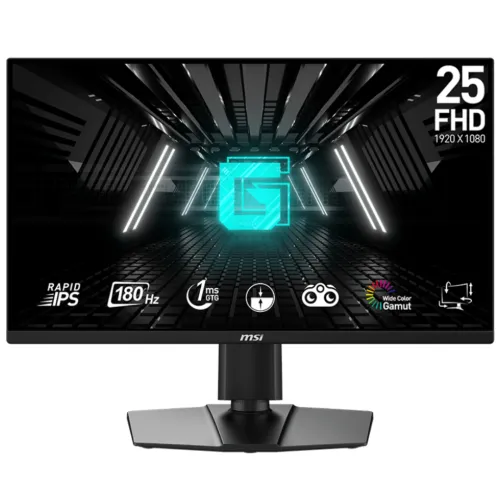
The MSI G255PF E2 is a 24.5-inch Full HD Rapid IPS gaming monitor with a 180Hz maximum refresh rate and 1ms GtG specification. MSI lists AMD FreeSync, a four-way adjustable stand, two 2W speakers, two HDMI 2.0b inputs and DisplayPort 1.2a. The combination supports a compact gaming setup that can also serve everyday desktop tasks. The G255PF E2 is a specific model and should not be mixed with MSI G255F or other similarly named G-series monitors. MSI’s specification identifies 180Hz at Full HD over HDMI and DisplayPort, along with integrated speakers and a 130mm height-adjustable stand. Confirm the model label and local serial before relying on retailer photos or bundled accessory details.
Rapid IPS, resolution and viewing
The flat 24.5-inch panel uses Rapid IPS technology with 1920 × 1080 native resolution, 16:9 aspect ratio and 0.2832 × 0.2802mm pixel pitch. MSI lists 178-degree horizontal and vertical viewing angles. The anti-glare surface helps reduce direct reflections from typical room lighting.
Full HD resolution is a practical match for high frame rates and a broad range of PC setups. It offers less fine detail and desktop workspace than QHD at the same or larger size. Choose native resolution in the computer display settings for the clearest image. If you use small text or detailed creative software for long sessions, compare the pixel density and scaling options with a higher-resolution alternative.
180Hz refresh and connection modes
MSI lists up to 180Hz at 1920 × 1080 on DisplayPort 1.2a and HDMI 2.0b. A high refresh rate can make compatible motion and pointer movement look smoother, but it does not guarantee that a game or computer outputs 180 frames each second. Graphics card performance, game settings, source device, cable and driver all influence the actual frame rate.
Connect using a suitable HDMI 2.0b or DisplayPort 1.2a cable, select the active input and choose 1920 × 1080 at the highest supported refresh in the operating system. If 180Hz does not appear, verify the cable, GPU port, driver, color output settings and source mode. Check the monitor information screen after selecting the rate. Stable frame pacing matters along with the maximum refresh specification.
Response time, FreeSync and motion
MSI specifies 1ms GtG response. Gray-to-gray timing is a pixel-transition measurement; it is not the same as full system input latency. Actual transitions vary by color change and display mode. MSI also lists AMD FreeSync and a vertical signal range from 48 to 180Hz for supported operating conditions.
Enable FreeSync in the monitor and graphics settings if the source supports it, then test with a compatible game. Variable refresh can help coordinate display updates with frame output within its range, but it does not guarantee artifact-free operation in every game or configuration. Use the response/overdrive option that looks cleanest; aggressive settings can cause overshoot. No independent response-time test is claimed here.
Brightness, contrast and color
MSI lists 300 cd/m² typical brightness and 1000:1 typical static contrast, along with 16.7 million colors. The manufacturer also lists Adobe RGB 82%, DCI-P3 78% and sRGB 99% using the CIE1976 standard. These gamut figures describe color-space area and are not a factory calibration report or a measured Delta E result.
Set brightness for the room and reduce glare rather than relying on the maximum level. If you edit photos or prepare print output, use a calibrated and color-managed workflow; a gamut percentage does not prove color accuracy, uniformity or white-point calibration on an individual unit. The 27G4 from AOC and other MSI monitors can have different gamut claims, so do not carry over specifications from another model.
Speakers, ports and connected devices
Two integrated 2W speakers provide basic sound without separate desktop speakers. The rear connections are one DisplayPort 1.2a, two HDMI 2.0b and one headphone-out, along with AC power and a Kensington lock. MSI’s product page does not list USB-C, USB hub or camera functions.
HDMI allows two digital sources to stay connected while DisplayPort supports a compatible PC. Use the OSD to select an input. The built-in speakers suit basic system audio, but external speakers may be better for music or larger rooms. For private listening, confirm the audio route from the source and connect headphones through a compatible output; MSI lists a headphone-out on this display.
Ergonomic stand, VESA and placement
The included stand adjusts from 0 to 130mm in height, tilts -5° to +20°, swivels -30° to +30° and pivots -90° to +90°. MSI lists a 100 × 100mm VESA pattern. This lets users adjust the viewing height and angle or rotate the panel for portrait use, as well as move to a compatible arm.
Measure desk space before assembly. The monitor with stand measures about 557.1 × 227.9 × 511.9mm and weighs 5.3kg net; without stand it measures 557.1 × 66.4 × 326.9mm. Allow cable slack before swiveling or pivoting. A VESA arm should match the mounting pattern, fasteners and weight rating. Use the manufacturer’s instructions and support the panel during installation.
Power and maintenance
MSI specifies an internal power board, AC 100–240V at 50/60Hz, typical consumption of 18W, saving-mode power below 0.5W and off-mode power below 0.3W. These are manufacturer figures; actual consumption can vary with brightness, refresh settings and use. Keep the vents unobstructed and use a stable surface.
Use the supplied power cable and a suitable grounded outlet. Unplug safely before moving or cleaning the screen. Wipe it with a soft microfiber cloth and do not spray liquid directly onto the panel. Keep the box, serial label and invoice for warranty support. Ask the seller to confirm all included cables and stand components in the local package, since regional bundles may differ.
Bangladesh availability, price and warranty
Price observations found Speedtech at ৳25,700 and Monarch at ৳26,500. These seller pages may update, and stock can vary by location and import channel. They do not confirm a BiponiBD price, available inventory, shipping charge or final offer. Confirm the exact G255PF E2 model before placing an order.
Some local retailers advertise three years of warranty. Before buying, request written confirmation of the service provider, serial eligibility, claim location, invoice and box requirements, and dead-pixel policy. Keep the invoice and serial number. The listing does not claim that an advertised term is verified for a specific unit or that retailer availability represents BiponiBD stock.
Who this monitor may suit
The G255PF E2 may suit a PC gamer who wants 180Hz Full HD, an IPS panel, variable refresh, built-in speakers and a flexible stand in a 24.5-inch format. Its HDMI and DisplayPort inputs allow different source devices, and the adjustable stand can support both landscape and portrait setups.
It may be less suitable if you need QHD detail, USB-C docking, a USB hub, very bright HDR, integrated webcam or premium external audio. The model lists FreeSync and HDR Ready in some retailer descriptions, but MSI’s cited official specification confirms FreeSync and does not establish DisplayHDR certification. Compare your intended use and graphics capability before choosing solely by refresh rate.
Key features
- 24.5-inch flat Rapid IPS display with Full HD 1920 × 1080 resolution.
- 180Hz maximum refresh rate through DisplayPort 1.2a and HDMI 2.0b per MSI timing notes.
- 1ms GtG response specification; actual transition behavior depends on mode and content.
- AMD FreeSync support and vertical scan range of 48–180Hz.
- 300 cd/m² typical brightness and 1000:1 typical static contrast.
- Integrated stereo speakers rated 2 × 2W, with a headphone-out connection.
- Two HDMI 2.0b inputs plus one DisplayPort 1.2a and Kensington security lock.
- Four-way stand adjustment: height, tilt, swivel and pivot; 100 × 100mm VESA.
- 16.7 million colors and MSI CIE1976 gamut figures, explicitly separate from calibration accuracy.
- Internal power supply and anti-glare display surface.
Frequently asked questions
What are the screen size and resolution?
MSI specifies a flat 24.5-inch Rapid IPS panel with 1920 × 1080 Full HD resolution and a 16:9 aspect ratio.
Does the G255PF E2 support 180Hz over HDMI?
Yes. MSI lists Full HD up to 180Hz over its HDMI 2.0b inputs as well as DisplayPort 1.2a. The computer, cable, driver and chosen output timing must support the mode.
What does 1ms GtG mean?
It is MSI’s gray-to-gray pixel transition specification. It does not represent end-to-end system input latency and does not guarantee every pixel transition or overdrive mode behaves identically.
Does it support AMD FreeSync?
Yes. MSI lists AMD FreeSync with a 48–180Hz vertical range. A compatible graphics device, connection, driver and settings are required.
Does the monitor have built-in speakers?
Yes. MSI lists integrated 2 × 2W speakers. For louder or fuller sound, use external speakers or headphones through a compatible device.
What ports are available?
One DisplayPort 1.2a, two HDMI 2.0b, a headphone-out, AC input and Kensington lock are listed.
Can I adjust monitor height and rotate the display?
The stand supports height adjustment from 0 to 130mm, tilt from -5° to +20°, swivel from -30° to +30° and pivot from -90° to +90°.
What mount standard does it use?
MSI lists a 100 × 100mm VESA mount. Check the arm’s load rating and use appropriate fasteners before installation.
What is the color gamut and is the screen calibrated?
MSI lists Adobe RGB 82%, DCI-P3 78% and sRGB 99% using CIE1976. Those gamut values are not a calibration report or measured color-accuracy result.
What is the price in Bangladesh?
Retail observations showed Speedtech at ৳25,700 and Monarch at ৳26,500. Prices and stock change and do not establish a BiponiBD offer.
What warranty is available locally?
Some Bangladesh sellers advertise three years. Confirm the exact unit’s serial eligibility, provider, service center, invoice requirements and dead-pixel terms in writing.
What comes in the box?
MSI lists a power cable. Ask the seller to confirm the exact local carton’s cables, stand parts, documentation and warranty card before purchase.
Source note: Technical details use MSI’s exact model specification, datasheet and user manual. Bangladesh price and warranty are retailer observations checked 2026-11-08T21:18:57.036Z; they do not verify a BiponiBD offer or local serial coverage. No independent hands-on test is claimed.