Pros
- 180Hz refresh with G-SYNC Compatible support for compatible systems.
- Rapid IPS and broad 178° viewing-angle specification.
- Two HDMI inputs plus DisplayPort support several source devices.
- VESA mounting and a tilt-adjustable stock stand.

All categories
 New condition
Monitors
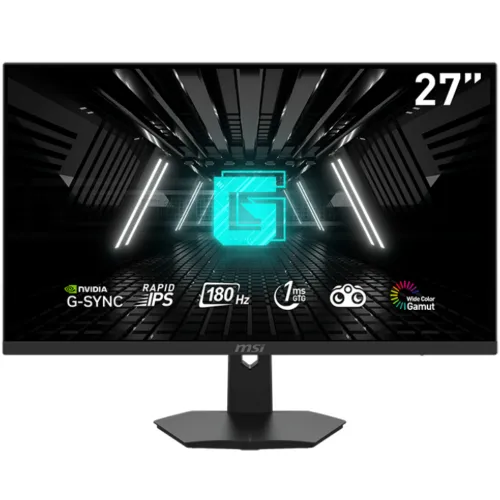
MSI · G274F 27-inch 180Hz
27-inch FHD Rapid IPS monitor with 180Hz, G-SYNC Compatible, 1ms response and HDMI 2.0/DisplayPort inputs.
Price unavailable
Price range updating
No verified price is available yet. Store offers will appear when merchants publish them.
Compare store prices
No live offers for this variant
Offers will appear when merchants publish them.
Loading history…
Product story
MSI G274F is a 27-inch Full HD Rapid IPS gaming monitor. MSI lists 1920 × 1080 resolution, 180Hz refresh rate, 1ms MPRT and 1ms minimum GtG, G-SYNC Compatible variable refresh, HDR Ready, 250-nit SDR brightness, two HDMI 2.0 inputs and one DisplayPort 1.2a. It has an anti-glare screen, headphone output, tilt-only stand and 75 × 75mm VESA mount. The manufacturer data corrects the catalog’s inaccurate 75 × 75 compatibility (correct), brightness (250 nit), port set and stand details. This is G274F, not MAG 274F or another MSI 27-inch model; confirm the full name and part number on the carton.
The display measures 27 inches diagonally with an active area of 597.6 × 336.15mm and a native resolution of 1920 × 1080 pixels in a 16:9 aspect ratio. MSI lists a pixel pitch of 0.31125mm. Full HD can be easier for a graphics card to drive at high frame rates than QHD, but text and fine interface elements have less pixel density than on a 27-inch QHD monitor. Set the computer to 1920 × 1080 for the native image. Viewing distance, operating-system scaling and personal preference affect how sharp the screen appears.
MSI identifies the panel as Rapid IPS, with 178° horizontal and vertical viewing angles and an anti-glare surface. The panel is flat and uses a frameless design. MSI lists 1000:1 contrast and 16.7 million colors with an 8-bit (6-bit + FRC) configuration. These values describe the published specification and do not independently establish uniformity, calibration or the performance of a particular unit. The anti-glare treatment can reduce reflections but does not eliminate them; place the display away from direct bright windows and adjust room lighting for comfortable viewing.
The manufacturer lists 180Hz refresh and a vertical signal range of 48–180Hz. MSI also gives a horizontal signal frequency of 31–201kHz. Achieving 180Hz requires a compatible graphics output, supported input timing, cable and system setting. After connecting, choose 1920 × 1080 and 180Hz in the operating system or graphics control panel, and verify the monitor’s information page. A high refresh rating does not cause the computer to render more frames; the game, graphics card, driver, connection and settings all contribute to actual frame rate.
MSI lists 1ms MPRT and 1ms minimum GtG. MPRT and GtG are different measurement methods, and “minimum” does not mean every pixel transition remains at 1ms in all settings. Motion blur reduction, overdrive and response options can change brightness or create overshoot. Compare the available modes with moving content and use the setting that produces the clearest image without distracting artifacts. Actual motion performance depends on refresh, frame rate, pixel transitions, source and selected mode rather than one response-time label alone.
MSI lists G-SYNC Compatible as its dynamic refresh technology and a 48–180Hz activated range. Variable refresh can synchronize compatible GPU output with the monitor within supported conditions, helping reduce tearing. Enable the feature in the monitor and graphics driver where supported, and check the connection, driver and frame-rate range if it is unavailable. The manufacturer’s designation is G-SYNC Compatible; do not describe this monitor as having a dedicated G-SYNC hardware module unless a source specifically establishes that. Adaptive-sync behavior can differ among graphics cards and input modes.
MSI specifies HDR Ready and 250 nits SDR brightness. “HDR Ready” is the manufacturer’s feature label; it does not by itself establish a VESA DisplayHDR certification, local dimming or a particular peak HDR luminance. The published contrast ratio is 1000:1, and no local-dimming system is listed in the specifications cited here. Use HDR only when the source and operating system support it, and compare the resulting image with SDR because tone mapping varies. Do not infer premium HDR performance solely from the HDR Ready wording.
MSI publishes color-space area/overlap figures: sRGB 134%/99% in CIE 1976 and 137%/99% in CIE 1931; Adobe RGB 115%/94% and 101%/90%; DCI-P3 107%/98% and 101%/96%, respectively. These paired figures distinguish gamut area from overlap and should not be shortened to an unqualified coverage number. MSI also lists NTSC and Rec.709/Rec.2020 values. Wide gamut does not guarantee accurate color. For design, photography or print, use the correct profile, color-managed applications and a calibrated panel; confirm whether the vivid preset needs adjustment for sRGB work.
The official specification lists two HDMI 2.0 inputs with HDCP 2.3 and one DisplayPort 1.2a input with HDCP 2.3. It also lists one headphone output. The product data does not list USB-C, a USB hub, VGA or built-in speakers. The box includes one HDMI cable but lists no DisplayPort cable, so buyers planning a DisplayPort setup may need to obtain a compatible cable separately. Input capability and available timing depend on the connected device and cable. Confirm which input is used for a particular computer or console and check its output modes.
The included stand provides tilt adjustment from -5° to +20°. MSI lists 75 × 75mm VESA mounting. Its specification does not list height adjustment, swivel or pivot for the included stand; the previous catalog’s “Height Adjustment: N/A” is retained in substance, and other ergonomic motions are not promised. A VESA arm can add movement if the bracket, fasteners and load rating match. MSI lists 5.3kg net weight with stand and 3.95kg without stand. Check desk clearance, monitor placement and cable slack before mounting or repositioning.
MSI specifies an external 12V 3A adapter, input voltage 100–240V at 50/60Hz, 21W on-mode consumption, 0.5W standby and 0.3W off-mode consumption. It lists a C13 power cord, one AC adapter, one HDMI cable, four VESA screws and a quick guide. The listed gross weight is 7.2kg, with package dimensions of 72.8 × 15.8 × 48.7cm. Regional accessory bundles can vary, so compare the delivered package with the seller’s invoice. Keep ventilation openings clear and use the supplied adapter for the correct model.
Use a computer or console with a compatible HDMI 2.0 or DisplayPort output and configure the monitor at its native Full HD resolution. To target 180Hz, confirm the device, selected port, cable and system timing all support that mode. For G-SYNC Compatible operation, use a supported graphics card and current driver and enable variable refresh in the relevant settings. An adapter, dock or older console can reduce available resolution or refresh. If the monitor remains at 60Hz, check the display control panel and cable path before assuming the panel is faulty.
The official G274F spec sheet reviewed here does not list a low-blue-light feature, so this page does not carry forward the previous “Low Blue Light: Yes” claim without manufacturer backing. It does list an anti-glare surface. Adjust brightness to the room, use readable scaling and take breaks during long sessions. The monitor includes on-screen picture and gaming controls; their precise behavior is described in the user manual. If a setting changes color or motion appearance, return to the default mode and adjust one control at a time.
MSI lists a headphone output but does not list built-in speakers. Plan for headphones or separate speakers, and select the monitor as the audio endpoint when using an HDMI or DisplayPort source if audio is routed through it. The headphone output is not a speaker system. Confirm the required audio cable and connection with the actual source device. This distinction is especially useful for console users who expect sound directly from a monitor.
MSI’s specification page lists a 36-month warranty field for the model, but local warranty eligibility and service conditions depend on the country, seller, serial and invoice. The catalog currently says three years, which matches the duration shown in MSI’s sheet, but does not by itself prove coverage for a specific BiponiBD unit. Ask who handles service, where the authorized center is, whether serial registration is needed, what the dead-pixel policy covers and whether the warranty is official. Confirm current price and stock with BiponiBD before checkout; no live offer was verified in this review.
G274F combines 180Hz Full HD, Rapid IPS, G-SYNC Compatible variable refresh, manufacturer-listed 1ms MPRT/1ms minimum GtG, two HDMI inputs, DisplayPort, anti-glare coating and a 75 × 75mm VESA pattern. Trade-offs include 27-inch Full HD pixel density, 250-nit SDR brightness, a tilt-only included stand and no listed USB hub, USB-C or built-in speakers. HDR Ready is a limited manufacturer label and should not be confused with a certification. Consider the connection, desk space, sound setup and resolution preference alongside gaming refresh.
Confirm the carton and rear label identify MSI G274F and part number 9S6-3CC2CH-239 for the listed specification. Verify Full HD at up to 180Hz over the chosen input, and check the included HDMI cable, adapter, power cord and VESA screws. Ask for the local warranty provider and written dead-pixel/return terms. On setup choose 1920 × 1080 at 180Hz, enable G-SYNC Compatible if supported, and test the headphone output. If you require height adjustment, speakers, USB-C or a USB hub, confirm those features separately because they are not listed in the cited official specification.
MSI G274F is a 27-inch 1920 × 1080 Rapid IPS gaming monitor with 180Hz refresh, 1ms MPRT and 1ms minimum GtG, G-SYNC Compatible at 48–180Hz, HDR Ready, 250-nit SDR brightness, 1000:1 contrast, two HDMI 2.0 inputs, one DisplayPort 1.2a, headphone output, tilt stand and 75 × 75mm VESA mounting. It uses an external 12V 3A adapter and MSI lists a 36-month warranty. The manufacturer details have been used to correct and expand the previous sparse catalog content. Confirm exact local serial coverage and current BiponiBD offer before purchase.
Helpful answers
Product-specific answers maintained with the catalog information.
MSI lists 1920 × 1080 Full HD and 180Hz.
The exact model specification identifies a 27-inch Rapid IPS panel.
MSI lists G-SYNC Compatible dynamic refresh with a 48–180Hz activated range.
MSI lists 1ms MPRT and 1ms minimum GtG; the measurement methods differ.
MSI labels it HDR Ready. This is not, by itself, proof of a VESA DisplayHDR certification.
Two HDMI 2.0 inputs and one DisplayPort 1.2a input, plus a headphone output.
Neither built-in speakers nor USB-C/USB hub is listed in MSI’s exact-model specification.
MSI lists tilt from -5° to +20° and 75 × 75mm VESA mounting; height adjustment is not listed.
MSI lists 36 months; confirm the local seller, serial eligibility and service terms for the exact unit.
Customer community
Become a merchant
Join BiponiBD, publish accurate offers and start free.