Pros
- WQHD resolution and high refresh rate suit PC gaming.
- Rapid IPS and adaptive sync support smooth motion.
- Multiple input types include USB-C video.
- Height-adjustable stand supports flexible positioning.

All categories
 New condition
Monitors
MSI · G274QPF E2
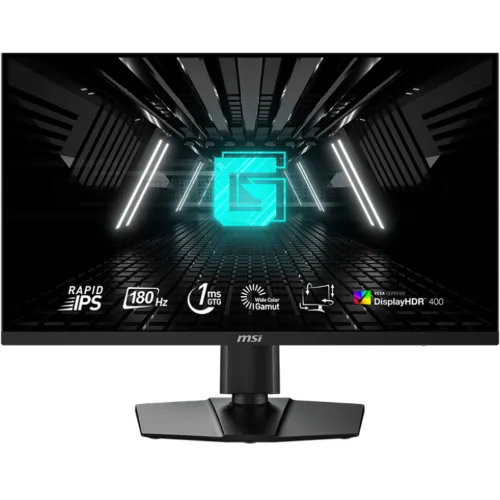
27-inch WQHD Rapid IPS gaming monitor with up to 180Hz, 1ms response, Adaptive-Sync, DisplayHDR 400 and USB-C video.
Price unavailable
Price range updating
No verified price is available yet. Store offers will appear when merchants publish them.
Compare store prices
No live offers for this variant
Offers will appear when merchants publish them.
Loading history…
Product story
The MSI G274QPF E2 is a 27-inch flat gaming display built around a 2560 × 1440 WQHD Rapid IPS panel. MSI lists a refresh rate up to 180Hz and 1ms response options, making it a high-refresh monitor for compatible gaming PCs and consoles. Its specification includes DisplayPort, two HDMI inputs, a USB-C port with DisplayPort Alt Mode and 15W power delivery, and a headphone output. The E2 suffix matters: check the complete model name on the carton and rear label because similarly named G274QPF models have different feature sets.
The 16:9 WQHD panel provides 2560 horizontal by 1440 vertical pixels. That gives desktop applications more workspace than Full HD and lets games render sharper details, while remaining less demanding than 4K. Rapid IPS is designed for faster pixel transitions while retaining the viewing-angle behavior expected from IPS. The screen is flat and uses an anti-glare surface. MSI lists a typical contrast ratio of 1000:1 and 178-degree horizontal and vertical viewing angles. These are panel specifications, not a guarantee that every unit has identical calibration.
MSI lists 180Hz refresh for the G274QPF E2, with the manual indicating the display may default to 60Hz until the source configures a higher mode. To use 180Hz, connect a compatible graphics output using an appropriate DisplayPort or USB-C video path, install any required drivers, and select the refresh rate in the operating system or game. The available modes depend on the connected device, cable and resolution. The 1ms figure is a response-time mode/specification, not a promise that every pixel transition takes exactly one millisecond in all conditions.
The product page identifies 1ms GtG response and MSI lists 1ms MPRT. GtG and MPRT measure different behavior, so they should not be treated as interchangeable. Rapid response modes can alter overdrive or strobing behavior and may produce artifacts depending on the game and refresh rate. Try settings in actual content and select the clearest mode for your preference. A high refresh rate reduces the interval between displayed frames, but smooth results still depend on the PC rendering frames and on a compatible input connection.
MSI lists Adaptive-Sync and compatibility with common variable-refresh technologies for supported graphics cards. Variable refresh can help reduce tearing when frame delivery changes. Support depends on the GPU, driver, port, cable and configuration. If the display does not offer the desired mode, check the connected input, driver control panel, monitor on-screen menu and cable quality. Marketing compatibility does not mean every console or computer will expose every refresh and sync combination.
MSI lists VESA DisplayHDR 400 support, a 400-nit typical brightness and 400-nit HDR peak in product specifications. HDR playback also requires suitable game or video content and operating-system configuration. DisplayHDR 400 is an entry-level certification and does not imply full-array local dimming. Color gamut and color-depth figures vary across MSI regional specification pages; verify the exact market variant before relying on a particular coverage percentage. For color-sensitive work, use a calibrated workflow and consider that gaming presets may change image output.
The rear input set includes one DisplayPort connection, two HDMI 2.0b inputs and one USB-C input that supports DisplayPort Alt Mode; a headphone output is also listed. HDMI can be convenient for consoles and secondary devices, while DisplayPort is typically used for high-refresh PC operation. Verify the maximum refresh available for each source and mode in the MSI specification and device documentation. Use the correct input in the monitor menu and avoid assuming that every USB-C cable carries video.
USB-C supports DisplayPort Alt Mode and MSI specifies 15W power delivery. This can provide limited power to a small accessory or mobile device, but it is far below typical laptop charging requirements. Do not treat this display as a one-cable laptop dock or as a substitute for a full-power charger. USB-C video requires a host that supports DisplayPort Alt Mode and a cable rated for video. The 15W figure describes charging output and does not indicate a built-in USB hub unless MSI lists one separately.
The included stand supports height adjustment up to approximately 130mm, tilt and swivel; MSI documentation lists pivot adjustment as well. Adjust the height so the top of the image is comfortable for your seated posture and turn the screen only when the desk has enough clearance. If using an arm, verify the VESA pattern and the arm’s load rating. Keep ventilation openings clear and allow room for rear-facing connectors, power cable and stand movement.
The listed VESA mount pattern is 75 × 75mm. Confirm the screw length and monitor-arm compatibility before installation; an incorrect screw can damage the display. The monitor uses an external power adapter, so plan for the adapter and its cable near the desk. Check the carton for the stand, power adapter, AC cord and video cables because included accessories may vary by region or seller. Do not lift the unit by the panel surface.
MSI lists a headphone output, allowing audio to pass to wired headphones or speakers when supported by the connected source. Integrated speakers are not listed for this model, so plan an external audio device if sound is needed. The package contents may differ by market. Before purchase, ask the seller which cables and accessories are included and whether the display has been opened or used. The supplied adapter rating and local power plug should match the delivered unit.
The monitor’s on-screen display provides picture and gaming settings. Menu names and available options can vary with selected input and firmware. Start with the standard picture mode, then adjust brightness for the room and try response or sync features one at a time. If a setting causes overshoot, flicker or an unexpected refresh limit, return to the previous mode and check MSI’s manual. Keep a note of preferred values before restoring defaults or changing multiple options.
Before ordering, compare the full model code G274QPF E2 with the source device requirements. Check that the computer or console can output WQHD at the intended refresh rate over the selected port. Confirm that a USB-C host supports video Alt Mode if you plan to use that input. A USB-C connector alone does not guarantee video output. Confirm desk depth, VESA arm support, power outlet access and any color or HDR requirements. The product is a monitor; a gaming PC, console and audio speakers are separate items.
At 27 inches, WQHD provides a useful balance between image detail and high frame rates for many gaming setups. A 180Hz panel can display more frequent frames than a conventional 60Hz screen when the source supplies them. Competitive players may value rapid motion and variable refresh, while story games can benefit from the extra resolution. Actual performance is determined by the graphics hardware, settings, game engine and connection. Use the monitor’s native resolution where practical and verify the selected refresh in the OS.
The same screen can serve for browsing, office applications, coding and media. WQHD resolution offers additional space for side-by-side windows, while the height-adjustable stand helps tailor the viewing position. Rapid IPS and wide viewing angles are useful for shared viewing, though individual color accuracy depends on calibration and settings. For long sessions, choose comfortable brightness, take regular breaks and enable eye-comfort features if they suit your needs.
Use a soft, clean microfiber cloth for the screen and follow MSI’s care instructions. Avoid spraying liquid directly onto the panel, abrasive cleaners and pressure on the LCD surface. Keep the adapter and connectors dry, do not block ventilation and disconnect power before cleaning the enclosure. When moving the monitor, support the frame and protect the panel from impact. Retain the carton if it may be needed for a return or warranty claim.
The 180Hz maximum does not mean every port, cable or source automatically operates at that rate. Response-time labels do not describe every transition under all settings. HDR certification does not guarantee premium local-dimming performance. USB-C 15W power delivery is not laptop-grade charging. Variable refresh depends on the source and configuration, and regional color values can differ between manufacturer pages. These limits help set realistic expectations and identify what should be checked before buying.
The product listing’s existing three-year warranty wording has not been independently confirmed for a specific Bangladesh serial or sales channel. Ask the seller whether the warranty is official, who provides service, what proof of purchase is required and how dead pixels are handled. Check that the serial on the box and monitor matches the invoice. Keep packaging and accessories until the return period ends. Warranty duration and coverage can differ by importer, region and seller; confirm the actual terms in writing.
Before checkout, confirm the delivered product is the G274QPF E2 and not the original G274QPF or another MAG/QRF variant. Ask whether stock is sealed, the warranty applies locally, and which accessories are included. Prices, promotions, delivery charges, payment options and return terms can change; verify those details on the current offer. On delivery, inspect the carton, serial, screen surface, stand and ports. Test for image output, dead pixels, refresh-rate options and USB-C video during the allowed inspection window.
The G274QPF E2 is suited to buyers seeking a 27-inch WQHD Rapid IPS display with up to 180Hz refresh, adaptive sync and flexible ergonomic positioning. Its HDMI, DisplayPort and USB-C video inputs support varied setups, while the 15W USB-C power output remains limited. It is less suitable for users who require built-in speakers, high-wattage laptop charging, 4K resolution or advanced local-dimming HDR. Confirm exact regional specifications, warranty and offer details before purchasing.
Helpful answers
Product-specific answers maintained with the catalog information.
It is a 27-inch WQHD display with 2560 × 1440 resolution.
MSI lists up to 180Hz; the source, port, cable and settings must support the mode.
Yes, MSI identifies the G274QPF E2 panel as Rapid IPS.
MSI lists 1ms GtG and MPRT specifications; the measurement methods differ and results depend on settings.
It supports video Alt Mode and 15W power delivery, which is not typical laptop charging power.
MSI lists two HDMI 2.0b inputs and one DisplayPort input.
Integrated speakers are not listed; a headphone output is available.
MSI lists VESA DisplayHDR 400 certification.
Confirm the seller’s serial-specific local warranty and service terms in writing.
Customer community
Become a merchant
Join BiponiBD, publish accurate offers and start free.