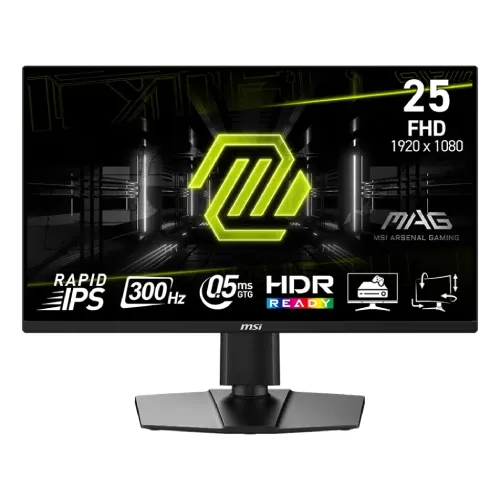
The MSI MAG 255PXF is a 24.5-inch Full HD Rapid IPS gaming monitor built around a high refresh target. MSI lists 1920 × 1080 resolution, up to 300Hz over DisplayPort 1.4a, 0.5ms GtG minimum response, AMD FreeSync Premium and a fully adjustable stand. Its practical strengths are fast motion presentation, broad viewing angles, multiple digital inputs and desk-position flexibility. The product page should be read as a model-specific specification summary, not a promise that every PC will deliver 300 frames per second. A graphics card, game engine, connection, cable and selected resolution all affect the refresh mode. The 300Hz mode is listed for DisplayPort; HDMI 2.0b is specified up to 240Hz at Full HD. Confirm the refresh rate in the operating system and graphics control panel after connecting the monitor. This distinction helps buyers choose the right cable and avoid assuming all three inputs have identical bandwidth.
Panel, resolution and viewing
The flat 24.5-inch Rapid IPS panel uses a 16:9 aspect ratio and 1920 × 1080 pixels. MSI quotes a 0.2832mm horizontal and 0.2802mm vertical pixel pitch, with 178° horizontal and vertical viewing angles. The anti-glare surface can reduce mirror-like reflections, although room lights and windows can still be visible depending on placement.
Full HD is a common fit for competitive gaming because it is less demanding than higher resolutions at very high frame rates. It also means the monitor has less desktop workspace and lower pixel density than a 1440p alternative. Buyers who prioritize small text, detailed creative work or several open windows may want to compare a higher-resolution screen at a similar viewing distance. The flat panel avoids curved-screen geometry, which some users prefer for straightforward alignment and productivity.
300Hz refresh and real system requirements
MSI lists 300Hz maximum refresh for the MAG 255PXF at Full HD using DisplayPort 1.4a. A refresh rate describes how often the display can update its image; it does not guarantee that a game or computer will produce 300 frames each second. Reaching high frame rates depends on the processor, graphics card, game settings, software and the scene being rendered.
HDMI 2.0b is specified up to 240Hz at FHD on this model. For the 300Hz target, use a suitable DisplayPort cable and a source that supports the mode. After setup, open the operating system’s advanced display settings, choose 1920 × 1080 and select the highest supported refresh rate. If 300Hz is unavailable, check the selected input, cable, GPU output, driver, color-depth setting and monitor configuration before concluding the panel is faulty.
Response time and motion clarity
The manufacturer lists 0.5ms GtG minimum response time. GtG refers to a pixel transition measurement under defined test conditions. It is not the time for the entire computer to react to a mouse click, and it is not a uniform promise for every pixel transition or overdrive setting. The 300Hz refresh capability and pixel response specification describe separate parts of motion presentation.
For a fair real-world check, use the monitor at the chosen refresh rate and evaluate motion with familiar content. Look for overshoot or inverse ghosting if an overdrive setting is enabled aggressively. The exact experience depends on game frame rate, frame pacing, display mode, sync settings and the viewer’s sensitivity. Avoid interpreting a single minimum response number as proof that motion artifacts are impossible or that every user will see identical results.
Adaptive-Sync and FreeSync Premium
MSI lists AMD FreeSync Premium and an Adaptive-Sync operating range of 48–300Hz. Adaptive sync coordinates display refresh with supported frame output to reduce tearing and judder within a compatible operating window. Its effect depends on the graphics hardware, drivers, selected input, game and the settings on both the monitor and computer.
Enable the supported variable refresh setting in the graphics driver and check the monitor’s on-screen display for applicable options. When frame output falls outside the operating range, behavior can differ by system and configuration. The specification does not mean every game is tear-free in every condition, nor does it guarantee compatibility with every GPU. NVIDIA users should confirm behavior with their exact graphics card and driver because the official listed feature is FreeSync Premium/Adaptive-Sync, not a separately stated G-SYNC module.
Brightness, contrast and HDR wording
MSI lists typical SDR brightness of 250 cd/m², static contrast of 1000:1 and a dynamic contrast ratio of 100,000,000:1. Static contrast is the more useful figure for understanding ordinary panel contrast; dynamic contrast is a changing processing metric and should not be compared directly with a static ratio. The model is described as HDR Ready.
HDR Ready indicates signal handling or readiness in MSI’s product terminology; it is not the same as VESA DisplayHDR certification. The official specification does not identify this monitor as DisplayHDR-certified, and its 250 cd/m² SDR figure is not a certified HDR peak value. Buyers seeking a pronounced HDR effect should compare certified models with explicit peak brightness, local dimming and contrast details. For this model, use SDR expectations when judging everyday brightness and dark-room viewing.
Color support and sensible use
MSI specifies 1.07 billion colors with 8-bit + FRC. Its CIE1976 standard color-gamut figures are Adobe RGB 87%, DCI-P3 90% and sRGB 120%. These are area figures, not a factory calibration report or a guarantee of color accuracy. A gamut-area percentage may exceed 100% because it describes relative color-space area and overlap, not necessarily complete coverage or accurate reproduction.
For games, video and general desktop use, the stated color support provides useful context, but color-critical photography, print and design work need a calibrated workflow and a review of the target color space. Do not infer Delta E, uniformity or calibration status from the area numbers. If accurate color is essential, check whether a measured calibration report exists for the exact unit and consider a colorimeter and application-managed workflow.
Connections and device planning
The rear connections listed by MSI are one DisplayPort 1.4a, two HDMI 2.0b ports, a headphone-out, AC-in and a Kensington lock. This lets a user keep a desktop PC and additional HDMI devices attached, then select an input as needed. The specifications do not list USB-C, a USB hub, a webcam, or integrated speakers.
Plan cabling before mounting the display. Use DisplayPort for the 300Hz FHD mode; HDMI supports up to 240Hz FHD per MSI. The headphone-out can route audio from a connected source when supported, but users who need room-filling sound should use separate speakers. Keep plugs accessible if the monitor is positioned close to a wall or on an arm. Confirm the input and cable capability of a laptop, dock or console before expecting high refresh output.
Stand, portrait rotation and mounting
The included stand supports 0–130mm height adjustment, -5° to +20° tilt, -30° to +30° swivel and -90° to +90° pivot. MSI lists a 100 × 100mm VESA pattern. This combination allows users to tune the screen height, angle and orientation on a desk, or choose a compatible wall/arm mount.
Check desk depth and cable slack before swiveling or rotating the panel. When pivoting to portrait orientation, make sure the display has enough overhead clearance and that the computer’s display settings rotate the image. A VESA mount should match the 100 × 100mm pattern and have a load rating suitable for the display. Use the correct screws and the manufacturer’s mounting instructions; avoid forcing fasteners or loading the panel by its edge.
Physical dimensions, weight and installation
MSI lists dimensions with stand of 557.1 × 227.9 × 511.9mm (width × depth × height), and without stand of 557.1 × 66.4 × 326.9mm. Net weight is stated as 5.3kg and gross shipping weight as 7.8kg. The stand increases desk depth and height, so compare the full installed footprint with the available space before purchase.
The package weight includes packaging and is not the same as the assembled monitor weight. Keep the box and protective materials until the display has been checked. During installation, use a stable surface, hold the frame rather than pressing on the LCD area and route power/video cables so they are not bent sharply. For wall mounting, use a properly secured support appropriate to the wall construction and the assembled load.
Power, standby and daily use
The monitor uses an internal power board and accepts AC 100–240V at 50/60Hz. The MSI manual lists power consumption below 18W in operation, below 0.5W in standby and below 0.3W when off. Actual use can vary with selected brightness, refresh settings and connected conditions. Use the supplied C13 power cord and a properly grounded outlet appropriate to local electrical requirements.
The manual’s figures are manufacturer-rated conditions, not a household energy-bill forecast. Avoid blocking ventilation and disconnect the power safely before moving or cleaning the monitor. Use a soft dry microfiber cloth for the panel; do not spray liquid directly onto the display. Follow the full MSI manual for setup, safety notices, menu controls and warranty/service guidance for the exact model.
Who this monitor may suit
The MAG 255PXF may suit a PC gamer who values a high refresh ceiling, a compact 24.5-inch Full HD panel, IPS viewing angles and an adjustable stand. It can also serve as a general desktop display, with HDMI inputs for additional devices. The combination is most compelling when the computer can produce high frame rates in the games the user plays and can connect through DisplayPort for 300Hz.
It may be less suitable for buyers who prioritize high pixel density, certified HDR, USB-C docking, built-in speakers or a high-brightness productivity display. A 300Hz screen also has limited practical value if the PC consistently renders far below that rate, although variable refresh can still help within supported conditions. Compare GPU capability, resolution preference, work needs and total desk setup costs before selecting a monitor based only on its maximum Hz number.
Bangladesh price, availability and warranty checks
Retail pages checked for this review showed Skyland at ৳27,000 and In Stock with a three-year warranty advertised, PC House at ৳30,800 and In Stock, and UltraTech marked the model discontinued. These are dated seller observations and can change with stock, promotions and import channels. They do not establish a current BiponiBD selling price, inventory status or official warranty for a particular serial number.
Before ordering, ask the seller to confirm the final delivered price, exact MAG 255PXF model and regional part, new/sealed condition, available stock, invoice, dead-pixel policy, warranty provider and local serial eligibility. Ask where service is handled and what documentation a claim requires. Keep the invoice and serial details. A seller’s three-year advertisement should be treated as a seller claim until the terms for the exact unit are confirmed.
Setup checklist and troubleshooting
Connect the monitor to the PC using a suitable DisplayPort cable when targeting 300Hz. Power on the display, choose the matching input, install the graphics driver and select 1920 × 1080 at the supported refresh rate. Enable Adaptive-Sync/FreeSync in the monitor and compatible graphics settings if desired. Then test a game or motion sample, audio through the headphone-out and each input device.
If the refresh option is missing, reseat or replace the cable with one capable of the required mode, check the graphics card’s output and driver, verify the active input, and review operating-system display settings. If colors or brightness seem wrong, reset the monitor picture mode and check source output range and HDR settings. If adaptive sync is unavailable, verify GPU/driver support, connection and the variable-refresh options. Consult the manual or local authorized service provider for persistent faults.
Model identity and specification boundaries
This listing is for MSI MAG 255PXF, which is distinct from MAG 255XF and other MSI 24.5-inch gaming displays. The “PXF” model has the height-adjustable, swivel and pivot stand described on MSI’s specifications; details from a related model should not be copied into this listing. The long description and structured attributes use the 255PXF model-specific official specification and its user manual.
Some retailers may shorten model names, reuse images or mix regional package details. Confirm the label on the box, rear product label and invoice before relying on a retailer listing. Official manufacturer information is used for technical capabilities; retailer pages are used only for local market observations. This page does not claim independent instrument testing, verified BiponiBD stock, a guaranteed selling price, a custom HDR certification or a locally verified serial warranty.
Key features
- 24.5-inch flat Rapid IPS panel with 1920 × 1080 Full HD resolution and 16:9 aspect ratio.
- 300Hz maximum refresh rate over DisplayPort 1.4a; both HDMI 2.0b inputs are specified up to 240Hz at Full HD.
- Adaptive-Sync range 48–300Hz and AMD FreeSync Premium for compatible graphics hardware and supported refresh modes.
- Manufacturer-rated 0.5ms GtG minimum response time; this does not equal complete system input latency.
- 250 cd/m² typical SDR brightness, anti-glare surface and 178° horizontal/vertical viewing angles.
- HDR Ready input handling; MSI does not identify this model as VESA DisplayHDR-certified.
- 1.07 billion displayed colors using 8-bit + FRC; manufacturer CIE1976 gamut area figures are disclosed with their limitations.
- Four-way stand adjustments: up to 130mm height, tilt, swivel and portrait pivot; 100 × 100mm VESA mounting.
- One DisplayPort 1.4a, two HDMI 2.0b inputs, headphone-out and Kensington lock.
- Internal power board with 100–240V AC input; manufacturer manual states low standby and off-mode power figures.
Frequently asked questions
What is the MSI MAG 255PXF screen size and resolution?
It has a 24.5-inch flat Rapid IPS panel with 1920 × 1080 Full HD resolution and a 16:9 aspect ratio.
Does it support a 300Hz refresh rate?
MSI specifies up to 300Hz at Full HD over DisplayPort 1.4a. The two HDMI 2.0b inputs are specified up to 240Hz at Full HD. The source device, cable, selected timing and settings must support the target mode.
What does the 0.5ms response figure mean?
MSI lists 0.5ms GtG minimum. It is a panel response specification under the manufacturer’s measurement conditions, not a measurement of total PC-to-screen input latency or a guarantee that every transition behaves identically.
Is AMD FreeSync supported?
Yes. MSI lists AMD FreeSync Premium and an Adaptive-Sync operating range of 48–300Hz. Operation depends on a compatible graphics device, connection, driver and settings.
Can I use G-SYNC with this monitor?
MSI’s specification lists AMD FreeSync Premium and Adaptive-Sync, not a separate G-SYNC module certification. Some NVIDIA cards may expose compatible adaptive-sync behavior, but compatibility and behavior should be checked with the exact GPU, driver and connection.
Is this a true HDR monitor?
MSI calls it HDR Ready. The official specifications do not list VESA DisplayHDR certification. Its stated 250 cd/m² SDR brightness should not be read as a certified HDR peak-brightness result.
What ports are available and which one should I use for 300Hz?
There is one DisplayPort 1.4a, two HDMI 2.0b ports and one headphone-out. MSI specifies the 300Hz FHD mode over DisplayPort; HDMI is specified up to 240Hz FHD.
Does the monitor have built-in speakers?
MSI’s published specifications list a headphone-out but do not list integrated speakers. Plan for headphones or external speakers if you need audio.
Can the stand rotate vertically?
Yes. The stand supports 0–130mm height adjustment, -5° to +20° tilt, -30° to +30° swivel and -90° to +90° pivot. The panel also supports a 100 × 100mm VESA mount.
What is included in the box?
MSI lists a DisplayPort 1.4a cable, C13 power cord, quick guide and four stand screws. An HDMI cable is not listed in the official accessory set; ask the seller to confirm the exact regional package.
What is the current price in Bangladesh and is it in stock?
Retail observations checked for this review showed Skyland at ৳27,000/In Stock, PC House at ৳30,800/In Stock and UltraTech as discontinued. These can change and do not confirm a BiponiBD offer or today’s stock.
How can I confirm warranty before ordering?
Retail listings advertise three years in some cases, but local serial eligibility and the responsible service provider are not verified here. Ask the seller to confirm the warranty provider, serial coverage, invoice requirement, service location and claim process in writing.
Source note: Technical details are based on MSI’s official model specification and user manual. Bangladesh price, stock and warranty references are retailer observations checked 2026-11-08T20:56:07.614Z; they do not confirm a BiponiBD offer or local serial coverage. No hands-on testing or color measurement is claimed.