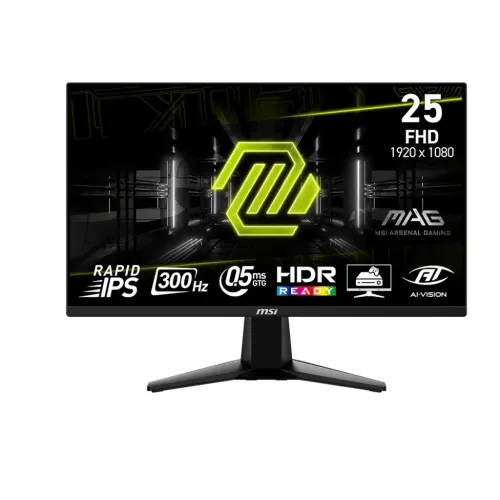
The MSI MAG 255XF is a 24.5-inch Full HD Rapid IPS gaming monitor with a maximum 300Hz refresh rate over DisplayPort and a listed minimum 0.5ms gray-to-gray response time. MSI specifies two HDMI 2.0b inputs, one DisplayPort 1.4a input, Adaptive-Sync, AMD FreeSync Premium, HDR Ready, AI Vision and a headphone output. The distinction between input ports matters: MSI specifies HDMI up to FHD 240Hz, while the 300Hz maximum is reached over DisplayPort with compatible hardware and timing. This model has a tilt-only stand and no USB hub.
Screen size, resolution and pixel pitch
The display measures 24.5 inches diagonally with a 1920 × 1080 resolution and 16:9 aspect ratio. MSI lists an active display area of 543.744 × 302.616mm and a pixel pitch of 0.2832mm horizontally by 0.2802mm vertically. Full HD at this size can suit users prioritizing high frame rates and a compact competitive gaming view. QHD provides more fine detail and desktop space, but asks the graphics system to render more pixels. Match the resolution to the games, frame-rate target and computer capability.
300Hz and connection timing
MSI specifies 300Hz over DisplayPort 1.4a. The product datasheet lists two HDMI 2.0b ports with Full HD up to 240Hz. For the 300Hz mode, the graphics card output, DisplayPort cable, driver and monitor setting must all support the timing. If 300Hz does not appear, confirm the connection and choose a supported mode in the operating system or graphics control panel. A 300Hz screen cannot force a game to render 300 frames per second; rendering rate depends on the computer and application.
Response time and motion modes
The manufacturer lists 0.5ms GtG minimum response time. This is a gray-to-gray pixel transition claim under MSI’s specified measurement conditions, not total input lag. Different transitions and overdrive settings can behave differently. Response time is also distinct from motion-picture response time (MPRT). Use MSI’s OSD controls and compare real gameplay for overshoot, blur and clarity rather than assuming one minimum number describes every mode or every unit.
Rapid IPS, brightness and color
MSI specifies a Rapid IPS panel with typical brightness of 250 nits, typical static contrast of 1000:1 and viewing angles of 178° horizontally and vertically. The datasheet lists 1.07 billion colors (8-bit + FRC) and CIE1976 gamut figures of Adobe RGB 87%, DCI-P3 90% and sRGB 120%. Gamut coverage/volume does not establish color accuracy, calibration or uniformity. For color-critical editing, use a calibrated workflow and confirm the required color space with actual measurements.
Adaptive-Sync and FreeSync Premium
The MAG 255XF lists Adaptive-Sync and AMD FreeSync Premium. Variable refresh can coordinate compatible graphics output with the display to reduce tearing or stutter under supported conditions. Enable the function in the monitor and graphics driver and check supported refresh range for the selected connection. It does not increase rendering speed by itself. Results depend on the GPU, driver, game, connection and display setting.
HDR Ready and AI Vision
MSI describes the panel as HDR Ready and lists AI Vision, which is intended to adjust image visibility and color in darker scenes. HDR Ready is not the same as DisplayHDR certification, and the published typical brightness is 250 nits. HDR content appearance depends on the device, content and configured mode. Use the OSD controls to choose whether AI Vision improves visibility for your environment; the effect is a viewing preference and does not represent independent image-quality testing.
HDMI and DisplayPort connections
The input set includes one DisplayPort 1.4a and two HDMI 2.0b ports. MSI specifies FHD up to 300Hz over DisplayPort and FHD up to 240Hz over HDMI. Use a cable and computer output that support the timing you want. Multiple connected systems can use separate inputs, with the on-screen menu used to select the active source. MSI also lists a headphone output, AC-in and a Kensington lock; it does not list USB connections or a USB hub.
Audio and peripheral setup
There is a headphone output for compatible headphones or audio devices, but MSI does not list built-in speakers. Audio may need to be routed through the graphics device over HDMI or DisplayPort and then selected in the computer’s sound settings. For external speakers, connect them to the PC or another audio source. Since the monitor has no USB hub, a mouse, keyboard or other USB peripheral connects to the computer or a separate hub rather than to this display.
Stand adjustment and VESA mounting
The supplied stand provides tilt from -5° to +20°. MSI does not list height, swivel or pivot adjustments for this stand. The monitor supports 100 × 100mm VESA mounting, so a compatible third-party arm may offer greater range. Check the mount’s weight capacity, screw compatibility and clearance before removing the stand. Support the panel during installation and keep power and signal cables slack enough for the arm’s motion.
Dimensions, weight and desk placement
MSI lists dimensions of 557.1 × 220.1 × 418.5mm with the stand and 557.1 × 66.4 × 326.9mm without it (W × D × H). The datasheet gives a net weight of 3.24kg and gross weight of 5.13kg. Measure desk depth, stand footprint and viewing distance before setup. If using a monitor arm, plan for the panel-only weight and enough cable reach. Keep the vents clear and place the screen where overhead lighting will not reflect into the display.
Power supply and efficiency
MSI specifies an internal power board with an AC input of 100–240V at 50/60Hz. The user guide lists power-on consumption below 18W, standby below 0.5W and off-mode below 0.3W under the document’s test conditions. Actual draw can vary with settings and use. Use the supplied power cable and a correctly grounded outlet. Turn the display off and disconnect power before moving it or cleaning the screen.
Who this monitor may suit
The MAG 255XF may suit players who value very high Full HD refresh, compatible variable refresh and a 24.5-inch IPS format. A fast DisplayPort-connected PC can use its 300Hz specification, while HDMI offers up to 240Hz per MSI. It may be less suitable when you need QHD detail, a height-adjustable stand, USB-C docking, a USB hub, built-in speakers or certified HDR. Compare the exact connection and stand requirements against the user’s setup before choosing it.
Bangladesh price and warranty
During research, Monarch displayed ৳28,500 and an in-stock status; TechLand displayed ৳26,600 with an out-of-stock status. These seller pages can change, and neither verifies BiponiBD inventory or offer. Local listings advertise three years of warranty. Ask the retailer to confirm the local service provider, serial eligibility, claim location, dead-pixel terms and what is included in the box. Keep the invoice and box label so the exact MAG 255XF can be identified during support.
Care and model identification
Confirm the rear label says MAG 255XF. Similar MSI models such as MAG 255PXF or MAG 255XFV may have different refresh rates, panel technologies or stand adjustment. Keep the invoice, serial and packaging. Clean only after switching off and disconnecting power; use a soft cloth and avoid spraying liquid directly onto the panel. Use MSI documentation for the exact model if you need to adjust refresh, overdrive, HDR Ready or Adaptive-Sync settings.
Key features
- 24.5-inch Rapid IPS flat panel with Full HD 1920 × 1080 resolution and 16:9 aspect ratio.
- 300Hz maximum refresh rate over DisplayPort 1.4a according to MSI’s connection timing notes.
- Two HDMI 2.0b inputs support Full HD up to 240Hz; 300Hz requires a compatible DisplayPort source.
- 0.5ms GtG minimum response specification from MSI; not total input latency or a guarantee for every pixel transition.
- 250-nit typical brightness, 1000:1 typical static contrast and 178° viewing angles.
- 1.07 billion color support (8-bit + FRC) and MSI’s CIE1976 gamut values.
- Adaptive-Sync and AMD FreeSync Premium for compatible graphics systems and settings.
- HDR Ready label; MSI does not identify DisplayHDR certification for this model.
- One DisplayPort 1.4a, two HDMI 2.0b, headphone-out and Kensington lock; no USB hub.
- Tilt adjustment from -5° to +20° with a 100 × 100mm VESA mounting pattern.
- AI Vision and anti-glare finish are listed features for the MAG 255XF.
- Internal power board with MSI-listed consumption below 18W while on under stated conditions.
Pros and considerations
Pros
- A 300Hz DisplayPort mode can provide very high refresh for competitive play when the PC and game produce enough frames.
- Rapid IPS, FreeSync Premium and a 0.5ms GtG minimum response specification give the panel a gaming-focused feature set.
- Two HDMI inputs and DisplayPort allow multiple digital sources to remain connected.
- The 24.5-inch Full HD format offers a more compact gaming footprint than 27-inch panels while maintaining high refresh.
- The headphone output, VESA mounting and tilt stand provide useful connection and placement options.
Cons and limitations
- Full HD is less detailed than QHD; this size suits high frame rate priorities more than maximum desktop detail.
- The 300Hz maximum is available through DisplayPort; HDMI is specified up to 240Hz.
- The included stand only tilts and does not adjust height, swivel or pivot.
- There is no USB hub or built-in speaker listed; peripheral and audio needs require separate connections.
- HDR Ready is not equivalent to DisplayHDR certification, and 250-nit typical brightness is an SDR-level specification.
Frequently asked questions
What are the screen size and resolution?
MSI specifies a 24.5-inch Rapid IPS panel with 1920 × 1080 Full HD resolution and a 16:9 aspect ratio.
Can the MAG 255XF run at 300Hz over HDMI?
MSI specifies 300Hz over DisplayPort 1.4a. The two HDMI 2.0b inputs are specified for Full HD up to 240Hz. The source and cable must support the selected timing.
What does 0.5ms GtG mean?
It is MSI’s minimum gray-to-gray response specification. It is not total system input latency, and actual transitions can vary with mode, overdrive, refresh and panel sample.
Does it support FreeSync?
MSI lists Adaptive-Sync and AMD FreeSync Premium. A compatible graphics device, driver, connection and configuration are required to use variable refresh.
What ports are included?
The listed ports are one DisplayPort 1.4a, two HDMI 2.0b inputs, one headphone output, AC power and a Kensington lock. MSI does not list USB ports.
Does the monitor have built-in speakers?
MSI does not list built-in speakers. Use computer audio, headphones through the monitor’s headphone output or separate speakers connected to the source.
Is HDR certified?
MSI labels the display HDR Ready. The cited MSI materials do not list DisplayHDR certification, so HDR Ready should not be read as a certification or a guarantee of high peak HDR brightness.
What is the panel brightness and contrast?
MSI lists 250 nits typical brightness and 1000:1 typical contrast. The 100,000,000:1 figure is dynamic contrast ratio, not static contrast.
What color gamut does MSI list?
MSI lists Adobe RGB 87%, DCI-P3 90% and sRGB 120% under the CIE1976 standard, with 1.07 billion colors (8-bit + FRC). These are gamut figures, not calibration accuracy.
What stand adjustments are available?
The stand tilts from -5° to +20°. MSI does not list height, swivel or pivot adjustment. A separate VESA-compatible arm can provide different movement.
Can it be mounted on an arm?
MSI specifies 100 × 100mm VESA mounting. Confirm the arm’s load rating, fastener compatibility and clearance for the 24.5-inch panel before installation.
What are current Bangladesh price and warranty details?
Monarch displayed ৳28,500 in stock and TechLand ৳26,600 out of stock during research. Local seller pages advertise three years, but confirm the exact serial, provider and dead-pixel terms. These are retailer observations, not a BiponiBD offer.
Source note: Technical details use MSI’s exact MAG 255XF product specification, datasheet and user guide. Bangladesh price and warranty are retailer observations checked 2026-11-08T21:39:38.405Z; they do not verify a BiponiBD offer or a particular serial’s coverage. No independent hands-on test is claimed.