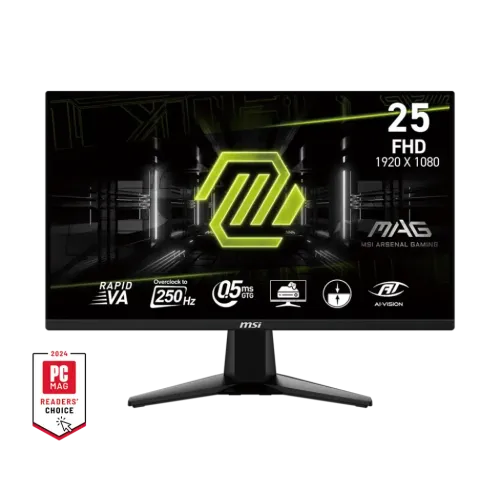
The MSI MAG 255XFV is a 24.5-inch flat Rapid VA gaming monitor with Full HD resolution and an overclocked maximum refresh rate of 250Hz. MSI specifies up to 250Hz over DisplayPort and up to 240Hz over HDMI. This guide explains the differences between the two inputs and separates official specifications from Bangladesh seller observations.
Model overview and identity
The MSI MAG 255XFV is a 24.5-inch flat monitor built around a Rapid VA panel. MSI specifies Full HD resolution and an overclocked maximum refresh rate of 250Hz. The product identity is kept specific to MAG 255XFV so it is not confused with similarly named MAG 255XF or other 24.5-inch MSI displays. Confirm the full model code on the rear label and invoice before buying.
The core buying decision is whether a 24.5-inch Full HD screen and very high refresh rate fit the intended PC or console. Full HD is supported by many systems and requires less rendering work than QHD, while a higher resolution can show more fine detail. The right choice depends on viewing distance, game type, graphics performance and the buyer’s preference for sharpness versus frame rate.
Panel, resolution and image area
The panel measures 24.5 inches diagonally and uses 1920 × 1080 pixels in a 16:9 layout. MSI gives the active display area as 543.744 mm horizontally by 302.616 mm vertically. Pixel pitch is listed as 0.2832 mm horizontally and 0.2802 mm vertically. These figures describe the physical display grid; interface scaling and text size can be adjusted in the operating system.
The panel is Rapid VA, not IPS. MSI lists a typical 3000:1 contrast ratio, 250-nit typical brightness and 178° horizontal and vertical viewing angles. VA technology is often selected for contrast, though perceived color and dark-scene motion can vary by panel and overdrive setting. This product description does not claim hands-on testing or uniform results from every unit.
The screen has an anti-glare surface and a flat form. Its gamut coverage is listed as 82% Adobe RGB, 78% DCI-P3 and 100% sRGB under CIE 1976. MSI specifies 1.07 billion colors using 10-bit processing via 8-bit plus FRC. These figures do not prove factory calibration or color accuracy; calibrate the actual monitor for color-critical workflows.
Refresh rate and port-specific maximums
MSI lists 250Hz as an overclocked maximum and an activated range of 48–250Hz. The DisplayPort 1.4 input supports Full HD up to 250Hz, while HDMI 2.0b supports Full HD up to 240Hz. The port distinction matters: a 250Hz setting should be expected through the supported DisplayPort connection, not every HDMI connection.
A high refresh rate can show more screen updates when the computer renders enough frames. It does not increase the game’s own frame rate. The graphics card, game settings, cable, display driver and selected input all influence the available signal. If 250Hz is unavailable, try a direct DisplayPort connection, verify the graphics output and set the refresh rate in the operating system or graphics control panel.
The HDMI maximum of 240Hz can still exceed common 60Hz and 120Hz modes, but the chosen source must support Full HD at that rate. HDMI port bandwidth and device compatibility should be confirmed for consoles, laptops and docks. The 250Hz overclocked figure reflects MSI’s specification and not a promise that every connected device can select it.
Response time, sync and gaming features
MSI states 0.5ms GtG minimum response time. “Minimum” describes the fastest stated transition, not all gray-level changes or typical performance. GtG is a different measurement from MPRT; do not compare the number as if both methods were the same. Response behavior can depend on overdrive and other display settings.
Adaptive-Sync is the listed dynamic refresh technology. When supported by the display and graphics source, variable refresh can reduce tearing within its operating range. MSI’s specification gives an activated range of 48–250Hz, but exact support also depends on GPU, driver, firmware, cable and selected input. This listing does not claim an unverified FreeSync or G-Sync certification.
MSI describes AI Vision as a smart black tuner intended to make details in darker scenes more visible. The monitor also lists console mode, a frameless design and PIP/PBP. These are display features rather than a guarantee of game performance, input lag, HDR quality or compatibility with every console output mode. Check the manual for supported combinations.
HDR Ready and realistic image expectations
MSI labels HDR support as HDR Ready. This is the manufacturer’s feature wording. It is not a claim of a VESA DisplayHDR certification level, local dimming, a specified HDR peak brightness or a guaranteed high-dynamic-range result. MSI lists typical brightness at 250 nits, so buyers who prioritize HDR should compare certified performance and measured brightness rather than relying on the label alone.
For standard SDR use, set brightness to suit room lighting and choose a color mode appropriate to the task. For HDR playback, the source operating system, graphics hardware, application and content must all support the desired signal. If HDR appears washed out or too dim, check the source settings and manual. No image quality test was performed for this catalog update.
The listed sRGB coverage is 100%, while Adobe RGB and DCI-P3 figures are lower. Coverage percentages and 1.07 billion color processing do not equal calibrated accuracy. Designers should check hardware calibration controls, uniformity and measurement results for their exact unit before using it as a reference display.
Inputs, audio and multiple sources
The monitor has one DisplayPort 1.4 input, two HDMI 2.0b inputs and one headphone output. MSI’s datasheet specifies Full HD up to 250Hz over DisplayPort and up to 240Hz over HDMI. Confirm the source device’s output and cable before choosing which port to use. USB ports are listed as unavailable, so the monitor is not a USB hub or data dock.
A headphone output is available, but built-in speakers are not listed. Use headphones or external speakers for audio. No USB-C video input, USB power delivery, webcam, microphone or Ethernet port is specified in the reviewed MSI specification. Use a compatible adapter only after checking the source’s output standards and supported display mode.
PIP and PBP functions are listed. They can display content from multiple sources, either in a smaller overlay or side-by-side arrangement, subject to source and mode limits. Refer to the user manual for supported combinations. PIP/PBP may change the available resolution or refresh behavior compared with single-input gaming.
Stand, mounting and physical fit
The supplied stand supports tilt from -5° to 20°. MSI lists no swivel, height adjustment or pivot. Buyers who need an adjustable eye line may use a riser or compatible arm. The VESA pattern is 100 × 100 mm; check the arm’s load rating and confirm sufficient clearance for power and signal cables.
With the stand, MSI lists dimensions of 557.1 × 220.1 × 418.5 mm (width × depth × height). Without the stand, dimensions are 557.1 × 66.4 × 326.9 mm. Net/gross weights are 3.24 kg and 5.13 kg. Measure desk depth, stand footprint and clearance around nearby shelves before installation.
The chassis has a frameless design and a Kensington lock. The lock can secure the device with a compatible cable lock, but does not replace physical supervision. MSI lists no pivot function, so portrait rotation should not be assumed even though a VESA arm may offer that movement. Follow the manual when removing or installing the stand.
Power, package and setup
MSI lists a power cable and AC input range of 100–240V, 50/60Hz. Use the supplied power cable and a grounded outlet appropriate to local electrical requirements. The official specification does not list a separate external DC adapter for this model. Do not substitute a power supply based only on a connector shape.
MSI publishes worldwide carton dimensions of 630 × 125 × 411 mm and outer-carton dimensions of 650 × 145 × 443 mm. Confirm the package version with the seller because retail packaging may vary by market. Keep the packaging for transport or warranty needs if the seller’s terms recommend it.
For setup, connect the source and choose the matching input in the on-screen menu. Set Full HD and the highest mode supported by that port: up to 250Hz through DisplayPort or 240Hz through HDMI according to MSI. If the mode is missing, check the source, cable, driver, input selection and Windows display settings before assuming the monitor is faulty.
Bangladesh market price and warranty
The PC House page reviewed displayed ৳24,490 and In Stock and stated a three-year warranty. This is a seller-page snapshot; stock and price can change and a visible listing does not guarantee availability at checkout. The current BiponiBD product offer was not established by these external listings.
Ask the seller to confirm the exact MAG 255XFV model, sealed/open-box condition, final price, delivery and return terms. For warranty, confirm the local provider, serial number eligibility, service locations, required invoice and coverage exclusions. A three-year statement on a retailer page is not proof that another seller provides the same coverage.
If an offer appears materially different from other listings, verify whether it covers the same model, included cables, warranty and seller. Keep the purchase receipt and serial number. This page uses one third-party price observation and does not claim a lowest-price guarantee.
Pros, trade-offs and who should compare alternatives
The key strengths are the 250Hz DisplayPort maximum, Rapid VA panel, Adaptive-Sync, two HDMI inputs, PIP/PBP and 100 × 100 mm VESA mounting. A competitive player with a system capable of high frame rates may value the refresh capability. A user who needs height adjustment, USB ports or built-in speakers should account for those missing features or select separate accessories.
The principal trade-offs are Full HD resolution, 250-nit typical brightness and a tilt-only stand. At 24.5 inches, Full HD remains a common gaming format, but a QHD panel can provide more workspace and fine detail. HDR Ready should be read as a feature label, not a substitute for certified HDR capability.
Compare this model with alternatives based on panel type, exact refresh limit per port, pixel density, stand adjustment, input count, warranty provider and actual stock. The short and long descriptions, feature list, specifications, pros, cons and FAQs are intended to make those comparisons easier without presenting unsupported test results.
Care and safety
Place the monitor on a stable surface and keep ventilation unobstructed. Avoid pressing the LCD panel, exposing it to liquids or using abrasive cleaners. When moving the display, support the body and stand as directed in the manual; do not lift it by the screen edge.
Route signal and power cables so they do not pull against the connectors or become trapped in the stand. Use an appropriately rated VESA mount if replacing the stand, and secure the lock cable if needed. For HDR, variable refresh or PIP/PBP issues, consult the manual and verify that the connected device supports the selected mode.
Technical specifications may vary by market and are subject to manufacturer updates. MSI notes that local availability and configuration can differ. Confirm the model’s printed label and local seller documentation if a particular input mode, warranty or accessory is essential.
Key features
- 24.5-inch flat Rapid VA panel with Full HD 1920 × 1080 resolution and 16:9 aspect ratio.
- 250Hz overclocked maximum refresh rate over DisplayPort; HDMI supports Full HD up to 240Hz per MSI.
- 0.5ms GtG minimum response time as specified by MSI; this is not a typical response guarantee for every pixel transition.
- 3000:1 native contrast ratio and 250-nit typical brightness according to the manufacturer.
- Adaptive-Sync supports variable refresh in a stated 48–250Hz activated range.
- Two HDMI 2.0b ports and one DisplayPort 1.4 input; supported maximum refresh differs by port.
- Anti-glare surface and 178° horizontal/vertical viewing-angle specifications.
- HDR Ready label and PIP/PBP functions; no HDR certification tier is claimed.
- Tilt-only stand from -5° to 20°; no height/swivel/pivot adjustment listed.
- 100 × 100 mm VESA mounting and Kensington lock.
- Headphone output is present; MSI does not list built-in speakers or USB ports.
- sRGB 100%, DCI-P3 78%, Adobe RGB 82% gamut figures follow CIE 1976 as stated by MSI.
Pros
- High refresh capability up to 250Hz over DisplayPort can suit competitive gaming when the system can supply matching frame rates.
- Rapid VA panel and 3000:1 contrast specification provide a higher stated native contrast than many IPS displays.
- Two HDMI inputs plus DisplayPort allow several connected sources, with port-specific refresh limits documented by MSI.
- Adaptive-Sync, anti-glare surface, PIP/PBP and headphone output provide useful gaming and general-use options.
- 100 × 100 mm VESA support and Kensington lock add mounting and physical security options.
Cons and trade-offs
- The panel is Full HD, so buyers wanting higher pixel density or more desktop workspace may prefer a QHD monitor.
- HDMI output is limited to 240Hz at Full HD; 250Hz is specified over DisplayPort.
- The stand offers tilt only; height, swivel and pivot adjustments are not listed.
- 250 nits typical brightness may be modest in brightly lit rooms or near direct sunlight.
- HDR Ready is a feature label, not proof of a certified HDR tier or a specific HDR image-quality level.
Specifications
- Brand: MSI
- Model: MAG 255XFV
- PanelSize: 24.5 inches (62.22 cm)
- PanelType: Rapid VA
- Resolution: Full HD 1920 × 1080
- AspectRatio: 16:9
- ScreenForm: Flat
- RefreshRate: 250Hz (overclocked maximum)
- ResponseTime: 0.5ms GtG, minimum
- Brightness: 250 nits typical
- ContrastRatio: 3000:1
- DynamicContrastRatio: 100,000,000:1 (DCR)
- ActiveDisplayArea: 543.744 × 302.616 mm (H × V)
- PixelPitch: 0.2832 mm (H) × 0.2802 mm (V)
- ViewingAngle: 178° horizontal / 178° vertical
- ColorGamut: 82% Adobe RGB / 78% DCI-P3 / 100% sRGB (CIE 1976)
- DisplayColors: 1.07 billion; 10-bit via 8-bit + FRC
- SurfaceTreatment: Anti-glare
- HDR: HDR Ready (not equivalent to an HDR certification tier)
- DynamicRefresh: Adaptive-Sync; activated range 48–250Hz
- DisplayPort: 1 × DisplayPort 1.4; Full HD up to 250Hz
- HDMI: 2 × HDMI 2.0b; Full HD up to 240Hz
- Audio: 1 × headphone out; built-in speakers not listed
- USB: No USB ports listed
- PictureModes: PIP / PBP supported
- FramelessDesign: Yes
- StandAdjustment: Tilt -5° to 20°; no height, swivel or pivot adjustment listed
- VesaMount: 100 × 100 mm
- KensingtonLock: Yes
- PowerInput: 100–240V AC, 50/60Hz; power cable
- DimensionsWithStand: 557.1 × 220.1 × 418.5 mm (W × D × H)
- DimensionsWithoutStand: 557.1 × 66.4 × 326.9 mm (W × D × H)
- Weight: 3.24 kg net / 5.13 kg gross
- CartonDimensions: Worldwide carton 630 × 125 × 411 mm; outer carton 650 × 145 × 443 mm
- LocalWarrantyObservation: PC House product page states 3 years; local provider and serial eligibility should be confirmed with the selling shop.
Frequently asked questions
What size and resolution is the MSI MAG 255XFV?
MSI lists a 24.5-inch flat Rapid VA panel with Full HD 1920 × 1080 resolution and 16:9 aspect ratio.
Does the monitor support 250Hz on every input?
No. MSI lists Full HD up to 250Hz over DisplayPort 1.4 and up to 240Hz over the two HDMI 2.0b ports.
What does the 0.5ms response time mean?
MSI specifies 0.5ms GtG minimum. “Minimum” is not a typical guarantee across all transitions or settings, and it should not be relabeled as MPRT.
Is the MAG 255XFV an IPS monitor?
No. MSI specifies a Rapid VA panel.
Does it support Adaptive-Sync?
Yes. MSI lists Adaptive-Sync and an activated range of 48–250Hz. Actual operation depends on the connected graphics hardware, driver, port and supported mode.
Which ports are available?
The specification lists one DisplayPort 1.4, two HDMI 2.0b ports and one headphone output. USB ports and built-in speakers are not listed.
Is HDR supported?
MSI labels it HDR Ready. This does not establish a VESA DisplayHDR certification tier or guarantee a particular HDR experience.
Can the stand adjust its height?
MSI lists tilt from -5° to 20° but does not list height, swivel or pivot adjustment. A compatible VESA arm may provide additional movement.
Can it be mounted on an arm?
Yes. MSI lists a 100 × 100 mm VESA pattern. Check the arm’s load capacity and the monitor dimensions.
What is its brightness and contrast?
MSI lists 250 nits typical brightness and a 3000:1 contrast ratio. Actual perceived image depends on settings, ambient light and the individual unit.
What are PIP and PBP?
MSI lists both functions. They allow picture-in-picture or side-by-side display from multiple sources; consult the manual for source combinations and supported resolutions.
What is the current price and warranty in Bangladesh?
The PC House listing displayed ৳24,490 and In Stock, and stated a three-year warranty when reviewed. Confirm current checkout stock, price, local warranty provider and serial eligibility with the seller. This is not a BiponiBD offer.
Source note: MSI official specifications/datasheet for technical facts; PC House for a Bangladesh seller snapshot. No hands-on testing or BiponiBD offer is claimed.