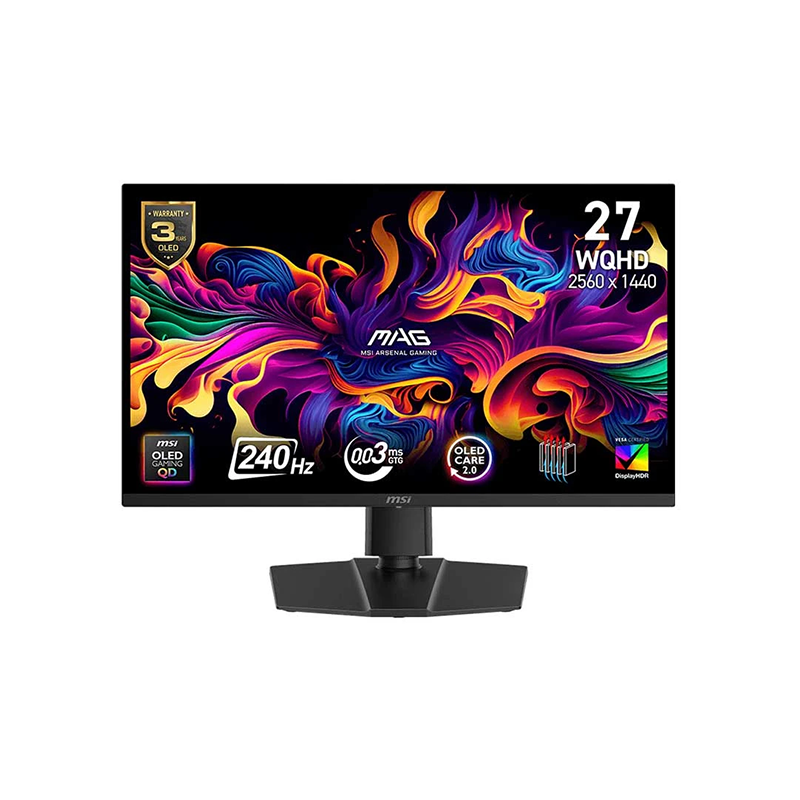
MSI MAG 273QP QD-OLED X24 overview
The MSI MAG 273QP QD-OLED X24 is a 26.5-inch viewable WQHD gaming monitor using a QD-OLED panel with 2560 × 1440 resolution, 240Hz refresh and 0.03ms GTG response. MSI lists VESA DisplayHDR True Black 400, FreeSync Premium Pro and NVIDIA G-SYNC Compatible, plus OLED Care 2.0 and a three-year warranty that includes panel burn-in on its global specification. The X24 suffix identifies this specific product; do not confuse it with MAG 271QP, MAG 273QP X50 or other similarly named MSI OLED models. Actual behavior depends on image content, brightness settings, source device, cable, firmware and local warranty terms. Refer to MSI support for the exact regional unit and current software.
Exact X24 model identification
The official model name is MAG 273QP QD-OLED X24. MSI specifies a 26.5-inch active panel (often marketed as 27 inches), a flat 16:9 QD-OLED display and WQHD 2560 × 1440 resolution. It is not a 4K screen, not an IPS LCD, and not the 500Hz MAG 272QP QD-OLED X50. The exact model matters because ports, power, refresh and warranty may differ across MSI monitor variants. Check the rear label and box model code before accepting delivery. Actual behavior depends on image content, brightness settings, source device, cable, firmware and local warranty terms. Refer to MSI support for the exact regional unit and current software.
26.5-inch WQHD QD-OLED display
The native 2560 × 1440 resolution provides more desktop and game detail than Full HD while being less demanding than 4K at high frame rates. MSI lists a 0.2292mm pixel pitch and 178-degree horizontal and vertical viewing angles. The QD-OLED panel controls individual pixel light, supporting deep blacks and vivid colors. A 26.5-inch active viewable area is suitable for a typical desktop distance. OLED subpixel structure and operating-system scaling may affect fine text appearance for some users, so inspect the display at your normal distance if text is a major workload. Actual behavior depends on image content, brightness settings, source device, cable, firmware and local warranty terms. Refer to MSI support for the exact regional unit and current software.
240Hz refresh and pixel response
MSI specifies a 240Hz maximum refresh rate and 0.03ms GTG response. A 240Hz panel can refresh up to 240 times per second when connected to a compatible source using the supported mode. Fast pixel transitions can reduce visible smearing compared with slower LCD technologies, but overall input latency still depends on the PC, game, frame rate, settings and peripherals. To benefit from 240Hz, choose 2560 × 1440 at 240Hz in the operating system and ensure the game can sustain a suitable frame rate. Actual behavior depends on image content, brightness settings, source device, cable, firmware and local warranty terms. Refer to MSI support for the exact regional unit and current software.
HDR True Black 400 and brightness figures
MSI lists 250 nits SDR brightness, 450 nits typical HDR brightness at 10% average picture level, and 1000 nits peak at 3% average picture level. It is certified DisplayHDR True Black 400. The peak figures apply to limited bright regions rather than a full white screen; HDR tone mapping, picture mode, content and window size affect the output. OLED offers very dark blacks, but do not interpret the 1000-nit peak as sustained full-screen brightness. Compare HDR and SDR modes in actual games and adjust for room lighting. Actual behavior depends on image content, brightness settings, source device, cable, firmware and local warranty terms. Refer to MSI support for the exact regional unit and current software.
Color gamut and color accuracy claims
The official specification lists 98% Adobe RGB, 99% DCI-P3 and 138% sRGB coverage using CIE 1976 measurements, with 1.07 billion colors and 10-bit output. MSI also advertises Delta E ≤2 color accuracy. Wide gamut can make supported games and media look vivid, but coverage and factory claims do not guarantee a specific unit’s uniformity or a color-managed workflow in every application. Use an appropriate color profile for photo and video work, and calibrate if the work requires measured, repeatable color. Actual behavior depends on image content, brightness settings, source device, cable, firmware and local warranty terms. Refer to MSI support for the exact regional unit and current software.
OLED Care 2.0 and burn-in protection
MSI OLED Care 2.0 includes pixel shift, panel protection/pixel refresh, static-screen detection, boundary detection and taskbar/logo detection. These functions are designed to reduce the risk of image sticking and burn-in by moving pixels or lowering brightness around persistent elements. They reduce risk but do not make an OLED panel immune to permanent retention. Keep protection enabled, allow scheduled pixel refresh to complete, use screen sleep or varied content, and avoid unplugging the display while a maintenance cycle is running. Actual behavior depends on image content, brightness settings, source device, cable, firmware and local warranty terms. Refer to MSI support for the exact regional unit and current software.
Three-year panel burn-in warranty terms
MSI’s official specification states a three-year warranty including panel burn-in, and the product overview also advertises three-year burn-in coverage. This is meaningful for an OLED buyer, but regional coverage, purchase-channel requirements and claim procedures can differ. The global manufacturer page explicitly says specifications and availability can vary by country. Before purchase in Bangladesh, ask the seller or MSI service point to confirm in writing that the specific serial and regional part number receive the same coverage and how pixel defects or burn-in claims are evaluated. Actual behavior depends on image content, brightness settings, source device, cable, firmware and local warranty terms. Refer to MSI support for the exact regional unit and current software.
Adaptive-Sync, FreeSync and G-SYNC
The monitor supports NVIDIA G-SYNC Compatible and AMD FreeSync Premium Pro. Variable refresh rate synchronizes panel refresh with compatible GPU output to reduce tearing and uneven motion when frame rate fluctuates. Enable VRR in the graphics driver and monitor/game settings, then confirm that the active input supports the desired mode. VRR does not create frames and cannot guarantee smoothness if the PC is overloaded. Check the display and driver settings together if tearing or judder remains. Actual behavior depends on image content, brightness settings, source device, cable, firmware and local warranty terms. Refer to MSI support for the exact regional unit and current software.
HDMI 2.1 and DisplayPort connections
Video inputs include two HDMI 2.1 ports supporting WQHD at up to 240Hz and one DisplayPort 1.4a HBR3 input. An audio headphone output is also listed. There is no USB-C input, USB hub or built-in speaker specified for this model. DisplayPort and HDMI can each carry the advertised WQHD high-refresh mode when the source, cable and selected timing support it. If connecting several devices, the two HDMI inputs and one DP input allow multiple sources without an external switch. Actual behavior depends on image content, brightness settings, source device, cable, firmware and local warranty terms. Refer to MSI support for the exact regional unit and current software.
Console mode, VRR and ALLM
MSI console mode supports HDMI 2.1 features including VRR and ALLM, with console output up to 120Hz according to the product page. The monitor can use HDMI CEC to communicate with connected devices for supported wake and mode behavior. Actual resolution and refresh depend on console model, game and output settings; the PC maximum of 240Hz is not a console guarantee. Select the correct HDMI input, enable console VRR if supported, and verify the negotiated signal in the console’s video information screen. Actual behavior depends on image content, brightness settings, source device, cable, firmware and local warranty terms. Refer to MSI support for the exact regional unit and current software.
Stand, height, pivot and VESA mounting
The stand supports tilt from -5 to +20 degrees, swivel ±30 degrees, pivot ±90 degrees and height adjustment from 0 to 130mm. MSI lists a 100 × 100mm VESA mount, Kensington lock and a 6.7kg net weight. The stand can raise, rotate or turn the panel to portrait orientation for compatible tasks. Confirm desk clearance before pivoting the monitor and use the proper VESA screws when installing an arm. Keep cables loose enough for the full motion range without putting tension on the connectors. Actual behavior depends on image content, brightness settings, source device, cable, firmware and local warranty terms. Refer to MSI support for the exact regional unit and current software.
PIP, PBP and KVM limitations
The monitor supports HDMI CEC and Picture-in-Picture/Picture-by-Picture. MSI explicitly lists KVM as unsupported, so do not assume that the display can switch one keyboard and mouse between two connected computers. PIP/PBP can show more than one source when configured, but the available layout and resolution behavior should be checked in the OSD. For a two-PC workspace requiring shared peripherals, use an external KVM or a separate USB switch and verify compatibility with your equipment. Actual behavior depends on image content, brightness settings, source device, cable, firmware and local warranty terms. Refer to MSI support for the exact regional unit and current software.
PC setup and refresh-rate troubleshooting
For PC use, connect the GPU directly with DisplayPort 1.4a or HDMI 2.1, select 2560 × 1440, and choose 240Hz in the operating system. Update the graphics driver and enable adaptive sync where appropriate. If 240Hz is missing, check the cable rating, port, GPU output capability, display settings and current firmware. Do not confuse the monitor’s 240Hz ceiling with a game’s actual frame rate. Try a lower refresh temporarily to isolate a cable or bandwidth issue, then restore the supported mode after diagnosis. Actual behavior depends on image content, brightness settings, source device, cable, firmware and local warranty terms. Refer to MSI support for the exact regional unit and current software.
OLED maintenance for desktop use
Use the OLED protection functions during everyday desktop work, especially if the display shows fixed taskbars, spreadsheets, dashboards or editing timelines for long periods. Set a screen timeout, avoid leaving bright static content unattended and let MSI’s panel refresh routine operate when prompted. Keep adequate ventilation around the rear heatsink. OLED care routines are preventive maintenance rather than a promise that burn-in can never occur. Review the warranty terms and preserve proof of purchase and serial details for any future service request. Actual behavior depends on image content, brightness settings, source device, cable, firmware and local warranty terms. Refer to MSI support for the exact regional unit and current software.
Gaming and media use cases
QD-OLED contrast and color can provide immersive games and HDR media, while 1440p at 240Hz serves both detailed visuals and competitive play. The 26.5-inch size fits standard desks, and the adjustable stand can accommodate height and portrait use. MSI advertises ClearMR 13000 certification and OLED Care 2.0. These specifications can support a fast, vivid gaming setup, but they should be matched to the user’s GPU, the game’s rendering performance, desired brightness and tolerance for OLED-specific care. Actual behavior depends on image content, brightness settings, source device, cable, firmware and local warranty terms. Refer to MSI support for the exact regional unit and current software.
Trade-offs and alternatives
The panel is 1440p rather than 4K and SDR brightness is specified at 250 nits. OLED care remains relevant when static desktop elements are displayed for long periods. MSI lists no USB-C, no integrated USB hub, no speakers and no KVM. The external 24V 5A power adapter adds a separate component to the desk setup. Buyers seeking high-power laptop charging, integrated docking, a brighter full-screen image or a 4K creative workspace should compare other models rather than assuming this gaming monitor provides those functions. Actual behavior depends on image content, brightness settings, source device, cable, firmware and local warranty terms. Refer to MSI support for the exact regional unit and current software.
Bangladesh purchase and warranty checklist
Before buying in Bangladesh, verify the exact MAG 273QP QD-OLED X24 model, local inventory, final delivered price, new/sealed condition, serial number, dead-pixel policy, return window, adapter and included cables. MSI specifies a three-year panel burn-in warranty globally, but the local seller must confirm that the serial is eligible and identify the service point and claim process. Ask whether warranty starts from purchase or import date, what documentation is required, and whether burn-in coverage applies to the exact regional SKU. Get the answer in writing. Actual behavior depends on image content, brightness settings, source device, cable, firmware and local warranty terms. Refer to MSI support for the exact regional unit and current software.
Frequently asked questions
What is the resolution? 2560 × 1440 WQHD. What refresh rate? Up to 240Hz. What is the panel? QD-OLED. What response time is specified? 0.03ms GTG. Which HDR certification? VESA DisplayHDR True Black 400. Does it have USB-C? No, the listed video ports are HDMI 2.1 and DisplayPort 1.4a. Does it have speakers or KVM? Neither is listed; MSI explicitly says KVM is unsupported. What is the warranty? MSI lists three years including panel burn-in, subject to regional and serial eligibility. Actual behavior depends on image content, brightness settings, source device, cable, firmware and local warranty terms. Refer to MSI support for the exact regional unit and current software.
Who should choose this monitor
Choose the MAG 273QP QD-OLED X24 if you want QHD OLED contrast and color with a 240Hz gaming refresh rate, adjustable stand and a published burn-in coverage statement. It is less suitable if a USB-C dock, high-wattage laptop charging, integrated speakers, KVM, 4K resolution or long unattended static desktop use is essential. Make sure the PC can deliver the required frame rates and confirm the local warranty before payment. Keep OLED protections enabled and follow MSI maintenance prompts. Actual behavior depends on image content, brightness settings, source device, cable, firmware and local warranty terms. Refer to MSI support for the exact regional unit and current software.