Pros
- WQHD resolution and 180Hz refresh over DP/USB-C.
- Quantum-dot gamut and DisplayHDR 400 are listed by MSI.
- USB-C video and 65W power can simplify compatible laptop setups.
- Flexible stand supports height, tilt, swivel and portrait pivot.

All categories
 New condition
Monitors
MSI · MAG 274QRF QD E2
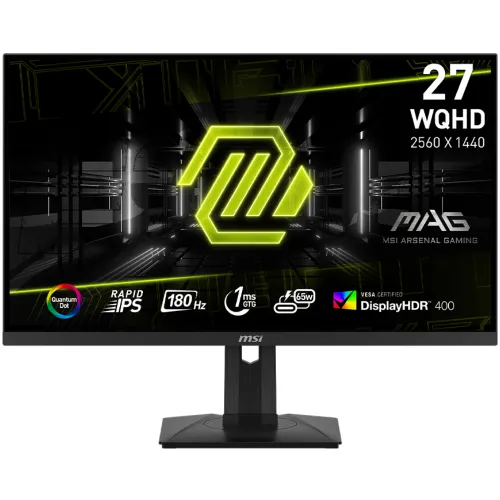
27-inch WQHD Rapid IPS monitor with 180Hz over DP/USB-C, DisplayHDR 400, quantum-dot color and 65W USB-C charging.
Price unavailable
Price range updating
No verified price is available yet. Store offers will appear when merchants publish them.
Compare store prices
No live offers for this variant
Offers will appear when merchants publish them.
Loading history…
Product story
The MSI MAG 274QRF QD E2 is a 27-inch flat WQHD gaming monitor with a Rapid IPS panel, quantum-dot color technology and a maximum 180Hz refresh. MSI lists DisplayHDR 400, AMD FreeSync, one DisplayPort 1.4a, two HDMI 2.0b ports and USB-C with 65W charging. Confirm exact regional package and warranty before ordering. Use the MSI MAG 274QRF QD E2 specification page and datasheet for exact connection and setup details. Manufacturer specifications describe model capability; actual compatibility depends on source, cable, software and the unit supplied. Confirm local offer, stock and warranty with the seller.
The complete product name is MAG 274QRF QD E2. It is distinct from earlier MAG274QRF-QD and other MAG models. MSI warns that features can vary by market. Match the rear label, carton and seller invoice to the QD E2 model code and check the exact product datasheet for regional port or accessory changes. Use the MSI MAG 274QRF QD E2 specification page and datasheet for exact connection and setup details. Manufacturer specifications describe model capability; actual compatibility depends on source, cable, software and the unit supplied. Confirm local offer, stock and warranty with the seller.
MSI specifies a 27-inch panel with 2560 × 1440 WQHD resolution and a 16:9 ratio. At this size, QHD offers detailed games and desktop text without the pixel load of 4K. Select native resolution for clarity. Scaling, viewing distance and operating-system settings influence comfort during long sessions. Use the MSI MAG 274QRF QD E2 specification page and datasheet for exact connection and setup details. Manufacturer specifications describe model capability; actual compatibility depends on source, cable, software and the unit supplied. Confirm local offer, stock and warranty with the seller.
The maximum refresh rate is 180Hz with a 48–180Hz activated range. MSI’s timing table lists 2560 × 1440 at up to 180Hz through DisplayPort and USB-C, and up to 144Hz through HDMI. Select the correct connection and verify active timing in the monitor OSD and system display settings. Use the MSI MAG 274QRF QD E2 specification page and datasheet for exact connection and setup details. Manufacturer specifications describe model capability; actual compatibility depends on source, cable, software and the unit supplied. Confirm local offer, stock and warranty with the seller.
The panel type is Rapid IPS. MSI lists 178-degree horizontal and vertical viewing angles and 1000:1 contrast. IPS provides broad viewing, while actual black level, uniformity and motion transitions depend on the unit and settings. The monitor is flat, which can suit standard desktop use and design tasks. Use the MSI MAG 274QRF QD E2 specification page and datasheet for exact connection and setup details. Manufacturer specifications describe model capability; actual compatibility depends on source, cable, software and the unit supplied. Confirm local offer, stock and warranty with the seller.
MSI lists quantum-dot wide color and gamut coverage figures using CIE1976 standards: 94% Adobe RGB, 98% DCI-P3 and 150% sRGB. Gamut coverage describes range and not calibration accuracy. No unit-specific calibration certificate was confirmed. For color-critical work, calibrate the display and use a managed color workflow. Use the MSI MAG 274QRF QD E2 specification page and datasheet for exact connection and setup details. Manufacturer specifications describe model capability; actual compatibility depends on source, cable, software and the unit supplied. Confirm local offer, stock and warranty with the seller.
The specification lists VESA DisplayHDR 400 and 400 nits SDR and peak brightness. HDR compatibility alone does not mean OLED-level contrast or local dimming. HDR depends on supported source content, signal settings and picture mode. Compare actual SDR and HDR output in the intended room before relying on it for grading. Use the MSI MAG 274QRF QD E2 specification page and datasheet for exact connection and setup details. Manufacturer specifications describe model capability; actual compatibility depends on source, cable, software and the unit supplied. Confirm local offer, stock and warranty with the seller.
MSI specifies 1ms GTG response. This is distinct from total input lag, and the result depends on response mode and transitions. Choose the OSD response setting that balances clarity and overshoot. High refresh can improve motion when the PC produces enough frames; the monitor cannot create frames absent from the source. Use the MSI MAG 274QRF QD E2 specification page and datasheet for exact connection and setup details. Manufacturer specifications describe model capability; actual compatibility depends on source, cable, software and the unit supplied. Confirm local offer, stock and warranty with the seller.
The monitor lists AMD FreeSync and an activated variable-refresh range of 48–180Hz. VRR requires compatible GPU, driver, selected input and settings. Enable the feature on both display and source, then confirm behavior in supported games. Do not assume every device or port supports every variable-refresh mode. Use the MSI MAG 274QRF QD E2 specification page and datasheet for exact connection and setup details. Manufacturer specifications describe model capability; actual compatibility depends on source, cable, software and the unit supplied. Confirm local offer, stock and warranty with the seller.
USB-C supports DisplayPort Alt Mode and up to 65W power delivery according to MSI. A compatible laptop can carry video and receive charging over one cable, subject to its own power needs. Verify USB-C source capabilities and cable rating. Other USB peripherals may require the upstream connection specified in the manual. Use the MSI MAG 274QRF QD E2 specification page and datasheet for exact connection and setup details. Manufacturer specifications describe model capability; actual compatibility depends on source, cable, software and the unit supplied. Confirm local offer, stock and warranty with the seller.
MSI lists one DisplayPort 1.4a, two HDMI 2.0b, USB-C, two USB-A 2.0, USB-B and headphone output. Its product timing table sets different maximum refresh by port: DP and USB-C up to 180Hz, HDMI up to 144Hz at WQHD. Confirm regional cable accessories and hub connections. Use the MSI MAG 274QRF QD E2 specification page and datasheet for exact connection and setup details. Manufacturer specifications describe model capability; actual compatibility depends on source, cable, software and the unit supplied. Confirm local offer, stock and warranty with the seller.
The official specifications list tilt from -5° to +20°, swivel from -45° to +45°, pivot from -90° to +90° and height adjustment from 0 to 130mm. Adjust the screen to a comfortable eye level and keep the base stable. Stand range can help with positioning but does not alter panel performance. Use the MSI MAG 274QRF QD E2 specification page and datasheet for exact connection and setup details. Manufacturer specifications describe model capability; actual compatibility depends on source, cable, software and the unit supplied. Confirm local offer, stock and warranty with the seller.
MSI specifies a 75 × 75mm VESA mounting pattern and dimensions of 613.5 × 196.5 × 402.1mm with stand. Check screw depth and mount capacity before fitting an arm. Leave room for connectors and airflow. Support the monitor while mounting and verify the exact screw hardware in the manual. Use the MSI MAG 274QRF QD E2 specification page and datasheet for exact connection and setup details. Manufacturer specifications describe model capability; actual compatibility depends on source, cable, software and the unit supplied. Confirm local offer, stock and warranty with the seller.
For PC gaming, connect over DisplayPort or USB-C for 2560 × 1440 at up to 180Hz; HDMI is listed up to 144Hz at QHD. Use a suitable cable, current GPU driver and supported source. Select refresh in the operating system, verify in the OSD and tune game settings to maintain frame rates. Use the MSI MAG 274QRF QD E2 specification page and datasheet for exact connection and setup details. Manufacturer specifications describe model capability; actual compatibility depends on source, cable, software and the unit supplied. Confirm local offer, stock and warranty with the seller.
Console capabilities differ by model and game. HDMI at QHD is listed up to 144Hz, but consoles commonly use lower refresh modes. Check the console’s resolution, HDR and VRR output against the monitor input. The DP maximum of 180Hz does not apply to HDMI-connected consoles. Use the MSI MAG 274QRF QD E2 specification page and datasheet for exact connection and setup details. Manufacturer specifications describe model capability; actual compatibility depends on source, cable, software and the unit supplied. Confirm local offer, stock and warranty with the seller.
QHD, wide-gamut color and a flat 27-inch layout can suit gaming, streaming and general desktop work. HDR can improve supported content within DisplayHDR 400 limits. For photo or video work, verify the color mode and profile and calibrate the individual screen; a wide gamut alone does not ensure accuracy. Use the MSI MAG 274QRF QD E2 specification page and datasheet for exact connection and setup details. Manufacturer specifications describe model capability; actual compatibility depends on source, cable, software and the unit supplied. Confirm local offer, stock and warranty with the seller.
Useful strengths include Rapid IPS, 180Hz via DP/USB-C, quantum-dot gamut, DisplayHDR 400, FreeSync and 65W USB-C charging. Trade-offs include HDMI’s lower 144Hz QHD limit and the GPU load of high frame rates. HDR400 has practical contrast limits, and USB-C charging may not power every laptop under load. Use the MSI MAG 274QRF QD E2 specification page and datasheet for exact connection and setup details. Manufacturer specifications describe model capability; actual compatibility depends on source, cable, software and the unit supplied. Confirm local offer, stock and warranty with the seller.
Keep the panel clean with a microfiber cloth; do not spray liquid directly on it. Maintain ventilation and support the display during adjustment. On delivery, inspect screen, ports, stand, USB hub, included cables and dead-pixel condition. Keep packaging, serial label and invoice until the return period has ended. Use the MSI MAG 274QRF QD E2 specification page and datasheet for exact connection and setup details. Manufacturer specifications describe model capability; actual compatibility depends on source, cable, software and the unit supplied. Confirm local offer, stock and warranty with the seller.
For Bangladesh, confirm live price and stock, delivery, return/dead-pixel policy, included accessories and serial-specific warranty provider, duration and service location. MSI specifications do not prove local coverage. The catalog’s previous three-year claim must be confirmed against the unit serial and written seller terms. Use the MSI MAG 274QRF QD E2 specification page and datasheet for exact connection and setup details. Manufacturer specifications describe model capability; actual compatibility depends on source, cable, software and the unit supplied. Confirm local offer, stock and warranty with the seller.
The official MAG 274QRF QD E2 specification lists 27-inch WQHD Rapid IPS, 180Hz, 1ms GTG, DisplayHDR 400, FreeSync, 65W USB-C, DP 1.4a and dual HDMI 2.0b. Port timing differs: HDMI reaches up to 144Hz at QHD while DP and Type-C list 180Hz. Verify the regional version. Use the MSI MAG 274QRF QD E2 specification page and datasheet for exact connection and setup details. Manufacturer specifications describe model capability; actual compatibility depends on source, cable, software and the unit supplied. Confirm local offer, stock and warranty with the seller.
Helpful answers
Product-specific answers maintained with the catalog information.
MSI specifies 2560 × 1440 WQHD at a 16:9 aspect ratio.
Up to 180Hz over DP/USB-C at QHD; HDMI is listed up to 144Hz at QHD.
The MAG 274QRF QD E2 uses a 27-inch Rapid IPS panel.
MSI lists VESA DisplayHDR 400 and 400-nit SDR/peak brightness.
QD refers to quantum-dot wide color technology used in this monitor.
USB-C supports DP Alt Mode and up to 65W power delivery for compatible devices.
MSI lists AMD FreeSync with a 48–180Hz activated range.
MSI timing information lists HDMI up to 144Hz at QHD; DP and USB-C list 180Hz.
Ask the seller to confirm serial-specific provider, service location and coverage term.
Customer community
Become a merchant
Join BiponiBD, publish accurate offers and start free.