Pros
- QHD at up to 180Hz through DisplayPort for compatible PCs.
- Rapid IPS panel with broad listed color gamut.
- Adaptive-Sync and DisplayHDR 400 are specified.
- Ergonomic stand supports height, tilt, swivel and pivot.

All categories
 New condition
Monitors
MSI · MAG 274QRFW
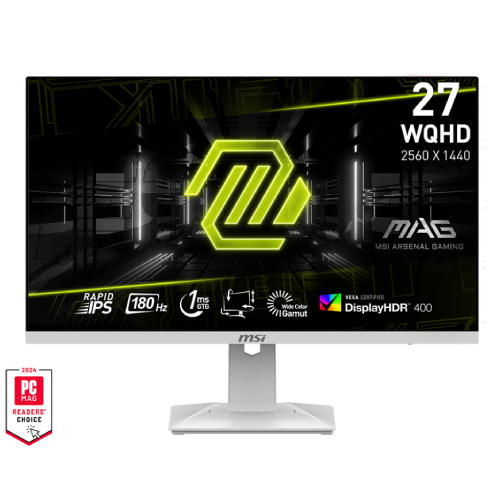
27-inch WQHD Rapid IPS monitor with 180Hz over DisplayPort, 1ms GTG, Adaptive-Sync, DisplayHDR 400 and ergonomic stand.
Price unavailable
Price range updating
No verified price is available yet. Store offers will appear when merchants publish them.
Compare store prices
No live offers for this variant
Offers will appear when merchants publish them.
Loading history…
Product story
MSI MAG 274QRFW is a 27-inch flat WQHD gaming monitor using a Rapid IPS panel. MSI specifies 2560 × 1440 resolution, up to 180Hz, 1ms GTG, Adaptive-Sync and VESA DisplayHDR 400. Its stand supports height, tilt, swivel and pivot adjustment. It is suited to high-refresh PC use and general desktop work; confirm the exact regional model, warranty and live offer with the seller. For this model, confirm the exact cable and source combination against MSI documentation before setup. The selected display mode, GPU capability and application requirements determine actual signal behavior. Retain space behind the screen for connectors and adjust the stand for a centered, comfortable view.
The 27-inch panel has a native 2560 × 1440 resolution, 16:9 aspect ratio and 596.736 × 335.664mm active display area. WQHD provides more workspace and image detail than Full HD at a similar screen size. Set the computer to native resolution for sharp output, then adjust scaling for readable text. High refresh at this resolution requires a source, cable and port that support the selected timing. For this model, confirm the exact cable and source combination against MSI documentation before setup. The selected display mode, GPU capability and application requirements determine actual signal behavior. Retain space behind the screen for connectors and adjust the stand for a centered, comfortable view.
MSI specifies a Rapid IPS panel with 178-degree horizontal and vertical viewing angles. IPS technology is designed for broad viewing positions, useful for shared viewing and desktop use. The typical contrast ratio is 1000:1. Image appearance still depends on room lighting, viewing angle and settings; the specification does not guarantee identical uniformity or calibration on every physical unit. For this model, confirm the exact cable and source combination against MSI documentation before setup. The selected display mode, GPU capability and application requirements determine actual signal behavior. Retain space behind the screen for connectors and adjust the stand for a centered, comfortable view.
The maximum refresh rate is 180Hz, with an activated range of 48–180Hz. MSI lists QHD 180Hz over DisplayPort 1.4a and up to 144Hz over HDMI 2.0b. Connect using DisplayPort if targeting the maximum QHD refresh, set 2560 × 1440 and 180Hz in system settings, and verify the active signal in the monitor OSD. For this model, confirm the exact cable and source combination against MSI documentation before setup. The selected display mode, GPU capability and application requirements determine actual signal behavior. Retain space behind the screen for connectors and adjust the stand for a centered, comfortable view.
MSI rates the response time at 1ms GTG. Gray-to-gray response is a pixel-transition measurement and differs from input lag or MPRT. It does not guarantee blur-free motion in all content. Refresh rate, overdrive setting, frame rate and scene content affect motion appearance. Use the monitor’s response controls thoughtfully and inspect for overshoot or other artifacts at the chosen setting. For this model, confirm the exact cable and source combination against MSI documentation before setup. The selected display mode, GPU capability and application requirements determine actual signal behavior. Retain space behind the screen for connectors and adjust the stand for a centered, comfortable view.
Adaptive-Sync is listed as dynamic refresh technology. It can coordinate display updates with compatible graphics output to reduce tearing within supported modes. Enable it in the OSD and graphics driver, use a suitable connection and verify compatibility with the GPU. The supported activated range is listed as 48–180Hz. The feature cannot make an unsupported source deliver a refresh rate it cannot output. For this model, confirm the exact cable and source combination against MSI documentation before setup. The selected display mode, GPU capability and application requirements determine actual signal behavior. Retain space behind the screen for connectors and adjust the stand for a centered, comfortable view.
MSI lists VESA DisplayHDR 400 support. Typical brightness is 400 nits, with typical contrast of 1000:1. HDR output requires supported content, operating-system configuration and source hardware. The certification level describes a defined display class and should not be presented as advanced local-dimming HDR. Check HDR mode behavior with the actual source and adjust settings to suit the room. For this model, confirm the exact cable and source combination against MSI documentation before setup. The selected display mode, GPU capability and application requirements determine actual signal behavior. Retain space behind the screen for connectors and adjust the stand for a centered, comfortable view.
MSI lists Adobe RGB 93%, DCI-P3 95% and sRGB 123% using the CIE 1976 standard, with 1.07 billion colors via 8-bit plus FRC. The anti-glare treatment helps manage reflections. Gamut coverage is not calibration accuracy; color-sensitive work should use a calibrated unit and suitable color-management profile. Picture presets may shift color temperature, gamma or saturation. For this model, confirm the exact cable and source combination against MSI documentation before setup. The selected display mode, GPU capability and application requirements determine actual signal behavior. Retain space behind the screen for connectors and adjust the stand for a centered, comfortable view.
Inputs include one DisplayPort 1.4a and two HDMI 2.0b ports, plus one headphone output. MSI’s timing table lists QHD at up to 180Hz through DisplayPort and up to 144Hz through HDMI. USB ports are listed as unavailable, and built-in speakers are not listed. Confirm the source output and cable before choosing a connection; use external speakers or headphones for sound. For this model, confirm the exact cable and source combination against MSI documentation before setup. The selected display mode, GPU capability and application requirements determine actual signal behavior. Retain space behind the screen for connectors and adjust the stand for a centered, comfortable view.
The stand supports tilt from -5° to +20°, swivel from -45° to +45°, pivot from -90° to +90° and height adjustment from 0 to 130mm. These adjustments let users raise, rotate or angle the screen to suit their workstation. Support the panel during adjustment, check clearance for pivoting and allow cable slack so movement does not strain the connectors. For this model, confirm the exact cable and source combination against MSI documentation before setup. The selected display mode, GPU capability and application requirements determine actual signal behavior. Retain space behind the screen for connectors and adjust the stand for a centered, comfortable view.
MSI specifies a 75 × 75mm VESA mounting pattern and Kensington lock. Check mount capacity, screw fit and clearance before attaching an arm. Confirm the physical mount pattern rather than assuming the more common 100 × 100mm size. Support the monitor while mounting, avoid pressing the screen and follow the supplied manual for hardware and safe installation. For this model, confirm the exact cable and source combination against MSI documentation before setup. The selected display mode, GPU capability and application requirements determine actual signal behavior. Retain space behind the screen for connectors and adjust the stand for a centered, comfortable view.
For QHD at 180Hz, MSI lists DisplayPort 1.4a as the supported connection. Use a compatible graphics output and cable, choose 2560 × 1440 at 180Hz in the system display controls, and check the OSD signal information. HDMI 2.0b is listed up to QHD 144Hz. If a mode is missing, check port, cable, driver, resolution and display configuration. For this model, confirm the exact cable and source combination against MSI documentation before setup. The selected display mode, GPU capability and application requirements determine actual signal behavior. Retain space behind the screen for connectors and adjust the stand for a centered, comfortable view.
Rapid IPS, 180Hz and Adaptive-Sync target smooth PC gaming. MSI also lists PIP/PBP functionality and a frameless design. The graphics card and game must render enough frames to benefit from high refresh; the monitor does not increase GPU performance. Choose response and HDR settings for the particular game, and verify that the selected input supports the intended resolution and refresh. For this model, confirm the exact cable and source combination against MSI documentation before setup. The selected display mode, GPU capability and application requirements determine actual signal behavior. Retain space behind the screen for connectors and adjust the stand for a centered, comfortable view.
The two HDMI inputs can connect compatible consoles or media sources. MSI lists QHD up to 144Hz over HDMI, but console output depends on model, game and supported timing. Do not assume a console will use 180Hz. HDR requires compatible content and system configuration. Verify active signal and audio routing after connection, and consider the 16:9 ratio for console content. For this model, confirm the exact cable and source combination against MSI documentation before setup. The selected display mode, GPU capability and application requirements determine actual signal behavior. Retain space behind the screen for connectors and adjust the stand for a centered, comfortable view.
WQHD resolution provides workspace for documents, spreadsheets, browser windows and creative applications. The adjustable stand helps align the display to desk height and viewing position. The listed color gamut can support broad media work, but does not prove factory calibration. For color-critical design, calibrate the monitor and validate output on the target device. For this model, confirm the exact cable and source combination against MSI documentation before setup. The selected display mode, GPU capability and application requirements determine actual signal behavior. Retain space behind the screen for connectors and adjust the stand for a centered, comfortable view.
MSI lists PIP/PBP support, allowing compatible sources to be displayed in picture-in-picture or side-by-side layouts. Use the OSD to configure source combinations and window arrangement. Supported modes can depend on input pair, resolution and refresh, so consult the manual rather than assuming all ports can show their maximum timings simultaneously. This feature is useful for comparing sources or viewing a secondary device. For this model, confirm the exact cable and source combination against MSI documentation before setup. The selected display mode, GPU capability and application requirements determine actual signal behavior. Retain space behind the screen for connectors and adjust the stand for a centered, comfortable view.
The monitor uses an external 19V 2.58A adapter with 100–240V, 50/60Hz input. MSI lists approximate dimensions with stand as 613.5 × 196.5 × 402.1mm and without stand as 613.5 × 69.7 × 362.5mm. Net weight is about 6kg and weight without stand about 3.95kg. Measure the desk and check package contents before installation. For this model, confirm the exact cable and source combination against MSI documentation before setup. The selected display mode, GPU capability and application requirements determine actual signal behavior. Retain space behind the screen for connectors and adjust the stand for a centered, comfortable view.
Place the monitor on a stable surface and keep ventilation unobstructed. Clean the anti-glare panel using a soft microfiber cloth; do not spray liquid directly onto it or use abrasive cleaners. Support the frame while raising, pivoting or moving the display. Keep cables from pulling during stand adjustment and retain packaging, invoice and serial information through delivery inspection. For this model, confirm the exact cable and source combination against MSI documentation before setup. The selected display mode, GPU capability and application requirements determine actual signal behavior. Retain space behind the screen for connectors and adjust the stand for a centered, comfortable view.
The catalog’s three-year warranty text does not prove MSI local coverage for a particular Bangladesh serial. Ask the seller for the warranty provider, duration, service location, dead-pixel policy, invoice requirements and serial eligibility. Match unit and carton serials with the invoice. Confirm current price, stock, delivery, returns and included adapter/cables on the live seller offer before payment. For this model, confirm the exact cable and source combination against MSI documentation before setup. The selected display mode, GPU capability and application requirements determine actual signal behavior. Retain space behind the screen for connectors and adjust the stand for a centered, comfortable view.
Choose the MAG 274QRFW if a 27-inch WQHD Rapid IPS display with 180Hz over DisplayPort, Adaptive-Sync, DisplayHDR 400 and a fully adjustable stand fits the setup. It is less suitable when USB hub, built-in speakers, USB-C video, or 180Hz over HDMI is required. Confirm the local offer and serial-specific warranty, then select the connection based on the source’s supported mode. For this model, confirm the exact cable and source combination against MSI documentation before setup. The selected display mode, GPU capability and application requirements determine actual signal behavior. Retain space behind the screen for connectors and adjust the stand for a centered, comfortable view.
Helpful answers
Product-specific answers maintained with the catalog information.
MSI MAG 274QRFW is a 27-inch WQHD monitor with 2560 × 1440 resolution.
It supports up to 180Hz over DisplayPort; HDMI is listed up to 144Hz at QHD.
MSI specifies a Rapid IPS panel.
Yes, VESA DisplayHDR 400 support is listed.
One DisplayPort 1.4a, two HDMI 2.0b and one headphone output are listed.
MSI lists no built-in speakers and USB ports as unavailable.
It supports 0–130mm height, tilt, swivel and pivot adjustment.
The specified mounting pattern is 75 × 75mm.
Confirm serial-specific MSI warranty coverage and service with the seller.
Customer community
Become a merchant
Join BiponiBD, publish accurate offers and start free.