Pros
- 4K UHD detail with a high 160Hz refresh ceiling.
- HDMI 2.1 supports modern PC and console signal paths.
- Rapid IPS, FreeSync and adjustable stand support gaming use.
- USB-C video can connect a compatible laptop or device.

All categories
 New condition
Monitors
MSI · MAG 274UPF E2
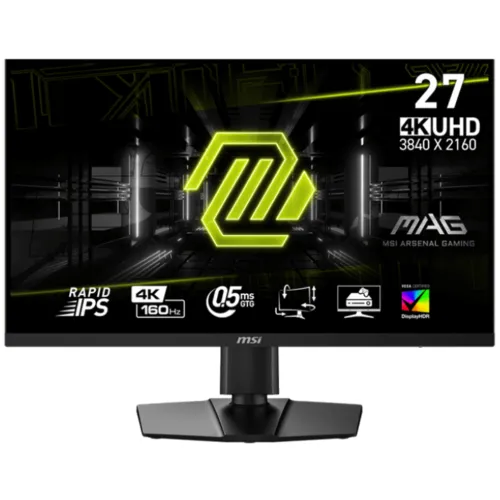
27-inch 4K Rapid IPS monitor with 160Hz, HDMI 2.1, FreeSync and USB-C video with 15W power.
Price unavailable
Price range updating
No verified price is available yet. Store offers will appear when merchants publish them.
Compare store prices
No live offers for this variant
Offers will appear when merchants publish them.
Loading history…
Product story
The MSI MAG 274UPF E2 is a 27-inch flat 16:9 gaming monitor with a 3840 × 2160 UHD Rapid IPS panel. MSI lists a 160Hz refresh rate, 0.5ms GTG minimum response, AMD FreeSync, VESA DisplayHDR True Black 400, two HDMI 2.1 inputs, DisplayPort 1.4a and USB-C with DisplayPort Alt Mode and 15W power. This is the E2 model, not the earlier MAG 274UPF. Use MSI documentation for the exact E2 region and verify the source, cable, input and OSD as a complete signal chain. Maximum modes depend on the connected hardware and configuration. Local price, availability, included items and warranty need seller confirmation for the specific unit.
Confirm the model label says MAG 274UPF E2. The earlier MAG 274UPF differs in refresh, panel and connectivity details. E2 specifications include 4K 160Hz, Rapid IPS, HDMI 2.1 and USB-C 15W charging. Do not assume it offers the prior model’s 65W USB-C power delivery or a built-in KVM; those specifications do not apply to this variant. Use MSI documentation for the exact E2 region and verify the source, cable, input and OSD as a complete signal chain. Maximum modes depend on the connected hardware and configuration. Local price, availability, included items and warranty need seller confirmation for the specific unit.
The 27-inch screen uses native 3840 × 2160 UHD at a 16:9 aspect ratio. This high pixel density suits detailed text, high-resolution content and games with 4K output. Operating system scaling can help make interface elements comfortable to read. For high refresh at 4K, the source graphics output, cable, monitor input and settings all need to support the required signal bandwidth. Use MSI documentation for the exact E2 region and verify the source, cable, input and OSD as a complete signal chain. Maximum modes depend on the connected hardware and configuration. Local price, availability, included items and warranty need seller confirmation for the specific unit.
MSI identifies the panel as Rapid IPS with 178-degree viewing angles. The flat screen and IPS panel support consistent viewing across a desk, though contrast, uniformity and color can vary by unit and viewing environment. The anti-glare coating helps with reflections. For color-critical work, calibrate the actual monitor and use color-managed software. Use MSI documentation for the exact E2 region and verify the source, cable, input and OSD as a complete signal chain. Maximum modes depend on the connected hardware and configuration. Local price, availability, included items and warranty need seller confirmation for the specific unit.
The E2 supports 160Hz refresh and 0.5ms GTG minimum response according to MSI. Minimum GTG is not a guarantee across every pixel transition and should not be confused with a typical response measurement. Select the supported refresh in the graphics control panel and review overdrive or response settings for the desired balance of motion clarity and overshoot. Use MSI documentation for the exact E2 region and verify the source, cable, input and OSD as a complete signal chain. Maximum modes depend on the connected hardware and configuration. Local price, availability, included items and warranty need seller confirmation for the specific unit.
MSI lists AMD FreeSync with an activated range of 48–160Hz. Variable refresh can synchronize a compatible graphics source and reduce tearing within supported modes. Enable the feature in the monitor and GPU settings. Performance depends on frame rate, source hardware, connection and game; it does not make every game render at 160 frames per second. Use MSI documentation for the exact E2 region and verify the source, cable, input and OSD as a complete signal chain. Maximum modes depend on the connected hardware and configuration. Local price, availability, included items and warranty need seller confirmation for the specific unit.
This model is listed with VESA DisplayHDR True Black 400 certification. Confirm the exact regional certification and settings for the unit, as naming differs from standard DisplayHDR 400. HDR effect depends on source content, system output and picture mode. HDR certification does not guarantee the same brightness or contrast behavior in every scene or application. Use MSI documentation for the exact E2 region and verify the source, cable, input and OSD as a complete signal chain. Maximum modes depend on the connected hardware and configuration. Local price, availability, included items and warranty need seller confirmation for the specific unit.
MSI lists Adobe RGB 93%, DCI-P3 98% and sRGB 133%, plus 1.07 billion colors using 8-bit plus FRC. Gamut values describe color-space coverage rather than individual-unit calibration. Use a calibrated profile for color-sensitive creative work. Picture presets and HDR modes can change color appearance, brightness and signal processing. Use MSI documentation for the exact E2 region and verify the source, cable, input and OSD as a complete signal chain. Maximum modes depend on the connected hardware and configuration. Local price, availability, included items and warranty need seller confirmation for the specific unit.
The monitor provides one DisplayPort 1.4a and two HDMI 2.1 inputs. HDMI 2.1 supports console and PC high-bandwidth signals, but achievable resolution and refresh depend on the source and cable. Use a certified, suitable cable and check the input mode in the OSD. If 4K 160Hz is unavailable, inspect the graphics output capability, driver and selected signal format. Use MSI documentation for the exact E2 region and verify the source, cable, input and OSD as a complete signal chain. Maximum modes depend on the connected hardware and configuration. Local price, availability, included items and warranty need seller confirmation for the specific unit.
USB-C supports DisplayPort Alt Mode and up to 15W charging in MSI’s E2 datasheet. This is enough for some accessories and light-duty devices, but not full charging for most laptops. Check that the computer’s USB-C port supports video output. A USB-C cable does not by itself guarantee display signal or laptop charging at higher wattage. Use MSI documentation for the exact E2 region and verify the source, cable, input and OSD as a complete signal chain. Maximum modes depend on the connected hardware and configuration. Local price, availability, included items and warranty need seller confirmation for the specific unit.
MSI lists console mode supporting 120Hz at QHD 2K resolution with compatible next-generation consoles. The console, game and cable must support the selected output; the monitor’s 160Hz maximum is a PC monitor capability rather than a console frame-rate guarantee. Check the console signal info and game settings after connection. Use MSI documentation for the exact E2 region and verify the source, cable, input and OSD as a complete signal chain. Maximum modes depend on the connected hardware and configuration. Local price, availability, included items and warranty need seller confirmation for the specific unit.
The stand supports tilt from -5 to +20 degrees, swivel from -30 to +30 degrees and height adjustment up to 130mm. MSI lists a 75 × 75mm VESA pattern and Kensington lock. Verify the exact region’s mount dimensions, arm screw length and load capacity. Position the display at a comfortable height and leave cable clearance when swiveling. Use MSI documentation for the exact E2 region and verify the source, cable, input and OSD as a complete signal chain. Maximum modes depend on the connected hardware and configuration. Local price, availability, included items and warranty need seller confirmation for the specific unit.
MSI lists dimensions of 613.5 × 227.8 × 406.6mm and net/gross package weights of 6.4/8.8kg in the cited datasheet. The monitor uses an external 19V, 3.42A adapter and AC input of 100–240V, 50/60Hz. Use the supplied power adapter and allow ventilation around the monitor and adapter. Use MSI documentation for the exact E2 region and verify the source, cable, input and OSD as a complete signal chain. Maximum modes depend on the connected hardware and configuration. Local price, availability, included items and warranty need seller confirmation for the specific unit.
An audio headphone output is provided; confirm speaker presence against the regional datasheet before purchase rather than assuming built-in audio. The cited package may include a power adapter and cord, display cable and documentation. Cables and accessories can vary across markets and retailer bundles, so ask the seller to confirm box contents. Use MSI documentation for the exact E2 region and verify the source, cable, input and OSD as a complete signal chain. Maximum modes depend on the connected hardware and configuration. Local price, availability, included items and warranty need seller confirmation for the specific unit.
For PC gaming at 4K 160Hz, connect through a compatible DisplayPort 1.4a or HDMI 2.1 output and select 3840 × 2160 at 160Hz in system settings. A high-end GPU is needed to render demanding games at high frame rates. Check the monitor OSD and source driver if a mode is missing; use an appropriate cable and firmware. Use MSI documentation for the exact E2 region and verify the source, cable, input and OSD as a complete signal chain. Maximum modes depend on the connected hardware and configuration. Local price, availability, included items and warranty need seller confirmation for the specific unit.
The 4K panel can suit detailed PC games, creative work and high-resolution video, while the 160Hz ceiling favors responsive gaming when the GPU can deliver high frame rates. Rendering at 4K is demanding, so many games may require graphics quality adjustments. USB-C video is useful for compatible devices, but its 15W charging ceiling limits laptop power use. Use MSI documentation for the exact E2 region and verify the source, cable, input and OSD as a complete signal chain. Maximum modes depend on the connected hardware and configuration. Local price, availability, included items and warranty need seller confirmation for the specific unit.
Advantages include 4K resolution, Rapid IPS, 160Hz, HDMI 2.1, FreeSync, VESA HDR certification and USB-C video. Trade-offs include the GPU demand of 4K high-refresh gaming, low USB-C charging power at 15W, no assumption of KVM or high-wattage laptop charging, and region-dependent package details. Choose it based on system capability and intended use. Use MSI documentation for the exact E2 region and verify the source, cable, input and OSD as a complete signal chain. Maximum modes depend on the connected hardware and configuration. Local price, availability, included items and warranty need seller confirmation for the specific unit.
On arrival, inspect the panel for cracks, pressure marks and defects under the seller’s return policy. Check serial label, stand, external power adapter, cables and included accessories. Keep packaging and invoice during the return period. Clean with a soft microfiber cloth and do not press on the panel or spray liquid directly onto it. Use MSI documentation for the exact E2 region and verify the source, cable, input and OSD as a complete signal chain. Maximum modes depend on the connected hardware and configuration. Local price, availability, included items and warranty need seller confirmation for the specific unit.
Before buying in Bangladesh, confirm exact MAG 274UPF E2 model and regional part number, live price and stock, new/open-box status, included cables, dead-pixel and return policy, delivery, and serial-specific MSI warranty provider and term. The catalog’s existing warranty text is not proof of local service. Request confirmation in writing on the invoice. Use MSI documentation for the exact E2 region and verify the source, cable, input and OSD as a complete signal chain. Maximum modes depend on the connected hardware and configuration. Local price, availability, included items and warranty need seller confirmation for the specific unit.
MSI MAG 274UPF E2 is a 27-inch 3840 × 2160 Rapid IPS monitor with 160Hz refresh, HDMI 2.1 and USB-C video with 15W power. It differs from the original MAG 274UPF, including its power delivery specification. Confirm regional bundle, signal support and local serial warranty before purchase. Use MSI documentation for the exact E2 region and verify the source, cable, input and OSD as a complete signal chain. Maximum modes depend on the connected hardware and configuration. Local price, availability, included items and warranty need seller confirmation for the specific unit.
Helpful answers
Product-specific answers maintained with the catalog information.
It is a 27-inch 4K UHD monitor with 3840 × 2160 native resolution.
MSI lists a maximum 160Hz refresh rate for the E2 model.
Yes, the E2 datasheet lists two HDMI 2.1 inputs.
USB-C supports video and 15W charging, which is not full laptop charging power.
No. E2 is a distinct model with different refresh and port/power specifications.
Yes, MSI lists AMD FreeSync with a 48–160Hz activated range.
MSI lists 0.5ms GTG minimum; it is not a typical result for every transition.
MSI lists 120Hz console mode at QHD for compatible next-generation consoles.
Confirm the serial-specific MSI provider, term and service with the seller in writing.
Customer community
Become a merchant
Join BiponiBD, publish accurate offers and start free.