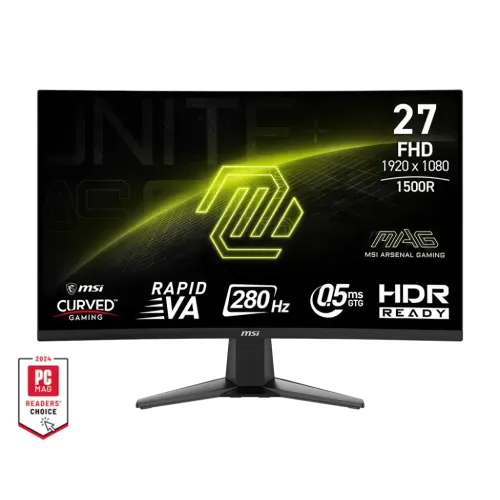
MSI MAG 276CXF overview
The MSI MAG 276CXF is a 27-inch Full HD curved gaming monitor with a Rapid VA panel and 280Hz maximum refresh rate. MSI’s exact-model product specification lists a 1500R curve, 1920 × 1080 resolution, 300 nits typical brightness, 4000:1 contrast, Adaptive-Sync, 0.5ms GtG minimum response and 1ms MPRT. It includes two HDMI 2.0b inputs, one DisplayPort 1.4a input and a headphone output. The monitor is designed for high-frame-rate PC gaming and broad curved viewing. The standard stand supports tilt only; it does not provide the height adjustment listed for some different MAG monitors.
27-inch Full HD and pixel density
The panel measures 27 inches diagonally with a 16:9 aspect ratio and native Full HD resolution of 1920 × 1080. MSI specifies a pixel pitch of 0.3114mm. At 27 inches, FHD provides a larger physical image and is less demanding to render at high frame rates than QHD, but text and fine detail are less dense. Set the computer to native resolution for the sharpest mapping and adjust application scaling to suit your viewing distance. Buyers who want more desktop detail at this size may prefer QHD; competitive players who prioritize high frame rate may prefer the lighter Full HD rendering load.
1500R curved Rapid VA panel
MSI identifies a Rapid VA panel with 1500R curvature. The curved screen brings the edges toward a centered viewer and can make the 27-inch image feel more enveloping. The product page lists 4000:1 typical contrast, a value associated with the VA panel’s dark-scene presentation. Actual contrast depends on settings and viewing conditions, and the curve may not suit perspective-critical design or drawing. Choose a centered seat and measure desk depth before buying. The panel is flat across neither its geometry nor appearance; use the specified curvature when comparing it with flat alternatives.
280Hz refresh and signal setup
MSI lists a maximum 280Hz refresh rate and Adaptive-Sync. The current specification gives a vertical signal range up to 280Hz but buyers should consult the exact manual timing table to confirm the maximum available through their chosen input. Use a suitable cable and graphics output, select 1920 × 1080 and choose a supported refresh in the operating system. If 280Hz is missing, verify the cable, input and GPU output and connect directly rather than through a dock or adapter. A monitor refreshes the supplied frames; the computer and game determine the rendered frame rate.
Competitive gaming and computer requirements
Full HD at 280Hz can suit competitive games where fast motion and high frame rates are priorities. Lighter esports titles can run at higher frame rates with appropriate settings, while visually demanding games may not reach the display maximum. Results depend on GPU, CPU, game engine, detail settings and thermal limits. Adaptive-Sync can coordinate screen updates with variable frame output when supported, but it does not increase rendering speed. Confirm your PC’s expected performance in the games you play. Console output may be limited to lower refresh modes, so check the console and input compatibility rather than assuming it can use 280Hz.
Response time: GtG and MPRT
MSI lists 0.5ms GtG as a minimum response time and 1ms MPRT. GtG measures pixel transition behavior under a specified mode; MPRT relates to perceived motion persistence and may use backlight strobing. These measures are not input-lag values and should not be treated as a guarantee for every pixel transition. The product page lists Anti-Motion Blur as an option. Strobing can change brightness and may interact with Adaptive-Sync or other settings. Consult the exact manual for combinations and operating limits. If overdrive introduces overshoot, adjust the response setting and test moving scenes in actual games.
Brightness, contrast and HDR Ready
MSI lists 300 nits typical SDR brightness, 4000:1 typical contrast and HDR Ready support. HDR Ready is not the same as a VESA DisplayHDR certification tier, and the reviewed MSI specification does not list VESA DisplayHDR certification. HDR appearance depends on content, source, tone mapping and panel behavior. The 300-nit typical figure applies to SDR mode, not every HDR peak. Compare HDR and SDR using content you know, and use the mode that keeps highlights and shadows legible. For everyday SDR, adjust brightness to the room rather than leaving it at maximum.
Color gamut and color accuracy
MSI’s regional specification lists color gamut with measurement standards: sRGB 102% (CIE 1976), DCI-P3 80% (CIE 1976) and Adobe RGB 87% (CIE 1976), with additional CIE 1931 figures in the datasheet. Gamut size and coverage are not interchangeable. These specifications do not certify factory calibration or unit-level color accuracy. For gaming and media, a vivid preset may be preferred; for color-sensitive design or photography, calibrate the actual panel and use a managed workflow. Check the current country datasheet if comparing gamut coverage with another monitor.
Adaptive-Sync and variable refresh
MSI lists Adaptive-Sync and a variable refresh range of 48–280Hz. Variable refresh can reduce tearing and stutter by aligning screen updates with compatible GPU frame output. Enable Adaptive-Sync in the monitor menu and graphics software where required. Compatibility depends on GPU, driver, input, cable and selected timing. It does not create frames or remove all input latency. If the option is unavailable, update the graphics driver, verify that the display is connected through a supported digital input and check the selected refresh mode.
Inputs and connectivity
The monitor has two HDMI 2.0b inputs, one DisplayPort 1.4a and one headphone output. The reviewed MSI page identifies these interfaces but users should confirm the manual’s per-port maximum modes for 280Hz, HDR and VRR. The headphone jack is an audio output, not a microphone input. No USB hub or USB-C video input is listed for this model. Connect a console, desktop or laptop using the port supported by its output. Adapters, docks and KVMs can restrict refresh or synchronization; test a direct cable if a mode is missing.
Audio and speakers
MSI lists one headphone output and does not list integrated speakers. Plan to use headphones or external speakers. When connected by HDMI or DisplayPort, the computer may route digital audio through the monitor; select the MSI display as the playback device and connect compatible audio equipment to the headphone output. Check source volume and mute settings if there is no sound. The port is not specified as a microphone input. Confirm local box accessories before purchase because the specification page does not imply a headset is included.
Stand, VESA and mounting
The included stand tilts from -5 to +20 degrees. MSI’s specification does not list height adjustment, swivel or pivot for the MAG 276CXF standard stand. A 100 × 100mm VESA mount is listed, and a Kensington lock slot is provided. Use a compatible arm if additional ergonomic motion is required, and confirm weight rating and screw depth. The 1500R curve and 27-inch width need desk and wall clearance. Route cables with enough slack for tilt, and install the monitor on a stable surface. Do not assume the movement range of a similar MAG 276 model applies to this exact model.
Dimensions and desk placement
MSI lists a 27-inch curved panel and product dimensions that vary with the stand and regional sheet. The display requires more depth than a flat panel of the same width because of its curved front-to-back profile and stand. Measure desk width, depth and wall clearance before placing it. A centered position helps the 1500R curve appear even from the main seat. Leave space behind the monitor for HDMI, DisplayPort and power cables, and avoid routing them where a chair or adjustable desk can pinch them. Check the latest regional datasheet for exact dimensions and weight before using a tight shelf or monitor arm.
Power and energy
MSI’s specifications list AC 100–240V at 50/60Hz, typical power below 21W, standby below 0.5W and off-mode below 0.3W. Actual consumption changes with brightness, selected refresh, picture settings and operating state. Use the supplied power cord and a properly grounded outlet. Keep ventilation clear and avoid placing liquids near the display. Turn off and disconnect the monitor before cleaning or moving it. Use the power-saving settings if the screen will be idle for long periods.
Gaming OSD and image tools
The MAG 276CXF includes gaming OSD controls such as Game Mode, Crosshair, Optix Scope, Anti-Motion Blur, Night Vision, Adaptive-Sync and response-time options, depending on the manual revision. These features can change visibility and motion behavior but do not improve the PC’s frame rate. Crosshair overlays can be disabled where they are unwanted or unsuitable. Night Vision adjusts darker scenes and may alter picture balance. Change one setting at a time, test in the target game and restore a neutral profile if colors or shadows look unnatural.
Eye comfort and surface
MSI lists anti-flicker and less-blue-light features and an anti-glare surface. These options can help some users manage long sessions, but comfort still depends on brightness, room lighting, text size, viewing distance and regular breaks. Low-blue-light mode can warm the image and may not suit color evaluation. Anti-glare treatment reduces some reflections but does not eliminate bright sources. Adjust the curved panel so the main viewing position is centered and set brightness for the room. These product features are display settings, not medical claims.
Advantages and practical trade-offs
The MAG 276CXF combines a 1500R curved 27-inch Rapid VA panel with Full HD resolution, 280Hz refresh and a high typical contrast specification. This can suit competitive gaming where high frame rates and dark-scene contrast matter. Adaptive-Sync, Anti-Motion Blur and a headphone output add practical options. Trade-offs include lower pixel density than QHD at 27 inches, a tilt-only standard stand, no listed built-in speakers and HDR Ready wording without a VESA DisplayHDR tier. Match the 280Hz ceiling to your computer and verify exact port timings before purchase.
Warranty and Bangladesh purchase terms
The MSI global product page cautions that specifications can vary by country and model. The catalog’s three-year warranty claim must be confirmed for the Bangladesh serial and seller. Ask whether service is handled by MSI’s authorized local channel or the seller, when coverage begins, which panel and pixel defects are included, where service is provided and what invoice is required. Current BiponiBD price, stock, delivery, payment and return conditions can change; check the live offer at purchase. Keep the serial label, invoice and packaging for any warranty or return request.
Setup and troubleshooting
Assemble the stand, connect the power cord and use HDMI 2.0b or DisplayPort 1.4a from the source. Set 1920 × 1080 and select a supported refresh, then enable Adaptive-Sync if needed. If 280Hz is unavailable, check the cable, input, graphics output and driver, and test a direct connection. If motion artifacts appear, adjust response-time or Anti-Motion Blur settings. For audio, select the display as the digital playback device and connect headphones or external speakers to the headphone output. Use a stable mode if an overclocked refresh causes flicker or blanking.
Who should consider this monitor
The MSI MAG 276CXF suits a PC gamer who wants a large curved display and high Full HD refresh, especially for competitive games where 280Hz can be useful with sufficient frame output. The Rapid VA panel and 1500R curve may appeal to users who prefer stronger contrast and immersive curvature. It is less suitable for users who want QHD sharpness at 27 inches, a height-adjustable included stand, integrated speakers or certified HDR performance. Check that your GPU and connection support the intended mode and that the curved shape fits your desk and viewing position.
Product summary
MSI MAG 276CXF is a 27-inch 1500R curved Rapid VA monitor with FHD 1920 × 1080 resolution, 280Hz refresh, 0.5ms GtG minimum, 1ms MPRT, 300 nits typical brightness, 4000:1 contrast and HDR Ready support. It offers Adaptive-Sync, HDMI 2.0b × 2, DisplayPort 1.4a × 1, headphone output and a -5° to +20° tilt stand with 100 × 100mm VESA mounting. Confirm exact input timing, local warranty, accessories, current price and stock before ordering.