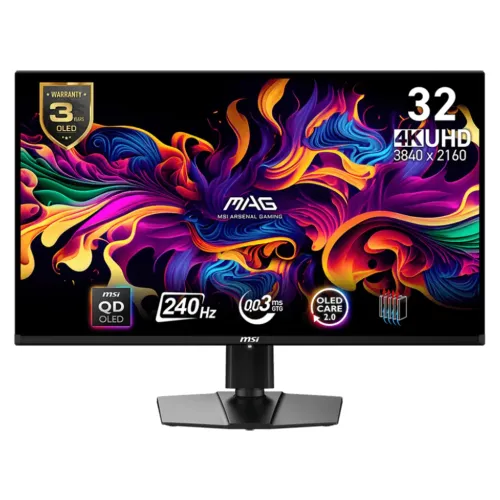
MSI MAG 321UPX QD-OLED overview
The MSI MAG 321UPX QD-OLED is a flat 31.5-inch 4K monitor with 3840 × 2160 resolution, 16:9 aspect ratio, 240Hz refresh and 0.03ms GTG response. MSI lists third-generation QD-OLED, 1,500,000:1 contrast, DisplayHDR True Black 400, Adaptive-Sync and 10-bit color. Its connections include two HDMI 2.1 ports, DisplayPort 1.4a, USB-C DP Alt Mode with 15W PD, and a headphone output.
Exact model and suffix
Verify the exact model MAG 321UPX QD-OLED on the label, carton and invoice. It is distinct from MAG 321UP, which has different refresh capability, and from MPG 321URX or newer 321UPX successors. Similar model names can hide real changes in refresh, USB hub, firmware support or panel characteristics. This record keeps its current BiponiBD slug and variant/SKU identity.
31.5-inch flat QD-OLED panel
MSI specifies a 31.5-inch flat QD-OLED panel with 16:9 proportions. OLED pixels illuminate individually, enabling deep black areas and strong pixel-level contrast. The flat panel suits conventional desks and grid-based applications. Room lighting, display mode, panel condition and viewing position influence perceived color and black levels. Handle the thin panel carefully and follow MSI cleaning guidance.
4K UHD 3840 × 2160
The native resolution is 3840 × 2160, commonly called 4K UHD. This provides detailed game imagery and desktop text, with more GPU demand than QHD at equivalent frame rates. Set native resolution in the operating system and check scaling for comfortable text. A compatible GPU, cable, port and settings are needed to reach the intended refresh and bit depth.
240Hz refresh at 4K
MSI lists 240Hz at the panel’s native 4K resolution over DisplayPort, HDMI and USB-C DP Alt Mode under supported signal conditions. A high refresh can improve motion smoothness when the source produces sufficient frames. Graphics hardware, cable, mode and driver affect what is available. The monitor does not increase the frame rate rendered by a game.
0.03ms response specification
MSI specifies 0.03ms gray-to-gray response time. This is a panel transition claim and not a measurement of total input lag or complete system latency. Game engine, graphics pipeline, frame pacing and input devices remain important. Use the monitor’s supported modes and assess motion with actual content rather than treating one specification as a guarantee.
HDR True Black 400
MSI lists VESA DisplayHDR True Black 400 and HDR support. The model’s product information describes peak brightness up to 1,000 nits under a small-area HDR condition; typical SDR brightness is 250 nits. Peak highlights are not sustained full-screen brightness. HDR requires compatible source content, operating-system settings and selected input mode.
Color range and 10-bit depth
The regional MSI specification lists Adobe RGB 97.5%, DCI-P3 99% and sRGB 138.2%, alongside 1.07 billion 10-bit colors. MSI advertises QD Premium Color with Delta E ≤ 2. These model claims are not an individual delivered-unit calibration report. Use color-managed applications and request or measure calibration evidence if precise creative work matters.
Anti-reflection surface
MSI specifies an anti-reflection surface treatment. It can reduce some reflections but cannot make the monitor reflection-free in bright rooms. Avoid direct light sources and position the display for a comfortable view. The perceived QD-OLED black level can depend on ambient light. Clean the surface only as described by MSI to avoid coating damage.
HDMI 2.1 and console mode
The monitor has two HDMI 2.1 ports rated for 48Gbps with support for 4K at up to 240Hz in the manufacturer’s timing table. MSI describes console mode for compatible sources. Console game output is limited by the console and title and usually will not use 240Hz. Confirm the supported mode and VRR in both source settings and the manual.
DisplayPort 1.4a input
MSI lists one DisplayPort 1.4a input. At high 4K refresh, the source and monitor may use DSC depending on signal configuration. Check GPU support, cable certification, color settings and the monitor’s signal information. If 240Hz does not appear, verify the input, port, cable, driver and active resolution before changing color depth or chroma.
USB-C video and 15W power
USB-C supports DisplayPort Alt Mode and MSI lists 15W charging for this model. It can carry a video signal from a compatible device and supply modest power, but it is not a full-power laptop charger. Confirm cable and device compatibility. Keep the laptop’s adapter available when its power requirement exceeds the monitor’s USB-C output.
Adaptive-Sync and variable refresh
MSI lists Adaptive-Sync with an activated range of 48–240Hz. The feature can synchronize monitor refresh with a compatible source to reduce tearing. Operation depends on GPU, driver, input and selected mode. Enable VRR in the monitor and graphics settings, then test a compatible game. Variable refresh cannot compensate for inadequate GPU performance.
MSI OLED Care 2.0
MSI OLED Care 2.0 provides panel-maintenance functions designed to reduce image sticking and burn-in risk. Follow OSD guidance for panel protect and allow maintenance cycles to finish. Static bright elements displayed for long periods can still contribute to uneven wear. Protection tools help manage use but do not guarantee that image retention can never occur.
Ergonomics and stand movement
The specification lists tilt from -5° to 15°, swivel around ±30°, pivot around -10° to 10° and height adjustment up to 100mm. Adjust the panel for posture and reflections. The catalog previously stated 110mm height and -30°/+30° tilt/swivel values; the update corrects these according to MSI’s official regional specification. Check the delivered manual for tolerance and exact position.
VESA mounting and desk fit
MSI specifies a 100 × 100mm VESA pattern and lists 9.1kg net weight with stand, with 11.4kg gross shipping weight. Verify arm capacity, screw depth and installation method before mounting. Support the monitor during assembly and allow clearance for rear ports, the stand and cable bend radius. Use the regional packaging measurements if delivery access is narrow.
Audio and package contents
The official specification lists one headphone output and does not list built-in speakers. Use headphones or external speakers for audio. The local box may include a power cable, display cable, USB-C cable, adapter or paperwork depending on market. Ask the seller to confirm what accompanies the exact regional SKU. Keep warranty and serial documents together with the invoice.
PC and console configuration
For PC gaming, confirm the GPU and cable can drive 3840 × 2160 at the required refresh through HDMI, DisplayPort or USB-C. Set native resolution, select the supported refresh and enable Adaptive-Sync if desired. Console modes depend on the console’s HDMI output and game support. Check reported signal information if 4K, HDR or VRR does not activate.
Bangladesh price and warranty
This review does not verify live BiponiBD inventory, current price, unit condition or a local serial’s eligibility. MSI lists a three-year warranty including panel burn-in on its model specification page, but regional policy and seller authorization matter. Ask for written confirmation of Bangladesh service, duration and OLED coverage for the exact serial. Keep invoice and carton label.
Frequently asked questions
What is native resolution? 3840 × 2160 4K UHD. What is the maximum refresh? 240Hz. What panel type? QD-OLED. Does it support HDMI 2.1? Yes, two ports. What is USB-C PD? 15W, so it may not fully charge a laptop. What HDR certification? DisplayHDR True Black 400. What is response time? 0.03ms GTG. Does it have speakers? MSI does not list built-in speakers. What is VESA mount size? 100 × 100mm. What Bangladesh warranty applies? Confirm serial-specific local terms with the seller.