Pros
- Large curved QHD display with 180Hz DisplayPort mode.
- Rapid VA panel lists 3500:1 contrast.
- Adaptive-Sync and DisplayHDR 400 features.
- Two HDMI inputs and a DisplayPort for multiple sources.

All categories
 New condition
Monitors
MSI · MAG 32CQ6F
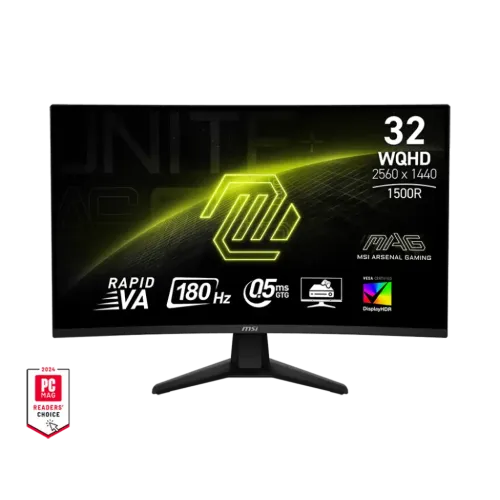
31.5-inch 1500R WQHD Rapid VA monitor with 180Hz DisplayPort, HDMI up to 144Hz, Adaptive-Sync and DisplayHDR 400.
Price unavailable
Price range updating
No verified price is available yet. Store offers will appear when merchants publish them.
Compare store prices
No live offers for this variant
Offers will appear when merchants publish them.
Loading history…
Product story
The MSI MAG 32CQ6F is a 31.5-inch QHD curved gaming monitor with a Rapid VA panel and 1500R curvature. MSI lists 2560 × 1440 resolution, 180Hz refresh, 0.5ms GtG minimum response, Adaptive-Sync and VESA DisplayHDR 400. Its inputs are one DisplayPort 1.4 and two HDMI 2.0b ports, with HDMI QHD up to 144Hz. The monitor includes a tilt-only stand, headphone output and 100 × 100mm VESA mounting.
The panel measures 31.5 inches diagonally and displays 2560 × 1440 WQHD in a 16:9 format. QHD gives more detail and desktop space than Full HD, with a higher GPU rendering load in games. MSI lists an active viewing area of about 697.34 × 392.26mm and a pixel pitch of 0.2724mm. Set the computer to the native resolution for sharpness and choose scaling based on viewing distance and text comfort.
MSI identifies a Rapid VA panel with typical static contrast of 3500:1 and 400-nit typical brightness. VA technology can provide stronger native contrast than many IPS displays, which can help dark scenes look deeper. Viewing behavior and pixel transitions depend on the mode and unit. The listed 178-degree viewing angle does not mean contrast is identical from every position. Calibrate the display for color-sensitive work rather than relying only on gaming specifications.
The 1500R curve wraps the broad display toward the user. Sit centered at a comfortable distance and ensure the desk gives enough depth for the stand. The curve can make supported games and movies feel immersive, but preference varies. It can be less appropriate for users who require a flat geometry reference or a shared screen viewed from wide angles. The monitor remains 16:9 rather than an ultrawide format.
MSI lists 180Hz as the maximum refresh, with a vertical signal range up to 180Hz. The signal specification lists DisplayPort 2560 × 1440 up to 180Hz. The source GPU and cable must support the selected mode, and the refresh may need to be enabled in the operating system or driver. Check the on-screen display’s active signal information after setup. A high refresh number does not mean every game or input automatically runs at 180Hz.
The rear panel has one DisplayPort 1.4 HBR2 and two HDMI 2.0b inputs. MSI lists HDMI WQHD up to 144Hz, while DisplayPort supports WQHD up to 180Hz. Use DisplayPort for the highest PC refresh. HDMI remains useful for consoles and secondary devices. Confirm resolution and refresh in the source settings, use a suitable cable and avoid assuming HDMI 2.0b reaches the DisplayPort rate.
MSI lists 0.5ms GtG minimum response. This is a best-case minimum, not a universal transition time in every mode. Response time and input lag are separate measures. Overdrive can reduce some transitions but may cause overshoot or halos when set too aggressively. Compare settings with moving scenes and use a mode that looks clean at your normal refresh and frame rate. Do not equate the response label with a guarantee against all motion blur.
The MAG 32CQ6F supports AMD FreeSync/Adaptive-Sync according to MSI. Variable refresh can reduce tearing when a compatible GPU’s frame rate changes within the display’s supported range. Enable the feature in both the monitor OSD and graphics driver. Actual behavior depends on source device, driver, input, cable and firmware. Do not assume that every console or NVIDIA GPU will expose the exact same VRR mode or certification.
MSI lists VESA DisplayHDR 400 support. HDR requires compatible source content and system output. DisplayHDR 400 is an entry-level certification and does not imply local dimming zones or OLED-level contrast. Typical brightness is listed as 400 nits. HDR results depend on game/video mastering, output format, room conditions and monitor settings. Use the certification as a capability indicator, not a promise of a dramatic improvement for all content.
MSI reports Adobe RGB, DCI-P3 and sRGB values of 82%, 78% and 101% respectively under CIE1976. The display supports 1.07 billion colors using 10-bit output via 8-bit plus FRC. Gamut coverage and gamut-size methods differ, so these numbers should not be compared interchangeably with unrelated monitors. For creative work, calibrate the exact panel and verify the selected color mode. Gaming presets may alter gamma, saturation and white balance.
MSI lists tilt adjustment from -5 to +20 degrees. The MAG 32CQ6F does not list height, swivel or pivot adjustment in the manufacturer specification. This is an important distinction from models with more adjustable stands. Position the desk or use a stable riser if the screen needs to sit higher. Keep the curved display centered and leave room behind it for cables and stand movement.
The monitor supports 100 × 100mm VESA mounting. Check the arm’s load rating, mounting screws and clearance before installation. MSI lists a net weight around 5.3kg with stand and 4.8kg without stand. Use the correct screw length and support the chassis rather than pressing on the LCD. Retain the original stand and hardware if you plan to move the monitor or need a return.
The monitor includes one headphone output; MSI does not list integrated speakers. Use headphones or external speakers for audio. The inputs comprise DisplayPort and two HDMI ports, with no USB-C or USB hub specified. Select the correct audio output on the connected PC or console. Audio over HDMI/DP depends on the source configuration, while the 3.5mm jack provides a direct connection to an external listening device.
MSI describes a console mode supporting QHD 120Hz for compatible next-generation consoles. Actual output depends on the console model, game and HDMI timing. HDMI is listed up to 144Hz at WQHD, but a console may expose only a subset of modes. Set resolution, HDR, VRR and audio in the console menu, then confirm the active signal in the monitor OSD. Do not use the PC’s 180Hz DisplayPort maximum as a console guarantee.
A 31.5-inch curved QHD panel offers detailed, immersive views for supported games. The 180Hz DisplayPort mode can show frequent updates when the GPU renders enough frames. Heavy games may need graphics adjustments to maintain high frame rates at native resolution. Adaptive-Sync can help when frame delivery varies. Choose settings for stable performance and comfort; the monitor cannot increase GPU or game-engine output.
The large QHD screen can serve for office work, browsing and media in addition to gaming. Its broad horizontal area can fit multiple application windows, while the VA contrast can suit video viewing. The curved form and tilt-only stand may not fit every workflow. For text, adjust scaling and viewing distance. For color work, use a calibrated mode because the manufacturer gamut figures do not establish per-unit accuracy.
MSI lists AC input of 100–240V, 50/60Hz and a power cable. Package contents and cable versions can vary by market, so ask the Bangladesh seller which HDMI/DP cable, power lead and documentation are included. Ensure the local plug and power cord are suitable. Keep the ventilation area clear and disconnect power before cleaning. Avoid using an unverified adapter or damaged cable.
Clean the anti-glare panel with a soft microfiber cloth and avoid abrasive chemicals or pressure. Do not spray liquid directly onto the screen. Protect the curved LCD from impact when moving the monitor, and keep cables from pulling on the connectors. Use a stable desk or correctly rated mount. Save preferred OSD settings before changing multiple gaming modes, and restore defaults if a mode causes unexpected artifacts.
The product catalog currently says three years, but MSI’s global specifications do not validate coverage for a particular Bangladesh serial. Ask the seller to confirm warranty provider, duration, local service, dead-pixel policy and invoice requirements. Verify current stock, offer price, delivery and return terms before ordering. Match the model and serial on the monitor, box and invoice. Warranty and accessories can vary by market and seller.
The MSI MAG 32CQ6F suits users who want a large 31.5-inch QHD curved Rapid VA display with 180Hz DisplayPort, Adaptive-Sync and DisplayHDR 400. It is less suitable for buyers who need a height-adjustable stand, USB-C docking or built-in speakers. HDMI QHD refresh is limited to 144Hz, and the included stand offers tilt only. Check GPU capability, local warranty and package contents before purchasing. Also confirm desk depth for the 1500R screen, whether the seller provides a DisplayPort cable, and if the graphics card can sustain high frame rates at 2560 × 1440 in your preferred games. The large curved panel can also be useful for films and productivity, but viewers who need accurate geometry should compare it with a flat monitor first.
Helpful answers
Product-specific answers maintained with the catalog information.
The MAG 32CQ6F is a 31.5-inch 2560 × 1440 WQHD monitor.
MSI lists 180Hz over DisplayPort; HDMI WQHD is up to 144Hz.
MSI specifies a Rapid VA panel with 1500R curvature.
Yes, MSI lists AMD FreeSync/Adaptive-Sync support.
MSI lists VESA DisplayHDR 400 certification.
Integrated speakers are not listed; a headphone output is available.
MSI lists tilt only; height adjustment, swivel and pivot are not listed.
No USB-C input is listed.
Confirm the serial-specific MSI warranty and service terms with the seller.
Customer community
Become a merchant
Join BiponiBD, publish accurate offers and start free.