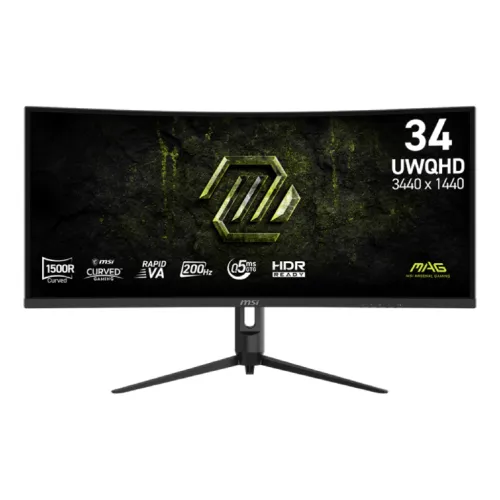
MSI MAG 342CQRF E20 overview
The MSI MAG 342CQRF E20 is a 34-inch 21:9 curved gaming monitor with a Rapid VA panel and 3440 × 1440 UWQHD resolution. MSI lists 1500R curvature, 200Hz refresh, 0.5ms GTG minimum response, AMD FreeSync Premium, HDR Ready, one DisplayPort 1.4a input, two HDMI 2.0b inputs and a headphone output. This E20 model is distinct from other MAG 342 or 345-series variants. Check MSI documentation for this exact E20 variant and verify the source device, input, cable and OSD together when configuring. Maximum modes depend on the whole signal chain and software. Local stock, price, package and warranty need confirmation from the seller for the actual unit.
Exact E20 model identity
Check that the box and monitor label read MAG 342CQRF E20. It is not the MAG 345CQR or another model with different refresh or curvature. MSI documentation for E20 specifies 200Hz, HDMI up to 100Hz at native UWQHD, and a 75 × 75mm VESA mount. Compare seller photos, SKU and invoice to the precise model before ordering. Check MSI documentation for this exact E20 variant and verify the source device, input, cable and OSD together when configuring. Maximum modes depend on the whole signal chain and software. Local stock, price, package and warranty need confirmation from the seller for the actual unit.
34-inch UWQHD and 21:9 workspace
The 34-inch panel uses 3440 × 1440 UWQHD resolution and a 21:9 aspect ratio. It provides a wide desktop canvas for compatible games, editing timelines and side-by-side windows. Native 3440 × 1440 keeps text and graphics sharp. Some games and apps do not support 21:9 and may add side bars, stretch the image or crop the view. Check MSI documentation for this exact E20 variant and verify the source device, input, cable and OSD together when configuring. Maximum modes depend on the whole signal chain and software. Local stock, price, package and warranty need confirmation from the seller for the actual unit.
1500R Rapid VA panel
MSI identifies the panel as Rapid VA with 3500:1 typical contrast and 178-degree horizontal and vertical viewing angles. Its anti-glare surface helps reduce reflections. VA contrast can render darker scenes with depth, though brightness and color may shift with viewing position and ambient light. Evaluate the screen at your normal seating distance and room lighting. Check MSI documentation for this exact E20 variant and verify the source device, input, cable and OSD together when configuring. Maximum modes depend on the whole signal chain and software. Local stock, price, package and warranty need confirmation from the seller for the actual unit.
200Hz refresh and response
The 1500R curvature wraps the ultrawide display toward the viewer. This can create a more continuous view across the wide panel, particularly in games and large desktop workspaces. Check desk depth and width because the monitor is around 81cm wide. Curvature preference varies, and users who work with straight architectural lines may prefer a flat panel. Check MSI documentation for this exact E20 variant and verify the source device, input, cable and OSD together when configuring. Maximum modes depend on the whole signal chain and software. Local stock, price, package and warranty need confirmation from the seller for the actual unit.
AMD FreeSync Premium
The maximum refresh rate is 200Hz with a listed activated range of 48–200Hz. MSI specifies 0.5ms GTG minimum; minimum response is not a guarantee for every pixel transition or overdrive setting. A compatible source and DisplayPort signal are needed for 3440 × 1440 up to 200Hz. HDMI is specified up to 100Hz at native resolution. Check MSI documentation for this exact E20 variant and verify the source device, input, cable and OSD together when configuring. Maximum modes depend on the whole signal chain and software. Local stock, price, package and warranty need confirmation from the seller for the actual unit.
HDR Ready and brightness
MSI lists AMD FreeSync Premium and Adaptive-Sync. Variable refresh can synchronize compatible GPU frame output with display refresh within its range and reduce tearing. Enable it in the monitor and graphics settings, then check the driver reports the expected mode. Game frame rate, GPU support and display settings determine the result. Check MSI documentation for this exact E20 variant and verify the source device, input, cable and OSD together when configuring. Maximum modes depend on the whole signal chain and software. Local stock, price, package and warranty need confirmation from the seller for the actual unit.
Color gamut and 10-bit signal
The monitor is marked HDR Ready with 300 cd/m² typical SDR brightness. HDR Ready is not the same as VESA DisplayHDR certification or a local-dimming backlight. HDR quality depends on source content and settings, and users should compare the result with SDR. Do not infer peak brightness or HDR performance beyond MSI published specifications. Check MSI documentation for this exact E20 variant and verify the source device, input, cable and OSD together when configuring. Maximum modes depend on the whole signal chain and software. Local stock, price, package and warranty need confirmation from the seller for the actual unit.
DisplayPort and HDMI mode limits
MSI lists 88% Adobe RGB, 90% DCI-P3 and 110% sRGB using the stated CIE 1976 standard, with 1.07 billion colors and 8-bit plus FRC. These figures describe gamut and signal capability, not measured factory accuracy for each unit. Color-sensitive work benefits from calibration, a consistent picture mode and color-managed applications. Check MSI documentation for this exact E20 variant and verify the source device, input, cable and OSD together when configuring. Maximum modes depend on the whole signal chain and software. Local stock, price, package and warranty need confirmation from the seller for the actual unit.
Console mode and VRR
One DisplayPort 1.4a with HBR3 supports UWQHD up to 200Hz. Two HDMI 2.0b inputs are listed with UWQHD up to 100Hz. The input choice therefore changes the available maximum refresh at native resolution. Check source output, cable, selected monitor input and operating system mode if the requested refresh is not offered. Check MSI documentation for this exact E20 variant and verify the source device, input, cable and OSD together when configuring. Maximum modes depend on the whole signal chain and software. Local stock, price, package and warranty need confirmation from the seller for the actual unit.
Picture and gaming tools
MSI lists console mode supporting 1080p at 60Hz and 120Hz, HDMI CEC and VRR support for PS5 and Xbox. These capabilities depend on console firmware, game, settings and signal format. A console will not use the monitor’s 200Hz PC maximum. Verify the detected signal in the console settings and consult the MSI model specification. Check MSI documentation for this exact E20 variant and verify the source device, input, cable and OSD together when configuring. Maximum modes depend on the whole signal chain and software. Local stock, price, package and warranty need confirmation from the seller for the actual unit.
Stand adjustment and mounting
The specification includes PIP/PBP support and MSI gaming display tools such as Night Vision, Anti-Flicker and Less Blue Light across related documentation. Exact OSD options can vary by mode. Picture processing may change brightness, response behavior or color; use the manual to configure the feature and compare on-screen results. Check MSI documentation for this exact E20 variant and verify the source device, input, cable and OSD together when configuring. Maximum modes depend on the whole signal chain and software. Local stock, price, package and warranty need confirmation from the seller for the actual unit.
Dimensions and power adapter
The stand supports tilt from -5 to +20 degrees, swivel from -30 to +30 degrees, pivot from -5 to +5 degrees, and height adjustment from 0 to 90mm. MSI lists a 75 × 75mm VESA mounting pattern and Kensington lock. Confirm screw length, arm load rating and clearance for the curved screen before installation. Check MSI documentation for this exact E20 variant and verify the source device, input, cable and OSD together when configuring. Maximum modes depend on the whole signal chain and software. Local stock, price, package and warranty need confirmation from the seller for the actual unit.
Audio and included accessories
MSI lists dimensions of 808.6 × 269.97 × 423.97mm with stand and 808.6 × 119.67 × 363.95mm without. Net weight is approximately 6.95kg. The display uses an external 19V, 3.42A adapter and AC input of 100–240V at 50/60Hz. Use the supplied adapter and keep ventilation clear. Check MSI documentation for this exact E20 variant and verify the source device, input, cable and OSD together when configuring. Maximum modes depend on the whole signal chain and software. Local stock, price, package and warranty need confirmation from the seller for the actual unit.
PC setup for 200Hz
One headphone output is provided; built-in speakers are not listed. Regional MSI package information lists a DisplayPort 1.4a cable, C13 power cord, AC adapter, quick guide and four VESA screws. Accessories may vary by region or seller bundle, so confirm the physical contents before accepting the unit. Check MSI documentation for this exact E20 variant and verify the source device, input, cable and OSD together when configuring. Maximum modes depend on the whole signal chain and software. Local stock, price, package and warranty need confirmation from the seller for the actual unit.
Workspace and game compatibility
For the 200Hz native mode, connect a capable PC through DisplayPort 1.4a, select 3440 × 1440, and choose 200Hz in the graphics settings. If unavailable, verify the GPU supports the bandwidth, the cable is suitable, the monitor input is DisplayPort and driver settings are current. HDMI is listed up to 100Hz at native UWQHD. Check MSI documentation for this exact E20 variant and verify the source device, input, cable and OSD together when configuring. Maximum modes depend on the whole signal chain and software. Local stock, price, package and warranty need confirmation from the seller for the actual unit.
Strengths and trade-offs
The 21:9 screen is useful when a game supports ultrawide rendering or when work benefits from a broad timeline and multiple windows. Some esports titles restrict ultrawide field of view, and some video content will show side bars. A 200Hz UWQHD target also needs a capable graphics card to render high frame rates. Check MSI documentation for this exact E20 variant and verify the source device, input, cable and OSD together when configuring. Maximum modes depend on the whole signal chain and software. Local stock, price, package and warranty need confirmation from the seller for the actual unit.
Delivery inspection and care
Benefits include UWQHD resolution, Rapid VA contrast, 1500R curve, 200Hz DisplayPort refresh, FreeSync Premium, PIP/PBP and a highly adjustable stand. Trade-offs include HDMI refresh limited to 100Hz at native resolution, HDR Ready rather than a certified HDR tier, no listed speakers and the broad footprint of a 34-inch curved screen. Check MSI documentation for this exact E20 variant and verify the source device, input, cable and OSD together when configuring. Maximum modes depend on the whole signal chain and software. Local stock, price, package and warranty need confirmation from the seller for the actual unit.
Bangladesh warranty and buying checklist
Inspect the curved panel for cracks, pressure marks and defects under the seller’s stated policy. Check the stand, adapter, DisplayPort cable, screws, serial number and invoice. Preserve packaging until the return period ends. Clean with a soft microfiber cloth and avoid pressing or spraying liquid directly onto the screen. Check MSI documentation for this exact E20 variant and verify the source device, input, cable and OSD together when configuring. Maximum modes depend on the whole signal chain and software. Local stock, price, package and warranty need confirmation from the seller for the actual unit.
Frequently asked questions
Before purchase in Bangladesh, confirm current stock and price, exact MAG 342CQRF E20 model and regional part number, new or open-box condition, package contents, return and dead-pixel rules, delivery, and the serial-specific local MSI warranty provider and term. A catalog warranty statement alone does not prove local coverage; request written terms on the invoice. Check MSI documentation for this exact E20 variant and verify the source device, input, cable and OSD together when configuring. Maximum modes depend on the whole signal chain and software. Local stock, price, package and warranty need confirmation from the seller for the actual unit.