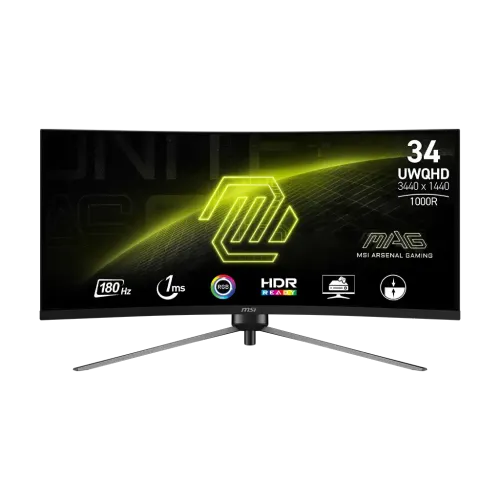
MSI MAG 345CQR overview
The MSI MAG 345CQR is a 34-inch 21:9 curved gaming monitor with a 3440 × 1440 UWQHD VA panel, 1000R curve and 180Hz refresh rate. MSI lists 1ms MPRT, Adaptive-Sync support, HDR Ready, a height-adjustable stand, one DisplayPort 1.4a input, two HDMI 2.0b inputs and a headphone output. It is an ultrawide desktop display rather than a 4K 16:9 panel. Consult MSI documentation for the regional unit and check the source device, selected input, cable and OSD settings together. Features and achievable modes depend on those connected components and the application. Local stock, price, seller terms and warranty require separate confirmation for the actual Bangladesh offer.
Exact model and SKU identity
Confirm the label says MAG 345CQR. MSI also has nearby model names such as MAG 345CQRDE and other 34-inch curved monitors; panel and regional bundle details can differ. MSI regional sheets list specific part numbers, including 9S6-3DD14H variants. Ask the seller to show the exact unit label, packaging and included accessories before payment. Consult MSI documentation for the regional unit and check the source device, selected input, cable and OSD settings together. Features and achievable modes depend on those connected components and the application. Local stock, price, seller terms and warranty require separate confirmation for the actual Bangladesh offer.
34-inch UWQHD ultrawide resolution
The 34-inch screen uses a 21:9 aspect ratio and native 3440 × 1440 UWQHD resolution. The wider workspace can show multiple application panes side by side, while games must support ultrawide output to fill the panel. Some titles may use a narrower image with side bars or crop the view. Set 3440 × 1440 in the operating system for native clarity. Consult MSI documentation for the regional unit and check the source device, selected input, cable and OSD settings together. Features and achievable modes depend on those connected components and the application. Local stock, price, seller terms and warranty require separate confirmation for the actual Bangladesh offer.
VA panel, contrast and viewing
MSI specifies a VA panel with typical 3000:1 contrast and 178-degree horizontal and vertical viewing angles. VA contrast can provide deeper dark scenes than many IPS panels, although perceived color and contrast vary with position, room light and the individual screen. The anti-glare surface helps with reflections but does not remove the need to manage ambient light. Consult MSI documentation for the regional unit and check the source device, selected input, cable and OSD settings together. Features and achievable modes depend on those connected components and the application. Local stock, price, seller terms and warranty require separate confirmation for the actual Bangladesh offer.
1000R curvature and desk setup
The 1000R curvature follows a tight curve intended to bring the broad ultrawide screen toward the viewer. Check the desk depth and viewing distance before purchase; the panel occupies more horizontal space than a standard 27-inch display. The curve can feel immersive in games and large work canvases, while straight lines near the edges may look curved to users who prefer flat screens. Consult MSI documentation for the regional unit and check the source device, selected input, cable and OSD settings together. Features and achievable modes depend on those connected components and the application. Local stock, price, seller terms and warranty require separate confirmation for the actual Bangladesh offer.
180Hz refresh and response time
MSI lists a maximum 180Hz refresh rate and 1ms MPRT. Refresh rate describes how often the display can update, while MPRT is a motion-picture response measure and is not interchangeable with GTG response. MSI connection note specifies up to 180Hz at 3440 × 1440 over DisplayPort; HDMI is listed up to 100Hz at native resolution. Consult MSI documentation for the regional unit and check the source device, selected input, cable and OSD settings together. Features and achievable modes depend on those connected components and the application. Local stock, price, seller terms and warranty require separate confirmation for the actual Bangladesh offer.
Adaptive sync and gaming
The MAG 345CQR specification identifies Adaptive-Sync and MSI UK sheet identifies AMD FreeSync Premium, with an activated range of 48–180Hz. Variable refresh can reduce tearing when paired with a compatible graphics card and supported frame rate. Enable the feature on both monitor and host, then check the GPU driver for supported operation. Consult MSI documentation for the regional unit and check the source device, selected input, cable and OSD settings together. Features and achievable modes depend on those connected components and the application. Local stock, price, seller terms and warranty require separate confirmation for the actual Bangladesh offer.
HDR Ready and brightness
MSI labels the display HDR Ready. Typical SDR brightness is listed at 300 nits, and HDR Ready should not be mistaken for a VESA DisplayHDR certification or local-dimming system. HDR impact depends on game or video, operating system, graphics output and monitor settings. Compare content in both modes and use realistic expectations for highlight brightness. Consult MSI documentation for the regional unit and check the source device, selected input, cable and OSD settings together. Features and achievable modes depend on those connected components and the application. Local stock, price, seller terms and warranty require separate confirmation for the actual Bangladesh offer.
Color gamut and 10-bit support
The manufacturer lists 90% Adobe RGB, 95% DCI-P3 and 120% sRGB using CIE 1976 area percentage/overlap, plus 1.07 billion colors with 8-bit plus FRC. These are gamut and signal specifications, not a calibration report for this particular unit. For color-critical work, verify calibration and color management with appropriate tools. Consult MSI documentation for the regional unit and check the source device, selected input, cable and OSD settings together. Features and achievable modes depend on those connected components and the application. Local stock, price, seller terms and warranty require separate confirmation for the actual Bangladesh offer.
DisplayPort and HDMI inputs
The display has one DisplayPort 1.4a and two HDMI 2.0b video inputs, plus a headphone output. MSI spec notes the resolution and refresh limits by input: DisplayPort can reach 3440 × 1440 up to 180Hz, while HDMI is listed up to 100Hz at the same resolution. Cable quality and graphics output capability also affect available modes. Consult MSI documentation for the regional unit and check the source device, selected input, cable and OSD settings together. Features and achievable modes depend on those connected components and the application. Local stock, price, seller terms and warranty require separate confirmation for the actual Bangladesh offer.
Console gaming compatibility
MSI describes console mode supporting 120Hz at Full HD or WQHD with next-generation PS5 and Xbox Series X/S consoles. The console and game must support the selected resolution and refresh; the monitor 180Hz PC maximum does not mean a console will output 180Hz. Verify the console signal information and use the appropriate HDMI input and cable. Consult MSI documentation for the regional unit and check the source device, selected input, cable and OSD settings together. Features and achievable modes depend on those connected components and the application. Local stock, price, seller terms and warranty require separate confirmation for the actual Bangladesh offer.
Ergonomics and stand adjustment
The supplied stand supports tilt from -5 to +20 degrees and height adjustment from 0 to 100mm. MSI product specification records also list swivel -30 to +30 degrees for some regional sheets. Confirm swivel support for the exact package. Set the display at a comfortable eye level and ensure there is clearance behind and beside the curved panel. Consult MSI documentation for the regional unit and check the source device, selected input, cable and OSD settings together. Features and achievable modes depend on those connected components and the application. Local stock, price, seller terms and warranty require separate confirmation for the actual Bangladesh offer.
VESA mounting, size and weight
The monitor supports a 100 × 100mm VESA mount. Listed dimensions are 797.53 × 332.31 × 518.9mm with stand and 797.53 × 158.18 × 363.02mm without it. MSI data lists net weight around 7.75kg, while another spec listing gives 5.5kg without stand. Check exact package documentation and the arm load capacity before mounting. Consult MSI documentation for the regional unit and check the source device, selected input, cable and OSD settings together. Features and achievable modes depend on those connected components and the application. Local stock, price, seller terms and warranty require separate confirmation for the actual Bangladesh offer.
Audio, power and accessories
The MAG 345CQR has one headphone output and no built-in speakers listed. MSI spec sheets describe an external 19V, 3.42A adapter and input power range of 100–240V, 50/60Hz. Regional package accessory lists may include a DisplayPort cable, power cord, adapter, VESA screws, warranty card and quick guide; confirm the local box contents with the seller. Consult MSI documentation for the regional unit and check the source device, selected input, cable and OSD settings together. Features and achievable modes depend on those connected components and the application. Local stock, price, seller terms and warranty require separate confirmation for the actual Bangladesh offer.
PC setup and refresh configuration
For PC use, connect DisplayPort for the highest listed 3440 × 1440 refresh mode, then select native resolution and 180Hz in the operating system or graphics driver. If the rate is unavailable, check the cable, GPU output, driver, input selection and monitor OSD. On HDMI, MSI lists up to 100Hz at native UWQHD, so a lower rate can be expected. Consult MSI documentation for the regional unit and check the source device, selected input, cable and OSD settings together. Features and achievable modes depend on those connected components and the application. Local stock, price, seller terms and warranty require separate confirmation for the actual Bangladesh offer.
Product strengths and limitations
Advantages include a high-refresh 34-inch ultrawide canvas, strong VA contrast, immersive 1000R curve, adaptive sync, height adjustment and VESA mounting. Trade-offs include large desk footprint, no listed speakers, HDMI refresh limits below DisplayPort, HDR Ready rather than a stated DisplayHDR tier and game/software compatibility for the 21:9 format. Consult MSI documentation for the regional unit and check the source device, selected input, cable and OSD settings together. Features and achievable modes depend on those connected components and the application. Local stock, price, seller terms and warranty require separate confirmation for the actual Bangladesh offer.
Gaming and productivity use
The wide canvas can suit racing and simulation games, compatible action titles, video timelines and side-by-side documents. Some older applications and games may not scale properly to 21:9, and very high refresh demands a capable graphics card at 3440 × 1440. Match expectations to the GPU and the games or software actually used. Consult MSI documentation for the regional unit and check the source device, selected input, cable and OSD settings together. Features and achievable modes depend on those connected components and the application. Local stock, price, seller terms and warranty require separate confirmation for the actual Bangladesh offer.
Care, delivery and inspection
On delivery, inspect the curved panel for cracks, pressure marks, dead pixels under the seller stated policy, stand parts, adapter, cables and serial label. Keep the packaging and invoice during the return period. Clean with a soft microfiber cloth, avoid pressure on the panel, and unplug power before connecting or moving equipment. Consult MSI documentation for the regional unit and check the source device, selected input, cable and OSD settings together. Features and achievable modes depend on those connected components and the application. Local stock, price, seller terms and warranty require separate confirmation for the actual Bangladesh offer.
Bangladesh purchase checklist
Before buying in Bangladesh, verify current stock and price, exact model/part number, new or open-box status, local MSI warranty provider and term tied to the serial, return/dead-pixel rules, delivery and all included cables/accessories. The catalog currently says three years, but warranty service must be confirmed by the seller in writing on the invoice. Consult MSI documentation for the regional unit and check the source device, selected input, cable and OSD settings together. Features and achievable modes depend on those connected components and the application. Local stock, price, seller terms and warranty require separate confirmation for the actual Bangladesh offer.
Frequently asked questions
MSI MAG 345CQR is a 34-inch 3440 × 1440 VA ultrawide with 1000R curvature, 180Hz DisplayPort refresh, 1ms MPRT and Adaptive-Sync. MSI lists HDMI up to 100Hz at native resolution. Check exact regional SKU, package, warranty provider and console or GPU compatibility before purchase. Consult MSI documentation for the regional unit and check the source device, selected input, cable and OSD settings together. Features and achievable modes depend on those connected components and the application. Local stock, price, seller terms and warranty require separate confirmation for the actual Bangladesh offer.