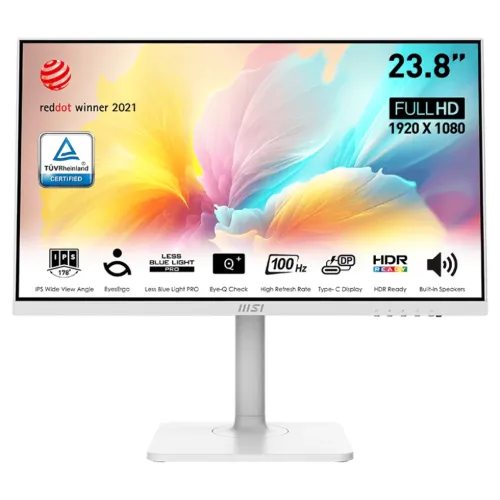
The MSI Modern MD2412PW is a white 23.8-inch Full HD IPS monitor with 100Hz refresh, HDR Ready, USB-C DisplayPort video and 15W power delivery. It also has HDMI, two 3W speakers, headphone-out and an adjustable height/pivot/swivel/tilt stand. Its USB-C power is not a full laptop charging supply. See full specifications and local buying checks below.
Product overview
The MSI Modern MD2412PW is a white 23.8-inch Full HD IPS monitor for home and office productivity. It combines 100Hz refresh, Adaptive-Sync, USB-C DisplayPort Alternate Mode with 15W power delivery, HDMI, built-in speakers and a fully adjustable stand. MSI also lists Comfort/EyesErgo features and HDR Ready support.
The MD2412PW model suffix identifies the white version; MSI lists a regional part number and warns that specifications can vary by market. The USB-C power output is 15W, so describe it as convenient low-power device support rather than a replacement laptop charger. Full specs and clear buying notes follow.
Display, resolution and refresh
The IPS display has a 23.8-inch diagonal, 1920 × 1080 resolution, a 16:9 aspect ratio and 0.2745mm pixel pitch. MSI rates the monitor at 100Hz and states an Adaptive-Sync activation range of 48–100Hz. This can make supported desktop motion and compatible games look smoother than a standard 60Hz mode.
The native Full HD resolution is broadly compatible and does not demand as much graphics processing as QHD or 4K. On the other hand, a 23.8-inch Full HD screen offers less workspace and fine-detail density than higher-resolution alternatives. Select based on your desk distance, software and preference for interface scale versus pixel density.
USB-C, HDMI and device charging
The USB-C connector supports DisplayPort Alternate Mode, allowing compatible devices to send video through the USB-C port. MSI specifies up to 15W power delivery. Whether a phone, tablet or laptop can use this depends on its own USB-C video and power requirements. A laptop that needs substantially more than 15W will still require its normal charger.
The monitor also has one HDMI 1.4b input and a headphone-out. MSI lists an HDMI cable in the regional package, but does not list a USB-C cable as included. Check your computer’s port capabilities and cable before expecting a single-cable setup; USB-C connectors do not all carry display signals.
Color, brightness and HDR Ready
MSI lists 300 nits SDR brightness and a 1000:1 static contrast ratio. Its regional specification gives CIE1976 area/overlap pairs for sRGB, DCI-P3, Adobe RGB and other spaces. Area and overlap are distinct measures; area can exceed 100 percent and should not be reported as calibrated coverage.
The monitor is described as HDR Ready. This is a signal feature and does not establish HDR certification or guarantee the peak brightness and contrast associated with a high-end HDR monitor. The published 300-nit figure is SDR brightness. Use a calibrated workflow for color-critical production instead of treating gamut figures as a calibration report.
Response and adaptive sync
The manufacturer lists 1ms MPRT and 4ms GTG, with 14ms Tr+Tf also shown in the manual. Each describes a different measurement approach. MPRT is related to motion-picture persistence, while GTG measures pixel transition. Neither should be confused with input lag from a computer or with the panel’s 100Hz refresh rate.
Adaptive-Sync is specified for 48–100Hz. Compatible graphics hardware and settings are required to use variable refresh. A compatible cable, correct refresh selection and graphics driver may also be needed. MSI does not promise that every connected device or console will expose every mode.
Speakers, ergonomics and mounting
Two built-in 3W speakers provide basic sound for calls, alerts and casual media. The headphone-out offers an alternative. The stand adjusts through 110mm of height, tilt from -5 to +20 degrees, swivel from -30 to +30 degrees and pivot from -90 to +90 degrees, which supports portrait orientation when desk space permits.
The VESA pattern is 75 × 75mm, with MSI listing M4 × 10mm screws. Confirm the monitor arm or bracket supports this smaller pattern. Use appropriate screws and check the mount’s weight rating. A Kensington lock and removable cable-management design are also listed.
Eye comfort and daily work
MSI includes EyesErgo, Anti-Flicker, Less Blue Light PRO and Eye-Q Check among its productivity features. These tools can help users adjust the display and take visual breaks. The anti-glare surface and IPS viewing angles also suit a range of common desk layouts.
Eye-comfort features do not guarantee that a particular user will avoid fatigue. Screen brightness, ambient light, font scaling, posture, viewing distance and rest breaks remain relevant. Set the display according to the room and task, and use the Eye-Q reminder as a prompt rather than a medical device.
Power, dimensions and package
The monitor uses an external 12V/4A adapter and accepts AC 100–240V, 50/60Hz. MSI lists 14kWh/1000h on-mode consumption, 0.5W standby and 0.3W off. Dimensions with stand are 541.9 × 200.8 × 490.1mm; without stand, 541.9 × 54.2 × 322.2mm. Weight is 4.65kg with stand and 2.76kg without it.
The manufacturer regional page lists one HDMI cable, power cord, adapter, quick guide and VESA screws; USB-C and DisplayPort cables are not listed. The exact part number and package can differ by market. Check the carton and local seller’s description for the white color, included accessories and service terms.
Who may prefer it
This model may suit users who need a white monitor, an adjustable stand, basic built-in audio, a 100Hz screen and USB-C video from a compatible device. Its 15W power output can reduce cable clutter for some low-power devices. It can also work as a regular HDMI office display when USB-C video is not available.
It may be a poor fit if your workflow depends on USB-C charging for a laptop, a high-resolution panel, HDR brightness, 100 × 100mm VESA, or high-refresh competitive gaming above 100Hz. Compare its specific ports and power output with a USB-C dock or a higher-resolution monitor before making a decision.
Bangladesh price, warranty and checks
Retail listings checked showed Monarch IT ৳25,800/Out of Stock, TechLand ৳26,000/Out of Stock and Creatus ৳25,500/In Stock. These seller prices and stock states can change and may differ due to import channel, promotion or included service. None establishes a live BiponiBD offer.
MSI specifications describe warranty by region; some Bangladesh retailers advertise three years. Before ordering, ask who provides the warranty, whether the exact serial is accepted locally, whether the box is mandatory for a claim, and where service is provided. Confirm the white MD2412PW model, correct part number, included HDMI cable and power adapter, final delivered price and return terms.
Key features
- 23.8-inch Full HD IPS panel with 1920 × 1080 resolution and 16:9 aspect ratio.
- 100Hz refresh rate and Adaptive-Sync range listed as 48–100Hz.
- USB-C DisplayPort Alternate Mode with up to 15W power delivery; this is not high-wattage laptop charging.
- One HDMI 1.4b input and one headphone-out, alongside USB-C video.
- Two integrated 3W speakers and a headphone output.
- Height adjustment, tilt, swivel and portrait pivot built into the white stand.
- 75 × 75mm VESA mount, Kensington lock and removable cable-management design.
- 300-nit SDR brightness, HDR Ready and MSI Eye-Q/eyes-care features listed.
- MSI specifies separate 1ms MPRT and 4ms GTG response values.
- An HDMI cable, AC adapter and power cord are listed in MSI regional contents; USB-C cable is not listed.
Pros
- 100Hz is smoother than a conventional 60Hz office screen for compatible everyday use.
- USB-C can carry DisplayPort video and up to 15W power for compatible devices, reducing cable clutter in light-duty setups.
- Integrated 2×3W speakers are useful for basic calls and system audio without separate desktop speakers.
- The stand provides height, tilt, swivel and pivot adjustments for portrait and shared-work setups.
- MSI publishes display gamut area/overlap, sync range, response modes and power details for this model.
Cons and buying considerations
- USB-C power delivery is limited to 15W and is not enough to charge most laptops while in use.
- Full HD on a 23.8-inch screen is less detailed than QHD or 4K for dense design or multiwindow workflows.
- HDR Ready does not mean certified high-brightness HDR; the listed SDR brightness is 300 nits.
- VESA size is 75 × 75mm, smaller than the common 100 × 100mm pattern.
- Local warranty eligibility, current stock and exact regional part number must be checked with seller.
Full specifications
- Brand: MSI
- Model: Modern MD2412PW
- ManufacturerPartNumber: 9S6-3PA59H-098 (MSI regional spec page; confirm local unit label)
- Color: 16.7 million; 8-bit (6-bit + FRC)
- ScreenSize: 23.8 inches / 60cm
- ActiveArea: 527.04 × 296.46mm
- Panel: IPS, flat
- Resolution: 1920 × 1080 Full HD
- AspectRatio: 16:9
- PixelPitch: 0.2745 × 0.2745mm
- RefreshRate: 100Hz; Adaptive-Sync activated range 48–100Hz
- Brightness: 300 nits SDR
- ContrastRatio: 1000:1 static; 100,000,000:1 DCR (dynamic ratio)
- ResponseTime: 1ms MPRT; 4ms GTG; 14ms Tr+Tf listed in MSI manual
- ViewingAngle: 178° horizontal / 178° vertical
- ColorGamut: MSI CIE1976 area/overlap: sRGB 114%/99%; DCI-P3 90%/89%; Adobe RGB 97%/88%. Area is not equivalent to overlap/coverage or calibration.
- HDR: HDR Ready (signal feature; not an HDR certification or HDR brightness guarantee)
- Sync: Adaptive-Sync; activated range 48–100Hz
- Ports: 1 × HDMI 1.4b (HDCP 1.4); 1 × USB-C with DisplayPort Alt Mode and 15W power delivery; 1 × headphone-out; DC input; Kensington lock
- Audio: 2 built-in speakers, 3W each; headphone-out
- Stand: Height 0–110mm; tilt -5° to +20°; swivel -30° to +30°; pivot -90° to +90°
- VESA: 75 × 75mm; MSI lists M4 × 10mm screw
- Power: External 12V 4A adapter; AC input 100–240V, 50/60Hz; MSI lists 14kWh/1000h on-mode, 0.5W standby and 0.3W off
- Dimensions: With stand 541.9 × 200.8 × 490.1mm (W×D×H); without stand 541.9 × 54.2 × 322.2mm
- Weight: 4.65kg with stand; 2.76kg without stand; 6.3kg gross
- Included: MSI regional spec lists HDMI cable, C13 power cord, adapter, quick guide and four VESA screws; USB-C cable is not listed as included.
- Warranty: MSI warranty details differ by region; Bangladesh retailers advertise three years. Verify local serial eligibility, provider and claim terms.
- LocalMarketObservation: Monarch IT ৳25,800/Out of Stock; TechLand ৳26,000/Out of Stock; Creatus ৳25,500/In Stock when checked. Retailer snapshots, not BiponiBD offers.
- Sources: [object Object]
- CheckedAt: 2026-11-08T20:38:35.936Z
Frequently asked questions
What are the screen size and resolution?
MSI specifies a flat 23.8-inch IPS screen with Full HD 1920 × 1080 resolution, 16:9 ratio and 0.2745mm pixel pitch.
What is the refresh rate?
The display is rated at 100Hz. MSI specifies an Adaptive-Sync activated range of 48–100Hz. The computer, connection and settings must support the selected mode.
Does the USB-C port support display and charging?
Yes. MSI specifies USB-C DisplayPort Alternate Mode and power delivery up to 15W. That can power some low-draw devices or reduce battery drain, but is not a replacement for a typical laptop charger or full USB-C docking station.
Which video ports are available?
MSI lists one HDMI 1.4b input and one USB-C port with DisplayPort Alternate Mode. The USB-C source must support video output over USB-C. MSI lists an HDMI cable in the regional package and does not list a USB-C cable as included.
Does it include speakers?
Yes. MSI specifies two built-in speakers rated at 3W each and one headphone-out. They are suitable for basic audio; a dedicated speaker system may provide fuller sound.
Can the stand rotate to portrait?
Yes. The stand has 0–110mm height adjustment, -5° to +20° tilt, -30° to +30° swivel and -90° to +90° pivot. Check desk and cable clearance before rotating.
What VESA mount does it use?
MSI specifies 75 × 75mm VESA mounting with M4 × 10mm screws. Verify the arm supports this pattern and use compatible screws.
Does it support HDR?
MSI calls the feature HDR Ready. This identifies supported HDR signal functionality, but does not certify HDR400 or guarantee a high-brightness HDR experience. MSI lists 300 nits SDR brightness.
What do 1ms and 4ms response times mean?
MSI lists 1ms MPRT and 4ms GTG. These use different measurement approaches; neither is a measure of system input lag. The monitor’s 100Hz refresh rate is a separate specification.
How should I read the color-gamut numbers?
MSI lists CIE1976 sRGB area/overlap at 114%/99%, DCI-P3 at 90%/89% and Adobe RGB at 97%/88%. Area percentage can exceed 100%; overlap represents a different comparison. These figures do not certify individual-unit calibration.
What is included in the package?
MSI lists an HDMI cable, power cord, external adapter, quick guide and four VESA screws. It does not list a USB-C cable. Contents can vary by market, so confirm the local box.
What is the price and warranty in Bangladesh?
At the time checked, Monarch IT showed ৳25,800 and Out of Stock, TechLand ৳26,000 and Out of Stock, and Creatus ৳25,500 and In Stock. Retailers advertise three years, but warranty provider and serial eligibility vary. These are not BiponiBD offers; confirm current stock, price, exact part number and coverage with seller.
Source note: MSI product specifications, datasheet and user manual are primary technical sources; local retailers are used for Bangladesh price/stock/warranty snapshots. No BiponiBD offer or hands-on test is claimed. Sources checked 2026-11-08T20:38:35.936Z.