Product overview
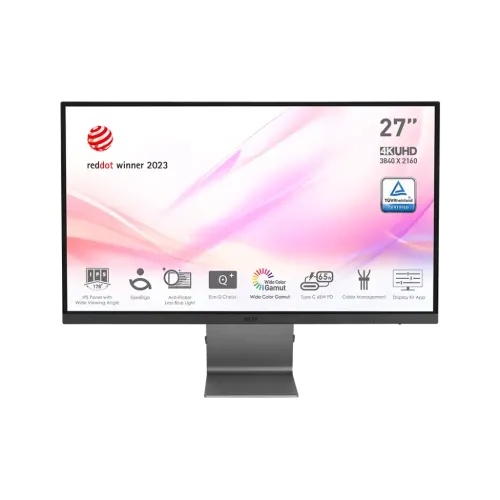
The MSI Modern MD271UL is a 27-inch 4K UHD productivity monitor with an IPS panel and USB-C connectivity. MSI lists 3840 × 2160 resolution, 60Hz refresh, 4ms GTG response, 10-bit color via 8-bit plus FRC, 65W USB-C Power Delivery and HDMI/DisplayPort inputs. It is designed for detailed desktop work and broad device compatibility; verify local warranty and package contents with the seller. MSI specifies the Modern MD271UL as a 3840 × 2160 60Hz IPS monitor with USB-C DP Alt Mode and 65W Power Delivery. Check source-device capability, selected color mode and cable requirements against the official specification and manual. Exact performance depends on the connected device and configuration.
27-inch 4K UHD display
The 27-inch panel displays 3840 × 2160 pixels in a 16:9 aspect ratio, with a 596.736 × 335.664mm active area. 4K provides fine text, image and video detail and a large workspace for documents and creative applications. Use native resolution for the clearest picture and adjust operating-system scaling for readable interface elements. The connected source must support 4K output. MSI specifies the Modern MD271UL as a 3840 × 2160 60Hz IPS monitor with USB-C DP Alt Mode and 65W Power Delivery. Check source-device capability, selected color mode and cable requirements against the official specification and manual. Exact performance depends on the connected device and configuration.
IPS panel and viewing angles
MSI specifies an IPS panel with 178-degree horizontal and vertical viewing angles, 1000:1 contrast and anti-glare surface. IPS supports broad viewing positions for desk work or shared review. Viewing angle does not guarantee uniform brightness or color across every panel; room lighting and settings affect perception. The monitor’s flat screen and 27-inch size suit a range of standard desk layouts. MSI specifies the Modern MD271UL as a 3840 × 2160 60Hz IPS monitor with USB-C DP Alt Mode and 65W Power Delivery. Check source-device capability, selected color mode and cable requirements against the official specification and manual. Exact performance depends on the connected device and configuration.
60Hz refresh and signal support
The maximum refresh rate is 60Hz. MSI lists 3840 × 2160 at up to 60Hz over HDMI, DisplayPort and USB-C. This makes the monitor suitable for standard 4K desktop use and video, rather than high-refresh competitive gaming. Select the correct input and verify the active 4K/60 mode in the operating system and monitor OSD after connection. MSI specifies the Modern MD271UL as a 3840 × 2160 60Hz IPS monitor with USB-C DP Alt Mode and 65W Power Delivery. Check source-device capability, selected color mode and cable requirements against the official specification and manual. Exact performance depends on the connected device and configuration.
4ms GTG response
MSI lists a 4ms gray-to-gray response time. GTG is a pixel transition measure and differs from end-to-end input lag or MPRT. Actual motion clarity depends on content, refresh rate, source frame rate and panel settings. A 60Hz maximum is the central motion limit, so the response figure should not be interpreted as a high-refresh gaming specification. MSI specifies the Modern MD271UL as a 3840 × 2160 60Hz IPS monitor with USB-C DP Alt Mode and 65W Power Delivery. Check source-device capability, selected color mode and cable requirements against the official specification and manual. Exact performance depends on the connected device and configuration.
Wide color gamut
The official MSI specification lists Adobe RGB 99%, DCI-P3 95% and sRGB 139% using CIE 1976. Such wide gamut can support vivid creative previews and broad color work. Gamut-size percentages are not identical to color coverage or accuracy and do not prove calibration. For color-sensitive delivery, use an appropriate profile and validate the actual monitor against the target output. MSI specifies the Modern MD271UL as a 3840 × 2160 60Hz IPS monitor with USB-C DP Alt Mode and 65W Power Delivery. Check source-device capability, selected color mode and cable requirements against the official specification and manual. Exact performance depends on the connected device and configuration.
10-bit color depth
The display supports 1.07 billion colors using 10-bit processing through 8-bit plus FRC. This can provide smoother tonal transitions in compatible content and workflows. The graphics device, operating system, application and connection must also support the selected color depth. Do not assume all content is 10-bit; check the signal settings and use a suitable application and media pipeline. MSI specifies the Modern MD271UL as a 3840 × 2160 60Hz IPS monitor with USB-C DP Alt Mode and 65W Power Delivery. Check source-device capability, selected color mode and cable requirements against the official specification and manual. Exact performance depends on the connected device and configuration.
USB-C 65W one-cable use
USB-C supports DisplayPort Alternate Mode and up to 65W Power Delivery. A compatible laptop can send video and receive charging through one cable; data and power behavior depend on the laptop port and cable. Confirm that 65W meets the laptop’s charging requirement, particularly under heavy load. USB-C does not guarantee every device supports video output or full charging through that connector. MSI specifies the Modern MD271UL as a 3840 × 2160 60Hz IPS monitor with USB-C DP Alt Mode and 65W Power Delivery. Check source-device capability, selected color mode and cable requirements against the official specification and manual. Exact performance depends on the connected device and configuration.
HDMI and DisplayPort inputs
Connectivity includes two HDMI 2.0b ports, one DisplayPort 1.2a and one USB-C input with DP Alt Mode/65W PD. All three video input types list 4K at up to 60Hz. Select the input that matches the source and use a cable rated for the required resolution. The monitor also supports standard audio out through a 3.5mm headphone jack. MSI specifies the Modern MD271UL as a 3840 × 2160 60Hz IPS monitor with USB-C DP Alt Mode and 65W Power Delivery. Check source-device capability, selected color mode and cable requirements against the official specification and manual. Exact performance depends on the connected device and configuration.
Brightness and contrast
The MSI product specification lists 300cd/m² brightness and 1000:1 typical contrast. These values support general indoor desktop use, but ambient light and image settings affect the perceived result. The current technical listing identifies HDR as not applicable; do not advertise HDR10 for this model based on an incorrect catalog value. Adjust brightness to the room and task. MSI specifies the Modern MD271UL as a 3840 × 2160 60Hz IPS monitor with USB-C DP Alt Mode and 65W Power Delivery. Check source-device capability, selected color mode and cable requirements against the official specification and manual. Exact performance depends on the connected device and configuration.
Color modes and creative use
MSI includes modes such as sRGB, Adobe RGB, DCI-P3, User, Movie and Office depending on the specification/OSD listing. Choose a mode that matches the intended content and color workflow. Adaptive-Sync may be listed as a display capability, but this remains a 60Hz productivity monitor. Color modes can change image appearance; verify output with the required profile for creative work. MSI specifies the Modern MD271UL as a 3840 × 2160 60Hz IPS monitor with USB-C DP Alt Mode and 65W Power Delivery. Check source-device capability, selected color mode and cable requirements against the official specification and manual. Exact performance depends on the connected device and configuration.
Laptop and mobile compatibility
MSI lists compatibility with PC, Mac, PS5, PS4, Xbox, mobile devices and notebooks, subject to connector support. USB-C can simplify connection for compatible laptops and mobile devices with video output. Confirm the specific device’s port capabilities and resolution modes. A USB-C connector on a host does not necessarily mean that it carries DisplayPort video or provides 65W charging. MSI specifies the Modern MD271UL as a 3840 × 2160 60Hz IPS monitor with USB-C DP Alt Mode and 65W Power Delivery. Check source-device capability, selected color mode and cable requirements against the official specification and manual. Exact performance depends on the connected device and configuration.
Console compatibility
HDMI inputs can connect compatible consoles and 4K media players. The display supports up to 3840 × 2160 at 60Hz, so it is intended for standard 4K output rather than 120Hz console gaming. Configure the console to a supported resolution and refresh. HDR should not be expected: MSI’s specification lists HDR as N/A for the MD271UL. MSI specifies the Modern MD271UL as a 3840 × 2160 60Hz IPS monitor with USB-C DP Alt Mode and 65W Power Delivery. Check source-device capability, selected color mode and cable requirements against the official specification and manual. Exact performance depends on the connected device and configuration.
Stand adjustment and positioning
The supplied stand supports tilt from -5° to +20°. The MSI global specification lists dimensions with stand as approximately 613.49 × 473.1 × 198.3mm and weight as 5.75kg. Adjust the screen angle for a comfortable eye line and consider a riser if extra height is needed. The stand does not provide the full ergonomic range of height, swivel and pivot found on some business displays. MSI specifies the Modern MD271UL as a 3840 × 2160 60Hz IPS monitor with USB-C DP Alt Mode and 65W Power Delivery. Check source-device capability, selected color mode and cable requirements against the official specification and manual. Exact performance depends on the connected device and configuration.
Desk space and VESA mounting
The monitor supports VESA 75 × 75mm according to MSI product specification records; confirm this unusual pattern against the regional manual and actual rear mounting holes before buying an arm. Allow room for connectors, the external adapter and cable bends. Check the mount load capacity and screw fit, and support the panel while installing hardware. MSI specifies the Modern MD271UL as a 3840 × 2160 60Hz IPS monitor with USB-C DP Alt Mode and 65W Power Delivery. Check source-device capability, selected color mode and cable requirements against the official specification and manual. Exact performance depends on the connected device and configuration.
Power adapter and energy
The monitor uses an external 19V 5.79A power adapter and accepts 100–240V, 50/60Hz input. Ensure the correct adapter is supplied and use the matching connector and rated power. Do not substitute an incompatible adapter. Place the power brick where it has ventilation and does not hang by its cable. Confirm regional plug and package accessories with the seller. MSI specifies the Modern MD271UL as a 3840 × 2160 60Hz IPS monitor with USB-C DP Alt Mode and 65W Power Delivery. Check source-device capability, selected color mode and cable requirements against the official specification and manual. Exact performance depends on the connected device and configuration.
Setup and troubleshooting
For 4K/60Hz, connect by HDMI 2.0b, DisplayPort 1.2a or USB-C DP Alt Mode using a suitable cable. Select 3840 × 2160 and 60Hz in system settings. If 4K is unavailable, check source GPU capability, cable, input choice and USB-C DP Alt Mode support. Verify the active input in the OSD before troubleshooting other settings. MSI specifies the Modern MD271UL as a 3840 × 2160 60Hz IPS monitor with USB-C DP Alt Mode and 65W Power Delivery. Check source-device capability, selected color mode and cable requirements against the official specification and manual. Exact performance depends on the connected device and configuration.
Care and handling
Keep the display on a stable surface and avoid pressure on the panel. Clean the anti-glare screen with a soft microfiber cloth; do not spray liquid directly on the monitor or use abrasive cleaners. Keep vents open and route signal and power leads so they are not pinched. Retain packaging and note serial and delivery condition until return checks are complete. MSI specifies the Modern MD271UL as a 3840 × 2160 60Hz IPS monitor with USB-C DP Alt Mode and 65W Power Delivery. Check source-device capability, selected color mode and cable requirements against the official specification and manual. Exact performance depends on the connected device and configuration.
Warranty and Bangladesh offer
MSI’s specification page describes technical features but does not establish the Bangladesh seller’s warranty. Confirm the local warranty provider, coverage period, service address, dead-pixel terms, invoice requirements and serial eligibility. Check unit and carton serials against the invoice. Verify current price, stock, delivery, return policy, adapter and cable contents before payment. MSI specifies the Modern MD271UL as a 3840 × 2160 60Hz IPS monitor with USB-C DP Alt Mode and 65W Power Delivery. Check source-device capability, selected color mode and cable requirements against the official specification and manual. Exact performance depends on the connected device and configuration.
Who should choose MD271UL
Choose the MD271UL for a 27-inch 4K IPS desktop with broad gamut, 65W USB-C charging and multiple 4K/60 inputs. It is suited to productivity, media and color-aware workflows when calibrated, but it is not a high-refresh gaming monitor and does not list HDR support. Confirm host USB-C video/power compatibility, VESA mounting pattern and Bangladesh warranty before purchase. MSI specifies the Modern MD271UL as a 3840 × 2160 60Hz IPS monitor with USB-C DP Alt Mode and 65W Power Delivery. Check source-device capability, selected color mode and cable requirements against the official specification and manual. Exact performance depends on the connected device and configuration.