Verified model overview
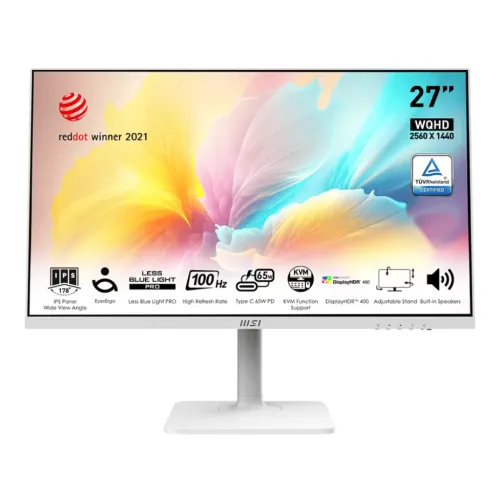
The MSI Modern MD272QXPW is a 27-inch flat IPS business monitor with 2560 × 1440 WQHD resolution and a 100Hz maximum refresh rate. MSI lists DisplayHDR 400, 400-nit peak HDR brightness, 4ms GtG and 1ms MPRT response modes, plus broad color coverage. Connectivity includes HDMI, DisplayPort, USB-C with up to 65W power delivery, USB hub, and KVM functions. The white chassis and adjustable stand distinguish this SKU. Confirm the exact regional package, ports and warranty on the product label.
27-inch WQHD display
Native resolution is 2560 × 1440 in a 16:9 format, with a 27-inch flat IPS panel. WQHD provides substantially more desktop area than Full HD and sharpens fine text at this size. Set the computer to native resolution for best clarity. Operating-system scaling can make text easier to read while retaining the extra workspace. The output mode depends on the graphics source, cable, dock and selected input.
IPS panel and viewing angles
MSI specifies an IPS panel with 178-degree horizontal and vertical viewing angles. This suits shared viewing and desk workflows where the screen is not always viewed straight on. The viewing-angle number is a panel rating, not a guarantee of identical brightness or color from every position. Position the screen to reduce glare and use the on-screen color controls. Color-critical tasks may require calibration and a managed workflow.
100Hz refresh rate
The monitor supports up to 100Hz, including QHD over supported inputs according to MSI’s specification. A higher refresh can make scrolling and pointer movement appear smoother when the computer supplies the frames. Select 2560 × 1440 and 100Hz in the operating system or GPU software, then confirm the active signal. Cable and adapter limits can restrict available modes. It is a productivity monitor, not a high-refresh esports display.
Response modes and motion
MSI lists 4ms gray-to-gray and 1ms MPRT response modes. The figures use different measurement methods and depend on settings; MPRT may involve backlight strobing and can affect brightness or flicker perception. Response time is not the same as input lag. Try the available response options with your content and use the setting that gives a clean image without distracting overshoot. Results vary with the source frame rate and transitions.
HDR and brightness
MSI lists DisplayHDR 400 certification and up to 400 nits peak HDR brightness. HDR quality depends on the source, mode, ambient light and panel behavior; certification should not be interpreted as local dimming unless a feature is specifically listed. The standard brightness and HDR peak values are not interchangeable. Use HDR with compatible games or media and compare against SDR for desktop work if colors appear less natural.
Color gamut and color depth
MSI publishes broad gamut coverage including 99% sRGB overlap, 93% Adobe RGB overlap and 92% DCI-P3 overlap using CIE 1976 figures. The panel supports 1.07 billion colors with 8-bit plus FRC. Coverage percentages describe gamut overlap under the stated measurement system, not guaranteed factory accuracy. For accurate photo or design work, use a calibrated profile and color-managed applications; gamut alone does not prove a Delta E result.
USB-C display and laptop power
The USB-C connection supports DisplayPort Alt Mode and up to 65W USB Power Delivery according to MSI product material. It can carry video and charge a compatible laptop over one cable, subject to the laptop’s power needs and the monitor’s port behavior. A 65W supply may not fully power every workstation under load. Use a full-featured USB-C cable and check the laptop manual for video and charging support.
KVM for two computers
The integrated KVM feature lets compatible computers share a keyboard and mouse connected to the monitor’s USB hub. Connect each computer’s video and USB upstream path as described in the manual, then select the active input or KVM source. The setup uses the monitor’s USB routing; it does not combine the computers’ processing or storage. Check the manual for supported input combinations and switching behavior before planning a multi-device desk.
Video inputs and USB ports
MSI’s official materials list HDMI, DisplayPort and USB-C input, along with USB downstream ports for peripherals. The exact number and version of each connector can vary by regional specification page and production configuration, so inspect the rear-panel diagram and unit label before ordering. Use an appropriate cable for QHD at 100Hz. The USB-C port’s video and power functions require compatible host devices and cable capability.
Ergonomic stand and portrait use
The stand provides height adjustment, tilt, swivel and 90-degree pivot for portrait orientation. The pivot feature helps with long documents and coding, while the other adjustments support different desk positions. Rotate the display carefully and set screen orientation in the computer. The stand can be detached for VESA installation; check the mount pattern and supported weight in the MSI manual before attaching an arm.
Eye comfort and software tools
MSI positions the Modern series for productivity and includes eye-care features and on-screen controls. Features can include reduced blue light and anti-flicker behavior, with exact menu names depending on firmware. Adjust brightness for the room, keep a comfortable viewing distance and take regular breaks. Eye-care modes are comfort settings rather than medical treatment. MSI’s software and KVM tools depend on operating-system support.
Built-in audio and webcam
The published specification does not establish an integrated webcam or speaker configuration for every regional SKU. Plan for external audio and camera equipment unless the exact product page or carton explicitly confirms those components. USB-C can pass video and USB data to compatible hosts, but it does not imply a webcam is built into the display. The monitor’s audio output and any speakers should be confirmed in the regional I/O specification.
White finish and desk setup
The MD272QXPW uses a white finish intended to coordinate with light desk setups. Keep ventilation and cable access clear, and route the USB-C and peripheral connections without strain. The adjustable stand requires enough desk depth for its base and movement. Product photos may show a particular regional accessory bundle; verify whether the required USB-C, HDMI or DisplayPort cables are included in the local box.
Power delivery expectations
USB-C Power Delivery is specified up to 65W. Actual charging depends on the computer’s accepted USB-PD profiles, cable rating, monitor state and simultaneous display/peripheral use. A laptop requiring more power may charge slowly or continue to draw battery during intensive work. Keep the laptop’s own power adapter available when full performance is needed. This is not a battery backup or universal charger.
Who should consider this model
The display suits office and hybrid work that benefits from WQHD space, a 100Hz desktop feel, USB-C docking, KVM and an adjustable stand. It can simplify a laptop and desktop setup if the input and USB routing meet your needs. Its 27-inch IPS format also works for documents and general media. Check whether the host supports QHD at 100Hz and whether 65W is enough for your laptop.
Tradeoffs to weigh
The 65W USB-C supply may be insufficient for high-power laptops. The broad color gamut can require color management for accurate work. USB-C video and KVM require correct upstream connections and compatible computers. HDR support does not guarantee a premium local-dimming experience. The large port set and features are helpful only when the regional unit includes the configuration described by MSI; verify before purchase.
Bangladesh unit, serial and warranty
MSI’s global product page does not establish the warranty attached to a specific Bangladesh unit. Ask the seller to confirm local authorization, warranty length, service location, panel policy and invoice requirements. Match the serial and complete model code on the monitor and carton, and retain purchase proof. Check live stock, price and included accessories at checkout because offers and availability can change.
Setup and troubleshooting
Assemble the stand on a stable desk, connect the preferred video input and set native 2560 × 1440 resolution. For USB-C docking, confirm the laptop supports DisplayPort Alt Mode and USB-PD; for KVM, connect the necessary USB paths as the manual illustrates. If 100Hz is missing, review cable, adapter, GPU and display settings. If charging is slow, use the laptop’s original adapter for demanding workloads.
Cleaning and care
Switch off and unplug the display before cleaning. Use a soft lint-free cloth and follow MSI’s care instructions; avoid spraying liquid directly onto the screen or using harsh chemicals. Do not press the LCD surface during transport or stand assembly. Keep the monitor away from moisture and ensure the power cable and USB-C cable are not pinched by the stand. Handle the panel from its frame when adjusting or mounting.