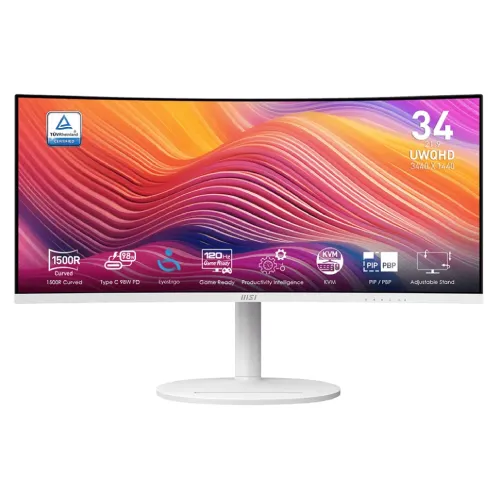
MSI Modern MD342CQPW overview
The MSI Modern MD342CQPW is a 34-inch 21:9 ultrawide productivity monitor with a curved VA panel, UWQHD 3440 × 1440 resolution and 120Hz refresh. Its notable desk features include USB-C with DisplayPort Alt Mode and up to 98W power delivery, an integrated KVM, USB hub, Adaptive-Sync, PiP/PbP and built-in speakers. The white model is designed for work and general multimedia, with casual gaming capability. Actual performance depends on computer output, cable, input, application and settings. Confirm local stock, package and serial-specific warranty with the seller; manufacturer specifications do not establish a current Bangladesh offer.
Confirm MD342CQPW model and color
The full model code is MD342CQPW; it is the white version in the Modern MD342CQP family. Verify the exact suffix and color on the label, since closely named variants may differ in finish or regional bundle. Do not confuse this monitor with MSI gaming ultrawides that have different refresh, panel or HDR specifications. The unit is a 120Hz VA LCD, not an OLED display. Actual performance depends on computer output, cable, input, application and settings. Confirm local stock, package and serial-specific warranty with the seller; manufacturer specifications do not establish a current Bangladesh offer.
34-inch 21:9 ultrawide workspace
A 34-inch 21:9 screen provides a wide horizontal desktop for side-by-side windows, editing timelines and long spreadsheets. Its 1500R curve bends the screen toward the user, helping the wide panel feel cohesive from a centered seating position. The broad layout can reduce window switching, although applications with fixed 16:9 layouts may leave unused space or show side borders. Actual performance depends on computer output, cable, input, application and settings. Confirm local stock, package and serial-specific warranty with the seller; manufacturer specifications do not establish a current Bangladesh offer.
UWQHD resolution and pixel density
The native 3440 × 1440 UWQHD resolution offers more horizontal pixels than standard 2560 × 1440 QHD while retaining a 1440-pixel vertical workspace. At this size the pixel pitch is approximately 0.23175mm. Choose operating-system scaling that keeps text readable and check whether your laptop or dock can drive the full resolution at 120Hz over the selected input. Actual performance depends on computer output, cable, input, application and settings. Confirm local stock, package and serial-specific warranty with the seller; manufacturer specifications do not establish a current Bangladesh offer.
1500R VA panel and contrast
MSI specifies a VA panel with 3500:1 contrast and 178-degree viewing angles. The high native contrast can help dark scenes and office content appear more defined than on many conventional IPS panels. Color coverage is listed at about 92% Adobe RGB, 95% DCI-P3 and 119% sRGB. Color gamut alone does not establish calibration accuracy; use an appropriate color mode for the task. Actual performance depends on computer output, cable, input, application and settings. Confirm local stock, package and serial-specific warranty with the seller; manufacturer specifications do not establish a current Bangladesh offer.
120Hz refresh and response time
The refresh rate is 120Hz, with 1ms MPRT and 4ms GtG listed. MPRT and gray-to-gray are different response measures. Adaptive-Sync can help reduce tearing when the source frame rate varies. For office work the higher refresh can make pointer movement and scrolling smoother; for gaming, the PC must still render enough frames to benefit from 120Hz. Actual performance depends on computer output, cable, input, application and settings. Confirm local stock, package and serial-specific warranty with the seller; manufacturer specifications do not establish a current Bangladesh offer.
HDR Ready and brightness
The monitor is described as HDR Ready and supports HDR input, but it is not listed as VESA DisplayHDR-certified. Its typical brightness is 300 cd/m². HDR Ready should not be interpreted as a high-brightness HDR certification or local-dimming capability. In a bright room, adjust placement and brightness; compare SDR and HDR output using content that is mastered for HDR. Actual performance depends on computer output, cable, input, application and settings. Confirm local stock, package and serial-specific warranty with the seller; manufacturer specifications do not establish a current Bangladesh offer.
USB-C 98W display and charging
The USB-C upstream port supports DisplayPort Alt Mode, data and up to 98W USB Power Delivery. A compatible laptop can transfer video and USB data while receiving power over one cable. Confirm the laptop port supports video output and that its charging needs fit within 98W. A dock, cable or host power policy may limit the available resolution, refresh or charging rate. Actual performance depends on computer output, cable, input, application and settings. Confirm local stock, package and serial-specific warranty with the seller; manufacturer specifications do not establish a current Bangladesh offer.
KVM and multi-computer workflow
The integrated KVM allows one keyboard and mouse connected to the monitor’s USB hub to be shared between two computers. One computer can connect through USB-C and another through the USB-B upstream path, with video connections assigned to their sources. Select the corresponding KVM input in the OSD or MSI Productivity Intelligence software. It switches peripherals; it does not merge computer sessions. Actual performance depends on computer output, cable, input, application and settings. Confirm local stock, package and serial-specific warranty with the seller; manufacturer specifications do not establish a current Bangladesh offer.
Video inputs and USB hub
Video inputs include two HDMI 2.0b ports, one DisplayPort 1.4a and one USB-C DP Alt Mode connection. The hub includes one USB-B upstream port and two USB-A downstream ports, plus a headphone output. Attach the USB upstream cable to the computer if you want the USB-A ports and KVM to work with that source. Check the selected port’s supported UWQHD mode in the manual. Actual performance depends on computer output, cable, input, application and settings. Confirm local stock, package and serial-specific warranty with the seller; manufacturer specifications do not establish a current Bangladesh offer.
PIP and PBP multi-view
PiP and PbP can display more than one video source at a time. This can help monitor a work laptop and desktop together, but each source may be shown at reduced size and the available combinations can restrict refresh or aspect ratio. Use the monitor OSD to choose layout and input pairing; verify text remains readable for the intended use. Actual performance depends on computer output, cable, input, application and settings. Confirm local stock, package and serial-specific warranty with the seller; manufacturer specifications do not establish a current Bangladesh offer.
Stand adjustment and VESA
The stand supports tilt from -5 to +20 degrees, swivel 30 degrees left/right and 110mm height adjustment. The screen does not pivot to portrait because of the ultrawide format. MSI specifies a 75 × 75mm VESA pattern; supplied spacer screws may be needed. Check desk depth, curve clearance, arm load rating and cable reach before mounting. Actual performance depends on computer output, cable, input, application and settings. Confirm local stock, package and serial-specific warranty with the seller; manufacturer specifications do not establish a current Bangladesh offer.
Laptop and desktop setup
For a laptop single-cable desk, use a USB-C cable rated for video and 98W power delivery. Connect another desktop with DisplayPort or HDMI and the USB-B upstream path for KVM sharing. On a PC, DisplayPort 1.4a supports UWQHD up to 120Hz. If 120Hz is unavailable, check the GPU, cable, dock, display mode and active signal in the operating system. Actual performance depends on computer output, cable, input, application and settings. Confirm local stock, package and serial-specific warranty with the seller; manufacturer specifications do not establish a current Bangladesh offer.
Gaming and console compatibility
The monitor can support PC gaming at UWQHD 120Hz with Adaptive-Sync, but it is a productivity-oriented model rather than an esports display. The wide aspect ratio is immersive in compatible games; some titles may use 16:9 with side bars. Consoles often output 16:9 and may not use the full 3440 × 1440 canvas or 120Hz at native ultrawide resolution. Actual performance depends on computer output, cable, input, application and settings. Confirm local stock, package and serial-specific warranty with the seller; manufacturer specifications do not establish a current Bangladesh offer.
Productivity Intelligence and eye care
MSI Productivity Intelligence software supports monitor controls and desktop workflows. Eye-Q Check helps users assess viewing conditions, and the monitor includes anti-flicker and less-blue-light features. These options can be useful during office sessions, though eye comfort also depends on breaks, posture, screen distance and ambient lighting. Eye-care modes may affect color; disable them for color-critical tasks. Actual performance depends on computer output, cable, input, application and settings. Confirm local stock, package and serial-specific warranty with the seller; manufacturer specifications do not establish a current Bangladesh offer.
Audio and built-in speakers
Two built-in 3W speakers provide basic sound for calls, system alerts and casual media. A headphone output is also included. The built-in speakers are not intended to replace dedicated desktop speakers for room-filling sound or critical audio work. Select the correct audio output device on the connected computer after switching between HDMI, DisplayPort and USB-C sources. Actual performance depends on computer output, cable, input, application and settings. Confirm local stock, package and serial-specific warranty with the seller; manufacturer specifications do not establish a current Bangladesh offer.
Advantages and trade-offs
Strengths include the 34-inch UWQHD workspace, 120Hz refresh, strong VA contrast, 98W USB-C power, KVM, PiP/PbP, a USB hub and adjustable stand. Trade-offs include HDR Ready without a listed HDR certification, 300-nit typical brightness, the 75mm VESA mount, external power adapter and limited console support for ultrawide aspect ratios. Actual performance depends on computer output, cable, input, application and settings. Confirm local stock, package and serial-specific warranty with the seller; manufacturer specifications do not establish a current Bangladesh offer.
Bangladesh purchase checklist
Before buying in Bangladesh, confirm the exact MD342CQPW white model, local stock, delivered price, included power adapter/cables, return policy and serial-specific MSI warranty. Ask the seller to state warranty provider, duration and coverage in writing. Ensure your laptop supports USB-C video and that its power requirement is no more than the available 98W if you expect one-cable charging. Actual performance depends on computer output, cable, input, application and settings. Confirm local stock, package and serial-specific warranty with the seller; manufacturer specifications do not establish a current Bangladesh offer.
Frequently asked questions
What is the resolution? 3440 × 1440 UWQHD. What is the refresh rate? 120Hz. How curved is it? 1500R. Can USB-C charge a laptop? Yes, up to 98W, if the host supports video over USB-C. Does it have KVM? Yes, with the necessary video and upstream USB connections. Does it have speakers? Two 3W speakers. Is it certified HDR? It is listed as HDR Ready, not with a VESA DisplayHDR certification. What VESA mount? 75 × 75mm. Actual performance depends on computer output, cable, input, application and settings. Confirm local stock, package and serial-specific warranty with the seller; manufacturer specifications do not establish a current Bangladesh offer.
Who should choose this monitor
Choose the MSI Modern MD342CQPW if you need an ultrawide productivity screen with a USB-C docking-style connection, KVM and a 120Hz panel. Its 21:9 layout works well for simultaneous windows, while VA contrast supports media and casual gaming. Consider connection, HDR and console limits before purchase, and confirm local offer and warranty for the exact white model. Actual performance depends on computer output, cable, input, application and settings. Confirm local stock, package and serial-specific warranty with the seller; manufacturer specifications do not establish a current Bangladesh offer.