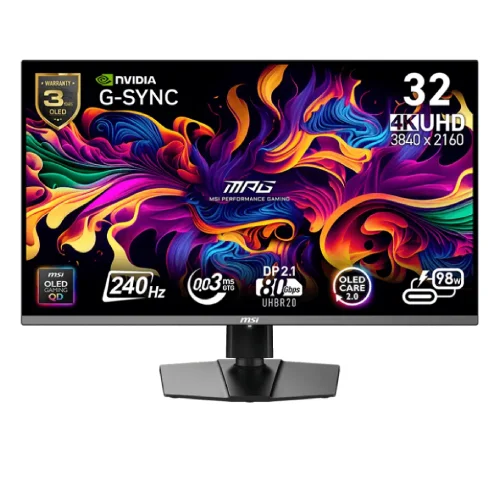
MSI MPG 322URX QD-OLED overview
The MSI MPG 322URX QD-OLED is a flat 31.5-inch 4K UHD gaming monitor with a 3840 × 2160 QD-OLED panel, 240Hz refresh rate and 0.03ms GTG response time. MSI lists VESA DisplayHDR True Black 400, G-SYNC Compatible and AMD FreeSync Premium Pro, HDMI 2.1, DisplayPort 2.1a UHBR20, USB-C with 98W Power Delivery and built-in KVM. The following details reflect MSI’s official specifications; local stock, offers and serial-specific warranty need seller confirmation.
Confirm the exact model
Check that the model label reads MPG 322URX QD-OLED on the monitor, box, invoice and support paperwork. This exact model is a flat 31.5-inch UHD monitor; similarly named MSI displays can differ in resolution, refresh, connectors and panel type. Regional packaging and accessory details may also vary. This catalog update retains the existing product slug, Active status and variant/SKU identity.
31.5-inch QD-OLED panel
MSI specifies a 31.5-inch flat QD-OLED panel with a 16:9 aspect ratio and 699.48 × 394.73mm active display area. Quantum Dot OLED combines OLED pixel control with quantum-dot color conversion. The anti-glare surface helps reduce reflections but does not remove all glare in bright rooms. Panel appearance can vary with room lighting, picture mode, viewing distance and the individual unit.
4K UHD 3840 × 2160 detail
The native resolution is 3840 × 2160, providing four times as many pixels as Full HD. This supports detailed game imagery and desktop work, while high-resolution text may benefit from operating-system scaling. Running demanding games at 4K and 240Hz requires a capable source and compatible cable. Confirm that the graphics card, selected input and system settings support the desired signal mode.
240Hz refresh and adaptive sync
MSI lists a maximum 240Hz refresh rate and an activated range of 48–240Hz. G-SYNC Compatible and AMD FreeSync Premium Pro support variable refresh with compatible graphics hardware to reduce tearing and stutter. Results depend on GPU, drivers, cable, game and selected settings. Enable adaptive sync on both monitor and source, then confirm the live refresh rate in the system or monitor display.
0.03ms GTG response rating
The manufacturer specifies a 0.03ms gray-to-gray response time. This is a panel transition rating, not total system input latency or a promise that every game runs at 240 frames per second. Motion perception also depends on refresh, source frame rate, processing, game settings and visual content. Use a supported refresh mode and adjust any response or motion settings to suit the actual workload.
HDR brightness and contrast
MSI specifies typical SDR brightness of 250 nits. For HDR it lists 450 nits typical at 10% average picture level and 1,000 nits typical peak at 3% average picture level, along with DisplayHDR True Black 400 and 1,500,000:1 typical contrast. Peak brightness applies to a limited image area and is not the brightness of a full white screen. HDR needs compatible content, source output and display settings.
Color gamut and 10-bit color
The specification lists 98% Adobe RGB, 99% DCI-P3 and 138% sRGB using the CIE 1976 standard, with 1.07 billion colors and 10-bit color. Gamut coverage describes color range; it does not itself prove exact color accuracy in every application or unit. MSI highlights QD Premium Color and Delta E ≤2 on its product overview. Color-managed workflows should still use appropriate profiles and calibration.
HDMI 2.1 for PC and console
Two HDMI 2.1 ports support UHD up to 240Hz according to MSI. The manufacturer notes HDMI 2.1 bandwidth up to 48Gbps and console support for 4K 120Hz, VRR and ALLM when the source supports those features. Actual modes depend on the device, cable, color format and game. Enable matching options on the source and monitor, then confirm the active signal before play.
DisplayPort 2.1a UHBR20
The monitor includes one DisplayPort 2.1a connection using UHBR20, specified for up to 80Gbps bandwidth. MSI describes native lossless 4K at 240Hz through this interface with a compatible source. Graphics hardware and cable capability determine available modes. Verify the connected GPU’s output specification and use a cable rated for the required DisplayPort mode.
USB-C video and 98W charging
One USB-C port supports DisplayPort Alt Mode and up to 98W Power Delivery. A compatible laptop may use one cable for video and charging, subject to its USB-C implementation and power needs. The source must support video over USB-C; a charge-only cable will not carry display output. Check that sustained power delivery is suitable for the computer and keep its original adapter available when needed.
USB hub and built-in KVM
MSI lists two USB 5Gbps Type-A downstream ports and one USB 5Gbps Type-B upstream port. The monitor supports KVM, so compatible computers can share connected keyboard and mouse peripherals after the USB upstream paths and menu routing are configured. KVM switches connected peripherals; it does not combine computers or applications. If devices do not follow the selected input, check both the video input and USB routing.
PIP, PBP and HDMI-CEC
The specification lists Picture-in-Picture and Picture-by-Picture functions, HDMI-CEC, and support for KVM. These features can help view multiple connected sources or coordinate control with compatible devices. Available layouts and combinations may depend on source resolution and active ports. Consult the on-screen display menu and the model manual to select supported combinations.
OLED Care 2.0 and static images
MSI promotes OLED Care 2.0 to reduce the risk of image sticking or burn-in and advertises a three-year burn-in warranty for this model. Static interface elements over long periods can still pose a panel-care concern. Use the monitor’s protection functions, follow pixel refresh prompts and vary displayed content as directed in the manual. Warranty availability and terms depend on the sales region and exact serial.
Stand adjustment and VESA mount
The supplied stand supports -5° to +15° tilt, -30° to +30° swivel, -10° to +10° pivot and 0–110mm height adjustment. The VESA pattern is 100 × 100mm. MSI lists dimensions of 718 × 242 × 483mm with stand and 718 × 69 × 418mm without stand. Check desk space, arm load rating, screw length and cable clearance before mounting.
Audio, ports and package
The monitor has a headphone-out jack; MSI does not list integrated speakers in the specification. Audio should therefore use headphones or an external sound system connected to the source. MSI lists HDMI and DisplayPort cables, power cord, USB Type-B-to-A cable, quick guide and VESA screws among accessories, but regional box contents may vary. Confirm the exact accessories supplied with the local unit.
Power and weight
The MPG 322URX uses an internal power board and accepts 100–240V AC at 50/60Hz. MSI lists net/gross weights of 9.6kg and 12.9kg. Use the supplied power cable and a suitable grounded outlet. Keep ventilation clear and follow MSI’s setup and cleaning instructions. For desk or wall mounting, account for the display’s weight and support it during installation.
Bangladesh price, availability and warranty
This review verifies MSI’s product specifications but does not confirm today’s BiponiBD price, stock, delivery condition or a particular unit’s local warranty. Ask the seller to confirm new/sealed condition, the exact model and serial, local service provider, warranty duration, panel burn-in coverage and included accessories. Retain invoice and carton serial information. MSI states three years including panel burn-in on its specification page, but regional terms must be confirmed for the supplied unit.
Frequently asked questions
What is the resolution? 3840 × 2160 UHD. What is the panel? QD-OLED. What refresh rate? Up to 240Hz. What response rating? 0.03ms GTG. Is USB-C charging supported? Yes, up to 98W with compatible devices. Which DisplayPort? DP 2.1a UHBR20. Does it have KVM? Yes. Does it have speakers? MSI lists headphone-out, not integrated speakers. What is the VESA size? 100 × 100mm. What Bangladesh warranty applies? Confirm exact regional and serial terms with the seller.