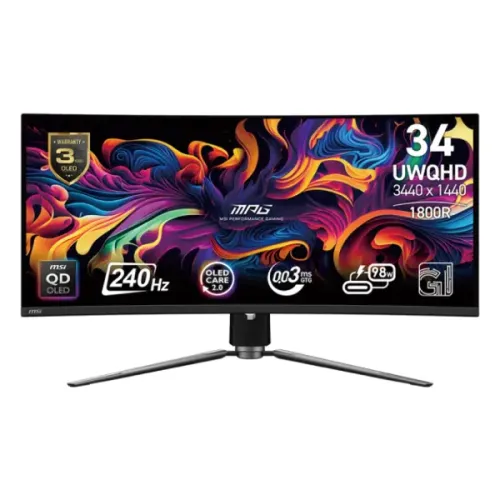
MSI MPG 341CQPX QD-OLED overview
The MSI MPG 341CQPX QD-OLED is a 34.18-inch curved ultrawide gaming monitor with 3440 × 1440 UWQHD resolution, 21:9 aspect ratio, 1800R curvature and a 240Hz refresh rate. MSI specifies a 0.03ms GTG response, 1,500,000:1 contrast, DisplayHDR True Black 400, ClearMR 13000, 99.3% DCI-P3 and Delta E ≤ 2. Its connections include HDMI 2.1, DisplayPort 1.4a, USB-C video with high-power delivery and a KVM-capable USB hub.
Identify the exact MSI model
Check the full model name MPG 341CQPX QD-OLED on the rear label, shipping carton and invoice. It differs from MAG 341CQP, MPG 341CQR and other similarly named MSI monitors, which may have different refresh rates, USB-C charging or panel capabilities. Model suffix and part number can vary by region. The current BiponiBD product slug and variant identity remain unchanged.
34.18-inch 21:9 curved display
MSI specifies a 34.18-inch panel with an active area of 800.06 × 337.06mm. Its 21:9 ultrawide ratio provides more horizontal workspace than a standard 16:9 monitor and can widen supported game and film views. Some content remains 16:9 and may show side bars. Measure the desk and viewing distance before installation because the display is broad.
UWQHD 3440 × 1440 resolution
The native resolution is 3440 × 1440, also called UWQHD. It offers a high-detail ultrawide desktop and is less demanding than 4K at comparable frame rates, though 240Hz gaming still requires strong graphics hardware. Use native resolution for sharp mapping and check that docks, GPUs and applications support the chosen refresh over the selected input.
240Hz refresh rate
MSI lists a 240Hz maximum refresh with an Adaptive-Sync range of 48–240Hz. High refresh can improve perceived motion smoothness when source hardware and game frame rates are sufficient. Set the correct mode in system settings and check the monitor information page. A 240Hz panel does not render frames; GPU and game performance determine delivered frame rate.
0.03ms GTG response and ClearMR
The specification lists 0.03ms gray-to-gray response and VESA ClearMR 13000 certification. Response time and ClearMR are different measurements: neither represents full system input latency. Game processing, frame pacing and source settings also matter. Review the monitor’s available motion modes and avoid assuming every preset improves clarity without affecting brightness or image quality.
HDR True Black 400 and brightness
MSI lists VESA DisplayHDR True Black 400 and 1,000-nit peak HDR brightness at a 3% APL condition; its sheet also gives a typical HDR level at 10% APL. Peak brightness applies to a small highlight area rather than the entire screen. HDR requires compatible content and source configuration. MSI’s certification and peak figure are distinct from SDR typical brightness.
QD-OLED contrast and color
MSI specifies a QD-OLED panel, 1,500,000:1 contrast, 99.3% DCI-P3 and 1.07 billion 10-bit colors. MSI’s QD Premium Color claims Delta E ≤ 2. These manufacturer values describe the model, not a measurement of each delivered unit. Room light and color management affect results; use a calibration workflow if professional color accuracy matters.
Anti-reflection surface and viewing environment
MSI lists an anti-reflection surface treatment. It can reduce reflections but cannot remove every reflection from direct light or bright windows. Position the screen to control glare and keep its surface clean following MSI’s care instructions. OLED black appearance can also change under ambient light. Avoid transferring coating claims from a newer or different MSI OLED panel.
HDMI 2.1 and console mode
The official product page describes two HDMI 2.1 ports with full 48Gbps bandwidth and support for UWQHD up to 240Hz, plus console-oriented VRR and ALLM features. Console output is limited by the console and game, usually below the monitor’s PC maximum. Use a compatible cable and confirm the supported timing in the manual. HDMI version alone does not guarantee every mode.
DisplayPort and DSC
MSI lists one DisplayPort 1.4a input. The selected signal may use DSC to support high-resolution, high-refresh output. Source GPU, cable, bit depth and display mode affect availability. If the expected 240Hz mode does not appear, check the graphics output, cable, selected input, driver and monitor OSD. Use the exact model timing table rather than a port label alone.
USB-C video and 98W power delivery
MSI product materials describe USB-C DisplayPort Alt Mode with high-power charging; the exact specification sheet for this SKU lists USB-C PD up to 98W. Charging depends on the connected laptop, cable, region and power mode. This can simplify a compatible laptop desk setup, but verify the local unit and whether power delivery meets the laptop’s requirements before removing its original charger.
KVM and USB connections
The MPG series includes a KVM function for using one keyboard and mouse across multiple connected devices. Connect video and USB upstream paths as described in the manual; USB-C may carry video, data and power to a compatible laptop. KVM changes peripheral routing, not the computer’s processing or desktop. Confirm port map and source selection if peripherals do not follow the displayed input.
MSI OLED Care 2.0
MSI OLED Care 2.0 provides panel-protection routines intended to reduce the risk of image sticking or burn-in. MSI states it extended its panel refresh cycle interval to reduce interruptions. Follow the OSD prompts and allow maintenance to finish. Static bright content can still contribute to uneven wear, so protection features should not be represented as eliminating all risk.
Heatsink and fanless construction
MSI identifies a graphene film and custom heatsink with a fanless design. This passive thermal approach avoids a cooling fan while helping manage panel heat. Ensure ventilation around the rear housing and do not block airflow with wall placement or desk objects. Exact surface temperature depends on ambient conditions and operation. The design does not change the need for recommended OLED care.
Gaming Intelligence and KVM tools
MSI lists Gaming Intelligence features such as AI Vision, Smart Crosshair and KVM, with software support for managing game profiles. Feature behavior can vary with input, firmware and connected system. Crosshair or image enhancement overlays are optional tools and may not suit every game. Download software and updates from MSI support for exact model MPG 341CQPX.
Stand adjustment and mounting
The manufacturer specification lists height adjustment up to 110mm, tilt from -5° to 20°, swivel from -30° to 30° and a 100 × 100mm VESA pattern. Confirm arm capacity and desk depth before mounting. Keep the curved OLED panel supported during assembly, follow screw-depth requirements and provide cable clearance behind the stand. Verify local package measurements if delivery access is tight.
Audio, accessories and daily use
MSI lists a headphone output; built-in speakers are not listed in the reviewed product specification. Plan external audio if needed. Confirm the local package for power cord, display cable, USB upstream cable and warranty paperwork. For daily work, set brightness comfortably, enable sleep timers and arrange static desktop elements to reduce prolonged fixed-image exposure.
Bangladesh price, stock and warranty
This review does not confirm live BiponiBD inventory, price, product condition or a particular unit’s warranty eligibility. MSI advertises a three-year OLED burn-in warranty on its product page, but local scope can depend on country, seller and serial. Ask for written Bangladesh service, duration and burn-in terms for the delivered unit. Keep invoice, carton label and serial documentation.
Frequently asked questions
What is the resolution? 3440 × 1440 UWQHD. What is refresh? Up to 240Hz. What curvature? 1800R. Is the panel QD-OLED? Yes. What response time is listed? 0.03ms GTG. What HDR certification? DisplayHDR True Black 400. What is peak HDR brightness? Up to 1,000 nits at 3% APL. Does USB-C charge a laptop? MSI lists up to 98W PD; confirm the local SKU and laptop needs. Does it have KVM? Yes. What Bangladesh warranty applies? Confirm serial-specific local coverage with the seller.