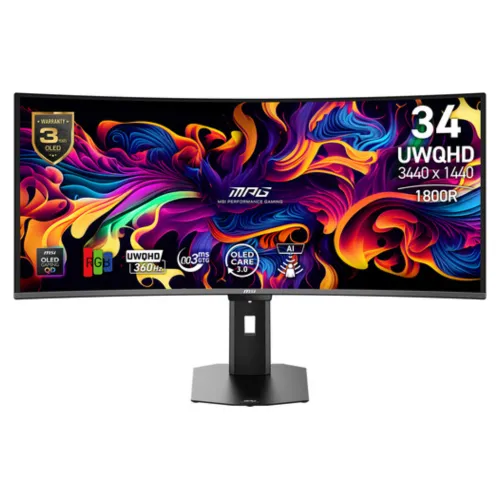
The MSI MPG 341CQR QD-OLED X36 brings together a 34-inch curved screen, an ultrawide 21:9 shape and a 3440 × 1440 UWQHD pixel grid. Its fifth-generation Tandem QD-OLED panel is designed for players who want OLED contrast and rich color while retaining a very high refresh rate. The 1800R curve follows the width of the display and can make the edges feel more naturally within view at an appropriate seating distance. Before choosing an ultrawide, check the depth and width of the desk, the space for the monitor stand, and the games or applications you use. Some games support 21:9 directly; others may show side bars or use a different field of view. The screen remains useful for compatible productivity layouts, but it is primarily a premium gaming monitor.
A wide QD-OLED screen for high-speed play
The MSI MPG 341CQR QD-OLED X36 brings together a 34-inch curved screen, an ultrawide 21:9 shape and a 3440 × 1440 UWQHD pixel grid. Its fifth-generation Tandem QD-OLED panel is designed for players who want OLED contrast and rich color while retaining a very high refresh rate. The 1800R curve follows the width of the display and can make the edges feel more naturally within view at an appropriate seating distance. Before choosing an ultrawide, check the depth and width of the desk, the space for the monitor stand, and the games or applications you use. Some games support 21:9 directly; others may show side bars or use a different field of view. The screen remains useful for compatible productivity layouts, but it is primarily a premium gaming monitor.
UWQHD means 3440 pixels across by 1440 pixels high. Compared with a standard 16:9 display at the same vertical resolution, the extra horizontal area can hold a game view, editing timeline, reference window or multiple application panes. The practical result depends on software support, scaling preferences and viewing distance. This is not a 4K monitor: buyers comparing resolution should distinguish 3440 × 1440 from 3840 × 2160. The 0.2315mm pixel pitch and broad 34-inch canvas provide a detailed desktop image, while the ultrawide format avoids the physical seam of two separate monitors. For competitive titles, confirm that the specific title supports the aspect ratio and that your graphics card can produce enough frames to take advantage of 360Hz. A high refresh ceiling is a capability of the display, not a promise that every computer or game will reach it.
360Hz motion and response
The headline 360Hz refresh rate allows the screen to update as often as 360 times per second when the input signal and system support that mode. Fast updates can make camera movement and target tracking appear more continuous, particularly in games that can render at high frame rates. MSI lists a 0.03ms gray-to-gray response time. Refresh rate and pixel response describe different parts of motion performance: the former is how often a new frame can be shown, while the latter describes a pixel transition under the manufacturer’s test method. Neither figure alone determines end-to-end latency, which also depends on the PC, game, settings, input device and network.
To get the intended refresh rate, connect a compatible graphics output to the correct monitor input, use a suitable certified cable, select 3440 × 1440 in the operating system or game, and enable the desired refresh rate in display settings. The graphics processor must also render frames quickly enough to make full use of the panel. If a game runs below 360 frames per second, the display still refreshes, but the practical motion benefit differs from a consistently high-frame-rate scenario. Variable refresh technologies help coordinate the display with supported frame rates and reduce tearing under compatible settings. Check the graphics card’s port capabilities, driver configuration and the mode tables in the official manual when building a system around this monitor.
QD-OLED contrast and HDR
OLED pixels can switch off individually, giving dark scenes a deep black appearance and strong contrast. MSI specifies a typical contrast ratio of 1,500,000:1 for this panel. Quantum Dot color conversion supports a wide color presentation, and MSI lists 1.07 billion colors at 10-bit output. Published gamut coverage is 98% Adobe RGB, 99% DCI-P3 and 139% sRGB under the CIE 1976 measurement standard. These gamut figures describe color-space coverage and should not be mistaken for a guarantee of professional calibration for every unit or workflow. The included color report and the monitor’s color controls can support setup, while color-critical work should still use appropriate calibration and managed software.
The display is certified VESA DisplayHDR True Black 500 and VESA ClearMR 18000. MSI lists 300 nits in SDR and up to 1300 nits for HDR in the activated range. Peak brightness figures can apply only to specific image sizes, modes and durations; perceived HDR performance also depends on the source, settings and ambient light. Use HDR with compatible games or media and compare the result with the normal SDR mode for your viewing conditions. The anti-reflection surface can help manage reflections, but it does not make the screen immune to bright windows or direct light. For a balanced setup, position the monitor away from strong reflections and set brightness to a comfortable level.
Connectivity for a desktop or laptop
The MPG 341CQR X36 includes two HDMI 2.1 inputs, one DisplayPort 2.1a input rated UHBR13.5, and one USB-C connector with DisplayPort Alt Mode and up to 98W Power Delivery. MSI states that HDMI, DisplayPort and Type-C can each support 3440 × 1440 at up to 360Hz, subject to the source device, cable and mode configuration. The USB-C connection can simplify a laptop desk by carrying video and supplying power over one compatible cable. Actual laptop charging behavior varies with the computer’s power needs; a high-load laptop may still draw from its own adapter.
Two USB 5Gbps Type-A ports and one Type-B upstream port provide a way to attach peripherals through the monitor. KVM support can simplify switching a keyboard and mouse between compatible connected systems. PIP and PBP allow picture-in-picture or side-by-side sources for supported combinations, and HDMI CEC is listed. A headphone output is provided for audio pass-through; official specifications do not list integrated speakers. When connecting multiple systems, identify which video input and USB upstream path belong to each computer, then configure KVM and picture modes according to the manual. A cable with the correct data and video capability is necessary; a USB-C connector’s shape by itself does not guarantee that it supports DisplayPort Alt Mode or 98W power.
Comfort and positioning
The supplied stand allows tilt from -5° to +15°, swivel from -30° to +30°, pivot from -10° to +10° and height adjustment across 0–110mm. These adjustments help align the top of the screen with the user’s eye line and angle the curved panel toward the seating position. The monitor also supports a standard 100 × 100mm VESA mount and lists a Kensington lock. Check the arm or wall bracket’s weight capacity and mounting hardware before installation. The monitor weighs 7.77kg net, while the packaged gross weight is 13.49kg. MSI lists dimensions with the stand as 812.83 × 228.3 × 543.08mm and without the stand as 812.83 × 118.54 × 372.09mm.
Because this is a wide 34-inch display, verify desk width, depth and viewing distance before ordering. Leave room for the stand’s footprint and for cables to bend without pressure. A monitor arm may free desk space, but it needs to be rated for the actual display weight and leverage. Ergonomic adjustment can improve comfort, yet it cannot compensate for a desk or chair that places the screen too high or too close. For extended sessions, combine a comfortable brightness level, regular breaks and an appropriate viewing distance. The anti-reflection treatment and curved shape are useful parts of the setup, but their perceived effect varies with room lighting and where the user sits.
OLED care and ownership
MSI lists OLED Care 3.0 and an AI Care Sensor as panel-care features. The display’s protection tools are intended to help manage OLED usage, but they do not remove the need to follow the on-screen prompts and maintenance guidance. Avoid disabling protective functions without understanding the trade-off. If a computer displays fixed taskbars, dashboards or game HUDs for long periods, use reasonable screen-saver, sleep and interface settings. Varying content and allowing the monitor to complete its own care cycles according to MSI instructions are sensible ownership practices. The warranty is listed as three years including panel burn-in, a notable coverage statement; warranty registration, service location, exclusions and proof-of-purchase requirements should be checked in the written local terms.
The internal power board accepts 100–240V at 50/60Hz. Use the supplied power cord and a properly grounded outlet, and keep ventilation areas clear. The box contents listed by MSI include an HDMI 2.1 cable, DisplayPort 2.1a cable, USB-B-to-A cable, C13 power cord, quick guide, four VESA screws, fiber cloth and color report. Confirm the packaging contents and model label when receiving a unit. Keep the invoice and packaging information until the purchase and warranty registration are complete. Since OLED care and warranty processes can vary by region, consult the official support documents and authorized local seller for instructions rather than relying on assumptions from a different MSI monitor model.
Who should consider it
This monitor is suited to enthusiasts who specifically need an ultrawide OLED image, a 360Hz ceiling, high contrast and modern connection options. Competitive players may value the motion capability if their PC and preferred games can sustain high frame rates at UWQHD. Simulation and role-playing players may enjoy the expansive aspect ratio in titles that support it. Laptop users can make use of USB-C video and 98W delivery if their notebook supports the required modes. Creative users may appreciate the broad gamut figures, 10-bit color support and wide workspace, while remembering that the screen is not a substitute for a verified calibration workflow.
It may be a poor match for buyers who need a low-cost monitor, prefer a compact flat screen, mostly play games that do not support ultrawide output, or do not have a graphics card capable of driving high frame rates. Users who keep static work dashboards on screen for long daily periods should be comfortable following OLED care practices. Anyone requiring guaranteed purchase today should confirm local stock first: the checked Bangladesh retail pages currently label it Up Coming. Before purchase, compare the exact X36 suffix, local warranty coverage, written price, delivery timing and return policy. Do not infer availability or a confirmed sale price from a product page that is still marked as upcoming.
Bangladesh availability and purchase checks
The TechLand BD listing identifies the exact MPG 341CQR X36 model, shows a three-year warranty and lists it as Up Coming; it also describes the item as currently unavailable in its showroom. Its page displays ৳140,000 alongside a regular ৳145,000 figure, but the availability warning means that figure is not counted as a confirmed purchaseable in-stock offer. Star Tech identifies the exact model and lists a three-year warranty, but its current status is Up Coming and its price is To be announced. Accordingly, no active exact-model offer or defensible Bangladesh market range could be confirmed during this review.
Treat the catalog price as unavailable until the seller confirms an orderable unit, final amount, delivery timeline and written warranty. The catalog should not turn a promotional or upcoming price into an MSRP. Check whether the supplied warranty is manufacturer-backed, whether panel burn-in coverage applies to the local unit, and whether the seller will document it on the invoice. Confirm that the product number on the box is MPG 341CQR QD-OLED X36 rather than another MSI 34-inch OLED model, as model variants can have materially different refresh rates, connections or panel generations. This product content is written for model discovery and technical understanding; availability and price need a fresh seller check at the time of purchase.
Key features
- 34-inch curved 21:9 QD-OLED display with 3440 × 1440 UWQHD resolution and 1800R curvature
- 360Hz refresh rate and 0.03ms GtG response rating for exceptionally fast motion handling
- Fifth-generation Tandem QD-OLED panel with 1,500,000:1 typical contrast
- VESA DisplayHDR True Black 500 and VESA ClearMR 18000 certifications
- HDR brightness up to 1300 nits in the activated range; SDR brightness 300 nits
- 10-bit color output with 1.07 billion colors and broad listed RGB gamut coverage
- NVIDIA G-SYNC Compatible and AMD FreeSync Premium Pro variable refresh support
- DisplayPort 2.1a UHBR13.5, two HDMI 2.1 ports and USB-C DP Alt Mode with 98W power delivery
- Two USB 5Gbps Type-A ports, one USB Type-B upstream port and headphone output
- OLED Care 3.0, AI Care Sensor, KVM, PIP/PBP, HDMI CEC and anti-reflection surface
- Stand supports tilt, swivel, pivot and 0–110mm height adjustment; VESA 100 × 100mm mounting
- Three-year manufacturer warranty that includes panel burn-in according to MSI specification
Advantages
- Very high 360Hz refresh with a 0.03ms GtG response rating
- QD-OLED contrast and HDR certification combine deep blacks with vivid color reproduction
- Ultrawide UWQHD resolution gives games and compatible applications a wide horizontal workspace
- USB-C can carry DisplayPort video and up to 98W power to a compatible laptop over one cable
- Broad ergonomic adjustments and VESA mounting support make desk positioning flexible
- MSI lists a three-year warranty including panel burn-in
Points to consider
- Current Bangladesh listings show the monitor as Up Coming; a confirmed in-stock local offer was not found
- A 3440 × 1440 image at 360Hz places substantial demand on the graphics card and connection setup
- OLED technology requires sensible care habits for static interface elements despite built-in protection features
- The 34-inch curved ultrawide format needs more desk width than a conventional 27-inch monitor
- No Bangladeshi purchase price could be verified from an in-stock exact-model listing at the time checked
- The display has a headphone output; built-in speakers are not listed in the official specifications
Frequently asked questions
What is the resolution of the MSI MPG 341CQR QD-OLED X36?
The native resolution is 3440 × 1440 pixels, also called UWQHD, in a 21:9 ultrawide aspect ratio.
What is its maximum refresh rate?
MSI specifies a 360Hz refresh rate, with a vertical frequency range of 48–360Hz. The computer, cable and selected resolution must support the desired mode.
Does it support adaptive sync?
Yes. MSI lists NVIDIA G-SYNC Compatible and AMD FreeSync Premium Pro support.
What HDR certifications does it have?
It carries VESA DisplayHDR True Black 500 and VESA ClearMR 18000 certifications. MSI lists HDR brightness up to 1300 nits in the activated range and SDR brightness of 300 nits.
Which video inputs are included?
The monitor has two HDMI 2.1 inputs, one DisplayPort 2.1a UHBR13.5 input and one USB-C port with DisplayPort Alt Mode.
Can USB-C charge a laptop?
The USB-C port supports up to 98W Power Delivery, subject to a compatible laptop, cable and power configuration.
Does the stand adjust?
Yes. It supports -5° to +15° tilt, -30° to +30° swivel, -10° to +10° pivot and up to 110mm height adjustment.
Can it be mounted on a monitor arm?
MSI specifies a 100 × 100mm VESA mount pattern. Confirm that the arm supports the monitor and its weight.
What warranty does MSI specify?
MSI lists a three-year warranty that includes panel burn-in. Verify the written terms and local service coverage on the invoice before purchase.
Is the monitor available in Bangladesh now?
The checked TechLand BD and Star Tech product pages both showed Up Coming status. Star Tech showed To be announced for price; no purchaseable in-stock offer was confirmed.
What is the current Bangladesh price?
No current in-stock exact-model price was verified. TechLand displays ৳140,000 while also marking the unit Up Coming/unavailable, so that display is not presented here as a live offer or MSRP.
Does this monitor include built-in speakers?
MSI lists a headphone output but does not list built-in speakers in the official specification page. Plan to use headphones or separate speakers.
Technical information is based on MSI’s official MPG 341CQR QD-OLED X36 specification page. Bangladesh retailer status was checked separately; neither checked local listing showed a confirmed in-stock purchase offer. Verify current availability, price, delivery and local warranty terms before ordering.