Pros
- 240Hz at UWQHD supports fast, immersive PC gaming.
- USB-C with 98W PD can support one-cable compatible laptop setups.
- Two HDMI 2.1 inputs plus DisplayPort 1.4a cover modern gaming sources.
- KVM and PIP/PBP support multi-device workflows.

All categories
 New condition
Monitors
MSI · MPG 346CQRF X24
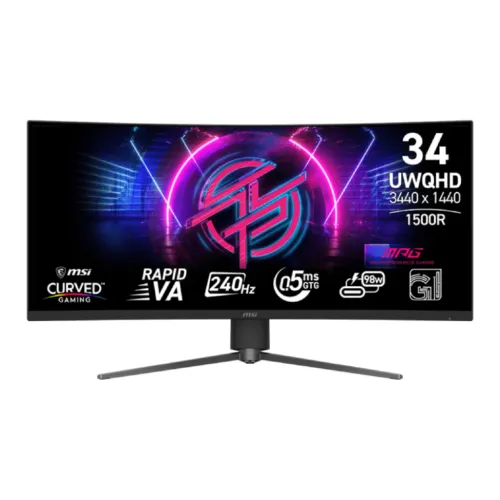
34-inch 1500R UWQHD Rapid VA gaming monitor with 240Hz, Adaptive-Sync, USB-C 98W and KVM.
Price unavailable
Price range updating
No verified price is available yet. Store offers will appear when merchants publish them.
Compare store prices
No live offers for this variant
Offers will appear when merchants publish them.
Loading history…
Product story
The MSI MPG 346CQRF X24 is a 34-inch 21:9 UWQHD gaming monitor with a Rapid VA panel and 1500R curvature. MSI specifies 3440 × 1440 resolution, 240Hz refresh, 0.5ms minimum GTG response, Adaptive-Sync, VESA DisplayHDR 400 and USB-C with up to 98W power delivery. It combines high-refresh ultrawide gaming with a USB-C hub and KVM features for compatible desktop and laptop setups. Actual modes depend on GPU, console, cable, source output and selected settings. Bangladesh price, stock, accessories and serial-specific warranty must be confirmed with the seller.
Confirm the exact MPG 346CQRF X24 model code and regional unit. Similar MSI MPG ultrawide products may have OLED panels, different curvature or a different power-delivery rating. The X24 listing specifies Rapid VA and 98W USB-C PD. Check the rear label, box and accessory list, and do not treat another MPG 34-inch model’s specifications as interchangeable. Actual modes depend on GPU, console, cable, source output and selected settings. Bangladesh price, stock, accessories and serial-specific warranty must be confirmed with the seller.
The 34-inch panel uses a 3440 × 1440 UWQHD resolution and 21:9 aspect ratio. This wide layout supports a broader field of view in compatible games and space for side-by-side applications. It needs more horizontal desk space than a 16:9 display. Some games may limit ultrawide rendering or apply competitive restrictions, so verify the titles you play. Actual modes depend on GPU, console, cable, source output and selected settings. Bangladesh price, stock, accessories and serial-specific warranty must be confirmed with the seller.
MSI specifies a Rapid VA panel with 1500R curvature, 4000:1 typical contrast and a 178-degree viewing angle. VA contrast can give dark scenes depth, while viewing position and transitions can affect the perceived image. The pronounced curve is intended for a centered user; check that its shape suits both gaming and work applications before choosing it. Actual modes depend on GPU, console, cable, source output and selected settings. Bangladesh price, stock, accessories and serial-specific warranty must be confirmed with the seller.
The monitor’s maximum refresh rate is 240Hz. MSI lists 0.5ms GTG as a minimum response figure, which is a manufacturer test condition rather than a guarantee for all transitions or settings. High refresh is most useful when a PC renders high frame rates. Test response-time and overdrive settings in real games to avoid overshoot or dark-transition artifacts. Actual modes depend on GPU, console, cable, source output and selected settings. Bangladesh price, stock, accessories and serial-specific warranty must be confirmed with the seller.
Adaptive-Sync is listed for variable refresh operation. It can align display refresh with compatible graphics output and reduce tearing within supported ranges. Enable the monitor feature and GPU driver option, then check behavior at frame rates typical for your games. Adaptive-Sync does not raise game performance and may behave differently across GPU, cable and input combinations. Actual modes depend on GPU, console, cable, source output and selected settings. Bangladesh price, stock, accessories and serial-specific warranty must be confirmed with the seller.
MSI specifies VESA DisplayHDR 400 with 400 cd/m² SDR and peak HDR brightness. HDR support makes compatible signals possible, but it does not establish local dimming or premium HDR contrast. Compare HDR and SDR modes with actual content, and configure the game, operating system and monitor consistently. Ambient light and brightness settings influence perceived highlights. Actual modes depend on GPU, console, cable, source output and selected settings. Bangladesh price, stock, accessories and serial-specific warranty must be confirmed with the seller.
Video inputs include two HDMI 2.1 ports and one DisplayPort 1.4a HBR3 input. MSI lists UWQHD at up to 240Hz across HDMI, DisplayPort and Type-C; cable and host bandwidth determine the active signal. Use the included or certified high-bandwidth cable and connect directly to a suitable GPU when troubleshooting missing refresh modes. Actual modes depend on GPU, console, cable, source output and selected settings. Bangladesh price, stock, accessories and serial-specific warranty must be confirmed with the seller.
USB-C supports DisplayPort Alt Mode and up to 98W power delivery, allowing a compatible laptop to send video and receive substantial charging over one cable. The monitor also supports KVM. Confirm the laptop USB-C port supports video, and verify its power requirement; high-performance notebooks can exceed 98W during demanding work and may still need their own charger. Actual modes depend on GPU, console, cable, source output and selected settings. Bangladesh price, stock, accessories and serial-specific warranty must be confirmed with the seller.
The display has two USB 2.0 Type-A downstream ports and one USB 2.0 Type-B upstream port, plus a headphone output. Connect the upstream cable to the host for hub and KVM functions. USB 2.0 is suitable for basic peripherals but slower than modern USB 3.x storage. MSI does not list built-in speakers for this model, so plan external audio. Actual modes depend on GPU, console, cable, source output and selected settings. Bangladesh price, stock, accessories and serial-specific warranty must be confirmed with the seller.
The stand offers 110mm height adjustment, tilt from -5 to +15 degrees and swivel ±30 degrees. VESA 100 × 100mm mounting is supported. Center the screen, set a comfortable viewing distance and keep space for the curved panel and stand footprint. Check the mount load rating and cable clearance before replacing the included stand. Actual modes depend on GPU, console, cable, source output and selected settings. Bangladesh price, stock, accessories and serial-specific warranty must be confirmed with the seller.
MSI’s console mode lists 1080p and 1440p at 60Hz or 120Hz, HDMI CEC and VRR support for PS5 and Xbox. The console mode ceiling is not the monitor’s 240Hz PC maximum. Console output depends on model, game, cable and selected resolution. Check the console’s signal information after connection and select a supported performance mode. Actual modes depend on GPU, console, cable, source output and selected settings. Bangladesh price, stock, accessories and serial-specific warranty must be confirmed with the seller.
PIP/PBP lets users view multiple sources at once, while KVM can share keyboard and mouse between connected systems when the required cables and source setup are in place. MSI also lists console mode and monitor gaming controls. These features depend on input selection and firmware/software support; consult the manual for device mapping and limitations. Actual modes depend on GPU, console, cable, source output and selected settings. Bangladesh price, stock, accessories and serial-specific warranty must be confirmed with the seller.
For UWQHD at 240Hz, connect a compatible graphics card using DisplayPort 1.4a or HDMI 2.1, select 3440 × 1440 and choose 240Hz in system display settings. Use a capable GPU and a high-bandwidth cable. If the maximum refresh is unavailable, check the selected input, cable, driver, color depth and whether an adapter or dock is limiting bandwidth. Actual modes depend on GPU, console, cable, source output and selected settings. Bangladesh price, stock, accessories and serial-specific warranty must be confirmed with the seller.
Advantages include a 34-inch curved UWQHD panel, 240Hz refresh, Rapid VA contrast, Adaptive-Sync, two HDMI 2.1 inputs, DisplayPort 1.4a, USB-C 98W, KVM, PIP/PBP and adjustable stand. Trade-offs include demanding GPU requirements at 3440 × 1440/240Hz, entry-level HDR400, USB 2.0 downstream ports and no listed built-in speakers. Actual modes depend on GPU, console, cable, source output and selected settings. Bangladesh price, stock, accessories and serial-specific warranty must be confirmed with the seller.
A 34-inch 1500R curve is immersive from a centered seat and can support broad timelines or multiple windows. Use scaling if small text is uncomfortable, and allow enough desk distance to see the full screen without frequent head movement. The curve and ultrawide aspect may be inconvenient for flat-line design or apps with limited 21:9 support. Actual modes depend on GPU, console, cable, source output and selected settings. Bangladesh price, stock, accessories and serial-specific warranty must be confirmed with the seller.
The display uses an internal power board and accepts 100–240V at 50/60Hz. Place it on a stable surface, connect power and signal cables with adequate slack, and ensure ventilation. Clean the screen with a soft microfiber cloth and avoid pressing on the panel. Retain packaging and invoice until the display, ports, stand and serial are inspected. Actual modes depend on GPU, console, cable, source output and selected settings. Bangladesh price, stock, accessories and serial-specific warranty must be confirmed with the seller.
If 240Hz is missing, confirm 3440 × 1440 is active, select the correct input, connect directly to a GPU with a suitable cable and review driver output modes. For USB-C charging, verify the host supports DisplayPort Alt Mode and connect the upstream path for KVM/hub functions. Map keyboard and mouse inputs to the correct computer in MSI settings. Actual modes depend on GPU, console, cable, source output and selected settings. Bangladesh price, stock, accessories and serial-specific warranty must be confirmed with the seller.
Before purchase in Bangladesh, verify current price and stock, exact MPG 346CQRF X24 version, new condition, included HDMI/DP/USB-C and USB Type-B cables, power cord, return and pixel policy, delivery, 98W USB-C behavior and seller’s written serial-specific MSI warranty provider and duration. Confirm service coverage on the invoice; a manufacturer’s international spec does not confirm local warranty. Actual modes depend on GPU, console, cable, source output and selected settings. Bangladesh price, stock, accessories and serial-specific warranty must be confirmed with the seller.
The MPG 346CQRF X24 is a 34-inch 3440 × 1440 1500R Rapid VA monitor with 240Hz refresh, Adaptive-Sync and DisplayHDR 400. MSI lists two HDMI 2.1 inputs, DP 1.4a, USB-C with 98W PD, KVM and PIP/PBP. It suits high-frame-rate PC ultrawide gaming and compatible laptop desks; confirm local warranty and package before ordering. Actual modes depend on GPU, console, cable, source output and selected settings. Bangladesh price, stock, accessories and serial-specific warranty must be confirmed with the seller.
Helpful answers
Product-specific answers maintained with the catalog information.
3440 × 1440 UWQHD on a 34-inch 21:9 panel.
MSI specifies up to 240Hz.
Up to 98W with DisplayPort Alt Mode for compatible hosts.
MSI specifies a 1500R curve.
Two HDMI 2.1 inputs are listed.
MSI specifications list a headphone output and no built-in speakers.
Console mode is listed up to 1440p 120Hz; 240Hz is a PC-oriented maximum.
Yes, KVM is listed; connect the USB host cable and map input sources.
Confirm local provider, service coverage, duration and serial-specific terms with the seller in writing.
Customer community
Become a merchant
Join BiponiBD, publish accurate offers and start free.