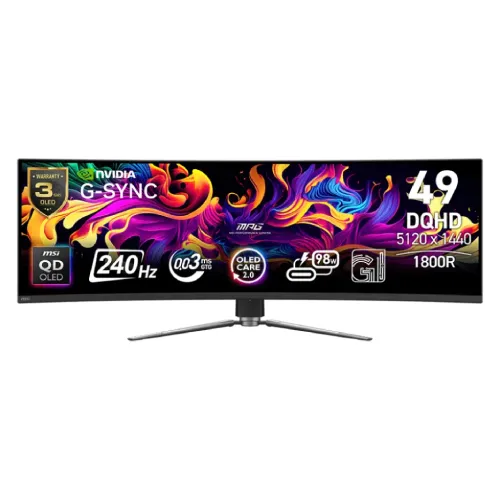
MSI MPG 491CQPX QD-OLED overview
The MSI MPG 491CQPX QD-OLED is a 49-inch curved super-ultrawide gaming monitor with a 5120 × 1440 DQHD resolution, 32:9 aspect ratio, 1800R curve, 240Hz refresh and 0.03ms GTG response. MSI lists a QD-OLED panel, VESA DisplayHDR True Black 400, G-SYNC Compatible, Adaptive-Sync, HDMI 2.1, DisplayPort 1.4a, USB-C DisplayPort Alt Mode with 98W Power Delivery and KVM. Specs below are based on MSI’s official product data; Bangladesh offer and individual serial warranty require seller confirmation.
Confirm exact model and panel
Check that the unit, carton and invoice identify MPG 491CQPX QD-OLED. This PX version is distinct from MPG 491CQP and other similar MSI ultrawide monitors; maximum refresh rate, ports and features can differ. Confirm the complete model number before purchase and support requests. This content update retains the existing product slug, active status and variant/SKU.
49-inch QD-OLED panel and 1800R curve
MSI specifies a 49-inch QD-OLED panel with a 1,196.7 × 339.2mm active area and an 1800R curve. The wide screen wraps around the viewing area and can suit compatible racing, flight, simulation and multitasking setups. It requires substantial desk width and depth; measure the stand and viewing position before installation. Screen comfort and perceived curve depend on distance and seating position.
Dual QHD resolution and 32:9 workspace
The native 5120 × 1440 DQHD resolution creates a 32:9 canvas, approximately the width of two QHD monitors side by side. Pixel pitch is 0.233mm and MSI lists 178-degree horizontal and vertical viewing angles. Applications and games must support ultrawide layouts for full-screen use; other content may have side bars or altered framing. Confirm that your GPU supports native resolution at the chosen refresh.
240Hz refresh and adaptive sync
MSI lists up to 240Hz refresh with an activated variable-refresh range of 48–240Hz. G-SYNC Compatible and Adaptive-Sync can coordinate the panel with a supported graphics source, helping reduce tearing. The available mode depends on GPU, cable, port and configuration. Enable adaptive sync on both devices and verify the refresh rate in the operating system or monitor information menu.
0.03ms GTG response rating
The manufacturer specifies a 0.03ms gray-to-gray response rating. It describes pixel transition behavior under MSI’s measurement conditions and is not the total input-to-display delay of a complete PC. Actual motion depends on the source frame rate, refresh, game engine and settings. Use the monitor at a supported timing and judge image clarity with your own content.
SDR and HDR brightness
MSI specifies 250 nits SDR brightness and HDR brightness of 450 nits typical at 10% average picture level, with 1,000 nits peak at 3% APL. It also lists a 1,500,000:1 typical contrast ratio and DisplayHDR True Black 400. The peak figure applies to a small bright area, not a full white screen. HDR requires compatible content and source settings.
Color gamut and 10-bit output
The MSI specification lists 98% Adobe RGB, 99% DCI-P3 and 146% sRGB using CIE 1976 area measurements, and 1.07 billion colors at 10 bits. These gamut figures describe color range and may differ from coverage or overlap measurements. They do not guarantee unit-level calibration. For color-critical work, use color-managed applications and verify the monitor profile or calibration of the delivered unit.
HDMI 2.1 input options
Two HDMI 2.1 ports support DQHD up to 240Hz according to MSI. A compatible graphics card, cable, signal format and software configuration are required to use the highest timing. HDMI CEC is listed among supported functions. If the selected resolution or refresh is unavailable, check the source output settings and cable certification. Console output depends on console mode and game support.
DisplayPort 1.4a
One DisplayPort 1.4a input supports the monitor’s DQHD modes, including up to 240Hz according to MSI’s connection notes. Confirm GPU and cable capability for the intended format. Display bandwidth can be affected by color depth, chroma format and other settings. Use the monitor’s information panel to verify actual signal resolution and refresh after setup.
USB-C video and 98W Power Delivery
One USB-C connection supports DisplayPort Alternate Mode and up to 98W Power Delivery. A compatible laptop may send video and receive power over one cable, but device support and charging requirements vary. Use a full-featured USB-C cable rated for the required mode; charge-only cables cannot carry video. Check whether 98W is sufficient for the laptop during demanding workloads.
USB hub and KVM
The monitor includes two USB 2.0 Type-A downstream ports and one USB 2.0 Type-B upstream connection. MSI lists KVM support so compatible connected systems can share keyboard and mouse peripherals after the required USB cables are connected and menu routing is configured. KVM does not combine computers or applications. Check both video input and USB upstream assignment if peripherals do not switch with the display.
PIP, PBP and HDMI CEC
MSI lists Picture-in-Picture and Picture-by-Picture along with HDMI CEC. PIP can show a smaller second input; PBP can divide the large ultrawide panel between two sources. Supported input combinations and scaling depend on mode and source signal. Configure source connections first, then choose layouts in the monitor menu. These tools do not expand the panel’s total native pixel resolution.
DisplayHDR True Black 400 and OLED care
The monitor is certified for DisplayHDR True Black 400 and uses MSI’s QD-OLED panel. MSI provides OLED protection functions on this monitor family to reduce the risk of image sticking or burn-in. Static elements displayed for long periods can still require care. Follow the on-screen panel maintenance reminders and manual, and confirm the local warranty’s coverage and exclusions for burn-in.
Stand adjustment and VESA mounting
The stand supports -5° to +20° tilt, -30° to +30° swivel and 0–100mm height adjustment. The VESA pattern is 100 × 100mm. MSI lists dimensions of 1195 × 328 × 410mm with stand and 1195 × 190 × 372mm without. Check desk space, arm load rating, mounting screws, cable bend radius and the ultrawide display’s center of gravity before fitting a monitor arm.
Weight, power and included cables
MSI lists approximately 10.6kg net and 16.4kg gross weight. The monitor uses an internal power board and accepts 100–240V AC at 50/60Hz. The listed package includes HDMI 2.1 and DisplayPort 1.4a cables, USB Type-B-to-A cable, power cord, quick guide and VESA screws; local bundles can vary. Confirm the delivered unit’s accessories and keep packaging for transport.
Bangladesh price, stock and warranty
MSI’s specification confirms product details, not current BiponiBD price, availability, delivery condition or serial-specific service. Before buying, ask the seller to confirm exact model MPG 491CQPX, new/sealed condition, local MSI service provider, warranty duration, burn-in coverage and included accessories. Retain the invoice and serial label. Warranty terms vary by market and cannot be established from a product-family specification alone.
Frequently asked questions
What size is the monitor? 49 inches. What is the resolution? 5120 × 1440 DQHD. What aspect ratio and curve? 32:9 and 1800R. What is the refresh rate? Up to 240Hz. What panel type? QD-OLED. Does USB-C charge a laptop? Up to 98W for compatible devices. Does it support KVM? Yes, with connected USB data paths. Which VESA mount? 100 × 100mm. Does it have built-in speakers? MSI lists a headphone output, not integrated speakers. What Bangladesh warranty applies? Confirm serial-specific local terms with the seller.