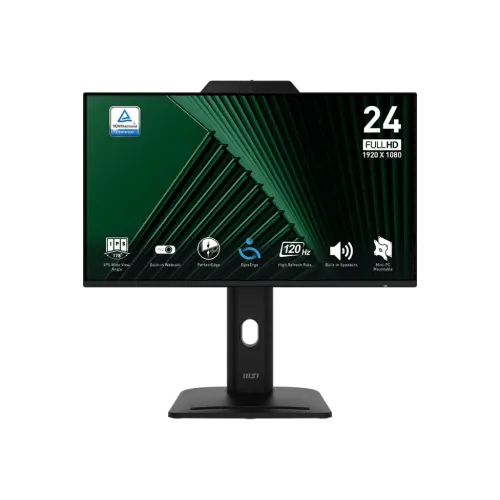
The MSI PRO MP242PMG is a 23.8-inch Full HD IPS business monitor with a 120Hz refresh rate, integrated 1080p webcam, microphone and privacy cover. MSI also lists USB 2.0 hub ports, a four-way adjustable stand, speakers, Adaptive-Sync and HDMI, DisplayPort and VGA inputs. This guide follows the model-specific MSI specification table and keeps Bangladesh seller price, stock and warranty claims clearly attributed.
Monitor purpose and model identification
The MSI PRO MP242PMG is a 23.8-inch Full HD business and productivity display with a built-in webcam and adjustable stand. Its combination of meeting camera, microphone, speakers, USB hub and ergonomic adjustments is intended to simplify an office or home-work desk. The model name is important: nearby MP242 variants may omit the webcam, USB hub or 120Hz feature.
This monitor can also handle everyday browsing, document work, video playback and casual gaming. The 120Hz refresh rate provides more frequent display updates than a conventional 60Hz monitor when the source can deliver the matching signal. It remains a Full HD office-oriented screen rather than a high-resolution design monitor or high-speed esports display.
Panel, resolution and text clarity
The 23.8-inch IPS panel displays 1920 × 1080 pixels in a 16:9 format, with a 0.2745mm pixel pitch and an active area of 527.04 × 296.46mm. Full HD is broadly compatible with business laptops and desktops and can keep interface elements readable at normal desk distance. At this size, QHD provides finer text and more workspace for users who frequently view dense spreadsheets or detailed design files.
MSI specifies a 178-degree horizontal and vertical viewing angle. IPS viewing behavior helps maintain image appearance when the user moves off center, although brightness uniformity and color consistency can still vary across individual panels. The anti-glare surface is intended to diffuse reflections from room lighting; positioning the display away from direct glare remains helpful.
120Hz refresh and signal modes
MSI lists a 120Hz refresh rate and specifies 1920 × 1080 up to 120Hz over HDMI 1.4b and DisplayPort 1.2a. The D-Sub/VGA input is listed up to 60Hz. Refresh selection depends on the source graphics output, cable, driver and operating-system setting. If 120Hz is missing, first confirm that the computer is connected to one of the digital inputs and that FHD 120Hz is selected.
A higher refresh can make pointer movement, scrolling and supported video or game motion appear smoother. It does not create additional frames or guarantee a lower measured input delay in every application. A video conference may remain at a much lower frame rate because the camera or meeting software sets its own capture and transmission limits.
Webcam, microphone and privacy
The integrated webcam is listed as 1080p and includes a microphone and webcam cover. It can reduce desk clutter and make common video meetings easier to set up without a separate camera. Image quality depends on room lighting, exposure, camera angle, application compression and the position of the user; 1080p is the stated resolution, not a promise of professional camera performance.
The cover is useful when the camera is not needed. Confirm how it moves and ensure it fully covers the lens on the exact unit. Select the monitor’s webcam and microphone in the meeting application, check operating-system permissions, and test framing and audio before an important call. The cover does not replace software privacy controls or a separate microphone mute setting.
USB hub and an important specification distinction
MSI’s detailed specification lists two USB 2.0 Type-A downstream ports and one USB 2.0 Type-B upstream port. Connect the upstream Type-B cable to the computer for the Type-A ports to function as a hub. The hub is suitable for low-bandwidth peripherals such as a keyboard, mouse or basic webcam accessory; it is not a high-speed external SSD or USB-C docking connection.
One MSI promotional datasheet graphic contains an unrelated “USB 4 / 40G” feature block, but the same document’s model-specific USB specification and connection diagram identify USB 2.0 Type-A and Type-B. This description follows the detailed model-specific port table and does not claim USB4, 40Gbps transfer, 5G networking or a USB-C port.
Ports, speakers and peripheral connections
The display includes one HDMI 1.4b, one DisplayPort 1.2a and one D-Sub/VGA input, plus a headphone output. HDMI and DisplayPort support FHD up to 120Hz according to MSI’s datasheet; VGA is listed up to 60Hz. This gives older office PCs a VGA connection while allowing newer desktops and laptops with suitable ports to use the higher refresh modes.
Two 2W speakers are built in for basic system sound and calls. Their output is convenient for routine tasks but is not a substitute for dedicated speakers in a noisy room or for music listening that needs deeper bass. Headphones can use the audio output. The monitor has no listed USB-C video input, so check laptop ports and adapters before planning a single-cable desk setup.
Color, brightness and HDR Ready
MSI specifies 300 cd/m² brightness, 1500:1 contrast and 16.7 million colors with 8-bit processing described as 6-bit plus FRC. Its CIE 1976 figures are 86% Adobe RGB, 89% DCI-P3 and 115% sRGB. Gamut percentages describe coverage relative to a color space and are not proof of factory calibration accuracy for the unit being purchased.
The “HDR Ready” label means MSI identifies HDR-related support, but the available specifications do not state a VESA DisplayHDR certification or high peak brightness class. Use the monitor’s picture settings and operating-system HDR controls only when the source and content support them. For color-critical work, calibrate the individual display and use color-managed software rather than relying only on gamut figures.
Response time and adaptive sync
MSI lists 1ms MPRT and 4ms GtG. MPRT and GtG are different measurement methods; the values are not directly comparable or a guarantee that every pixel transition completes in one millisecond. Motion appearance depends on refresh rate, overdrive settings, content contrast and the frame rate delivered by the computer.
Adaptive-Sync is listed for variable refresh. When supported by the graphics hardware and driver, it can coordinate display updates with changing frame delivery and help reduce tearing. The exact operating range is not provided in the basic datasheet, so check the manual and source device for supported combinations. If image flicker appears, test a stable refresh mode and review driver and cable connections.
Ergonomics, mounting and desk layout
The stand supports height adjustment from 0 to 130mm, tilt from -5° to +20°, swivel from -45° to +45° and pivot from -90° to +90°. These adjustments can help align the screen with the user’s eye level, reduce reflections and rotate the screen for portrait documents. Adjust gradually while supporting the panel and avoid pressing directly on the LCD surface.
MSI lists 100 × 100mm VESA mounting and a Kensington lock. A compatible arm can free desk space or make it easier to set viewing distance, but confirm the arm’s load rating, screw length and clearance. The listed dimensions are 540 × 227 × 412mm (W × D × H); allow room for the stand, connectors and cable bend radius.
Eye comfort, privacy and security
The anti-glare coating and MSI’s eye-care functions are aimed at routine work. Adjust brightness for the room, use readable text scaling and position the monitor at a comfortable distance. Take regular breaks during long work sessions. Low-blue-light or warm color settings can change color appearance, so select a neutral mode when preparing visual material.
A Kensington lock slot can help secure the monitor in shared offices, classrooms or public workspaces when used with a compatible lock. The webcam cover helps block the lens when not in use. These physical features address practical desk concerns but do not guarantee security against theft or control who can access the connected computer.
Power, cables and included accessories
The monitor uses an internal power supply rated for 100–240V AC at 50/60Hz. MSI’s datasheet lists an HDMI 1.4 cable, USB Type-B-to-Type-A cable, power cord, quick guide, stand screws and VESA hardware. Package contents can differ by region; check the box and seller listing before assuming every cable is included.
The USB Type-B upstream connection is required to use the built-in Type-A hub. The video connection remains separate through HDMI, DisplayPort or VGA. For a clean workstation, connect the chosen video cable and USB upstream cable, then route both along the stand’s cable path if available.
Bangladesh availability and warranty checks
Star Tech’s page displayed To be announced and Out of Stock, while its description cited ৳25,500. Nexus showed ৳25,000 and In Stock, with a notice that availability can change. These different seller snapshots should not be treated as a confirmed single market price or as proof of BiponiBD stock. Confirm final checkout price, delivery, stock and model code with the seller.
Local warranty terms must be checked for the exact PRO MP242PMG serial number. Ask who provides service, how long the warranty runs, whether the webcam or panel is covered, what dead-pixel policy applies and which invoice or packaging is required. An international MSI warranty statement does not automatically establish Bangladesh coverage.
Who should consider another display
This model may suit a home office, study area, reception desk or small business that needs an integrated webcam, microphone, speakers and flexible stand adjustments. The USB hub can reduce the need to reach the computer for a basic keyboard or mouse connection. It may also suit users switching between an older VGA computer and newer digital sources.
Choose a different display if you need USB-C docking, high-speed USB storage, QHD/4K detail, a high-brightness certified HDR experience or a higher gaming refresh rate. Evaluate the complete setup—camera quality, conferencing software, workspace, computer outputs and warranty support—rather than judging by the webcam or 120Hz specification alone. No hands-on image or camera test is claimed here.
Features
- 23.8-inch IPS Full HD 1920 × 1080 business monitor with a 16:9 flat screen.
- 120Hz refresh rate supported over HDMI 1.4b and DisplayPort 1.2a at FHD.
- Integrated 1080p webcam with microphone and a physical privacy cover.
- Ergonomic stand offers up to 130mm height adjustment, tilt, swivel and pivot.
- USB 2.0 hub provides two Type-A downstream ports and one Type-B upstream connection.
- One HDMI 1.4b, one DisplayPort 1.2a, one VGA input and headphone output.
- 2 × 2W speakers, HDR Ready and Adaptive-Sync support.
- 300 cd/m² brightness, 1500:1 contrast and 178-degree viewing angles.
- Anti-glare surface, Kensington lock and 100 × 100 mm VESA mounting.
- 1ms MPRT and 4ms GtG response specifications use different methods.
- MSI lists 115% sRGB and 89% DCI-P3 coverage using CIE 1976 figures.
- Internal universal-range power supply; source datasheet lists cables and stand/VESA hardware.
Pros
- A built-in 1080p webcam, microphone and privacy cover reduce separate accessories for calls.
- The adjustable stand supports height, tilt, swivel and portrait pivot for varied desk setups.
- USB hub, webcam, speakers and multiple video inputs make it a flexible workstation display.
- 120Hz can make scrolling and compatible video/game motion appear smoother than 60Hz.
- IPS viewing angles and Full HD resolution suit common office, study and home-work tasks.
Cons
- Full HD is less detailed than QHD or 4K for fine text and large creative workspaces.
- The USB connection is USB 2.0; a misleading “USB 4/40G” promotional graphic in one MSI PDF is not supported by its own detailed ports/specification list.
- 1ms MPRT and 4ms GtG are distinct specification methods and not guarantees of identical pixel response.
- 300-nit brightness and HDR Ready labeling do not establish VESA DisplayHDR certification.
- Bangladesh seller stock and warranty terms must be checked before purchase; pages reviewed showed stock inconsistencies or unavailable status.
Specifications
- Brand: MSI
- Model: PRO MP242PMG
- DisplaySize: 23.8 inches
- PanelType: IPS
- Resolution: Full HD 1920 × 1080
- RefreshRate: 120Hz
- ResponseTime: 1ms MPRT / 4ms GtG
- Brightness: 300 cd/m²
- ContrastRatio: 1500:1
- ViewingAngle: 178° horizontal / 178° vertical
- AspectRatio: 16:9
- PixelPitch: 0.2745 × 0.2745 mm
- ActiveDisplayArea: 527.04 × 296.46 mm
- ColorDepth: 8-bit (6-bit + FRC), 16.7 million colors
- ColorGamut: 86% Adobe RGB / 89% DCI-P3 / 115% sRGB (CIE 1976)
- HDR: HDR Ready
- VideoPorts: 1 × HDMI 1.4b (FHD up to 120Hz); 1 × DisplayPort 1.2a (FHD up to 120Hz); 1 × D-Sub/VGA (FHD up to 60Hz)
- USB: 2 × USB 2.0 Type-A downstream; 1 × USB 2.0 Type-B upstream
- Webcam: Integrated 1080p webcam with microphone and privacy cover
- Speakers: 2 × 2W built-in speakers
- Audio: 1 × headphone output
- AdaptiveSync: Adaptive-Sync
- Ergonomics: Height 0–130mm; tilt -5° to +20°; swivel -45° to +45°; pivot -90° to +90°
- VesaMount: 100 × 100 mm
- Security: Kensington lock
- Power: Internal power supply; 100–240V AC, 50/60Hz
- Dimensions: 540 × 227 × 412 mm (W × D × H)
- Weight: 5.5 kg net / 7.7 kg gross
- Warranty: MSI warranty terms vary by region; Bangladesh sellers list 3 years but local serial eligibility and provider require confirmation
Frequently asked questions
What is the screen size and resolution?
The MSI PRO MP242PMG uses a 23.8-inch IPS panel with Full HD 1920 × 1080 resolution and a 16:9 aspect ratio.
What refresh rate does it support?
MSI lists 120Hz. Its datasheet specifies up to 1920 × 1080 at 120Hz over HDMI and DisplayPort; VGA is listed up to 60Hz.
Does it have a webcam?
Yes. MSI lists an integrated 1080p webcam with microphone and a webcam cover for privacy. Check the cover and camera operation on the exact unit before relying on it for meetings.
Is the camera privacy cover a physical shutter?
MSI specifies a webcam cover. It provides a way to cover the camera lens when not in use; verify the mechanism on the delivered unit and use operating-system camera permissions as an additional control.
What USB ports are included?
MSI’s detailed specification lists two USB 2.0 Type-A downstream ports and one USB 2.0 Type-B upstream port. This is a USB 2.0 hub, not USB4. Connect the Type-B upstream cable to the computer to enable the monitor’s Type-A ports.
What stand adjustments are available?
The stand supports 0–130mm height adjustment, -5° to +20° tilt, -45° to +45° swivel and -90° to +90° pivot according to MSI.
Does it support HDR?
MSI calls the feature HDR Ready. This label does not confirm VESA DisplayHDR certification or a particular peak-brightness tier; the stated typical brightness is 300 cd/m².
What are its response-time figures?
MSI lists 1ms MPRT and 4ms GtG. MPRT and GtG measure different aspects of response and should not be treated as interchangeable results.
What inputs are available?
MSI lists one HDMI 1.4b, one DisplayPort 1.2a and one D-Sub/VGA input, plus headphone output. Each digital input supports FHD up to 120Hz in the datasheet; VGA is listed up to 60Hz.
Are speakers built in?
Yes. MSI lists two 2W speakers. They can provide convenient basic audio for calls and media, while headphones or external speakers may suit users who need more output.
Can the monitor be VESA-mounted?
MSI lists a 100 × 100 mm VESA pattern and a Kensington lock. Check arm load capacity and use the screws specified for the monitor.
What warranty and price apply in Bangladesh?
Star Tech showed To be announced/Out of Stock and cited ৳25,500 as a current price in page text; Nexus showed ৳25,000/In Stock, while its page warns stock can change. These are seller observations, not a BiponiBD offer. Ask the seller to verify stock, local warranty provider and serial eligibility.
Source note: MSI specification page and model datasheet establish technical facts. Bangladesh retailer pages are used only for seller price, stock and warranty observations. No BiponiBD offer or hands-on camera test is claimed.