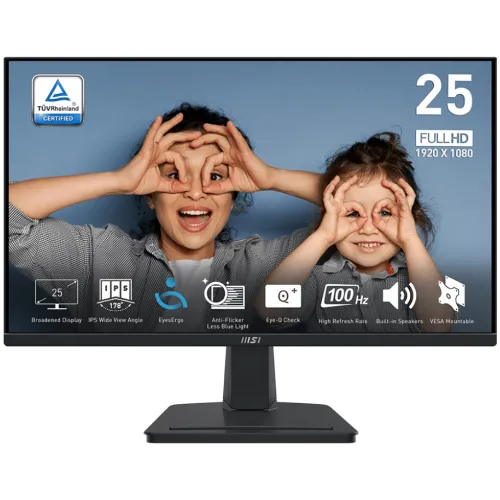
MSI PRO MP251 24.5-inch Full HD 100Hz IPS Monitor
The MSI PRO MP251 is a flat 24.5-inch Full HD IPS monitor for office work, study, home computing and everyday entertainment. It pairs 1920 × 1080 resolution with a 100Hz refresh rate over HDMI, integrated 2 × 2W speakers and Adaptive-Sync. It also has a VGA input for older computers, a headphone output and a separate line-in audio connection. The stand tilts for basic positioning, and a 100 × 100mm VESA pattern supports a compatible monitor arm.
This page describes the exact PRO MP251, not the PRO MP251P, PRO MP251 E2, MP251L E2 or MP251W E14A. Those similarly named monitors may differ in panel, refresh rate, ports, stand and speakers. The original MP251 is an IPS 100Hz model with HDMI 1.4b and VGA; it does not have DisplayPort. Check the model suffix and rear label before purchase, because the distinctions affect how you connect the computer and whether a feature applies.
Screen size, resolution and viewing
The display is 24.5 inches diagonally, with a 16:9 aspect ratio and a native resolution of 1920 × 1080 pixels. Full HD is supported by many desktops, laptops and consoles and can keep graphics demands moderate. It works well for documents, spreadsheets, web browsing, video and general home use. Compared with QHD or 4K, it provides less desktop workspace and less fine detail, so users who keep many dense windows open may prefer a higher resolution.
MSI specifies an IPS panel, 300 cd/m² typical brightness, 1300:1 typical contrast and 178-degree horizontal and vertical viewing angles. Its anti-glare surface can reduce some reflections from ordinary room lighting. These figures are manufacturer specifications and do not guarantee identical brightness or uniformity on every unit. The screen is flat, not curved. MSI lists 16.7 million colours and 8-bit processing using 6-bit plus FRC.
MSI's regional product specification reports 101% sRGB using the CIE1976 area measurement. A colour-area percentage can exceed 100%; it should not be read as colour accuracy, exact coverage or calibration. Other specification documents may use different measurement standards and report different gamut values. This monitor is presented as a general-purpose productivity display, not a factory-calibrated reference screen. For print, photography or grading tasks, check independent colour measurements and calibration support for the unit you will receive.
100Hz motion and response modes
The PRO MP251 supports up to 100Hz at 1920 × 1080 over HDMI 1.4b. MSI lists VGA/D-Sub up to Full HD at 60Hz. Use HDMI if you want the 100Hz mode; a VGA connection will not provide it. The computer's HDMI output, cable, operating system and graphics driver must also support the selected display mode. After connecting, select 100Hz in the system's display settings and confirm the active signal.
A 100Hz refresh can make cursor movement, scrolling and supported games appear smoother than a 60Hz display. The monitor does not generate additional frames; the source computer must render them. The practical benefit depends on the graphics processor, game or application, output port, cable and frame rate. If the computer sends only 60 frames per second, the display cannot turn that into 100 unique game frames.
MSI lists 1ms MPRT and 4ms GtG response-time figures. These use different measurement approaches. MPRT describes moving-picture response under a particular mode, while GtG describes pixel transition between grey levels. The monitor's settings may change apparent motion and can introduce overshoot. Treat these values as specifications rather than a guarantee that every transition is blur-free; try the available response modes with your own content.
Adaptive-Sync and eye-comfort settings
MSI lists Adaptive-Sync support for the PRO MP251. This technology can coordinate refresh timing with compatible graphics hardware to reduce tearing under supported conditions. The exact operating range can depend on the source device, driver, connection and configuration. The manufacturer page reviewed does not name this monitor as NVIDIA G-SYNC certified, so this description does not make that certification claim.
MSI's PRO range includes EyesErgo-oriented features and settings such as Anti-Flicker and Less Blue Light. These options let users adjust the image, but they do not provide medical protection. Low-blue-light modes may alter colour temperature; disable or adjust them when evaluating colour. Set a comfortable brightness for the room, keep the screen at a suitable distance and take breaks during long work sessions.
HDMI, VGA and audio connections
The input panel has one HDMI 1.4b port and one D-Sub (VGA) port. HDMI supports Full HD up to 100Hz; MSI lists VGA up to Full HD at 60Hz. The monitor also includes one line-in and one headphone-out audio connection. It does not list DisplayPort, USB-C, a USB hub, KVM switching or a built-in microphone. If your computer only has DisplayPort or USB-C, you will need an appropriate adapter, and the adapter must support the desired resolution and refresh rate.
Two 2W speakers are built in for basic sound from calls, alerts, video and casual viewing. Their small drivers are convenient but will not provide the depth or loudness of larger external speakers or headphones. Connect headphones or powered speakers through the headphone-out jack. The line-in provides an additional audio input path for compatible sources; follow the MSI manual for the intended wiring. If audio does not play, check which output device the computer has selected.
Stand, VESA mounting and workspace
The stand supports tilt adjustment from approximately -5° to +20°. Height, swivel and pivot adjustment are not listed for the base PRO MP251; do not confuse it with MP251P, which has a more adjustable stand. A riser or monitor arm can raise the screen if you need a different height. MSI lists a 100 × 100mm VESA pattern. Check that a bracket supports the pattern, the monitor weight, screw length and cable clearance before installation.
MSI lists dimensions with the stand of about 557.5 × 422.1 × 207.2mm (W × H × D). The monitor weighs approximately 2.9kg, with a gross shipping weight of 4.4kg. Carton dimensions are about 630 × 411 × 125mm. Allow room for the base and rear cables. Dimensions and bundle contents may differ slightly by regional version; check the label and quick-start guide for the unit being shipped.
Power adapter and box contents
The PRO MP251 uses an external 12V, 2.5A power adapter, with 100–240V AC, 50–60Hz input. Use the adapter supplied with the monitor and do not choose a substitute based only on connector shape. MSI lists typical operation below 18W, standby below 0.5W and power-off below 0.5W in the series documentation. Retail bundles may contain a power cord, HDMI cable, quick guide or other accessories; confirm the Bangladesh package contents before ordering.
Bangladesh price and warranty
Bangladesh retailer observations during this review ranged from about ৳17,300 to ৳18,500. Some listings reported stock, though availability and price change. These are external seller observations, not BiponiBD offers. Confirm the live price, exact model code, delivery, included cables and return conditions with the seller before paying.
Several local retailers advertise a three-year warranty for the PRO MP251. This is a seller-stated local term and may depend on importer, serial number and authorized service eligibility. Ask who provides service, where repairs are handled, what dead-pixel policy applies and what proof of purchase is required. Obtain the warranty terms for the exact unit in writing; do not assume that a similarly named E2 or P model carries the same coverage.
Who should consider the MSI PRO MP251?
Consider the PRO MP251 if you want a 24.5-inch Full HD IPS monitor with a 100Hz HDMI connection, basic built-in speakers and both HDMI and VGA. It can suit office and study setups, general entertainment and light gaming. The integrated speakers reduce desk clutter, while the VGA input can help connect legacy equipment. AMD-style Adaptive-Sync may improve motion with compatible systems and settings.
Compare alternatives if you need QHD detail, DisplayPort, USB-C docking, a height-adjustable stand, higher refresh over VGA, a USB hub or a confirmed colour-calibration report. For 100Hz, plan to use HDMI and verify the computer output. If you need an adjustable stand, check the MP251P or another model separately; the suffix changes the product configuration.
Key features
- 24.5-inch flat IPS panel with Full HD 1920 × 1080 resolution
- 100Hz maximum refresh over HDMI 1.4b
- VGA/D-Sub input supports Full HD up to 60Hz
- 1ms MPRT / 4ms GtG response-time specifications
- 300 cd/m² typical brightness and 1300:1 typical contrast
- 178° horizontal and vertical viewing angles
- Adaptive-Sync support
- Two built-in 2W speakers
- HDMI 1.4b, VGA, line-in and headphone-out
- Anti-glare panel and 16.7 million colours
- Tilt -5° to +20° and 100 × 100mm VESA mount
- External 12V / 2.5A adapter; verify local warranty terms
Advantages
- 100Hz HDMI can provide smoother motion on compatible devices than 60Hz.
- IPS viewing angles suit common office and home setups.
- Built-in speakers provide convenient basic audio without external hardware.
- HDMI and VGA allow newer and some legacy devices to connect.
- 100 × 100mm VESA support offers a mounting option beyond the tilt stand.
Limitations to consider
- Full HD provides less workspace and fine detail than QHD or 4K.
- 100Hz is available through HDMI; VGA is listed only up to 60Hz.
- The base stand tilts only, without listed height, swivel or pivot adjustment.
- No DisplayPort, USB-C, USB hub or microphone is listed.
- Small 2W speakers are suitable for basic sound, not a replacement for a speaker system.
- Local warranty depends on the seller and serial eligibility.
Frequently asked questions
What are the screen size and resolution?
The PRO MP251 has a 24.5-inch IPS screen with native 1920 × 1080 Full HD resolution and 16:9 aspect ratio.
Does it support 100Hz?
Yes, over HDMI 1.4b at Full HD. MSI lists VGA up to Full HD at 60Hz, so use HDMI for the 100Hz mode.
Does this monitor have built-in speakers?
Yes, MSI specifies two 2W speakers. They are intended for basic audio; headphones or external speakers can provide fuller sound.
What ports are available?
One HDMI 1.4b, one VGA/D-Sub, one line-in and one headphone-out are listed. DisplayPort and USB-C are not listed.
Does it support Adaptive-Sync?
Yes, MSI lists Adaptive-Sync support. The operating range and compatibility depend on the graphics device, driver and connection.
Can I mount it on a monitor arm?
Yes, the mount pattern is 100 × 100mm. Confirm arm load rating, screws and clearance before installation.
What is the Bangladesh warranty?
Local sellers advertise three years. Confirm the provider, serial eligibility, service location and dead-pixel conditions for your unit.
What is the price in Bangladesh?
Retailer observations ranged about ৳17,300–৳18,500. They can change and are not BiponiBD offers.
Before ordering: verify the exact PRO MP251 (not E2 or P), use HDMI for 100Hz, confirm bundle contents and obtain the warranty terms for the serial number.