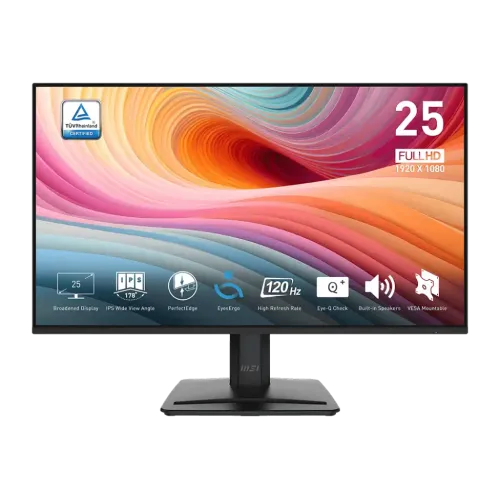
MSI PRO MP251 E2 24.5-inch Full HD 120Hz IPS Monitor
The MSI PRO MP251 E2 is a 24.5-inch flat IPS monitor designed for office productivity, study and everyday entertainment. It combines Full HD resolution with a 120Hz refresh rate, Adaptive-Sync, built-in stereo speakers and multiple video inputs. HDMI 2.0 and DisplayPort can support Full HD at up to 120Hz; the VGA input is listed for up to 60Hz. The stand offers tilt adjustment, and the rear supports a standard 100 × 100mm VESA mount.
This description is for the exact PRO MP251 E2, whose model suffix matters. Do not confuse it with the MP251L E2 or other PRO MP251 variants: related products can omit speakers or change connectivity, dimensions and features. MSI notes that product specifications may vary by region and can change. Confirm the E2 suffix, power adapter, cable bundle, warranty provider and exact unit label with the Bangladesh seller before purchase.
24.5-inch Full HD IPS picture
The screen has a 24.5-inch diagonal viewing area and native resolution of 1920 × 1080 pixels in a 16:9 format. Full HD is supported by a wide range of desktop PCs, laptops and consoles. At this size it is a familiar choice for documents, web pages, video and casual gaming, and it asks less of a graphics card than QHD or 4K. Its trade-off is a smaller desktop workspace and less fine detail than a higher-resolution screen of similar size.
MSI lists an IPS panel with 178-degree horizontal and vertical viewing angles, 300 cd/m² typical brightness, a 1500:1 typical contrast ratio and an anti-glare surface. Those are manufacturer specifications rather than a guarantee of identical brightness or contrast on every unit. The anti-glare treatment helps with ordinary reflections, but positioning the screen away from direct lights can still improve comfort.
MSI's specification lists sRGB at 99%. Gamut coverage does not by itself establish colour accuracy, calibration or uniformity. The panel is described here as a general-purpose display; no factory calibration report is supplied in the reviewed product record. For print preparation, colour grading or other critical work, check independent measurements and calibration options for the exact regional unit before relying on it.
120Hz refresh and response specifications
The maximum refresh rate is 120Hz. MSI lists 1920 × 1080 at up to 120Hz through HDMI 2.0 and DisplayPort 1.4a, while D-Sub/VGA is listed at up to 60Hz. With a compatible source, higher refresh can make cursor movement, supported video and games appear smoother than at 60Hz. The monitor cannot create extra frames: the computer or console, graphics output, cable, software and selected resolution must all support the mode you want.
MSI lists a 1ms MPRT response time and 4ms GtG response time. MPRT and GtG describe different measurement methods, so the figures should not be treated as interchangeable. A response-time setting can affect motion and introduce overshoot; choose the on-screen mode that looks clean to you. Neither specification guarantees the elimination of all blur or ghosting in every scene.
Adaptive-Sync is listed as the dynamic-refresh technology. It can coordinate screen refresh with compatible graphics output to reduce tearing within a supported range. The reviewed specification does not state the exact activated range for this model, so this listing does not invent a range or claim NVIDIA G-SYNC certification. Check the graphics card, driver, selected port and game settings if variable refresh is important to your setup.
HDR Ready and eye-comfort functions
MSI labels the PRO MP251 E2 HDR Ready. That label does not establish VESA DisplayHDR certification, local dimming or premium HDR brightness. The listed 300-nit typical brightness and 1500:1 typical contrast provide context for expectations: this is a standard IPS monitor with HDR signal handling, rather than a high-end HDR display. Use HDR when the source and operating system support it, and assess the result on your own content.
MSI lists EyesErgo and Eye-Q Check features. Low-blue-light and flicker-reduction options may be available through the monitor's settings/software. These functions provide display adjustments, not medical protection. Set brightness for the room, use a comfortable viewing distance and take breaks when working for long periods. Review any picture preset before colour-sensitive work because presets may change brightness and colour balance.
Video connections and audio
Input connections include one HDMI 2.0 port, one DisplayPort 1.4a port and one D-Sub (VGA) port. MSI lists HDMI and DisplayPort at Full HD up to 120Hz; VGA is listed at Full HD up to 60Hz. There is one headphone-out and one line-in connection. HDMI 2.0 can be convenient for consoles and modern PCs, DisplayPort is common on desktop graphics cards, and VGA can connect some older equipment at its lower refresh limit.
The monitor has two integrated 2W speakers. They provide basic sound for system alerts, calls and casual viewing without separate speakers, but their small drivers are not a substitute for headphones or a dedicated audio system when you need deeper sound or higher volume. Connect headphones or powered speakers through an appropriate audio output. No USB-C input, USB hub, KVM switch or integrated microphone is listed for the PRO MP251 E2.
Stand, VESA mounting and physical fit
The included stand tilts from about -5 to +20 degrees. Height, swivel and pivot adjustment are not listed. A monitor riser or compatible arm can help if you need to position the screen higher. MSI lists 100 × 100mm VESA mounting; check the arm's load rating, screw length and clearance and follow the installation instructions.
MSI's specification lists dimensions with the stand of approximately 556.89 × 413.91 × 188.2mm (W × H × D), and carton dimensions of 630 × 411 × 142mm. Net monitor weight is listed as 2.7kg and gross package weight as 4.9kg. Confirm the manual and measurements for the exact regional unit if desk clearance is tight. Keep space behind the screen for the power lead and video cables.
Power adapter and package contents
This model uses an external 12V, 2.5A adapter according to MSI's specification. The AC input is listed at 100–240V, 50–60Hz. Use the adapter supplied for the exact monitor; a connector that physically fits is not enough to establish electrical compatibility. The package contents can vary. Confirm whether the Bangladesh box contains an HDMI or DisplayPort cable and retain the adapter, invoice and warranty documents.
Bangladesh price and warranty checks
Bangladesh retailer observations during this review ranged from about ৳17,500 to ৳18,500 for the exact PRO MP251 E2. One retailer listing marked it out of stock while another listed it in stock. These observations can change and are not BiponiBD offers. Contact the seller to confirm current stock, delivery, included accessories and final price before ordering.
Local sellers advertise a three-year warranty for this model, but that is a seller listing and does not establish that every unit has identical official coverage. Ask who provides the warranty, where service is handled, what the dead-pixel policy covers, and which documents are required. Get the terms for the exact unit in writing. Do not rely on warranty information for a different MP251 variant.
Who should consider the MSI PRO MP251 E2?
Consider it if you want a 24.5-inch Full HD IPS screen with up to 120Hz, basic built-in speakers and HDMI, DisplayPort and VGA inputs. It can handle mixed office, study and entertainment use, and the 120Hz ceiling can make supported motion more fluid than 60Hz. The extra VGA connection may help in a legacy setup, although it cannot deliver 120Hz.
Look at alternatives if you need QHD/4K resolution, a height-adjustable stand, USB-C docking, more capable audio, a colour-calibration certificate or documented HDR certification. If your computer has only VGA available, expect the 60Hz limit. If you intend to use 120Hz, verify the specific computer output and cable, then choose HDMI or DisplayPort in the operating system display settings.
Key features
- 24.5-inch flat IPS panel with 1920 × 1080 Full HD resolution
- 120Hz maximum refresh rate
- HDMI 2.0 and DisplayPort 1.4a: FHD up to 120Hz
- D-Sub/VGA: FHD up to 60Hz
- 1ms MPRT / 4ms GtG response specifications
- 300 cd/m² typical brightness and 1500:1 typical contrast
- 178° viewing angles and anti-glare treatment
- Adaptive-Sync support; exact range not stated here
- HDR Ready label; VESA certification not verified
- Two 2W speakers, headphone out and line-in
- Tilt -5° to +20° and 100 × 100mm VESA mounting
- External 12V / 2.5A adapter; confirm local warranty and cables
Advantages
- 120Hz can improve motion smoothness when the source supports higher frame rates.
- IPS viewing angles work well for common desk tasks and shared viewing.
- HDMI, DisplayPort and VGA provide flexibility for newer and older equipment.
- Integrated speakers offer convenient basic audio without extra devices.
- VESA mounting allows use of a compatible arm instead of the included tilt stand.
Limitations to consider
- Full HD offers less detail and workspace than QHD or 4K alternatives.
- The included stand tilts only; height, swivel and pivot are not listed.
- VGA is limited to 60Hz, so HDMI or DisplayPort is needed for 120Hz.
- Small 2W speakers are intended for basic audio, not room-filling sound.
- HDR Ready does not confirm DisplayHDR certification or premium HDR performance.
- Bangladesh warranty provider, terms and exact box contents require confirmation.
Frequently asked questions
What are the screen size and resolution?
The PRO MP251 E2 has a 24.5-inch IPS panel with native Full HD 1920 × 1080 resolution and 16:9 aspect ratio.
Does it support 120Hz?
Yes. MSI lists up to 120Hz at Full HD over HDMI 2.0 and DisplayPort 1.4a. The VGA input is listed for up to 60Hz; the source and cable must also support the selected mode.
Does it have built-in speakers?
Yes, MSI lists two 2W speakers. They are intended for basic sound; headphones or external speakers may provide fuller audio.
What do 1ms MPRT and 4ms GtG mean?
They are different response-time measurements. MPRT can depend on a motion mode; GtG measures pixel transitions. Real-world motion clarity varies with settings and content.
Does it support G-SYNC?
Adaptive-Sync is listed. The reviewed MSI specification does not establish NVIDIA G-SYNC certification or state an exact activated range.
What ports are included?
One HDMI 2.0, one DisplayPort 1.4a, one D-Sub/VGA, one headphone-out and one line-in are listed.
Can I attach a monitor arm?
Yes, a 100 × 100mm VESA mounting pattern is listed. Confirm the arm rating, screws and installation clearance.
What warranty applies in Bangladesh?
Some local sellers advertise three years. Confirm the warranty provider, duration, service location and dead-pixel terms for the exact E2 unit.
What is the Bangladesh price?
Retailer observations were about ৳17,500–৳18,500; availability differed between listings. These are external observations, not BiponiBD offers.
Before ordering: verify the E2 model label, 120Hz through your chosen port, exact cables/adapter, seller warranty and current availability.