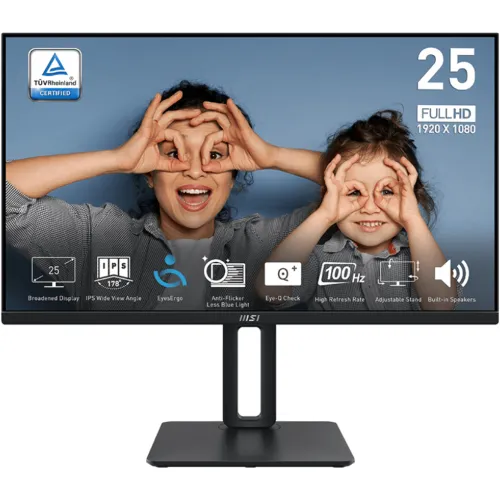
MSI PRO MP251P 24.5-inch Full HD business monitor
The MSI PRO MP251P is a 24.5-inch Full HD IPS monitor with a 100Hz refresh rate, built-in speakers and a fully adjustable ergonomic stand. MSI lists 1920 × 1080 resolution, 300 cd/m² brightness, 1300:1 contrast, 1ms MPRT/4ms GTG response modes, HDMI 1.4b, VGA and headphone output. Its stand supports height adjustment, swivel, pivot and tilt, and the monitor also supports 100 × 100mm VESA mounting.
The PRO MP251P is distinct from other similar MSI MP251-family models. Confirm the complete model name and any regional suffix on the carton and rear label. MSI’s official product specification and user manual are the primary sources for the technical details here. Bangladesh seller stock, current price, warranty provider and included cables can vary; verify those details for the exact unit before purchase.
24.5-inch Full HD IPS display
The monitor uses a flat 24.5-inch IPS panel with 1920 × 1080 Full HD resolution and a 16:9 aspect ratio. MSI lists a 543.7 × 302.6mm active display area and pixel pitch of 0.2832mm horizontally by 0.2802mm vertically. The anti-glare surface helps reduce reflections in typical indoor lighting. Full HD is widely supported and works well for office documents, browser windows, study, video and casual games.
MSI specifies 300 cd/m² brightness, 1300:1 contrast and 178-degree horizontal and vertical viewing angles. The product page lists 101% sRGB area coverage using CIE 1976, 16.7 million colours and 8-bit colour depth implemented as 6-bit plus FRC. Gamut area coverage is not the same as full gamut overlap or factory calibration. For color-critical work, use a calibrated display and verify measured accuracy, uniformity and the exact regional model.
100Hz refresh rate and motion clarity
The PRO MP251P supports up to 100Hz. MSI specifies HDMI at 1920 × 1080 up to 100Hz. A compatible PC, graphics output and cable are needed to select this refresh rate. After connecting, open the operating-system display settings and confirm the active resolution and refresh frequency. If 100Hz is not available, check the chosen input, graphics driver, adapter and cable specifications.
A 100Hz display can show more refreshes per second than a 60Hz screen, which may make scrolling, pointer movement and supported games appear smoother when the source provides enough frames. The monitor does not make the graphics card render faster. Its intended role spans business productivity, study, general computing and casual gaming rather than high-refresh competitive esports.
1ms MPRT and 4ms GTG
MSI lists response modes of 1ms MPRT and 4ms GTG. These are different measurement methods: MPRT describes perceived motion-picture response, while GtG measures a pixel transition between grey levels. They should not be compared as if both were the same test. Actual motion appearance depends on refresh, frame rate, pixel transition, overdrive settings and the content being shown.
Use the display mode that looks clearest in your games and everyday applications. A marketing response figure does not guarantee that every transition will be free from blur, overshoot or ghosting. If competitive play is the main use, compare independent measurements and refresh options of other monitors as well.
Adaptive-Sync and MSI EyesErgo features
MSI lists Adaptive-Sync and AMD FreeSync features for the PRO MP251P. Variable refresh can help coordinate supported graphics output with the display and reduce tearing or uneven frame delivery within a compatible range. The graphics card, driver, connection and on-screen settings determine whether it works in a specific setup. Confirm the feature in the graphics driver and test the content you use.
MSI’s EyesErgo feature set includes Anti-Flicker and Less Blue Light functions, with TÜV-related certifications documented on product materials. The monitor also has an anti-glare surface. These features support display comfort settings, but they cannot guarantee that long hours will be free from eye strain. Adjust brightness for the room, maintain comfortable viewing distance and take regular breaks.
Ports, sound and connected devices
The monitor has one HDMI 1.4b input and one D-Sub (VGA) input. MSI also lists a line-in and a headphone-out. It has two built-in 2W speakers, providing convenient basic sound for video calls, online classes and everyday media. Small monitor speakers generally have limited bass and volume; external speakers or headphones are better when richer sound is needed.
No USB hub, integrated camera or microphone is listed. Check the rear-panel labels and regional bundle before purchasing if your computer depends on a particular port. The included cables and power adapter may differ by market, and an adapter does not increase the input capabilities of the monitor.
Ergonomic stand and mounting
The PRO MP251P stand adjusts from -5° to +20° tilt, swivels by ±30°, pivots by ±90° and raises the screen through a 0–120mm height range. These adjustments make it easier to place the display at a suitable height and angle for one or more desk setups. Pivot can be useful for portrait documents, but check application and operating-system rotation support.
The monitor also supports a 100 × 100mm VESA mount and includes a Kensington lock point. When attaching an arm, verify its weight rating, the correct screw length and clearance for cables. Support the monitor during installation and follow MSI’s manual. A flexible stand can improve ergonomics, but screen height and viewing distance still need to fit the user and desk.
Dimensions, power and package
MSI lists an external 12V 2.5A power adapter and 100–240V AC input at 50/60Hz. Approximate dimensions and weight can vary by product revision and region; confirm exact figures against the manufacturer page or carton when planning a tight desk fit. Use the supplied adapter matched to the monitor, not a power supply selected only because its plug fits.
MSI’s regional package contents can differ. Confirm that the monitor, adjustable stand, power adapter and required video cable are included. If your PC uses VGA or HDMI, verify the correct cable is in the box or budget for one. Retain the invoice, serial number and warranty paperwork.
Who should choose the PRO MP251P?
This monitor may suit a home-office or business user who wants a 24.5-inch Full HD IPS screen, 100Hz refresh, built-in speakers and a genuinely adjustable stand. Its HDMI and VGA ports accommodate different sources, while headphone-out offers a convenient audio connection. Adaptive-Sync and EyesErgo features add useful flexibility for mixed work and leisure use.
Consider a higher-resolution screen for more desktop workspace, a higher-refresh gaming monitor for esports, or a model with USB-C/USB hub if you want simplified docking. If colour accuracy is essential, request exact regional gamut and calibration details and calibrate the display. If audio quality matters, compare the 2W speakers with dedicated speakers or headphones.
Bangladesh price, availability and warranty
Bangladesh retailer pages list the PRO MP251P, but a consistent current price range was not confirmed during this review. Stock and seller terms can change, and the available pages do not establish a live BiponiBD offer. Contact the seller to confirm current inventory, final price, delivery cost, exact PRO MP251P model and any included cables before ordering.
Some local retailer listings advertise a three-year warranty, but the local service provider, serial eligibility, coverage exclusions and dead-pixel policy need written confirmation. Ask whether service is handled by MSI or by the seller/distributor and retain the invoice and warranty card. Warranty terms shown by another shop do not automatically apply to a different unit.
Frequently asked questions
Model note: this page covers MSI PRO MP251P. Verify the complete model code, local warranty and accessories on the exact unit. MSI specifies a 24.5-inch FHD IPS panel, 100Hz, 1ms MPRT/4ms GTG and an ergonomic height-adjustable stand.