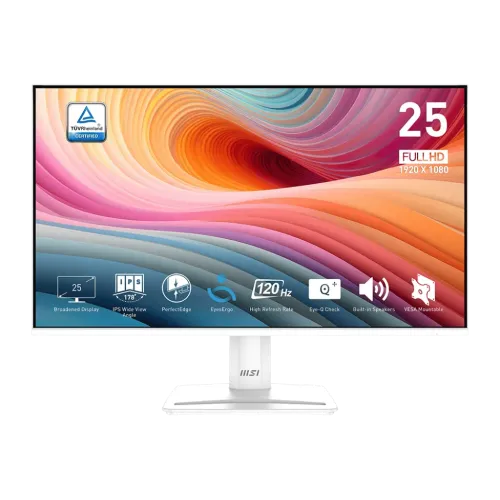
MSI PRO MP251W E2 24.5-inch 120Hz White IPS Monitor
The MSI PRO MP251W E2 is a 24.5-inch Full HD IPS monitor in a white finish. It is designed for work, study and everyday entertainment, with a 1920 × 1080 resolution, 120Hz refresh rate, Adaptive-Sync and built-in stereo speakers. HDMI 2.0 and DisplayPort 1.4a support Full HD up to 120Hz; VGA supports up to 60Hz. A headphone output, line-in, tilt stand and 100 × 100mm VESA mounting complete the main setup options.
This page covers the white PRO MP251W E2, part number 9S6-3PD4CM-002. Do not confuse it with the black MP251 E2 (3PD2), the base PRO MP251, or the PRO MP251P. Their refresh rate, colour, stand and ports differ. Check the W suffix and part number on the product carton or device label before purchase. MSI notes that configurations and package contents can vary by region.
24.5-inch Full HD IPS display
The monitor has a 24.5-inch diagonal screen with a flat 16:9 layout and native Full HD resolution of 1920 × 1080. This resolution is widely supported by computers and consoles and can keep graphics demands lower than QHD or 4K. It is a practical option for office documents, web browsing, video and games. The trade-off is less fine detail and workspace than higher-resolution screens at a similar size.
MSI specifies an IPS panel with 178-degree horizontal and vertical viewing angles, 300 cd/m² SDR brightness and 1500:1 contrast. The anti-glare treatment helps with ordinary reflections, but direct light can still make the image harder to see. The screen supports 16.7 million colours and 8-bit colour processing using 6-bit plus FRC. These manufacturer values do not guarantee identical brightness, uniformity or colour performance for each individual unit.
MSI's product specification shows 99% sRGB in one regional page, and regional datasheets use CIE1976 measurement. A gamut percentage is not a guarantee of calibration or colour accuracy. Different standards report coverage and colour area differently. No factory calibration report was found for this listing. For colour-critical photography, print or grading tasks, check independent test results and calibration options before relying on the monitor.
120Hz motion and response specifications
The PRO MP251W E2 supports up to 120Hz at 1920 × 1080 through HDMI 2.0 and DisplayPort 1.4a. The VGA/D-Sub input is listed for up to Full HD at 60Hz. To use 120Hz, connect through HDMI or DisplayPort and confirm that the computer, graphics output, cable and operating system support the chosen mode. Select the refresh rate in display settings after connection; an adapter or dock may restrict the available bandwidth.
A 120Hz display can refresh more frequently than 60Hz, making compatible games, scrolling and cursor movement appear smoother. It does not generate frames that the computer has not rendered. Your graphics card, game settings, connection and frame rate determine how much of the refresh capability you can use. If the game runs below 120 frames per second, the display cannot create the missing game frames.
MSI lists 1ms MPRT and 4ms GtG response-time figures. These measure different aspects of motion and should not be treated as equivalent. MPRT may depend on a motion-response mode, while GtG measures pixel transitions. Overdrive can affect both blur and overshoot. Treat 1ms as a mode-specific figure, not a promise that every transition is instant or free from ghosting. Test the available setting with your content and keep the mode that looks clean.
Adaptive-Sync and HDR Ready
MSI lists Adaptive-Sync with an activated range of 48–120Hz on its regional specification page. It can coordinate display refresh with compatible graphics output to reduce tearing within the supported range. The exact behaviour depends on the graphics card, driver, HDMI or DisplayPort connection and settings. The product is not described here as NVIDIA G-SYNC certified; an NVIDIA logo or compatibility reference alone should not be treated as certification without a matching official certification record.
The display is labelled HDR Ready. This does not establish VESA DisplayHDR certification or premium HDR performance. The specified 300-nit brightness and 1500:1 contrast give context: it is a conventional IPS business monitor with HDR signal support, not a high-brightness local-dimming screen. Use HDR with compatible devices if desired, but set expectations for entry-level HDR handling rather than cinematic highlight and black-level performance.
MSI's EyesErgo and Eye-Q Check functions provide settings and visual checks for extended use. These controls are not medical protection. Adjust brightness to the room, choose a comfortable viewing distance, and take breaks. Picture modes can change luminance and colour, so return to a neutral setting for colour-sensitive tasks.
Video inputs, audio and built-in speakers
Connections include one HDMI 2.0 input, one DisplayPort 1.4a input, one D-Sub (VGA) input, one headphone-out and one line-in. HDMI and DisplayPort support Full HD up to 120Hz; VGA supports up to 60Hz. HDMI CEC support is listed. The monitor does not list USB-C video, a USB hub or KVM switching. If a laptop only has USB-C, use an adapter rated for the required 1080p refresh mode and confirm audio routing.
Two integrated 2W speakers provide convenient basic sound for calls, alerts and casual video. Their small drivers are not a substitute for larger external speakers or headphones when you need deep bass, high volume or clearer music. Headphone-out supports compatible headphones or external audio; line-in is provided for an audio source. No integrated microphone is listed. Check the computer's selected audio device if sound does not reach the monitor.
White finish, stand and VESA mounting
The white “W” model has a matching white finish, unlike the black PRO MP251 E2. The included stand tilts from approximately -5° to +20°. Height, swivel and pivot adjustments are not listed. Use a riser or monitor arm if you need more precise positioning. MSI specifies a 100 × 100mm VESA pattern. Check the arm's load rating, screw type and clearance before mounting.
MSI lists dimensions with the stand of about 556.9 × 413.9 × 188.2mm (W × H × D), and carton dimensions of about 630 × 411 × 142mm. Net weight is around 3.0kg and gross package weight around 5.1kg. Allow desk space for the stand and rear cables. Measurements can vary slightly by region; confirm the unit label or manual if the monitor must fit inside a tight shelf.
Power and box contents
Unlike some related monitors that use an external brick, MSI specifies an internal power board for this model. It accepts 100–240V AC at 50–60Hz. Use the supplied power cable and follow the rating on the monitor. The datasheet lists power-on consumption below 40W, standby below 0.5W and power-off below 0.3W. The package contents may vary; confirm whether the local box includes an HDMI cable, power cord, stand hardware, setup guide and warranty card.
Bangladesh price and warranty
Bangladesh retailer listings observed during this review ranged from approximately ৳18,200 to ৳19,000. One listing showed out-of-stock status while another reported availability. Price and stock change, and these are third-party seller observations, not BiponiBD offers. Confirm the exact white model, part number, current price, delivery and included cables with the chosen seller.
Local retailers commonly advertise a three-year warranty for the MP251W E2, while MSI regional pages can show different warranty durations. Warranty coverage depends on the sales region and serial number. Ask who provides local service, whether the serial is eligible for MSI-authorized Bangladesh support, how dead pixels are handled and which documents are needed. Obtain written terms for the exact white unit rather than assuming the warranty shown for the black E2 or another country applies.
Who should consider the MSI PRO MP251W E2?
Consider it if you want a white 24.5-inch Full HD IPS display with 120Hz, Adaptive-Sync, basic built-in audio and HDMI, DisplayPort and VGA. It can suit productivity and entertainment, especially where a white setup and integrated speakers are desirable. Use HDMI or DisplayPort for 120Hz; VGA is available for legacy devices at 60Hz.
Compare alternatives if you need QHD resolution, a height-adjustable stand, USB-C docking, more capable audio, calibrated colour or certified HDR. If the white colour is not important, compare the black MP251 E2 and check the exact part number; do not assume their regional package or warranty matches. For warranty-sensitive purchases, verify local serial eligibility before choosing on price alone.
Key features
- 24.5-inch flat IPS panel with Full HD 1920 × 1080 resolution
- White model, part number 9S6-3PD4CM-002
- 120Hz over HDMI 2.0 and DisplayPort 1.4a
- VGA/D-Sub supports Full HD up to 60Hz
- 1ms MPRT / 4ms GtG manufacturer response figures
- 300 cd/m² brightness and 1500:1 typical contrast
- Adaptive-Sync, listed 48–120Hz activated range
- HDR Ready label; VESA HDR certification not verified
- Two built-in 2W speakers, headphone out and line-in
- HDMI CEC, Kensington lock and 100 × 100mm VESA
- Tilt -5° to +20°; no listed height/swivel/pivot adjustment
- Internal power board; confirm local warranty and box contents
Advantages
- 120Hz over HDMI or DisplayPort can improve motion smoothness when the source can render enough frames.
- IPS viewing angles work well for daily desktop and shared viewing.
- Built-in 2W speakers provide convenient basic sound without extra devices.
- HDMI, DisplayPort and VGA support newer and older computers.
- The white finish can match a white workstation and VESA mounting offers an arm option.
Limitations to consider
- Full HD provides less desktop workspace and detail than QHD.
- VGA is limited to 60Hz; use HDMI or DisplayPort for 120Hz.
- The stand tilts only, with no listed height, swivel or pivot adjustment.
- Small 2W speakers have limited volume and bass.
- HDR Ready does not confirm DisplayHDR certification or premium HDR performance.
- Bangladesh warranty and package details depend on the local seller and serial.
Frequently asked questions
What are the screen size and resolution?
It has a 24.5-inch IPS screen with 1920 × 1080 Full HD resolution and a 16:9 aspect ratio.
Does it support 120Hz?
Yes, MSI lists up to 120Hz over HDMI and DisplayPort at Full HD. VGA is limited to 60Hz. The source and cable must also support the selected mode.
Does it have built-in speakers?
Yes. MSI specifies two 2W speakers, plus headphone-out and line-in. Use headphones or external speakers for fuller sound.
What is the difference between the W E2 and black E2?
The MP251W E2 is the white model; MSI lists part number 9S6-3PD4CM-002. The black MP251 E2 has a different part number and should be checked separately for colour and package details.
Does it support G-SYNC?
MSI lists Adaptive-Sync. The product is not described here as NVIDIA G-SYNC certified; confirm the exact GPU compatibility if needed.
Which ports are included?
One HDMI 2.0, one DisplayPort 1.4a, one D-Sub/VGA, one line-in and one headphone-out are listed.
Can I mount it on an arm?
Yes, the VESA pattern is 100 × 100mm. Check the arm load rating and screw compatibility.
What warranty applies in Bangladesh?
Local sellers commonly list three years, but confirm the provider, service terms and serial-number eligibility for the exact white unit.
What is the Bangladesh price?
Retail observations ranged around ৳18,200–৳19,000, with stock differing between sellers. These are not BiponiBD offers.
Before ordering: verify white part number 9S6-3PD4CM-002, 120Hz support on your chosen port, box contents and written Bangladesh warranty terms.