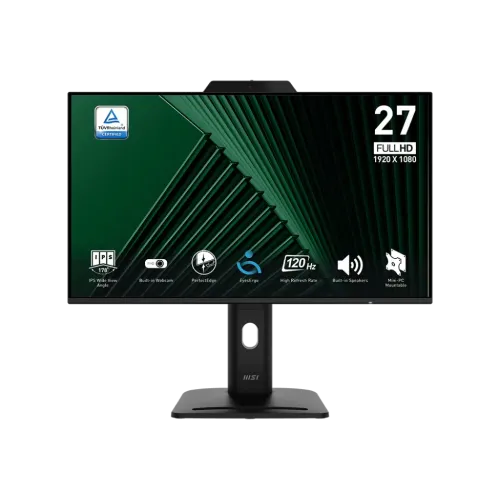
The MSI PRO MP272PMG is a 27-inch Full HD IPS 120Hz business monitor with a 1080p webcam, microphone, privacy cover, two 2W speakers and USB 2.0 hub. It has HDMI, DisplayPort, VGA and a four-way adjustable stand. Connect USB-B to the computer to enable webcam and hub data. Full specifications and Bangladesh buying notes follow.
Monitor overview
The MSI PRO MP272PMG is a 27-inch Full HD IPS business monitor with a 120Hz refresh rate, built-in 1080p webcam and digital microphone. It also includes a physical webcam cover, two 2W speakers, headphone-out and a USB 2.0 hub. Its stand supports height adjustment, tilt, swivel and pivot, with a 100 × 100mm VESA interface.
This model is designed for office, hybrid-work and video-meeting setups as well as everyday media. The webcam and USB hub connect through the USB-B upstream cable; HDMI or DisplayPort alone does not enable those USB functions. The detailed specs and buyer notes below explain that distinction and the product’s port limitations.
Screen, resolution and refresh
The monitor uses a 27-inch, 16:9 IPS panel with 1920 × 1080 Full HD resolution and 0.3114mm pixel pitch. MSI lists a 120Hz refresh rate and Adaptive-Sync range of 48–120Hz. A higher refresh rate can make scrolling and supported motion smoother than a 60Hz display when the source device provides compatible output.
Full HD across a 27-inch screen has less pixel density than QHD at the same size. This can be a trade-off for dense spreadsheets, fine text and detailed design work. In exchange, Full HD is broadly supported and less demanding to render. Consider your seating distance, text scaling and applications before choosing.
Built-in webcam, microphone and privacy
MSI specifies an integrated 1080p webcam with a digital microphone and webcam cover. The physical cover allows the camera lens to be blocked when it is not in use. This can simplify video calls by keeping the camera mounted at the display rather than on a laptop or separate accessory.
For the computer to detect the webcam, connect the included USB Type-B-to-Type-A upstream cable from the monitor to a USB port on the computer. Select the monitor camera and microphone in the meeting application and operating system. A video cable such as HDMI or DisplayPort carries the screen signal but does not provide the USB data path for the camera.
USB hub and connectivity
The monitor lists two USB 2.0 Type-A downstream ports and one USB 2.0 Type-B upstream port. The ports can connect basic peripherals such as a mouse or keyboard. They are USB 2.0, so users transferring large files to external drives should connect those drives to a faster computer port instead.
Video inputs include one HDMI 1.4b, one DisplayPort 1.2a and one VGA/D-Sub. MSI specifies Full HD up to 120Hz on HDMI and DisplayPort, and up to 60Hz on VGA. Choose the input based on the computer and required refresh. The monitor also includes a headphone-out, internal power board and Kensington lock.
Audio and everyday use
Two integrated 2W speakers can handle basic calls, system sounds and casual media playback. The headphone output offers a direct connection for private listening. For richer music or clearer audio in a noisy room, a dedicated headset or speakers may be preferable.
The combination of camera, microphone, speakers and USB hub can reduce the number of separate accessories on a hybrid-work desk. Keep the webcam cover closed when privacy is preferred, and verify the selected audio devices in the conference application before a meeting.
Motion, color and HDR Ready
MSI lists 1ms MPRT and 4ms GTG response specifications. MPRT and GTG use different measurement approaches, and neither represents total input lag from a computer. The panel is rated at 300 cd/m² SDR brightness and 1500:1 contrast. MSI calls it HDR Ready, but this does not establish a VESA DisplayHDR certification.
The regional specification publishes color-space area/overlap numbers for sRGB, DCI-P3 and Adobe RGB. The CIE1976 sRGB pair is 116% area and 99% overlap. Area can exceed 100% and should not be mistaken for calibrated coverage. For color-critical work, use an appropriate calibrated workflow and do not rely on gamut figures alone.
Stand, mounting and desk layout
The stand offers 0–130mm height adjustment, -5° to +20° tilt, -45° to +45° swivel and -90° to +90° pivot. A 100 × 100mm VESA interface is listed, with a VESA plate and screws among MSI’s accessories. The regional datasheet gives dimensions with stand of 612 × 227 × 429mm and without stand of 540 × 46 × 335mm.
Check desk depth and cable slack before rotating or swiveling the display. If using the VESA plate or a monitor arm, verify the mount’s screw pattern and load rating. Regional weight figures differ between MSI pages; the US spec lists 6.2kg net and 8.5kg gross, while other datasheets may show alternate configurations. Confirm shipping and installed weights with the local seller.
Power, software and setup
The monitor uses an internal power board and accepts 100–240V AC at 50/60Hz. It supports Adaptive-Sync and MSI productivity features, including Eye-Q Check and anti-flicker/eye-comfort options. Display settings and camera/audio devices can be adjusted through operating-system settings and MSI’s supported software where available.
Connect power and video first, then connect the USB-B upstream cable for webcam and hub functions. Set 1920 × 1080 at up to 120Hz in the computer display settings and enable Adaptive-Sync where supported. Test the camera, microphone and speakers before meetings. Update software and drivers through official MSI support for the exact regional model.
Who may prefer this monitor
The MP272PMG may suit a home office or hybrid-work user who wants a monitor-mounted webcam, microphone, speakers and USB hub in one device. Its adjustable stand supports a range of desk positions and portrait use. A 120Hz IPS display can also feel smoother for general movement and casual gaming than a typical 60Hz office model.
It may be less suitable if you require a high-resolution creative workspace, USB 3.x transfer speeds, high-wattage USB-C docking, HDR certification or a dedicated esports monitor. USB-B tethering is required for camera and hub data. Compare the full feature set with a laptop dock plus separate webcam if flexibility or component replacement is important.
Bangladesh market and warranty checks
When checked, TechLand and Skyland listed ৳27,000 and In Stock; Monarch showed ৳30,800 and In Stock; Technology Park showed ৳28,000 and In Stock. Retail prices and stock can change by seller, promotion and import channel. None of these pages establishes a BiponiBD offer.
MSI’s Canada regional sheet lists 36 months, and Bangladeshi sellers advertise three years. Confirm the exact part number, local serial eligibility, whether warranty is official or seller/importer-backed, service center, box and invoice requirements, dead-pixel policy and the final delivered price before purchase. Keep the invoice and package.
Key features
- 27-inch Full HD IPS display with 120Hz refresh and 48–120Hz Adaptive-Sync range.
- Integrated 1080p webcam, digital microphone and physical privacy cover for video meetings.
- One HDMI 1.4b, one DisplayPort 1.2a and one VGA input; all modes have documented maximums.
- Two USB 2.0 Type-A downstream ports and one USB 2.0 Type-B upstream connection.
- Two 2W speakers and one headphone-out for basic meeting/media audio.
- Height, tilt, swivel and pivot adjustments for flexible desk positioning.
- 1ms MPRT and 4ms GTG response specifications, which are different measurement methods.
- 300 cd/m² SDR brightness, 1500:1 static contrast and HDR Ready label.
- 100 × 100mm VESA mount, Kensington lock and accessory/mini-PC mounting provisions.
- USB-B upstream cable is listed by MSI; connect it for webcam and hub data functions.
Pros
- Built-in 1080p webcam with microphone and a privacy cover reduces the need for a separate camera.
- 120Hz and Adaptive-Sync support provide smoother motion than standard 60Hz office displays when the source is compatible.
- A four-way adjustable stand and VESA mounting offer more ergonomic setup flexibility.
- USB-A hub, HDMI, DisplayPort and VGA help connect peripherals and a range of computers.
- Speakers, headphone-out and a webcam suit video calls and hybrid-work desks.
Cons and buying considerations
- USB-A ports are USB 2.0, so they are not suited to high-speed storage transfer.
- The webcam and USB hub require the upstream USB-B connection; video over HDMI alone will not connect USB data.
- Full HD on a 27-inch screen is less sharp than QHD at a similar viewing distance.
- HDR Ready is not an HDR certification; listed brightness is 300 cd/m² SDR.
- Local offers vary in price and warranty channel; confirm serial coverage and exact accessory bundle.
Full specifications
- Brand: MSI
- Series: PRO
- Model: MP272PMG
- RegionalPartNumber: 9S6-3PD99T-003 (MSI Canada regional sheet; confirm local unit)
- ScreenSize: 27 inches / 69cm
- Panel: IPS, flat
- Resolution: 1920 × 1080 Full HD
- AspectRatio: 16:9
- PixelPitch: 0.3114 × 0.3114mm
- RefreshRate: 120Hz; Adaptive-Sync activated range 48–120Hz
- SignalTiming: HDMI 1.4b and DisplayPort 1.2a support Full HD up to 120Hz; VGA up to 60Hz per MSI
- Brightness: 300 cd/m² SDR
- ContrastRatio: 1500:1 static; 100,000,000:1 dynamic ratio (regional sheet)
- ResponseTime: 1ms MPRT; 4ms GTG
- ViewingAngle: 178° horizontal / 178° vertical
- Color: 16.7 million; 8-bit (6-bit + FRC)
- ColorGamut: MSI CIE1976 area/overlap: sRGB 116%/99%, DCI-P3 93%/90%, Adobe RGB 100%/86%. These are not a calibration result.
- HDR: HDR Ready (not an HDR certification or peak-brightness claim)
- Webcam: Built-in 1080p webcam with digital microphone and physical webcam cover
- Audio: 2 × 2W built-in speakers; 1 × headphone-out
- Ports: 1 × HDMI 1.4b; 1 × DisplayPort 1.2a; 1 × VGA/D-Sub; 2 × USB 2.0 Type-A downstream; 1 × USB 2.0 Type-B upstream; 1 × headphone-out; AC-in; Kensington lock
- USBHub: USB Type-B upstream cable is required for USB-A hub and webcam data connection to the computer; the USB-A ports are USB 2.0, not high-speed USB 3.x.
- Stand: Height 0–130mm; tilt -5° to +20°; swivel -45° to +45°; pivot -90° to +90°
- VESA: 100 × 100mm; VESA plate and screws listed in MSI regional accessories
- Power: Internal power board; AC 100–240V, 50/60Hz; MSI regional sheet lists 0.5W standby and 0.3W off
- Dimensions: With stand 612 × 227 × 429mm (W×D×H); without stand 540 × 46 × 335mm (regional sheet)
- Weight: 6.2kg / 8.5kg gross listed by MSI US page; some regional sheets differ or show TBD. Verify shipment configuration.
- Included: MSI lists HDMI cable, USB Type-B-to-Type-A upstream cable, power cord, quick guide, stand screws and VESA plate/screws; regional bundle may vary.
- Warranty: MSI regional spec sheet lists 36 months; Bangladesh sellers advertise three years. Confirm local serial eligibility, provider and claim terms.
- LocalMarketObservation: TechLand ৳27,000/In Stock; Skyland ৳27,000/In Stock; Monarch ৳30,800/In Stock; Technology Park ৳28,000/In Stock. Seller snapshots only, not BiponiBD offers.
- Sources: [object Object]
- CheckedAt: 2026-11-08T20:50:32.055Z
Frequently asked questions
What are the display size, resolution and refresh rate?
MSI specifies a 27-inch flat IPS monitor with Full HD 1920 × 1080 resolution, 16:9 ratio, 120Hz refresh and a 48–120Hz Adaptive-Sync range.
What webcam is built in?
The monitor includes a 1080p webcam with a digital microphone and webcam cover. Use the physical cover when the camera is not needed. The host computer must recognize the camera through the connected USB upstream cable.
Do I need USB-B to use the camera and USB ports?
Yes. MSI lists one USB Type-B upstream port and includes a USB Type-B-to-Type-A cable. Connect this cable from monitor to computer to enable the monitor’s USB hub and webcam data. HDMI or DisplayPort alone carries display signals, not the USB data path.
What USB ports are available?
The monitor has two USB 2.0 Type-A downstream ports and one USB 2.0 Type-B upstream port. They are suitable for basic peripherals but are slower than USB 3.x for large file transfers.
Which video inputs does it have?
MSI lists HDMI 1.4b, DisplayPort 1.2a and VGA/D-Sub. HDMI and DisplayPort support Full HD up to 120Hz; VGA supports up to 60Hz according to MSI.
Does it have speakers?
Yes. MSI specifies two built-in speakers rated at 2W each and a headphone output. These are convenient for calls and everyday sound; a separate headset or speaker system may provide stronger audio.
Can I adjust the stand?
The stand supports height adjustment from 0–130mm, tilt from -5° to +20°, swivel from -45° to +45° and pivot from -90° to +90°. MSI also lists 100 × 100mm VESA mounting.
What is the difference between 1ms MPRT and 4ms GTG?
MSI lists both 1ms MPRT and 4ms GTG. They use different measurement approaches. Neither is a system input-lag rating, and a particular response mode can affect image behavior.
Does HDR Ready mean HDR certified?
No. MSI labels the monitor HDR Ready, but the listed brightness is 300 cd/m² SDR and the specifications do not establish VESA DisplayHDR certification. Treat HDR Ready as signal-support wording rather than a promise of high-brightness HDR performance.
What color-gamut and brightness figures are specified?
MSI lists 300 cd/m² SDR brightness and CIE1976 area/overlap pairs for sRGB, DCI-P3 and Adobe RGB. For example, sRGB is 116% area/99% overlap. Area percentages are not a calibration result or guarantee of color accuracy.
What is included in the box?
MSI lists an HDMI cable, USB-B-to-USB-A upstream cable, power cord, quick guide, stand screws and VESA plate/screws. Confirm local package contents because regional bundles can differ.
What is the price and warranty in Bangladesh?
At the time checked, TechLand and Skyland showed ৳27,000/In Stock, Monarch ৳30,800/In Stock and Technology Park ৳28,000/In Stock. Local sellers advertise three years and MSI regional sheets list 36 months. These are not BiponiBD offers; verify stock, exact part number, authorized provider, serial eligibility and claim terms.
Source note: MSI specifications, datasheets and regional product sheet are primary technical sources; local retailers provide price/stock/warranty observations. No BiponiBD offer or hands-on test is claimed. Sources checked 2026-11-08T20:50:32.055Z.