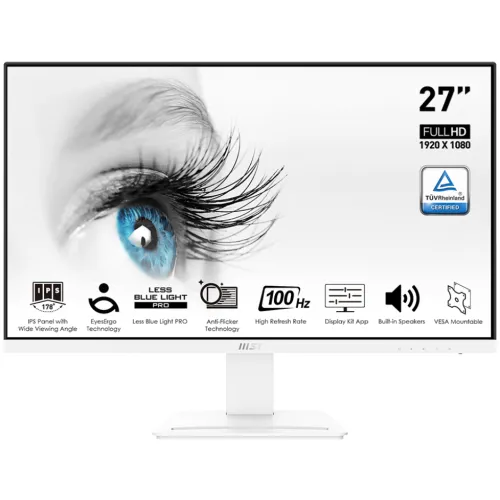
MSI PRO MP273AW 27-inch FHD 100Hz IPS Monitor is a white 27-inch Full HD IPS productivity monitor with 100Hz refresh, Adaptive-Sync and anti-glare treatment. MSI specifies 1ms MPRT / 4ms GTG, 1000:1 contrast, 106% sRGB (CIE 1976), two 3W speakers, DisplayPort 1.2a, HDMI 1.4b, VGA, line-in, tilt adjustment and 75 × 75mm VESA. HDMI and DisplayPort support up to 100Hz at Full HD; VGA is limited to 60Hz.
27-inch Full HD workspace
The PRO MP273AW uses a 27-inch panel with native 1920 × 1080 resolution and a familiar 16:9 layout. That size gives documents, websites and video a broad physical canvas while remaining compatible with common computers and consoles. It is a practical format for office work, remote meetings, study and entertainment. Because a 27-inch Full HD screen has fewer pixels per inch than QHD or 4K at the same size, very fine text and detailed design elements may look less crisp to users sitting close to the display.
Keep the panel at its native resolution for the clearest pixel mapping. If text feels small, use operating-system scaling or application font controls rather than a non-native output mode. The screen can show standard Full HD video and desktop output without requiring the graphics performance of QHD or 4K. Consider viewing distance, font size and the type of work you do when choosing between this model and a higher-resolution 27-inch monitor.
IPS angles, contrast and colour gamut
MSI specifies IPS technology, 178-degree horizontal and vertical viewing angles, a 1000:1 contrast ratio and 16.7 million display colours. These figures suit general office and home use where the viewer may shift position or share the screen. MSI reports 106% sRGB coverage under CIE 1976. This describes a colour gamut area and should not be treated as independent proof of colour accuracy, factory calibration, panel uniformity or a colour-critical workflow.
For photo, print or client work, calibrate the individual display and use colour-managed applications. A gamut percentage indicates range rather than how accurately a particular shade is reproduced. Brightness, picture mode, room lighting and reflections also affect appearance. For typical documents, browsing and streaming, the listed gamut offers a broad stated range; use a neutral mode when judging colours and adjust brightness to the room.
100Hz refresh and input-specific limits
The 100Hz refresh rate can make pointer movement, scrolling and compatible games feel smoother than a 60Hz display. MSI documents Full HD up to 100Hz over HDMI and DisplayPort, while D-Sub/VGA is limited to Full HD up to 60Hz. This port distinction is important: the source and cable must also support the requested timing. After connecting, select the correct input and verify the refresh rate in the operating system’s advanced display settings or graphics control panel.
A 100Hz display cannot create frames the computer does not render. The GPU, application settings and workload set the actual frame rate. If the 100Hz option is unavailable, confirm a digital connection, use a suitable cable, update the graphics driver and bypass adapters or docks that may impose a lower limit. VGA remains a useful legacy input, but it cannot use the 100Hz timing listed for HDMI and DisplayPort.
MPRT and GTG response claims
MSI lists response times of 1ms MPRT and 4ms GTG. These figures use different measurement methods and are not interchangeable. MPRT describes motion-picture response under a specified condition; GTG describes transitions between shades. Actual pixel behaviour can vary by colour transition, refresh mode and response setting. The headline value does not mean every pixel changes in exactly one millisecond or that motion blur is absent in all content.
Use the manufacturer figures as reference specifications rather than a guarantee of a particular result in every game. If the monitor exposes response or overdrive choices, compare them with your usual applications. Aggressive settings can create overshoot trails. Adaptive-Sync and frame pacing also influence perceived smoothness. A digital input, current driver and stable frame rate help the display operate in its intended mode.
Adaptive-Sync and device compatibility
MSI lists Adaptive-Sync and identifies compatibility with PC, Mac, PS5, PS4, Xbox, mobile devices and notebooks. Variable refresh may reduce tearing when the source and monitor support a compatible range and configuration. Enable the option in the display menu or graphics driver if required. Device compatibility does not mean every dock, adapter, console game or mobile output offers identical modes; check the source’s video capabilities and use a suitable cable for the selected input.
If flicker or unstable output occurs, update the graphics driver, try a different cable or input, and test with Adaptive-Sync disabled to isolate the cause. Console output depends on the title and console settings. Notebook docks can restrict refresh rates even when the computer itself supports a higher rate. Adaptive-Sync coordinates supported frame output; it does not increase the number of frames a game can render.
Anti-glare and eye-comfort features
The monitor has an anti-glare surface and MSI lists Anti-Flicker and Less Blue Light features. These options can support individual preferences during long work or study sessions but do not guarantee that eye strain will be prevented. Room lighting, screen distance, font size, brightness, posture and session length matter as well. Position the display to reduce reflections and set brightness to a comfortable level for the space rather than leaving it at maximum.
Low-blue-light modes may change the white point and colour appearance, which can be unsuitable for colour evaluation. Use a neutral mode for image work and a preferred mode for reading if helpful. Increase text size when needed and take regular breaks. If persistent discomfort occurs, change the setup and seek appropriate professional advice. These are general viewing suggestions, not medical claims about this monitor.
Speakers and connection options
MSI specifies two built-in 3W speakers and one line-in port. Video inputs include DisplayPort 1.2a, HDMI 1.4b and D-Sub/VGA. Integrated speakers can handle system alerts, calls and casual listening without a separate audio device. HDMI and DisplayPort are the digital options for the 100Hz mode; VGA is a legacy connection limited to 60Hz. Check the regional box contents with the seller because cables can vary by market or package.
If there is no sound, check the computer’s audio output selection, volume and cable connection. The line-in connector is an audio input rather than a headphone jack; external headphones may connect to the source device. The 3W speakers are convenient for basic listening but cannot reproduce the fuller bass or detail of dedicated speakers. MSI also lists a Kensington lock slot for a compatible cable lock in shared spaces.
Stand, tilt and VESA mounting
The supplied stand tilts from -5° to +20°. MSI specifies a 75 × 75mm VESA pattern, which can support a compatible arm or wall mount. Height adjustment, swivel and pivot are not listed for the included stand. A stable riser or correctly rated monitor arm may be useful if you need to position the screen higher. The white finish can coordinate with a light workstation, and the tilt range helps angle the panel to suit the seated position.
Check the mount’s load rating and screw requirements against the guide supplied with the delivered unit. Support the display while attaching the bracket and avoid overtightening screws. Because this uses a 75mm rather than 100mm pattern, confirm that the selected mount includes the right plate or adapter. Measure desk depth and cable clearance before installation. MSI lists 613.50 × 462.60 × 182mm dimensions and approximately 3.9kg net weight.
Work, study, meetings and entertainment
A 27-inch Full HD panel is suitable for ordinary documents, web browsing, classroom work, streaming and video calls. The 100Hz refresh can make desktop interactions appear smoother, while built-in speakers and several video inputs help keep a simple desk setup. MSI’s Display Kit software is described as a way to manage supported display modes and controls. The model can also connect to listed consoles, although their output resolution and refresh depend on the device and game.
For multitasking, window snapping and application layout can make better use of the screen area. Users working with dense timelines, small text or detailed image files may prefer QHD at 27 inches. For meetings, confirm the computer routes audio to the monitor speakers and use a separate microphone if required; the monitor does not list a built-in webcam. It is a general-purpose monitor, not a USB-C docking station or laptop charger.
Power, handling and care
MSI specifies an external 12V 2.5A adapter and 100–240V, 50–60Hz input. The datasheet lists a carton size of 687 × 458 × 119mm and net/gross weights of 3.9kg/5.3kg. These details help plan desk placement and unpacking. Keep the adapter ventilated and secure, route the power lead away from foot traffic and avoid placing objects where they can strike the panel. Clean the screen with a soft microfiber cloth without pressing on the LCD.
Unpack on a stable surface and follow the supplied setup guide. Hold the frame while moving the monitor and do not lift it by the screen. Inspect the display, stand, ports, adapter and accessories before discarding packaging. Keep the invoice and carton during the return period. Check the delivered cables and regional package contents with the seller; promotional photographs may not show the exact box contents.
Bangladesh price and warranty checks
When checked, Universal listed ৳23,500 and marked the monitor in stock; Micro listed ৳23,800 but marked it out of stock. These are independent seller observations and can change with promotions, payment method, delivery location and stock. They are not a BiponiBD offer. Confirm the current final price and delivery terms directly with the seller before purchase. Local pages advertise a three-year warranty, but the particular serial and service provider must be checked.
Ask which distributor or service centre handles the warranty, when coverage begins, what is excluded and what documents are needed for a claim. Confirm the dead-pixel policy and return window in writing. Keep the invoice, warranty card and serial information. MSI’s global specification page does not establish Bangladesh warranty eligibility for an individual unit, so the seller’s documented local terms matter.
Who should consider this model
The MP273AW can suit a home office, study desk or general-purpose setup where a 27-inch IPS panel, Full HD resolution, 100Hz refresh, basic integrated audio and a white finish fit the need. It accepts common digital and legacy video connections and includes tilt adjustment and 75mm VESA mounting. Adaptive-Sync and eye-comfort features add useful options, while the lower GPU requirement of Full HD can be practical for common computers.
Consider a different model if you need QHD or 4K detail at 27 inches, a height-adjustable stand, USB-C video/charging, a headphone-out socket, HDR support or a higher refresh ceiling. Confirm which port is available on your computer and use HDMI or DisplayPort for 100Hz. If using VGA, expect a 60Hz limit. Match the monitor to your desk ergonomics, image workload and local warranty route.
Specification source notes
MSI’s official product specification and datasheet are the sources for screen size, resolution, refresh rate, response methods, viewing angles, contrast, colour gamut, ports, audio, speakers, VESA, tilt, dimensions and input-specific refresh limits. MSI lists one DP 1.2a, HDMI 1.4b, D-Sub/VGA, line-in and two 3W speakers. The 106% sRGB claim is explicitly associated with CIE 1976. Local seller pages are used for Bangladesh price, availability and advertised warranty snapshots only.
This entry does not claim an active BiponiBD offer, review, verified serial warranty, GTIN, product origin or in-hand gallery inspection. Package contents and physical appearance should be checked against the delivered unit. Price and stock observations are time sensitive. Manufacturer technical documentation takes precedence for specifications; the local seller’s written conditions govern its own price, delivery and warranty promises.
Sources and Bangladesh price observations
Checked 2026-11-08 against MSI official specifications and local retailer listings. Universal showed ৳23,500 in stock and Micro listed ৳23,800 out of stock. These are seller snapshots, not a BiponiBD offer. Confirm current stock, final price, package contents and written warranty coverage with the seller.