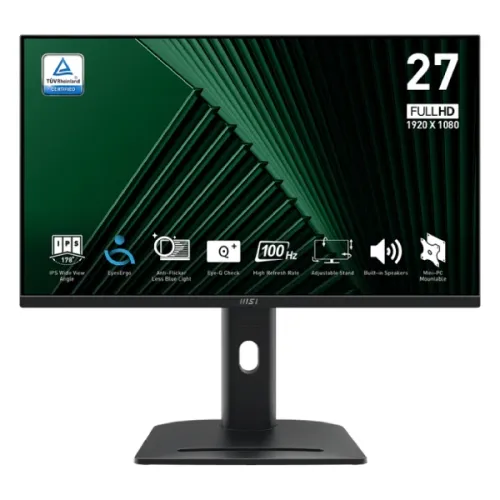
The MSI PRO MP275PG is a 27-inch Full HD IPS business monitor with a 100Hz refresh rate, Adaptive-Sync, built-in 2 × 2W speakers and a fully adjustable stand. It provides HDMI, DisplayPort and VGA inputs, HDR Ready support and a VESA mounting pattern. This guide distinguishes its standard 100Hz model from similarly named variants and labels Bangladesh seller prices as observations only.
Product identity and intended use
The MSI PRO MP275PG is a 27-inch Full HD IPS business monitor with refresh up to 100Hz. It is designed for general productivity, document work, web browsing, video, and home or office use. Its adjustable stand and built-in speakers support a practical workstation setup, while the input mix can accommodate newer desktop connections and older VGA computers.
This exact model should be distinguished from similarly named MP275PG E14, MP275PG E14 variants and other MP275 products. Related versions may have different refresh rates, port combinations or product features. This page follows the standard PRO MP275PG model number shown in the MSI datasheet; check the label and invoice before purchase.
Screen size, resolution and viewing distance
The 27-inch flat IPS panel displays 1920 × 1080 pixels in a 16:9 format. Its 0.3114mm pixel pitch and 597.888 × 336.312mm active area provide a large physical screen for office applications. Text and icons appear larger than on a 27-inch QHD monitor, while fine detail and usable workspace per pixel are lower.
Full HD can suit users who prefer larger interface elements or have a computer that handles 1080p comfortably. People who read dense spreadsheets, edit high-resolution images or keep many windows open may prefer QHD. Viewing distance, operating-system scaling, eyesight and application layout all influence which resolution feels comfortable.
100Hz refresh and Adaptive-Sync
MSI specifies 100Hz refresh and an Adaptive-Sync active range of 48–100Hz. At the top refresh mode, the screen can update more frequently than a standard 60Hz office display. This may make scrolling, pointer movement and supported video or games appear smoother, provided the source produces frames at a suitable rate.
Adaptive-Sync can coordinate refresh with variable frame delivery from a compatible system, helping reduce tearing within its supported range. It does not create extra frames or guarantee a fixed frame rate. Driver, graphics hardware, input, cable and selected mode affect behavior. The standard MP275PG’s 100Hz rating should not be confused with higher-rate E14 variants.
Response time and motion expectations
The datasheet lists 1ms MPRT and 4ms GtG. MPRT describes moving-picture response using a different method from gray-to-gray pixel transitions. The numbers are not directly comparable, and a 1ms headline figure does not mean every pixel changes in one millisecond in every mode. Refresh, overdrive settings and scene contrast affect visible motion.
For office use, the display is intended for readable and steady everyday images; its 100Hz refresh can make interaction feel more fluid than 60Hz. Competitive players who need the highest motion clarity may prefer a monitor designed for 144Hz, 180Hz or higher. Assess the actual panel at a preferred setting rather than relying on one response-time number.
Color, brightness and HDR Ready
MSI specifies 300 cd/m² typical SDR brightness, 1300:1 contrast and 16.7 million colors with 8-bit processing described as 6-bit plus FRC. The datasheet lists sRGB 95% coverage and 90% overlap under CIE 1976 and DCI-P3 74% coverage. Color gamut figures describe coverage, not a measured factory calibration result for the individual monitor.
MSI uses the term HDR Ready, but the model specification does not list VESA DisplayHDR certification or a high peak-brightness tier. HDR signal handling should not be interpreted as equivalent to a dedicated HDR display. For color-critical work, calibrate the individual screen and use color-managed applications; for everyday tasks, choose a neutral preset and adjust brightness to the room.
Inputs, audio and connected devices
The model includes one HDMI 1.4b, one DisplayPort 1.2a and one D-Sub/VGA input. A headphone output and line-in are listed, along with built-in 2 × 2W speakers. This selection supports common work computers, audio peripherals and some older systems. The model does not list USB-C video or a USB data hub, so plan separate connections for those functions.
The input choices allow the user to connect more than one computer source, but the monitor’s menu is used to select the active input. The presence of a VGA connector can help when using older office PCs or equipment. Use a digital input when available, and check the source resolution and refresh settings if the expected 100Hz mode is unavailable.
Stand adjustments, VESA and security
The included stand supports height from 0 to 130mm, tilt from -5° to +20°, swivel from -45° to +45° and pivot from -90° to +90°. The range can help position the screen for sitting or standing desks, reduce glare, and rotate the display for portrait documents. Adjust the panel carefully and avoid pressing the LCD surface.
MSI lists a 100 × 100mm VESA pattern and Kensington lock. Confirm that a monitor arm supports the unit’s weight and that its screws do not protrude too far into the display housing. With the stand, the model measures about 612.1 × 226.9 × 561.4mm (W × D × H), so check desk depth and clearance before placement.
Eye comfort and routine office use
The anti-glare surface, Flicker-Free and Low Blue Light features are intended to support comfortable routine viewing. Their effect depends on room lighting, brightness and user preference. Low-blue-light modes can shift white balance toward warmer tones; disable color-altering features when judging color and select a comfortable mode for reading or calls.
Place the monitor at a suitable distance and height, keep text at a readable scale, avoid strong reflections and take breaks during long sessions. These features are not a medical guarantee against eye strain. A good workstation setup also includes balanced ambient light, suitable chair and desk height, and camera placement near eye level for video calls.
Power and physical details
The datasheet lists an internal power board, 100–240V AC at 50/60Hz, on-mode consumption around 21W, standby up to 0.5W and off-mode up to 0.3W. Actual power use depends on brightness and operating mode. Use the supplied power cord and connect the display to a properly grounded outlet according to local electrical guidance.
The listed net weight is 6.03kg and gross package weight is 8.95kg. Dimensions and stand height can vary slightly by measurement method and regional packaging. Leave room for the stand footprint, cables and ventilation, and avoid placing the monitor where it can be knocked or exposed to moisture.
Bangladesh seller price, stock and warranty
Bangladesh retailer pages checked for this review list the standard PRO MP275PG at prices from about ৳23,800 to ৳25,500. Four Star and Tech Heaven pages showed In Stock; Creatus showed In Stock at ৳24,999. Seller pages can be stale or inconsistent, so verify current stock, exact model code, delivery, payment terms and final checkout price directly with the seller. These are not BiponiBD offers.
MSI’s datasheet lists a 36-month warranty, while local service conditions depend on the seller and serial. Confirm who provides the Bangladesh warranty, whether the serial is eligible, what dead-pixel threshold applies, whether panel or stand issues are covered and which documents are needed. Keep the purchase invoice and original packaging if the service policy requires them.
Who should consider alternatives
The MP275PG may suit users who want a relatively large 27-inch screen, an adjustable stand, common HDMI/DP/VGA connections and a refresh rate above 60Hz for office work and light entertainment. Its built-in speakers and ergonomic range can reduce desk accessories and make it easier to change viewing position.
It may not fit users who need QHD detail at 27 inches, certified HDR performance, USB-C docking, a USB hub, high-powered speakers or a competitive gaming refresh above 100Hz. Compare the complete model suffix, input list, stand and local warranty before choosing between standard MP275PG and E14 or other variants. No hands-on test is claimed for this product entry.
Features
- 27-inch IPS panel with 1920 × 1080 Full HD resolution and a 16:9 aspect ratio.
- 100Hz refresh rate and Adaptive-Sync support with a listed 48–100Hz activated range.
- 1ms MPRT and 4ms GtG response-time figures use different measurement methods.
- 300 cd/m² SDR typical brightness, 1300:1 contrast and 178-degree viewing angles.
- HDMI 1.4b, DisplayPort 1.2a and D-Sub/VGA inputs plus line-in and headphone connections.
- Built-in 2 × 2W speakers for convenient basic audio.
- Height adjustment up to 130mm, tilt, swivel and pivot support for flexible desk setup.
- Anti-glare surface, Flicker-Free and Low Blue Light display features.
- HDR Ready label; MSI does not list a VESA DisplayHDR certification for this model.
- 100 × 100 mm VESA mounting and Kensington lock.
- 16.7 million colors with 8-bit (6-bit + FRC) panel processing.
- Internal power board, 100–240V input and 21W on-mode power specification.
Pros
- The 27-inch screen gives more physical viewing area than 23.8–24-inch office monitors.
- 100Hz can make desktop motion and supported content feel smoother than a 60Hz display.
- Height, tilt, swivel and pivot adjustment help fit varied desks and reading positions.
- Built-in speakers, multiple video inputs and a headphone jack simplify an everyday work setup.
- Adaptive-Sync, anti-glare and eye-care features add flexibility for mixed office and home use.
Cons
- Full HD across 27 inches is less sharp than QHD at the same screen size; consider text density and viewing distance.
- 100Hz is below gaming-focused 144Hz–180Hz displays and may not suit users prioritizing competitive gaming.
- HDR Ready is not the same as a certified high-brightness HDR display.
- 1ms MPRT and 4ms GtG figures are not interchangeable measurements or guaranteed for every mode.
- Bangladesh seller pages show different prices and stock snapshots; confirm exact model and warranty before ordering.
Specifications
- Brand: MSI
- Model: PRO MP275PG
- DisplaySize: 27 inches (68.58 cm)
- PanelType: IPS
- Resolution: Full HD 1920 × 1080
- AspectRatio: 16:9
- RefreshRate: 100Hz; Adaptive-Sync range 48–100Hz
- ResponseTime: 1ms MPRT / 4ms GtG
- Brightness: 300 cd/m² SDR typical
- ContrastRatio: 1300:1 typical; 100,000,000:1 dynamic contrast
- ViewingAngle: 178° horizontal / 178° vertical
- PixelPitch: 0.3114 × 0.3114 mm
- ActiveDisplayArea: 597.888 × 336.312 mm
- ColorDepth: 8-bit (6-bit + FRC), 16.7 million colors
- ColorGamut: sRGB 95% coverage / 90% overlap (CIE 1976); DCI-P3 74% (CIE 1976)
- HDR: HDR Ready; no VESA DisplayHDR certification confirmed
- Inputs: 1 × HDMI 1.4b; 1 × DisplayPort 1.2a; 1 × D-Sub/VGA; line-in; headphone-out
- Speakers: 2 × 2W built-in speakers
- AdaptiveSync: Adaptive-Sync
- EyeCare: Anti-glare; Flicker-Free; Low Blue Light
- Ergonomics: Height 0–130mm; tilt -5° to +20°; swivel -45° to +45°; pivot -90° to +90°
- VesaMount: 100 × 100 mm
- Security: Kensington lock
- Power: Internal power supply; 100–240V AC, 50/60Hz; 21W on-mode; standby ≤0.5W
- Dimensions: 612.1 × 226.9 × 561.4 mm (W × D × H, stand included)
- Weight: 6.03 kg net / 8.95 kg gross
- Warranty: MSI global datasheet lists 36 months; confirm Bangladesh service provider and serial eligibility with seller
Frequently asked questions
What is the size and resolution of MSI PRO MP275PG?
It is a 27-inch IPS monitor with Full HD 1920 × 1080 resolution and a 16:9 aspect ratio.
What refresh rate does it support?
MSI specifies 100Hz, with Adaptive-Sync activated range of 48–100Hz. The connected computer, cable and selected display mode must support the rate.
Is it suitable for gaming?
It can handle casual gaming and smoother desktop motion at up to 100Hz. Competitive players seeking 144Hz or higher should compare faster gaming-focused monitors and check their GPU’s frame rate.
What are the response-time ratings?
MSI lists 1ms MPRT and 4ms GtG. These use different methods and should not be treated as equivalent or as a promise of the same response under every setting.
Does it support HDR?
MSI labels it HDR Ready. The datasheet does not identify VESA DisplayHDR certification; typical SDR brightness is 300 cd/m².
What ports does it have?
The manufacturer lists one HDMI 1.4b, one DisplayPort 1.2a and one D-Sub/VGA input, plus line-in and headphone-out connections.
Does it have built-in speakers?
Yes. The MSI datasheet lists 2 × 2W speakers for basic audio. External speakers or headphones can be preferable for fuller sound.
Can I adjust the stand?
The stand supports height adjustment up to 130mm, tilt from -5° to +20°, swivel from -45° to +45°, and pivot from -90° to +90°.
Can the monitor be mounted on an arm?
MSI lists a 100 × 100 mm VESA pattern. Check the arm’s load capacity, screw length and clearance before mounting.
Is the panel bright enough for a bright room?
MSI specifies 300 cd/m² typical SDR brightness. Strong direct light or window reflections may still reduce perceived contrast; adjust screen position and room lighting.
What warranty applies in Bangladesh?
MSI’s datasheet lists 36 months, but local provider, serial eligibility and exclusions vary by region. Confirm the terms with the seller and keep the invoice.
What price and stock are available in Bangladesh?
Retailer pages checked showed approximately ৳23,800–৳25,500 and stock labels varied. These are seller snapshots, not a BiponiBD offer; verify the exact PRO MP275PG model and checkout stock.
Source note: MSI product specification and datasheet establish technical values. Bangladesh retailers are used for price, stock and warranty observations only. No BiponiBD offer or hands-on test is claimed.