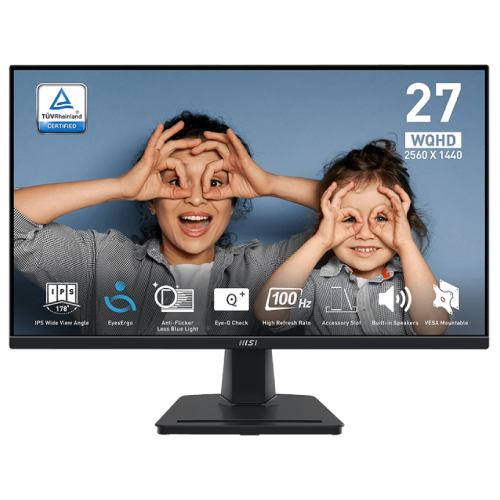
MSI PRO MP275Q is a 27-inch WQHD business monitor built for office work, study and everyday entertainment. MSI’s exact-model specification lists 2560 × 1440 resolution, an IPS panel and a 100Hz refresh rate. It also includes Adaptive Sync, a tilt stand, built-in 2W × 2 speakers and a headphone output. This page is specifically for PRO MP275Q; it is not the newer PRO MP275Q E14 variant, which has different refresh-rate specifications. Check the model label carefully because local shops may place the E14 description beside the older 100Hz model.
Screen size and resolution
The 27-inch panel uses a 16:9 format and a native 2560 × 1440 WQHD resolution. MSI lists an active display area of 596.736 × 335.664 mm and a 0.2331 mm pixel pitch. WQHD provides more desktop detail and working room than Full HD at the same screen size, which can help with spreadsheets, web pages, documents and side-by-side windows. It also requires more graphics performance than Full HD for games. Use the native resolution for a one-to-one image and adjust operating-system scaling if interface elements feel too small.
Refresh rate and response
MSI lists a 100Hz maximum refresh rate at 2560 × 1440 through both HDMI and DisplayPort. The listed response values are 1ms MPRT and 4ms GtG; these are different measurement methods and should not be treated as interchangeable guarantees for every pixel transition. A 100Hz display can show up to 100 refreshes per second when the source and selected mode support it. Enable the available mode through the operating system or graphics settings after connecting. The product should not be confused with the MP275Q E14’s 144Hz listing.
Adaptive Sync
MSI lists Adaptive Sync support and shows WQHD up to 100Hz on both HDMI and DisplayPort. Variable refresh can coordinate the monitor’s refresh with a compatible source’s frame delivery and may reduce tearing when supported and enabled. The exact behavior depends on the graphics card, driver, cable, port and operating range. Adaptive Sync is a feature label; do not infer every vendor-specific certification from that phrase. Check the current compatibility information for the GPU and the delivered model before relying on a particular G-SYNC or FreeSync certification.
Panel, brightness and image characteristics
The manufacturer specifies an IPS panel, 300 cd/m² brightness, 1300:1 contrast, 178° horizontal and vertical viewing angles, anti-glare surface treatment and 100% CIE 1976 sRGB coverage. MSI lists 1.07 billion display colors and 10-bit output using 8-bit plus FRC. Color gamut and bit-depth labels describe the display’s stated capability; they do not prove calibration accuracy, uniformity or suitability for a color-critical workflow. For professional image work, confirm measured calibration and profile behavior rather than relying on coverage alone.
HDR Ready wording
MSI uses the term HDR Ready in the technical sheet. That wording does not identify a VESA DisplayHDR certification or a specific peak HDR brightness. The listed typical brightness is 300 cd/m² and no peak HDR luminance or local-dimming system is specified on the page. Treat HDR Ready as signal/feature wording and keep expectations appropriate to the documented display characteristics. If certified HDR performance matters, request an exact certification and model-region document rather than assuming one from the product title.
Video and audio connections
The listed ports are two HDMI 2.0b inputs, one DisplayPort 1.2a input and one headphone-out jack. MSI specifies 2560 × 1440 at up to 100Hz over both HDMI and DisplayPort. There is no USB-C port or USB hub listed. Use an output and cable compatible with the source and requested timing; adapters or docks can limit resolution or refresh. Audio can be heard through the built-in speakers or routed through the headphone output. Confirm regional cable accessories with the seller.
Built-in speakers
Two 2W speakers are included according to MSI. They can handle basic system audio, video calls or casual media playback without a separate speaker set. A headphone output is also listed for private listening or routing audio to external speakers. The published specification does not describe a subwoofer or advanced spatial audio, so external speakers may be preferable for stronger bass or louder room playback. If audio does not play, check the selected HDMI/DisplayPort output device and the monitor’s volume settings.
Stand, tilt and mounting
The stand supports tilt from -5° to +20°. MSI lists 100 × 100 mm VESA mounting and a Kensington lock. The model’s specification does not list height adjustment, swivel or pivot, so those movements should not be assumed. A compatible monitor arm can provide more positioning flexibility if its plate and fasteners match the VESA pattern and its load rating supports the display. Check desk height, viewing distance and rear clearance before installation. The monitor should sit on a stable surface and the LCD panel should not be pressed while adjusting the stand.
Dimensions, weight and power
MSI lists dimensions of 614.0 × 456.7 × 207.2 mm (W × H × D), carton dimensions of 688 × 448 × 128 mm, net weight of 4.10 kg and gross weight of 5.54 kg. The power type is internal, with 100–240V at 50–60Hz input. These figures help with desk, shelf and shipping planning; keep the carton clearance in mind when transporting the monitor. Power consumption values are not shown in the current product specification page, so no consumption number is inferred here.
Work, study and everyday use
WQHD resolution offers useful workspace for text-heavy work and multitasking, while the IPS panel and anti-glare treatment support common office environments. The 100Hz refresh rate can make scrolling and pointer motion appear smoother than a basic 60Hz panel. Adaptive Sync provides a variable-refresh option when supported by the source. Built-in speakers and multiple HDMI inputs can simplify a home setup. The PRO MP275Q is positioned as a business/productivity monitor; choose a specialist high-refresh gaming model if competitive gaming response or a much higher refresh ceiling is the main goal.
EyesErgo and eye comfort
MSI positions the PRO MP275Q within its EyesErgo business monitor line and lists Eye-Q Check-related tools on product materials. Such settings may help users adjust display modes and check viewing habits, but they do not replace good lighting, posture, breaks or medical advice. The anti-glare surface, IPS viewing angles and 100Hz refresh provide practical display characteristics; use brightness and color settings that feel comfortable in the room. Feature names and bundled software availability may differ by region, so review the manual and support downloads for the delivered model.
Compatibility and device setup
MSI lists compatibility with PC, Mac, PS5, PS4, Xbox, mobile devices and notebooks, subject to the source’s video output and connection. The monitor itself does not increase console or computer frame rates. For a computer, connect through HDMI 2.0b or DisplayPort 1.2a and select 2560 × 1440 at 100Hz if the source offers it. For a console, review the console’s supported output modes; 100Hz may not match every console mode. Audio output and display timing can depend on the selected cable, adapter and source settings.
Exact model and Bangladesh market notes
MSI’s specification page confirms the 100Hz PRO MP275Q details. Some Bangladesh pages use similar wording for PRO MP275Q E14, a different model listed at 144Hz. Do not copy the E14 refresh rate or its commercial warranty terms into this record. Local retailer snapshots for PRO MP275Q show changing price and stock; those are not BiponiBD offers. The local importer, serial-specific warranty, dead-pixel rules and box accessories must be confirmed with the seller for the exact unit.
Who may prefer the PRO MP275Q
This monitor may suit office users, students and home users who want QHD detail, an IPS viewing angle, a moderate 100Hz refresh rate, Adaptive Sync, built-in speakers and common HDMI/DisplayPort connections. It may be less suitable for buyers who need a height-adjustable stand, USB-C one-cable laptop setup, high-power USB charging, HDR certification, a gaming refresh rate above 100Hz or verified local serial warranty before purchase. Compare the exact model suffix, port needs, stand movement and intended graphics output before ordering.
Purchase and warranty checklist
Before paying, verify the rear label says PRO MP275Q and not PRO MP275Q E14. Confirm two HDMI 2.0b ports, DisplayPort 1.2a, headphone output, included cable, stand and serial-specific local warranty. Ask the seller to state the coverage duration, service location, dead-pixel policy, adapter/cable terms and return period in writing. At setup, choose 2560 × 1440 and the available 100Hz mode, then enable Adaptive Sync only if the source supports it. Keep the invoice, carton and serial record until the return window and warranty registration steps are complete.
Summary
MSI PRO MP275Q is a 27-inch 2560 × 1440 IPS monitor with a manufacturer-listed 100Hz refresh rate, 1ms MPRT / 4ms GtG, Adaptive Sync, 300 cd/m² brightness, 1300:1 contrast, 100% CIE 1976 sRGB, two HDMI 2.0b inputs, DisplayPort 1.2a, headphone output and 2W × 2 speakers. Its stand tilts and supports VESA 100 × 100 mm mounting. It is distinct from the PRO MP275Q E14. Verify the exact local unit and written warranty before purchase.
Key features
- 27-inch WQHD 2560 × 1440 IPS display
- 100Hz maximum refresh rate over HDMI and DisplayPort
- 1ms MPRT / 4ms GtG response ratings
- Adaptive Sync support
- 300 cd/m² brightness and 1300:1 contrast
- 100% CIE 1976 sRGB and 1.07 billion colors (8-bit + FRC)
- HDR Ready wording; no VESA HDR certification specified
- Two HDMI 2.0b and one DisplayPort 1.2a
- Headphone-out and two 2W speakers
- Tilt adjustment from -5° to +20°
- 100 × 100 mm VESA mounting and Kensington lock
- EyesErgo / Eye-Q Check productivity features
Advantages
- QHD resolution provides detailed workspace at 27 inches.
- MSI confirms 100Hz at full resolution over both listed video inputs.
- IPS viewing angles and anti-glare surface suit typical office use.
- Two HDMI inputs, DisplayPort, speakers and headphone output provide flexible connectivity.
- VESA 100 × 100 mm mounting and Adaptive Sync are listed.
Limitations
- 100Hz is a moderate refresh ceiling compared with gaming models above 144Hz.
- The stand lists tilt only; height, swivel and pivot are not specified.
- No USB-C, USB hub or high-wattage laptop charging is listed.
- HDR Ready does not confirm a VESA HDR certification or peak HDR brightness.
- Local BiponiBD offer and serial-specific warranty remain unverified.
Frequently asked questions
What is the resolution of MSI PRO MP275Q?
The manufacturer lists 2560 × 1440 WQHD at 16:9.
What is the refresh rate?
MSI lists 100Hz at 2560 × 1440 over HDMI and DisplayPort.
What response time is specified?
MSI lists 1ms MPRT and 4ms GtG, which are different measurement methods.
Does it support Adaptive Sync?
Yes. MSI lists Adaptive Sync support; behavior depends on a compatible source and configuration.
Does it have HDR?
MSI uses HDR Ready wording; the listed page does not identify VESA DisplayHDR certification or peak HDR brightness.
Which video ports are available?
The specification lists two HDMI 2.0b inputs and one DisplayPort 1.2a input.
Does it have built-in speakers?
Yes. MSI lists two 2W speakers and one headphone-out jack.
Can the stand adjust in height?
The product specification lists tilt from -5° to +20°; height, swivel and pivot adjustment are not listed.
Can I mount it on an arm?
Yes. MSI lists 100 × 100 mm VESA mounting; verify the arm and screw compatibility.
Is this the same as PRO MP275Q E14?
No. E14 is a different model; local pages list different refresh specifications. Check the full suffix.
Does it have USB-C?
MSI lists HDMI and DisplayPort but no USB-C or USB hub for PRO MP275Q.
What warranty applies in Bangladesh?
Warranty terms depend on the local importer and seller. Confirm written serial-specific coverage before purchase.
Manufacturer source: MSI PRO MP275Q official specification and MSI datasheet. Bangladesh seller offers and warranty are not a BiponiBD offer. Reviewed 2026-11-08T22:36:11.977Z.