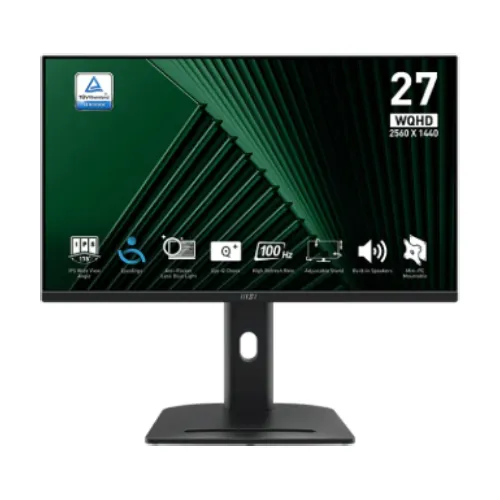
Exact model overview
The MSI PRO MP275QPG is a 27-inch flat IPS business and productivity monitor with 2560 × 1440 WQHD resolution and a maximum refresh rate of 100Hz. MSI’s exact-model product specification and user manual list 300 nits SDR brightness, 1300:1 contrast, 1ms MPRT and 4ms GtG response figures, 1.07 billion displayed colors using 8-bit plus FRC, Adaptive-Sync and two integrated 2W speakers. It includes a height-adjustable stand, HDMI, DisplayPort and headphone output. This is model MP275QPG; similarly named MP275Q or MP275 models can have different features.
WQHD resolution and 27-inch workspace
The 27-inch panel has a 16:9 aspect ratio and native resolution of 2560 × 1440 pixels. WQHD provides more desktop area and finer detail than Full HD at this screen size, which can be useful for documents, spreadsheets, browser windows, timelines and high-resolution media. Set the computer to the native resolution for sharp pixel mapping. Increase interface scaling if text is too small. Rendering games at WQHD requires more graphics power than Full HD, so game performance varies with the computer and settings.
IPS panel and flat screen
MSI specifies an IPS panel with a flat screen and 178-degree horizontal and vertical viewing angles. The wide stated angles support viewing from different positions, though a centered seat is usually best for consistent brightness and color. The typical contrast ratio is 1300:1. Panel type and gamut do not prove calibration accuracy for a particular unit. For work where color decisions matter, calibrate the display and use color-managed software. The anti-glare surface helps reduce some reflections but cannot remove strong light sources from the viewing area.
100Hz refresh for work and everyday motion
The manufacturer lists 100Hz maximum refresh at WQHD. A higher refresh than common 60Hz screens can make scrolling, pointer movement and supported game motion appear smoother when the computer supplies appropriate frames. It does not make applications or games render faster by itself. To select 100Hz, connect with a suitable HDMI 2.0b or DisplayPort cable, choose 2560 × 1440 and select an available refresh rate in the operating system. The exact signal table lists WQHD up to 100Hz over HDMI and DisplayPort.
Adaptive-Sync and compatibility
MSI lists Adaptive-Sync technology. When supported by the monitor, graphics card, driver and selected timing, variable refresh can synchronize screen updates with changing frame output and reduce tearing in compatible situations. It does not generate additional frames and cannot remove every kind of stutter or input latency. Enable the feature in the monitor and graphics software as needed. If it is unavailable, check the connection, driver and display mode. For office work, Adaptive-Sync can remain unused without affecting ordinary desktop operation.
Response time explained
MSI publishes 1ms MPRT and 4ms GtG response values. MPRT and gray-to-gray describe different aspects of motion behavior; neither number is an input-lag measurement, and neither means every pixel transition always completes at that speed. Backlight strobing or response settings can affect brightness and artifacts. Use the mode that produces clear motion without visible overshoot. For document and office use, balanced image quality may be more useful than the most aggressive response setting.
Brightness, contrast and color gamut
The PRO MP275QPG is specified at 300 nits SDR brightness and 1300:1 typical contrast. MSI lists 100% sRGB and 79% DCI-P3 using CIE 1976 values. Gamut figures describe a color range and are not a factory calibration certificate; coverage, area and measurement standards should not be compared as if identical. Set brightness for the room and calibrate the actual unit for color-sensitive workflows. The product specification reviewed does not identify a VESA DisplayHDR certification, so no such HDR certification is claimed here.
Color depth and image work
MSI lists 1.07 billion displayed colors and 10-bit signal processing using an 8-bit panel plus frame-rate control. This can provide smoother gradation with compatible source settings, but does not by itself guarantee banding-free output, color accuracy or professional calibration. Use a suitable graphics output and color depth setting, and check that the application and content support the selected mode. For web and general office work, accurate sRGB output is usually more relevant than selecting the widest possible gamut.
Video ports and signal timing
The monitor provides two HDMI 2.0b inputs and one DisplayPort 1.2a input. MSI lists WQHD at up to 100Hz through HDMI and DisplayPort. The manual also notes HDMI CEC support and compatibility with PC, Mac, PlayStation, Xbox, mobile and notebook devices, subject to the source device’s output. Use a suitable cable and connect directly when troubleshooting. Docks, adapters and KVM devices can constrain resolution, refresh or synchronization. No USB-C video input is listed for this exact monitor.
Speakers and headphone output
The PRO MP275QPG has two integrated 2W speakers and one headphone output. Built-in speakers can handle basic calls, notifications and everyday playback without separate desktop speakers, although they are not a substitute for a dedicated audio system when stronger bass or room-filling sound is needed. For headphones, connect them to the headphone-out jack and choose the monitor as the playback device when required. The jack is an output, not a microphone input. Check system volume, mute and output selection if sound is missing.
Ergonomic stand adjustments
The supplied stand supports tilt from -5° to 20°, swivel from -45° to +45°, pivot from -90° to +90° and 0–130mm height adjustment. These movements can help position the display for a desk, shared workspace or portrait document view. Adjust the screen while supporting it and leave slack in the power and video cables. Pivoting to portrait may require changing the operating system’s display orientation. Ensure the base is stable and avoid forcing the joint beyond its range.
VESA mounting and accessory slot
MSI lists a 100 × 100mm VESA mounting pattern and includes a VESA plate and screws among the listed accessories. The display also includes a Kensington lock provision and a stand accessory slot. Before installing an arm, verify its load rating, screw length and instructions for the included plate. Secure the panel safely and route cables so movement does not pull on connectors. The lock slot is for a compatible security cable; it is not a substitute for a stable stand or wall mount.
Dimensions and weight
MSI specifies dimensions of approximately 614.0 × 226.9 × 562.6mm with the stand and a carton size of 831 × 133 × 448mm. Net weight is 6.26kg and gross package weight is 9.32kg. Confirm regional packaging before arranging shipment or a close-fit installation. Measure desk width, depth, shelf clearance and cable space before purchase. The stand footprint and screen height should be considered together, especially if the monitor will sit beneath a shelf or on a compact workstation.
Power and energy use
The monitor uses an internal power board and accepts 100–240V AC at 50/60Hz. MSI lists typical operating power below 26W, standby below 0.5W and off mode below 0.3W. Actual consumption varies with brightness, connected devices and operating state. Use a properly grounded outlet and the supplied power cord. Keep ventilation clear and disconnect the monitor before moving or cleaning it. Do not use a replacement cable or power accessory with unsuitable electrical ratings.
Eye comfort and daily use
MSI promotes Eye-Q Check features and practical viewing tools for work and home. The exact monitor settings can help users assess viewing distance and posture, but they are not medical treatment. Comfort depends on brightness, room lighting, text size, viewing distance and breaks. Position the anti-glare panel to reduce reflections and set readable scaling for long documents. Color modes may alter image appearance; return to a neutral mode when accurate color matters. Take regular breaks during extended screen sessions.
Business, study and casual gaming
With WQHD resolution, IPS viewing angles, 100Hz refresh, Adaptive-Sync and integrated speakers, the MP275QPG is positioned for productivity and general home use while also supporting casual gaming. The 100Hz maximum can make everyday motion smoother than a 60Hz display, but competitive gamers seeking very high refresh rates may prefer a gaming-focused model. For laptops, verify that the chosen port can output WQHD at 100Hz. For consoles, check the device’s own output modes and use a compatible HDMI input.
Advantages and practical trade-offs
The MP275QPG combines a spacious 27-inch WQHD IPS panel with 100Hz refresh, Adaptive-Sync, 1300:1 typical contrast, integrated stereo speakers and a stand with height, tilt, swivel and pivot adjustments. Two HDMI inputs plus DisplayPort allow several source devices. Trade-offs include the 100Hz ceiling compared with dedicated high-refresh gaming monitors and color gamut figures that do not replace calibration for professional work. The built-in 2W speakers are convenient but modest. Check the exact product suffix and regional warranty before ordering.
Bangladesh warranty, offer and delivery
MSI’s global product specification documents features but does not guarantee the warranty tied to a specific Bangladesh serial number or the current BiponiBD offer. The existing catalog warranty says three years; confirm it with the seller and authorized local service channel. Ask when coverage begins, what panel defects qualify, whether the invoice and serial are required, and where service is provided. Price, stock, delivery, payment and return conditions can change. Review the current product offer at checkout and keep the invoice and packaging.
Setup and troubleshooting
Connect the supplied power cord and a compatible HDMI 2.0b or DisplayPort 1.2a cable. Select 2560 × 1440 and choose 100Hz if it is offered by the source and monitor. If 100Hz is missing, verify the cable, port, graphics output, driver and signal timing. For audio, select the display playback endpoint and check its volume or headphone connection. Adjust stand height and tilt for a comfortable posture. If the display behaves unexpectedly, restore a stable mode and consult the exact manual before changing advanced settings.
Specification summary
MSI PRO MP275QPG: 27-inch flat IPS, WQHD 2560 × 1440, 16:9, 100Hz, 300 nits SDR, 1300:1 typical contrast, 100% sRGB/79% DCI-P3 (CIE 1976), 1.07B colors (8-bit + FRC), 1ms MPRT/4ms GtG and Adaptive-Sync. Inputs: HDMI 2.0b × 2 and DisplayPort 1.2a × 1; audio: headphone out and 2W × 2 speakers. Stand: tilt, swivel, pivot and 0–130mm height. VESA: 100 × 100mm. Verify Bangladesh warranty and live commercial terms.