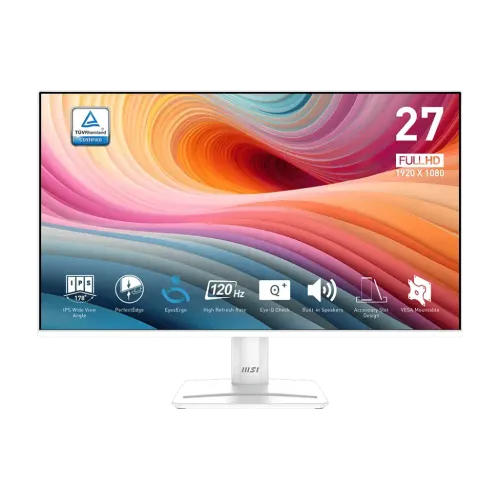
MSI PRO MP275W E2 27-inch FHD 120Hz IPS Monitor is a white 27-inch Full HD IPS display with 120Hz refresh, Adaptive-Sync and an anti-glare surface. MSI specifies 300 cd/m² brightness, 1500:1 contrast, HDMI 2.0, DisplayPort 1.2a, VGA, two 2W speakers and 100 × 100mm VESA mounting. MSI documents FHD up to 120Hz over HDMI/DisplayPort and up to 60Hz over VGA.
Full HD workspace
A 27-inch 1920 × 1080 display provides a spacious physical canvas for documents, browsers, video and common desktop applications. It uses the same pixel count as smaller Full HD screens, so fine details appear less dense than on a 27-inch QHD model. For standard office work, study and entertainment, this can be an acceptable balance when budget, broad compatibility and readable interface elements matter more than maximum sharpness.
Use the native resolution for clean pixel mapping. If text is too small, adjust operating-system scaling and application font size rather than selecting a non-native mode. Fine design work and dense spreadsheets may benefit from QHD; standard productivity and streaming commonly work well at Full HD. Viewing distance and scaling influence perceived clarity, so consider how the monitor will sit on the actual desk.
IPS panel, brightness and colour
MSI specifies an IPS panel, 300 cd/m² brightness, 1500:1 contrast and 178-degree horizontal and vertical viewing angles. IPS technology is useful when viewing from off-centre positions or sharing the screen. The datasheet states 16.7 million colours and 116% sRGB coverage under CIE1976. These figures describe the published colour range, not factory calibration accuracy, panel uniformity or measured performance of an individual unit.
Adjust brightness to the room and position the anti-glare display to reduce reflections. A wide gamut percentage can result in vivid colours but does not guarantee accurate colour reproduction. For photo, print or client work, use a calibrated workflow and colour-managed software. Ordinary browsing, documents and video are less demanding, though room lighting and viewing angle still affect appearance.
120Hz refresh and connection modes
The 120Hz refresh rate can make scrolling, pointer movement and compatible games appear smoother than 60Hz. MSI’s compatibility notes specify Full HD up to 120Hz over HDMI and DisplayPort, while VGA supports Full HD up to 60Hz. The computer, driver and cable must also support the desired mode. After connection, select 120Hz in the operating system’s advanced display settings and verify that the correct digital input is active.
A 120Hz panel does not generate extra frames from a slower computer. The GPU and application determine the actual frame output. If the mode is missing, check the cable, input, graphics driver and whether a dock or adapter limits output. Try a direct connection to the computer and a known suitable cable. VGA cannot use the 120Hz mode specified for HDMI and DisplayPort.
MPRT and GTG response claims
MSI lists 1ms MPRT and 4ms GTG. MPRT and grey-to-grey response are different measurement approaches and should not be compared as identical promises. MPRT describes motion-picture response under a defined condition; GTG describes pixel transitions between shades. Transition behaviour depends on the colour change, overdrive setting and refresh mode. The numbers are manufacturer claims, not a guarantee that every transition completes in the same time or that all motion blur disappears.
Try the available response or overdrive options using the games and applications you actually use. Aggressive settings can produce inverse trails or overshoot. Adaptive-Sync can coordinate refresh with compatible frame output, but results depend on the graphics card, driver and operating range. If motion appears unstable, test with another cable and compare the display with variable refresh enabled and disabled.
Adaptive-Sync and device compatibility
MSI lists Adaptive-Sync and identifies compatibility with PC, Mac, PS5, PS4, Xbox, mobile and notebook devices. Variable refresh can reduce tearing when the display and source operate in a supported range. Enable the feature in the monitor menu or graphics driver where required. The FHD 120Hz ceiling remains the panel limit, and the connected device must output the chosen timing. A compatibility list does not mean every adapter, game or dock supports the same mode.
For consoles, review the console’s video settings and each game’s output capability. A phone or notebook may need a suitable adapter and may not provide 120Hz through every connector. If no image appears, select the matching input and confirm the source output. If variable refresh flickers, update the graphics driver, test a different cable or temporarily disable the feature to isolate the cause.
HDR Ready and image expectations
HDR Ready denotes signal compatibility in MSI’s information. The datasheet also specifies 300 cd/m² brightness and 1500:1 contrast, and does not list a local-dimming system. This should not be mistaken for a high-end HDR experience with strong local contrast. HDR impact depends on brightness, contrast, tone mapping, source mastering and application support. The display may accept HDR content, but its published characteristics set practical limits on highlights and dark-scene detail.
Compare HDR and SDR with the same content and adjust operating-system calibration when available. Some desktop environments alter SDR appearance while HDR is enabled globally. The monitor does not convert standard dynamic range into native HDR, and the source must contain HDR content. For general desktop work, SDR may look more predictable. Do not infer an unlisted peak-brightness rating or certification from the HDR Ready label.
Ports and built-in audio
MSI lists HDMI 2.0, DisplayPort 1.2a and D-Sub/VGA, plus line-in and headphone-out. Two built-in speakers are rated at 2W each. This is convenient for calls, alerts and casual media without adding speakers to the desk. The five-way navigator controls the on-screen menu, while a Kensington slot can accept a compatible cable lock in shared spaces. Check the regional package for the included video cable before purchase.
If there is no sound, select the monitor as the computer’s digital audio output and verify the system volume. External headphones can connect to the headphone jack; the line-in serves a different audio path. Small integrated speakers have limited bass and loudness, so use external speakers or headphones for music, movies and detailed game audio. For maximum refresh, use the digital HDMI or DisplayPort connection rather than VGA.
Tilt stand and mounting
The included stand tilts from -5° to +20°. MSI specifies a 100 × 100mm VESA pattern, so a compatible arm can provide broader positioning. Height, pivot and swivel are not listed for the stock stand. A desk riser can help position the display near eye level, while tilt helps direct the panel and reduce some reflections. The white finish and narrow-bezel design can suit a clean office or home setup.
Measure desk depth and rear clearance before installation. If using an arm, check its load rating and the fastener requirements in the product guide. Support the monitor while attaching it, avoid overtightening screws and keep cables clear of moving joints. MSI lists 611.9 × 447.7 × 206.8mm dimensions with stand and 3.66kg net weight. A VESA pattern alone does not confirm that every mount fits safely.
EyesErgo, Eye-Q Check and comfort
MSI describes EyesErgo as an eye-care solution and Eye-Q Check as a self-check and rest-reminder tool. These features can support intentional screen habits but cannot guarantee that fatigue will be prevented. Lighting, reflections, distance, font size, posture and session length all matter. The anti-glare coating can reduce some reflections, although bright direct light may still affect readability.
Set brightness for the room, enlarge text where needed and take regular breaks. Colour or low-blue-light modes may change the image, so use neutral settings for colour-sensitive tasks. If persistent discomfort occurs, adjust the setup and consult a qualified professional. These are general screen-use suggestions; the display features are not medical treatment.
Productivity, study and entertainment
The monitor’s 27-inch FHD screen, IPS viewing angles and 120Hz refresh support typical office work, web browsing, video calls and casual gaming. MSI’s PerfectEdge design can help create a visually aligned multi-display setup. Integrated audio can reduce desk clutter, while the accessory slot offers a place for a compatible phone or pen. The display is a business productivity model with a white housing and several common video inputs.
For multi-monitor use, align screen heights with a riser or VESA arms because the stock stand lacks height adjustment. Check brightness and colour appearance across the screens. For games, confirm that the computer can output FHD at a high frame rate. This model is not a QHD screen, USB-C dock or laptop charger; choose a monitor with those features when they are required.
Power and physical setup
MSI specifies an internal power board and 100–240V AC input at 50–60Hz. The datasheet lists 611.9 × 447.7 × 206.8mm dimensions, 688 × 505 × 128mm carton size and net/gross weights of 3.66kg/6.54kg. These measurements help plan desk placement and unpacking. Leave ventilation clear and route the power lead where it will not be pulled by a chair or foot traffic.
Unpack on a stable padded surface and follow the included assembly guide. Hold the frame instead of pressing the LCD panel. Inspect the screen, ports, stand, power lead and included accessories before discarding packaging. Keep purchase documents during the return period. Regional packages may differ, so confirm whether an HDMI or DisplayPort cable is included rather than assuming from product photos.
Bangladesh price and warranty
On 2026-11-08, Monarch showed ৳24,300 in stock, Creatus ৳23,300 in stock and UltraTech ৳23,400 out of stock. These independent seller observations can change with stock, delivery, payment method and promotions; they are not a BiponiBD offer. Confirm final payable price and availability directly with the seller. Check the exact MP275W E2 suffix so the white version is not confused with the related MP275 E2 model.
Local retailer pages advertise a three-year warranty, but MSI’s global datasheet does not confirm eligibility for a specific Bangladesh serial. Ask for the provider, service location, coverage start, exclusions, dead-pixel policy and claim procedure in writing. Check the serial and invoice and retain the warranty card. Seller or distributor terms determine local service, and an advertised period alone does not establish what a particular unit is covered for.
Who should consider this model
The PRO MP275W E2 can suit users who want a 27-inch IPS Full HD monitor, 120Hz digital input, built-in speakers, Adaptive-Sync and a white design for general office work, study and casual gaming. HDMI, DisplayPort and VGA provide flexibility for common devices. VESA mounting, anti-glare treatment and Eye-Q Check add setup options when the price and local warranty terms meet the buyer’s needs.
Consider another model if you need QHD or 4K detail at 27 inches, a height-adjustable stock stand, USB-C charging, stronger speakers, certified high-end HDR, calibration data or a higher refresh ceiling. Confirm the source can drive FHD 120Hz over the chosen digital port. If VGA is the only connection, MSI documents a 60Hz limit. Match the monitor to the computer, desk ergonomics and service route.
Sources and limits of this listing
MSI’s official PRO MP275W E2 datasheet is the authority for panel size and resolution, response methods, brightness, contrast, ports, speakers, VESA, dimensions, tilt and input timing. It documents HDMI and DisplayPort at FHD 120Hz and VGA at FHD 60Hz, along with two 2W speakers and line-in/headphone-out. Local retailer pages were used for Bangladesh price, stock and advertised local warranty, not as proof of MSI’s global technical specifications.
This listing does not claim a live BiponiBD offer, product review, serial-specific warranty, verified origin, GTIN or in-hand gallery inspection. Regional packaging and unit condition should be checked on delivery. MSI’s cited sRGB result uses CIE1976; it is not described as calibration accuracy. Source review and seller snapshots are time-bound, so technical details, price and availability should be confirmed again before purchase.
Sources and Bangladesh price observations
Checked 2026-11-08 against MSI’s official datasheet and local retailer pages. Monarch showed ৳24,300 in stock, Creatus ৳23,300 in stock and UltraTech ৳23,400 out of stock. These are seller snapshots, not a BiponiBD offer. Confirm live stock, final price and written warranty terms with the seller.