Pros
- Different pictured tools can support cleaning of accessible device surfaces
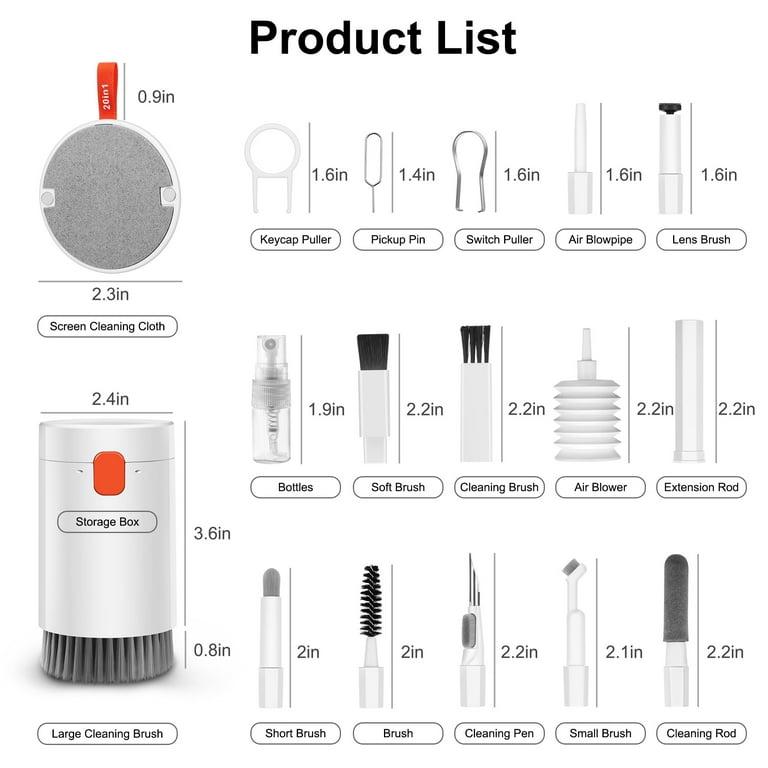
- Storage body and large brush are shown in the product image

All categories
 New condition
Computer Accessories
Q20
Q20 electronics cleaning kit, listed as 20-in-1, with brushes and small tools pictured for compatible keyboards and devices. Confirm the exact contents with the Store.
Current Store price
BDT 1,200
1 live offer; payable price may depend on the selected Store.
Compare store prices
undefined in stock
BDT 1,200
BDT 1,500
Loading history…
Product story
The Q20 is a multifunction electronics cleaning kit listed as 20-in-1. It is intended for routine cleaning around compatible keyboards, earbuds, phones, laptops and other devices. The product image shows a storage body with a large brush and several smaller accessories. Individual components and the way they are counted can vary by package, so ask the Store for the exact contents before ordering.
The illustration labels a screen cleaning cloth, large cleaning brush, smaller brushes, cleaning pen, air blower, bottle, extension rod, keycap puller and switch puller. A small pin and additional tips are also pictured. The image is a guide to the advertised kit rather than proof that every current package contains each component. Confirm the tool list, colour and whether the bottle contains any cleaning liquid with the seller.
Use a suitable soft brush to remove loose dust from accessible exterior surfaces. A keycap puller is shown for compatible removable keycaps; check the keyboard manufacturer’s instructions first, because some keycaps and switches are not intended to be removed by the user. Avoid pulling switches unless the keyboard is designed for that operation and the tool fits. A small brush or cleaning tip may help with accessible crevices, but do not push dirt into openings or scrape delicate mesh.
A clean, soft cloth can be used on an appropriate screen or exterior surface according to the device maker’s care instructions. A blower can help move loose dust from accessible areas without a brush touching the surface. Check the instructions for coated lenses and screens before use, and avoid abrasive or contaminated tools.
Power off and disconnect devices before cleaning. Never spray liquid directly onto a screen, keyboard or opening; use only a cleaner approved for the device and apply it as the device manufacturer directs. Do not insert metal tips into charging ports, apply force to speaker mesh, or use a hard brush on a camera lens. Keep small parts away from children and store the tools clean and dry.
Model Q20 and the 20-in-1 description come from the existing catalog. Brand, precise materials, dimensions, contents count, liquid inclusion and warranty are not specified by the catalog. Verify the exact package, current stock, price, delivery and return terms with the Store.
Helpful answers
Product-specific answers maintained with the catalog information.
The illustration shows brushes, a cloth, blower, bottle and pullers among other tools. Contents can vary, so confirm the exact package with the Store.
No universal compatibility is established. Check the keyboard manufacturer’s instructions and use pullers only on compatible removable parts.
The catalog does not confirm whether liquid is supplied. Ask the Store and use only cleaners approved for the device.
Customer community
Become a merchant
Join BiponiBD, publish accurate offers and start free.