Pros
- Manufacturer publishes conductivity, resistance and operating range
- Non-conductive property is stated in the official specification
- Manufacturer identifies CPU, GPU and laptop cooling applications

All categories
 New condition
Computer Accessories
Ocypus · Gamma ET20
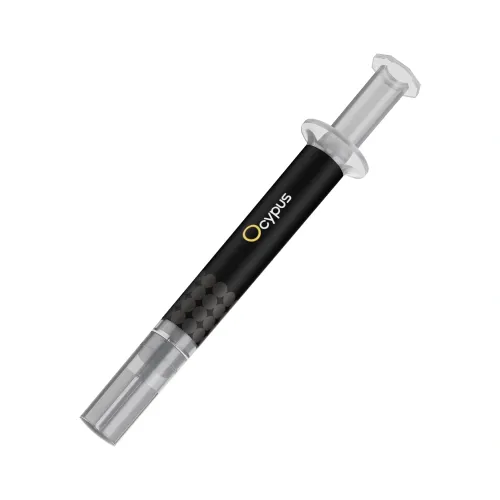
Ocypus Gamma ET20 is a grey, non-conductive thermal grease rated at 12.5 W/m·K. Confirm pack quantity, box contents and seller warranty.
Approximate Market Price
BDT 500
Informational market estimate only; this is not a current Store offer.
Compare store prices
No live offers for this variant
BDT 500
Approximate Market Price
Informational market estimate only; this is not a current Store offer.
Loading history…
Product story
Ocypus Gamma ET20 is a grey thermal grease intended to improve heat transfer across the small surface gaps between a heat source and its cooling device. Ocypus describes it for CPUs, GPUs, laptops and other components. The manufacturer lists 12.5 W/m·K thermal conductivity, 0.0016 °C·in²/W thermal resistance, a -50°C to 150°C usable range, 2.3 g/cm³ specific gravity at 25°C, and non-conductive electrical behavior. These laboratory and material specifications describe the compound; they do not predict a fixed temperature improvement in an assembled system.
The official specification lists thermal conductivity of 12.5 W/m·K and thermal resistance of 0.0016 °C·in²/W. Thermal paste is used at the interface between a component and cooler, where it fills microscopic surface irregularities. The installed result also depends on surface condition, layer thickness, cooler pressure, cooler capacity, fan operation and case airflow. Do not interpret the conductivity figure as a guaranteed reduction in processor temperature or as a direct comparison with another paste unless test methods and conditions match.
Ocypus lists Gamma ET20 as non-conductive, with a grey colour and specific gravity of 2.3 g/cm³ at 25°C. Non-conductive material can reduce the electrical-short risk associated with accidental contact compared with electrically conductive compounds, but care is still required. Keep paste away from socket contacts, connector pins and other areas where contamination could interfere with contact or maintenance. Follow the component and cooler instructions.
The manufacturer specifies a usable temperature range of -50°C to 150°C and product dimensions of 20 × 20 × 118 mm. The temperature interval refers to the compound rating, not a safe target range for a CPU or GPU. The dimension is listed as product size; the official page does not state the paste mass or confirm all retail-box contents. Check the model, pack quantity and packaging label with the seller before ordering.
Ocypus describes the compound for CPUs, GPUs, laptops and other components that need a thermal interface. Whether a particular machine is serviceable depends on its design. Some graphics cards and laptops use thermal pads, putty or different interface materials in locations other than the main processor die. Do not replace pads or remove a cooler without checking the service documentation, required thicknesses and warranty conditions for that device.
Before servicing a computer, shut it down, disconnect power and allow hot components to cool. Remove the cooler using its manufacturer instructions. Clean old compound from the mating surfaces with an appropriate lint-free material and cleaning method recommended for the hardware. Avoid liquid entering the board or socket, and do not scrape a surface with a sharp metal tool. If access requires disassembly beyond your experience, use a qualified technician.
Use the quantity and placement pattern recommended by the processor or cooler maker; there is no single application pattern suitable for every chip, heat spreader and mounting method. Keep the compound on the intended mating surface, install the cooler evenly and tighten it in the prescribed sequence. Excess material, uneven mounting or contamination can impair service. Remove residue according to manufacturer guidance before reapplying.
The official Ocypus specification page lists the compound properties and product dimensions but does not state the paste weight or bundled accessories. Retail listings for the same model family give conflicting quantities and accessory details. For that reason, this description does not promise a 2 g or 4 g pack, syringe accessories, wipes or a spreader. Confirm the exact package code, quantity and box contents with the chosen seller.
Warranty information is inconsistent across third-party retailer pages: some describe one-year coverage while another lists no warranty. Those are merchant-specific terms and do not establish coverage for a BiponiBD offer. Review the selected seller’s warranty provider, duration, exclusions and claim process, together with current price, stock and delivery terms, before checkout. No live BiponiBD offer was verified in this content review.
The useful documented points are the stated 12.5 W/m·K conductivity, non-conductive property, broad compound temperature rating and manufacturer-listed CPU/GPU/laptop use. The main buying limitation is incomplete package detail: the official page reviewed does not publish paste mass or the accessory list, and local listings vary. Thermal performance in a specific system and warranty coverage also depend on installation and seller terms.
Gamma ET20 may suit a PC builder or repairer looking for a thermal compound for a compatible CPU, GPU or laptop cooling interface and who can confirm the correct service procedure. Before purchase, check pack size, package contents, seller warranty and whether the device uses paste at the interface being serviced. If the product requires replacing a thermal pad or servicing a delicate laptop or graphics card, confirm the correct interface material and procedure first.
Gamma ET20 is a grey thermal grease for filling small gaps between a heat-producing component and a cooler. Ocypus describes it for CPUs, GPUs, laptops and other components.
Ocypus lists thermal conductivity as 12.5 W/m·K. This is a manufacturer specification; it is not a guaranteed temperature drop for every computer.
The manufacturer lists 0.0016 °C·in²/W. Actual cooling depends on the processor, cooler, mounting pressure, application, airflow and other system conditions.
Ocypus lists it as non-conductive. Apply it carefully and follow the manufacturer or cooler instructions; non-conductive does not mean the paste should be spread over connectors or sockets.
Ocypus lists a usable temperature range from -50°C to 150°C. This is the compound rating, not a recommended CPU or GPU operating temperature.
The manufacturer lists product dimensions of 20 × 20 × 118 mm. Confirm the retail package and included tools with the selected seller.
The official specification page checked for this review does not state the paste mass. Retail listings conflict between 2 g and 4 g, so verify the exact pack quantity and label before ordering.
Turn off and unplug the system, remove the cooler according to its instructions, clean old compound from the mating surfaces, apply only the amount and pattern recommended by the CPU/cooler manufacturer, then reinstall the cooler evenly. Avoid touching pins, contacts or the socket.
Packaging inclusions are not specified on the official product specification page reviewed. Retailer or market listings mention different package contents; ask the selected seller to confirm what is in the box.
Warranty terms differ across retailer listings, and the product-level offer on BiponiBD was not independently confirmed during this review. Check the selected seller, duration, coverage and claim process before purchase.
The manufacturer page does not provide a detailed compatibility matrix for bare dies, delidded CPUs, console repairs or liquid-metal replacement. Follow component-maker guidance and confirm suitability before specialized use.
This editorial review did not validate a live BiponiBD merchant offer, current stock or checkout price. Confirm those details on the active offer before ordering.
Helpful answers
Product-specific answers maintained with the catalog information.
Gamma ET20 is a grey thermal grease for filling small gaps between a heat-producing component and a cooler. Ocypus describes it for CPUs, GPUs, laptops and other components.
Ocypus lists thermal conductivity as 12.5 W/m·K. This is a manufacturer specification; it is not a guaranteed temperature drop for every computer.
The manufacturer lists 0.0016 °C·in²/W. Actual cooling depends on the processor, cooler, mounting pressure, application, airflow and other system conditions.
Ocypus lists it as non-conductive. Apply it carefully and follow the manufacturer or cooler instructions; non-conductive does not mean the paste should be spread over connectors or sockets.
Ocypus lists a usable temperature range from -50°C to 150°C. This is the compound rating, not a recommended CPU or GPU operating temperature.
The manufacturer lists product dimensions of 20 × 20 × 118 mm. Confirm the retail package and included tools with the selected seller.
The official specification page checked for this review does not state the paste mass. Retail listings conflict between 2 g and 4 g, so verify the exact pack quantity and label before ordering.
Turn off and unplug the system, remove the cooler according to its instructions, clean old compound from the mating surfaces, apply only the amount and pattern recommended by the CPU/cooler manufacturer, then reinstall the cooler evenly. Avoid touching pins, contacts or the socket.
Packaging inclusions are not specified on the official product specification page reviewed. Retailer or market listings mention different package contents; ask the selected seller to confirm what is in the box.
Warranty terms differ across retailer listings, and the product-level offer on BiponiBD was not independently confirmed during this review. Check the selected seller, duration, coverage and claim process before purchase.
The manufacturer page does not provide a detailed compatibility matrix for bare dies, delidded CPUs, console repairs or liquid-metal replacement. Follow component-maker guidance and confirm suitability before specialized use.
This editorial review did not validate a live BiponiBD merchant offer, current stock or checkout price. Confirm those details on the active offer before ordering.
Customer community
Become a merchant
Join BiponiBD, publish accurate offers and start free.